DJ TechTools
  • Blog
    • DJ Gear
      • DIY Projects
      • Gear Reviews
      • New Products
      • Controllerism
    • Techniques + Tips
      • Beginner DJ
      • Advanced DJ
      • Producer
      • Finger Drummer
    • News + Culture
      • Editorials + Opinions
      • Artist Interviews
      • Performances + Routines
      • How I Play
    • DJ Software Tutorials
      • Serato Tips
        • Traktor Tips
      • CDJ Tips
      • Ableton Live Tips
  • Store
    • Run by real DJs, not a corporation
    • DJ Controllers
      • Midi Fighter Twister
      • Midi Fighter Spectra
      • Midi Fighter 64
      • View All
    • Accessories
      • Chroma USB Drive for DJs
      • Chroma Caps
      • Chroma Cables Audio
      • Chroma Cables USB-A
      • Chroma Cables: USB-C
      • DJTT Gift Card
      • Midi Fighter T-Shirt
      • Keyboard Covers
      • Earplugs by V-Moda
    • Production Gear
    • Soundcards & Mixers
  • Community
    • Popular Forums
      • General Discussion
      • Buy & Sell
      • Reviews
      • Mixes
      • Music Production
      • Show Your Setup
      • Off Topic
    • Handy Links
      • New Posts
      • Private Messages
      • Register
      • Search
    • Midi Maps
      • Traktor
      • Ableton
      • Serato DJ
      • Midi Fighter 3D
      • Midi Fighter Twister
      • Midi Fighter Spectra
  • Midi Fighter
  • Chroma
No Result
View All Result
DJ TechTools
  • Blog
    • DJ Gear
      • DIY Projects
      • Gear Reviews
      • New Products
      • Controllerism
    • Techniques + Tips
      • Beginner DJ
      • Advanced DJ
      • Producer
      • Finger Drummer
    • News + Culture
      • Editorials + Opinions
      • Artist Interviews
      • Performances + Routines
      • How I Play
    • DJ Software Tutorials
      • Serato Tips
        • Traktor Tips
      • CDJ Tips
      • Ableton Live Tips
  • Store
    • Run by real DJs, not a corporation
    • DJ Controllers
      • Midi Fighter Twister
      • Midi Fighter Spectra
      • Midi Fighter 64
      • View All
    • Accessories
      • Chroma USB Drive for DJs
      • Chroma Caps
      • Chroma Cables Audio
      • Chroma Cables USB-A
      • Chroma Cables: USB-C
      • DJTT Gift Card
      • Midi Fighter T-Shirt
      • Keyboard Covers
      • Earplugs by V-Moda
    • Production Gear
    • Soundcards & Mixers
  • Community
    • Popular Forums
      • General Discussion
      • Buy & Sell
      • Reviews
      • Mixes
      • Music Production
      • Show Your Setup
      • Off Topic
    • Handy Links
      • New Posts
      • Private Messages
      • Register
      • Search
    • Midi Maps
      • Traktor
      • Ableton
      • Serato DJ
      • Midi Fighter 3D
      • Midi Fighter Twister
      • Midi Fighter Spectra
  • Midi Fighter
  • Chroma
No Result
View All Result
DJ TechTools

Serato DJ 1.8: Hardware Remapping, Key Detection + Shifting

Dean Zulueta by Dean Zulueta
October 6, 2015
in DJ Gear Announcements, News, News + Culture
Reading Time: 3 mins read
0
Serato DJ 1.8: Hardware Remapping, Key Detection + Shifting
79
VIEWS
Post on FacebookTweet thisUpvote on Reddit

There’s a new a major update coming out for Serato DJ that gives the entire platform a facelift. Until now, if a DJ wanted to remap their controller it was next to impossible without some creative engineering skills. In Serato DJ 1.8, there’s now user MIDI remapping tools, as well as key detection, and an update to Pitch ‘n Time DJing allowing key shifting/sync.

Pitch ‘n Time DJing with Harmonic Mixing
serato-pitch-and-time-dj

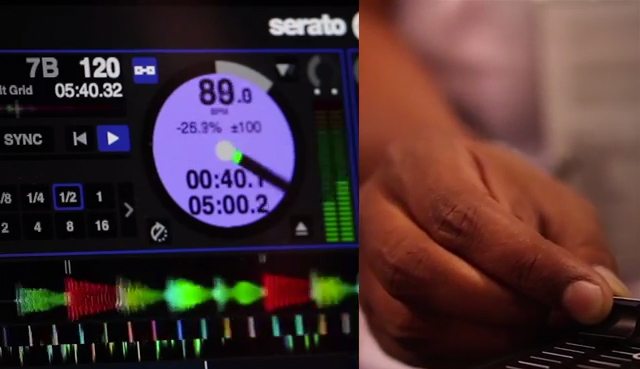
Serato has added their own key-detection engine (yes, we’ll be testing its accuracy soon). Now, DJs can import their tracks directly into Serato DJ to get all the necessary information needed for the perfect mix. The key display is color-coded (similar to other software) and a DJ can choose how the software displays the key of track – Camelot, Open Key, Musical Key notation. The algorithm used for the key detection was developed in-house by Serato who is also offering Serato Key, an external key detection tool for free download.

The key detection update for Pitch n’ Time (a paid add-on download to the software – free if you already have the Pitch n’ Time add-on) allows the DJ to key shift, match, and sync tracks. A visual representation of compatible track keys based on the current deck can be accessed for harmonic mixing. The key algorithm was created and used by post-production professionals, audio engineers, and producers to ensure accurate key detection within Serato DJ. A track can also be speed up or slowed down to extreme tempo values without changing the key of the track. The Pitch n’ Time update in conjunction with the added key detection tool gives DJs more creative freedom over their tracks and it will be interesting to see how the software keeps up with DJs’ crates.

Serato DJ Hardware Remapping (FINALLY!)
Hardware Remapping

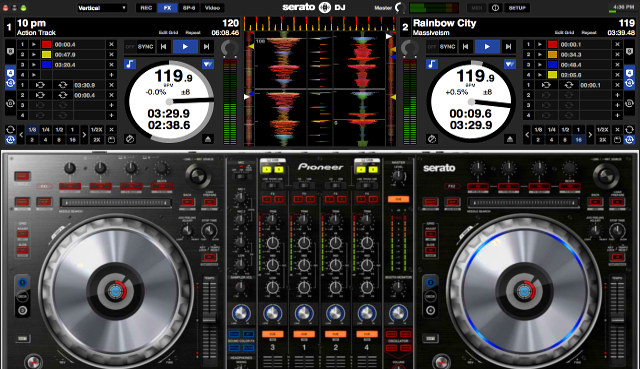
One of the most-requested missing features from Serato DJ is the ability to remap hardware. It is well known that non-affiliated controllers can’t be used or mapped in the software, but it seemed ridiculous that a Serato controller couldn’t be remapped to better fit personal preferences.

Serato has answered the calls by opening up supported hardware for user remapping. Advanced users can now remap parts of their controllers for better access to the many features that are available in Serato DJ. (Note: Serato Accessories do not support remapping at this time.) Serato does warn DJs however that there are some limitations for specific hardware and that information on remapping specific controllers will be included in updated controller quick start guides after the release of Serato DJ 1.8.

Serato DJ 1.8 offers some promising features for DJs who depend on the software along with a number of important performance and stability updates. No official word on compatibility with Mac OS X El Capitan but we are assuming Serato will soon have it under control – until then, don’t update your OS.

The new version of Serato DJ will be available end of October for download here – a free update for all DJs with supported hardware or licenses. All previous Serato DJ trials will be reset on release, giving all users another 14 day trial period to test out these new features.

Tags: camelotcontroller mappingsControllerismDj softwaredj software 2015El CapitanHarmonic Mixingkey analysiskey detectionmap serato controllersmusical keynew softwareopen keypitch 'n timeremappingseratoserato DJserato dj 1.8serato mappingsSoftwaresoftware update
Share1Tweet1Share
Previous Post

Pioneer Rekordbox 4.0 DJ Software + DDJ-RZ First Look

Next Post

Drum Compression Basics: Creating Punchy Drums

Related Posts

A screenshot of the 2.91 version of the Midi Fighter Utility software in Dark Mode
Midi Fighter

Midi Fighter Utility 2.91 Is Out; Our Biggest Update in Years

June 1, 2026
A Prime 4+ and a Kontrol S3 intercut against eachother over a black background
Breaking News

InMusic just bought Native Instruments. So what now for Traktor?

May 8, 2026
The DJM-V5 from AlphaTheta: 3 channels, 4-band EQ, V10 sound – no Beat FX or crossfader.
Breaking News

The DJM-V5 from AlphaTheta: 3 channels, 4-band EQ, V10 sound – no Beat FX or crossfader.

January 20, 2026
Load More
Next Post
Drum Compression Basics: Creating Punchy Drums

Drum Compression Basics: Creating Punchy Drums

Want to reach DJTT's audience here?

Shoot an email to advertising@djtechtools.com

DJTT ads
DJTT newsletter
Midi Fighter
Chat with us
  • ABOUT DJTT
  • CONTACT
  • PRIVACY
  • MIDI FIGHTER HELP
  • ABOUT DJTT
  • JOBS
  • CONTACT US
  • ADVERTISE
  • PRIVACY POLICY
  • ACCESSIBILITY STATEMENT

© 2024 DJ Techtools all rights reserved by DJ TechTools on all content unless otherwise noted.

No Result
View All Result
  • Blog
    • DJ Gear
      • DIY Projects
      • Gear Reviews
      • New Products
      • Controllerism
    • Techniques + Tips
      • Beginner DJ
      • Advanced DJ
      • Producer
      • Finger Drummer
    • News + Culture
      • Editorials + Opinions
      • Artist Interviews
      • Performances + Routines
      • How I Play
    • DJ Software Tutorials
      • Serato Tips
      • CDJ Tips
      • Ableton Live Tips
  • Store
    • Run by real DJs, not a corporation
    • DJ Controllers
      • Midi Fighter Twister
      • Midi Fighter Spectra
      • Midi Fighter 64
      • View All
    • Accessories
      • Chroma USB Drive for DJs
      • Chroma Caps
      • Chroma Cables Audio
      • Chroma Cables USB-A
      • Chroma Cables: USB-C
      • DJTT Gift Card
      • Midi Fighter T-Shirt
      • Keyboard Covers
      • Earplugs by V-Moda
    • Production Gear
    • Soundcards & Mixers
  • Community
    • Popular Forums
      • General Discussion
      • Buy & Sell
      • Reviews
      • Mixes
      • Music Production
      • Show Your Setup
      • Off Topic
    • Handy Links
      • New Posts
      • Private Messages
      • Register
      • Search
    • Midi Maps
      • Traktor
      • Ableton
      • Serato DJ
      • Midi Fighter 3D
      • Midi Fighter Twister
      • Midi Fighter Spectra
  • Midi Fighter
  • Chroma

© 2024 DJ Techtools all rights reserved by DJ TechTools on all content unless otherwise noted.

This website uses cookies. By continuing to use this website you are giving consent to cookies being used. Visit our Privacy and Cookie Policy.