DJ TechTools
  • Blog
    • DJ Gear
      • DIY Projects
      • Gear Reviews
      • New Products
      • Controllerism
    • Techniques + Tips
      • Beginner DJ
      • Advanced DJ
      • Producer
      • Finger Drummer
    • News + Culture
      • Editorials + Opinions
      • Artist Interviews
      • Performances + Routines
      • How I Play
    • DJ Software Tutorials
      • Serato Tips
        • Traktor Tips
      • CDJ Tips
      • Ableton Live Tips
  • Store
    • Run by real DJs, not a corporation
    • DJ Controllers
      • Midi Fighter Twister
      • Midi Fighter Spectra
      • Midi Fighter 64
      • View All
    • Accessories
      • Chroma USB Drive for DJs
      • Chroma Caps
      • Chroma Cables Audio
      • Chroma Cables USB-A
      • Chroma Cables: USB-C
      • DJTT Gift Card
      • Midi Fighter T-Shirt
      • Keyboard Covers
      • Earplugs by V-Moda
    • Production Gear
    • Soundcards & Mixers
  • Community
    • Popular Forums
      • General Discussion
      • Buy & Sell
      • Reviews
      • Mixes
      • Music Production
      • Show Your Setup
      • Off Topic
    • Handy Links
      • New Posts
      • Private Messages
      • Register
      • Search
    • Midi Maps
      • Traktor
      • Ableton
      • Serato DJ
      • Midi Fighter 3D
      • Midi Fighter Twister
      • Midi Fighter Spectra
  • Midi Fighter
  • Chroma
No Result
View All Result
DJ TechTools
  • Blog
    • DJ Gear
      • DIY Projects
      • Gear Reviews
      • New Products
      • Controllerism
    • Techniques + Tips
      • Beginner DJ
      • Advanced DJ
      • Producer
      • Finger Drummer
    • News + Culture
      • Editorials + Opinions
      • Artist Interviews
      • Performances + Routines
      • How I Play
    • DJ Software Tutorials
      • Serato Tips
        • Traktor Tips
      • CDJ Tips
      • Ableton Live Tips
  • Store
    • Run by real DJs, not a corporation
    • DJ Controllers
      • Midi Fighter Twister
      • Midi Fighter Spectra
      • Midi Fighter 64
      • View All
    • Accessories
      • Chroma USB Drive for DJs
      • Chroma Caps
      • Chroma Cables Audio
      • Chroma Cables USB-A
      • Chroma Cables: USB-C
      • DJTT Gift Card
      • Midi Fighter T-Shirt
      • Keyboard Covers
      • Earplugs by V-Moda
    • Production Gear
    • Soundcards & Mixers
  • Community
    • Popular Forums
      • General Discussion
      • Buy & Sell
      • Reviews
      • Mixes
      • Music Production
      • Show Your Setup
      • Off Topic
    • Handy Links
      • New Posts
      • Private Messages
      • Register
      • Search
    • Midi Maps
      • Traktor
      • Ableton
      • Serato DJ
      • Midi Fighter 3D
      • Midi Fighter Twister
      • Midi Fighter Spectra
  • Midi Fighter
  • Chroma
No Result
View All Result
DJ TechTools

DJ Trainspotting: How To Find Out What A DJ Is Playing

Dan White by Dan White
October 8, 2015
in DJ History, Editorials and Opinions, News + Culture
Reading Time: 5 mins read
0
DJ Trainspotting: How To Find Out What A DJ Is Playing
546
VIEWS
Post on FacebookTweet thisUpvote on Reddit

A really incredible track is playing, and you’ve never heard it before. In an era of instant-gratification music selection, DJs and their audiences all want to be “in the know”  about new, exciting tracks. How do you find out what track is playing without being rude? We explore in today’s article on trainspotting – the common nickname for peeking at the playing track in the DJ booth.

Trainspotting DJs?

Trainspotting (in DJing) as defined by the great Urban Dictionary: 

v: The act of staring over a DJ’s shoulder to see what records he’s spinning..

Originated from the British phenomenon of train geeks waiting on train platforms, notebooks in hand, recording the types and numbers of trains coming into the station.

“I went to the club last night to hit on this bad-ass DJ chick, but the records she brought were amazing, so I just sat near her at the decks trainspotting them all night!”

Whitelabel History and Hiding Tracks?

white-label-recrods

The act of finding out what track is playing has been a highly contentious one in DJ culture since the very early days of modern DJing. Bill Brewster and Frank Brougbton chronicle the first attempts to hide the names of records in their fantastic book “Last Night A DJ Saved My Life”:

Inevitably, competition grew between DJs, and to protect new discoveries they would cover the label and give them false names. “Covering up” can be seen as the forerunner to modern DJs’ white label exclusives, or the hip hop DJs’ habit of soaking off the labels from their most treasured breaks. The practice actually originated in the early sixties […] However, it was soul jocks who popularized it, both to preserve their exclusives and also as a way of throwing bootleggers off the scent.

“It’s only really the same as people playing acetates today, but these days instead of covering old records they’ve gone right to the source,” argues Jonathan Woodliffe. Dave Godin, however, hated the practice. “If I went somewhere and a DJ had some exclusive cover-up I knew, I would immediately blow the whistle and review it. Fuck it. They were putting their own ego above the singer, the composer and everyone else, and I couldn’t abide that.”

Farmer Carl Dene, the first northern DJ to cover up, would cut out the center of an unused record and place it on top of the record spinning […] Rob Bellars at the Wheel was the first person to cover up and rename the song. Thus Bobby Paterson’s “What A Wonderful Night For Love” became Benny Harper’s “What A Wonderful Night.”

Peeking Over/Into The DJ Booth
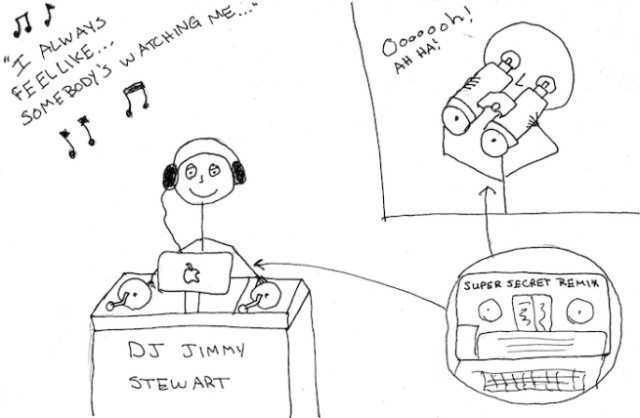
Trainspotting cartoon via Stuff DJs Hate

Almost every DJ playing out has had the experience of someone in the DJ booth who gets just a little too close to the gear in an attempt to scope out the on-air track. It’s a great way to find out the track, but often is highly discouraged. No DJ wants a stranger to get close enough to their equipment that they might spill a drink on it or “accidentally” hit the pause button.

An exception is if the person behind the decks is a DJ who you know personally and know wouldn’t mind if they glance at the track – but you’re still better off complimenting their solid selection by…

Asking The DJ
talking-to-club-owners-managers-DJs

If you really enjoy a track, and it’s not rude or excessive to casually make your way up to the booth and borrow 3 seconds of the DJ’s time, ask them what the track is! It’s as simple as saying

“Hey, I really like this song, great choice! What is it?”

If it’s a well-kept secret, they still might clue you into the label or artist that involved – but at least complimenting the track makes the DJ feel good and not like you’re only in the booth to steal their bangers.

Don’t do this more than once to a DJ in a night  – especially one who you like – because they’ll start to think you’re just poaching their tracks and don’t really care about the set that they’re playing.

Personally I’ve found that a great way to find out what a particular track was is by asking the DJ after the fact on Twitter. For instance – “Great set last night @w_o_r_t_h_y, what was that one song you played, female vocals, chorus had something about “say what you mean, mean what you say?”  clued me into an upcoming release:

@djspacecamp @zachdero it’s one of mine called “the words”, will be on my album

— Worthy (@w_o_r_t_h_y) January 20, 2013

Using Soundhound / Shazam

shazam-in-the-club-dj

This is my most-used tool for identifying tracks in a club setting – particularly one where the DJ is inaccessible or going up and asking them about the track would be rude or impossible. Both apps have a really good reputation for identifying a wide swath of releases, including remixes and edits, but in my testing are about 60 – 70% successful at picking out a track in a DJ set and finding the correct version.

Shazam seems to have more luck in noisy environments, and also claims to have optimized their engine for DJ sets where tracks are different in pitch or tempo.

Either way, if you use either of these song-identifying tools in the club, try not to raise your phone above your head during every single song to catch an ID – be discreet and use sparingly.

If you’re a DJ who can’t stand seeing people Shazaming your tracks, think of it less as someone “stealing” your selections: if someone wants to know a track that you select as a DJ, it means you’re introducing to something new that they like. That’s a job well done.

Checking 1001 Tracklists
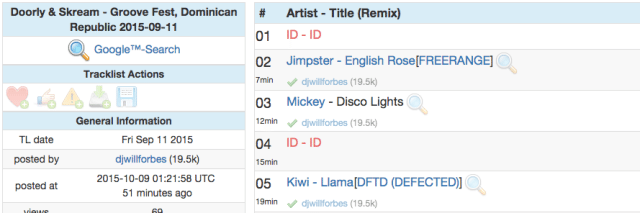
A screenshot of a typical setlist on 1001 Tracklists - some tracks identified, some still unknown.
A screenshot of a typical set list on 1001 Tracklists – some tracks identified, some still unknown.

Sometimes the best way to find out exactly what was played during a set is to hope that the complete tracklist comes out after the fact. With bigger electronic music DJs and at larger events (particularly where the set was recorded for a live stream), it’s increasingly common to find those set lists on 1001 Tracklists, an online repository for crowdsourcing IDs from a DJ set.

If you’ve got a great ear for identifying tracks, think of this site as the Wikipedia of DJ sets and jump in and contribute where there are gaps!

You could also similarly crowdsource your trainspotting by posting a link to the exact audio of the song in question to a group like Reddit’s /r/NameThatSong

Listening To Similar Recorded Sets

Odds are pretty good a lot of the tracks DJs play will be ones they play with some regularity. For instance, if you were to go out and see breaks masters Stanton Warriors, many of the tracks they play will probably be on one of their recent guest mixes on other radio shows, or a mix on their own Stanton Sessions podcasts.  This cross-referencing often helps you find even more great music in the process, as well as potentially discovering the name of the song in question.

Do you have other ways to ID songs? Afraid of other DJs stealing your hard-found floor-fillers? Share your thoughts in the comments.

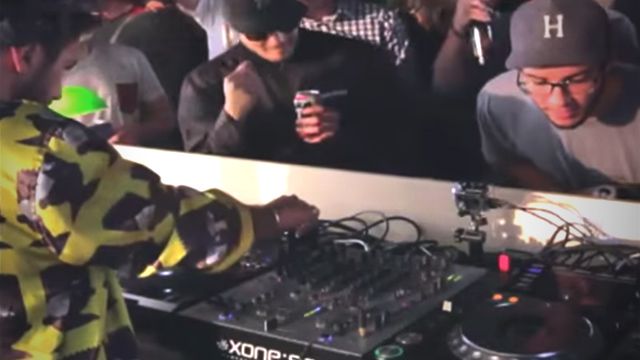
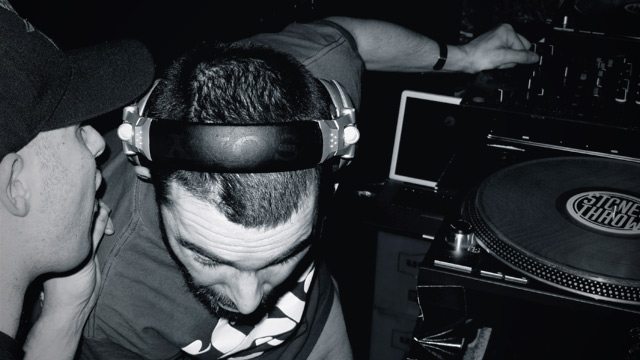
The lead image for this article is a screencapture from the Mixmag LA stream of Hot Since 82. Despite some incredibly blatant trainspotting, this is a great set – watch the full thing below:
Tags: 1001 tracklistsDJ AM modeplaylistsshazamsoundhoundtrackstrainspotting
Share4Tweet3Share
Previous Post

Using Headphones As A Microphone: Throwback Thursday DJ Technique

Next Post

Gain Staging For DJs + Staying Out Of The Red

Related Posts

MIXO wants to transform DJ Library Management with their new platform
Controllerism

MIXO wants to transform DJ Library Management with their new platform

May 2, 2023
Controlling the dancefloor: a guide on organizing playlists by energy
DJ Music Library Tips

Controlling the dancefloor: a guide on organizing playlists by energy

November 25, 2022
See The Top-Shazamed Tracks In Any City
DJ Music Library Tips

See The Top-Shazamed Tracks In Any City

March 22, 2019
Load More
Next Post
Gain Staging For DJs + Staying Out Of The Red

Gain Staging For DJs + Staying Out Of The Red

Want to reach DJTT's audience here?

Shoot an email to advertising@djtechtools.com

DJTT ads
DJTT newsletter
Midi Fighter
Chat with us
  • ABOUT DJTT
  • CONTACT
  • PRIVACY
  • MIDI FIGHTER HELP
  • ABOUT DJTT
  • JOBS
  • CONTACT US
  • ADVERTISE
  • PRIVACY POLICY
  • ACCESSIBILITY STATEMENT

© 2024 DJ Techtools all rights reserved by DJ TechTools on all content unless otherwise noted.

No Result
View All Result
  • Blog
    • DJ Gear
      • DIY Projects
      • Gear Reviews
      • New Products
      • Controllerism
    • Techniques + Tips
      • Beginner DJ
      • Advanced DJ
      • Producer
      • Finger Drummer
    • News + Culture
      • Editorials + Opinions
      • Artist Interviews
      • Performances + Routines
      • How I Play
    • DJ Software Tutorials
      • Serato Tips
      • CDJ Tips
      • Ableton Live Tips
  • Store
    • Run by real DJs, not a corporation
    • DJ Controllers
      • Midi Fighter Twister
      • Midi Fighter Spectra
      • Midi Fighter 64
      • View All
    • Accessories
      • Chroma USB Drive for DJs
      • Chroma Caps
      • Chroma Cables Audio
      • Chroma Cables USB-A
      • Chroma Cables: USB-C
      • DJTT Gift Card
      • Midi Fighter T-Shirt
      • Keyboard Covers
      • Earplugs by V-Moda
    • Production Gear
    • Soundcards & Mixers
  • Community
    • Popular Forums
      • General Discussion
      • Buy & Sell
      • Reviews
      • Mixes
      • Music Production
      • Show Your Setup
      • Off Topic
    • Handy Links
      • New Posts
      • Private Messages
      • Register
      • Search
    • Midi Maps
      • Traktor
      • Ableton
      • Serato DJ
      • Midi Fighter 3D
      • Midi Fighter Twister
      • Midi Fighter Spectra
  • Midi Fighter
  • Chroma

© 2024 DJ Techtools all rights reserved by DJ TechTools on all content unless otherwise noted.

This website uses cookies. By continuing to use this website you are giving consent to cookies being used. Visit our Privacy and Cookie Policy.