DJ TechTools
  • Blog
    • DJ Gear
      • DIY Projects
      • Gear Reviews
      • New Products
      • Controllerism
    • Techniques + Tips
      • Beginner DJ
      • Advanced DJ
      • Producer
      • Finger Drummer
    • News + Culture
      • Editorials + Opinions
      • Artist Interviews
      • Performances + Routines
      • How I Play
    • DJ Software Tutorials
      • Serato Tips
        • Traktor Tips
      • CDJ Tips
      • Ableton Live Tips
  • Store
    • Run by real DJs, not a corporation
    • DJ Controllers
      • Midi Fighter Twister
      • Midi Fighter Spectra
      • Midi Fighter 64
      • View All
    • Accessories
      • Chroma USB Drive for DJs
      • Chroma Caps
      • Chroma Cables Audio
      • Chroma Cables USB-A
      • Chroma Cables: USB-C
      • DJTT Gift Card
      • Midi Fighter T-Shirt
      • Keyboard Covers
      • Earplugs by V-Moda
    • Production Gear
    • Soundcards & Mixers
  • Community
    • Popular Forums
      • General Discussion
      • Buy & Sell
      • Reviews
      • Mixes
      • Music Production
      • Show Your Setup
      • Off Topic
    • Handy Links
      • New Posts
      • Private Messages
      • Register
      • Search
    • Midi Maps
      • Traktor
      • Ableton
      • Serato DJ
      • Midi Fighter 3D
      • Midi Fighter Twister
      • Midi Fighter Spectra
  • Midi Fighter
  • Chroma
No Result
View All Result
DJ TechTools
  • Blog
    • DJ Gear
      • DIY Projects
      • Gear Reviews
      • New Products
      • Controllerism
    • Techniques + Tips
      • Beginner DJ
      • Advanced DJ
      • Producer
      • Finger Drummer
    • News + Culture
      • Editorials + Opinions
      • Artist Interviews
      • Performances + Routines
      • How I Play
    • DJ Software Tutorials
      • Serato Tips
        • Traktor Tips
      • CDJ Tips
      • Ableton Live Tips
  • Store
    • Run by real DJs, not a corporation
    • DJ Controllers
      • Midi Fighter Twister
      • Midi Fighter Spectra
      • Midi Fighter 64
      • View All
    • Accessories
      • Chroma USB Drive for DJs
      • Chroma Caps
      • Chroma Cables Audio
      • Chroma Cables USB-A
      • Chroma Cables: USB-C
      • DJTT Gift Card
      • Midi Fighter T-Shirt
      • Keyboard Covers
      • Earplugs by V-Moda
    • Production Gear
    • Soundcards & Mixers
  • Community
    • Popular Forums
      • General Discussion
      • Buy & Sell
      • Reviews
      • Mixes
      • Music Production
      • Show Your Setup
      • Off Topic
    • Handy Links
      • New Posts
      • Private Messages
      • Register
      • Search
    • Midi Maps
      • Traktor
      • Ableton
      • Serato DJ
      • Midi Fighter 3D
      • Midi Fighter Twister
      • Midi Fighter Spectra
  • Midi Fighter
  • Chroma
No Result
View All Result
DJ TechTools

Mixxx 2.0: Free DJ Software Gets Even Better

Dean Zulueta by Dean Zulueta
December 8, 2015
in Breaking News, DJ Software Tips, News
Reading Time: 3 mins read
0
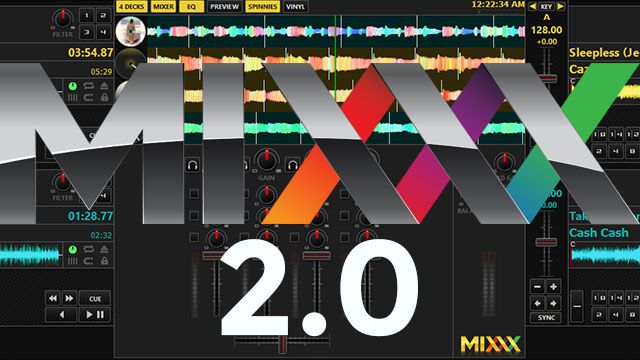
Mixxx 2.0: Free DJ Software Gets Even Better
162
VIEWS
Post on FacebookTweet thisUpvote on Reddit

Software for DJs will usually is expensive, and many of the cheap/free options have license restrictions or lack-luster features. Mixxx 2.0 hopes to change all of that with, a new update that brings a slew of features to a truly free DJ software.

Mixx is a freeware DJ software program that has been around for a few years, created by a team of hackers, artists, and translators who are driven to create the best free software for DJs. After the team announced an updated release of Mixxx 1.12.0, which will become Mixxx 2.0 we decided to take a look at the software and highlight some features that every DJ should know about.

Mixxx 1.12.0 is now Mixxx 2.0

When it comes to release numbers extensions to the 1.xx typically convey that the release is an update that improves upon the software. Originally, the latest Mixxx update was to be just that however so much work is being put into the upcoming release that the team decided to officially announce that the next version of Mixxx will be Mixxx 2.0, an updated expansion of the software bearing new features and major improvements in performance.
Mixxx 1

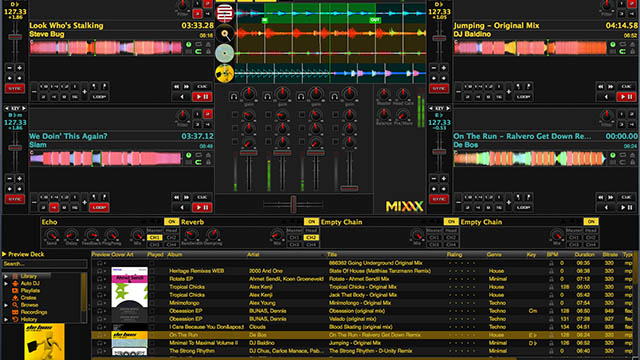
The Mixxx 1.12.0 beta was released in April of this year and since then the team has been improving on the software immensely with bug fixes and more controller support. The key features that were included in this release and the official 2.0 release coming at the end of this year include:

  • 4 Decks with a master sync
  • Effects with 4 effect modules and 5 built-in effects (more to be added soon)
  • Configurable user interface
  • Music key detection and shifting
  • Vinyl audio pass-through
  • 4 Microphone inputs and 4 Auxiliary Inputs
  • MIDI Mapping GUI
  • RGB Musical Waveforms
  • Improved pitch-independent algorithm

Mixxx 2.0 is shaping up to be a complete solution for DJs, adhering to today’s unspoken standards of DJ software (i.e. stacked waveforms, harmonic mixing, effects, etc.) The team is also talking to the community and engaging with active users throughout the whole process.

Why Is Mixxx Different?

What makes Mixxx 2.0 different from the other DJ software companies out there is that Mixxx is built by the DJ community to be a versatile, light-weight solution for DJs everywhere. After seeing student DJs use this software to mix music on my college radio station to what it has become today I can say from first hand experience that Mixxx has grown a lot over the past year.

Hands-On: Mixing with Mixxx

After playing with the software for 15 minutes (without reading any manuals), I was able mix a set with just the keyboard. After installing Mixxx 2.0,  I imported my Traktor library and began mixing tracks. It felt intuitive and I was able to mix a set with ease. The software works well and it feels efficient.
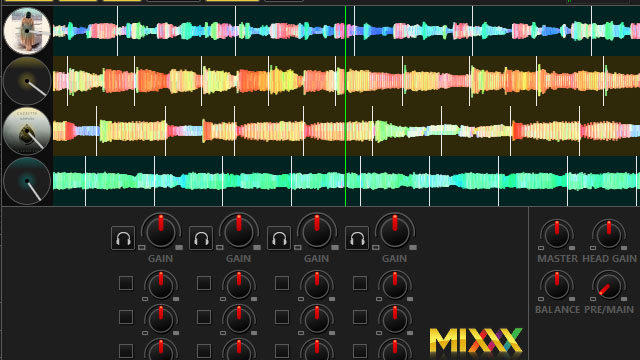
Mixxx 3

Many community-based projects fall mercy to the strength and foundation of the community creators however that isn’t the case with Mixxx 2.0. The software is being put to the test by DJs of all skill levels from all over the world. There aren’t many free options for DJs in terms of software and Mixxx 2.0 is a DJ’s best solution for free software. Whether it is a party in a college DJ’s dorm room or a club event, this software is provides DJs with the necessary tools to build a set. The extra bells and whistles may be missing, but if you need to get from point A to point B you can’t complain that your car isn’t a Ferrari.

The Mixxx development team released Release Candidate 1 on December 5th with the hopes of having the official release of Mixxx 2.0 to be available “in time for your New Year’s Eve parties”.

You can support the software and interact with the community by visiting Mixxx’s blog. Mixxx 2.0 RC 1 is compatible with Linux, Windows, and Mac OS X. The team is looking for testers, MIDI mappers, and translators so if you are looking to get on the ground floor be sure to check out their website.
Tags: 4 decksControllerismdjDj softwaredj software 2015free dj softwarefree mixing toolsfreewarehackerHarmonic Mixinglinux softwaremac osx softwaremidi controllermixing softwaremixing toolsMixxxmixxx 2.0software dj 2015windows software
Share1Tweet1Share
Previous Post

Pan-Pot Interview: Using a Kalimba In Your Productions

Next Post

Holiday Gift Guide for DJs + Producers: 2015 Edition

Related Posts

A Prime 4+ and a Kontrol S3 intercut against eachother over a black background
Breaking News

InMusic just bought Native Instruments. So what now for Traktor?

May 8, 2026
Ableton launches Live 12 Suite rent-to-own plan – and it’s not a subscription
Ableton

Ableton launches Live 12 Suite rent-to-own plan – and it’s not a subscription

October 1, 2025
Rekordox Spotify
Breaking News

Spotify (finally) slides into Rekordbox, Serato, and Algoriddim djay (again) – for better or worse?

September 24, 2025
Load More
Next Post
Holiday Gift Guide for DJs + Producers: 2015 Edition

Holiday Gift Guide for DJs + Producers: 2015 Edition

Want to reach DJTT's audience here?

Shoot an email to advertising@djtechtools.com

DJTT ads
DJTT newsletter
Midi Fighter
Chat with us
  • ABOUT DJTT
  • CONTACT
  • PRIVACY
  • MIDI FIGHTER HELP
  • ABOUT DJTT
  • JOBS
  • CONTACT US
  • ADVERTISE
  • PRIVACY POLICY
  • ACCESSIBILITY STATEMENT

© 2024 DJ Techtools all rights reserved by DJ TechTools on all content unless otherwise noted.

No Result
View All Result
  • Blog
    • DJ Gear
      • DIY Projects
      • Gear Reviews
      • New Products
      • Controllerism
    • Techniques + Tips
      • Beginner DJ
      • Advanced DJ
      • Producer
      • Finger Drummer
    • News + Culture
      • Editorials + Opinions
      • Artist Interviews
      • Performances + Routines
      • How I Play
    • DJ Software Tutorials
      • Serato Tips
      • CDJ Tips
      • Ableton Live Tips
  • Store
    • Run by real DJs, not a corporation
    • DJ Controllers
      • Midi Fighter Twister
      • Midi Fighter Spectra
      • Midi Fighter 64
      • View All
    • Accessories
      • Chroma USB Drive for DJs
      • Chroma Caps
      • Chroma Cables Audio
      • Chroma Cables USB-A
      • Chroma Cables: USB-C
      • DJTT Gift Card
      • Midi Fighter T-Shirt
      • Keyboard Covers
      • Earplugs by V-Moda
    • Production Gear
    • Soundcards & Mixers
  • Community
    • Popular Forums
      • General Discussion
      • Buy & Sell
      • Reviews
      • Mixes
      • Music Production
      • Show Your Setup
      • Off Topic
    • Handy Links
      • New Posts
      • Private Messages
      • Register
      • Search
    • Midi Maps
      • Traktor
      • Ableton
      • Serato DJ
      • Midi Fighter 3D
      • Midi Fighter Twister
      • Midi Fighter Spectra
  • Midi Fighter
  • Chroma

© 2024 DJ Techtools all rights reserved by DJ TechTools on all content unless otherwise noted.

This website uses cookies. By continuing to use this website you are giving consent to cookies being used. Visit our Privacy and Cookie Policy.