DJ TechTools
  • Blog
    • DJ Gear
      • DIY Projects
      • Gear Reviews
      • New Products
      • Controllerism
    • Techniques + Tips
      • Beginner DJ
      • Advanced DJ
      • Producer
      • Finger Drummer
    • News + Culture
      • Editorials + Opinions
      • Artist Interviews
      • Performances + Routines
      • How I Play
    • DJ Software Tutorials
      • Serato Tips
        • Traktor Tips
      • CDJ Tips
      • Ableton Live Tips
  • Store
    • Run by real DJs, not a corporation
    • DJ Controllers
      • Midi Fighter Twister
      • Midi Fighter Spectra
      • Midi Fighter 64
      • View All
    • Accessories
      • Chroma USB Drive for DJs
      • Chroma Caps
      • Chroma Cables Audio
      • Chroma Cables USB-A
      • Chroma Cables: USB-C
      • DJTT Gift Card
      • Midi Fighter T-Shirt
      • Keyboard Covers
      • Earplugs by V-Moda
    • Production Gear
    • Soundcards & Mixers
  • Community
    • Popular Forums
      • General Discussion
      • Buy & Sell
      • Reviews
      • Mixes
      • Music Production
      • Show Your Setup
      • Off Topic
    • Handy Links
      • New Posts
      • Private Messages
      • Register
      • Search
    • Midi Maps
      • Traktor
      • Ableton
      • Serato DJ
      • Midi Fighter 3D
      • Midi Fighter Twister
      • Midi Fighter Spectra
  • Midi Fighter
  • Chroma
No Result
View All Result
DJ TechTools
  • Blog
    • DJ Gear
      • DIY Projects
      • Gear Reviews
      • New Products
      • Controllerism
    • Techniques + Tips
      • Beginner DJ
      • Advanced DJ
      • Producer
      • Finger Drummer
    • News + Culture
      • Editorials + Opinions
      • Artist Interviews
      • Performances + Routines
      • How I Play
    • DJ Software Tutorials
      • Serato Tips
        • Traktor Tips
      • CDJ Tips
      • Ableton Live Tips
  • Store
    • Run by real DJs, not a corporation
    • DJ Controllers
      • Midi Fighter Twister
      • Midi Fighter Spectra
      • Midi Fighter 64
      • View All
    • Accessories
      • Chroma USB Drive for DJs
      • Chroma Caps
      • Chroma Cables Audio
      • Chroma Cables USB-A
      • Chroma Cables: USB-C
      • DJTT Gift Card
      • Midi Fighter T-Shirt
      • Keyboard Covers
      • Earplugs by V-Moda
    • Production Gear
    • Soundcards & Mixers
  • Community
    • Popular Forums
      • General Discussion
      • Buy & Sell
      • Reviews
      • Mixes
      • Music Production
      • Show Your Setup
      • Off Topic
    • Handy Links
      • New Posts
      • Private Messages
      • Register
      • Search
    • Midi Maps
      • Traktor
      • Ableton
      • Serato DJ
      • Midi Fighter 3D
      • Midi Fighter Twister
      • Midi Fighter Spectra
  • Midi Fighter
  • Chroma
No Result
View All Result
DJ TechTools

Denon DJ MCX8000: Hybrid Standalone DJ Setup + Serato DJ Controller

Dan White by Dan White
January 18, 2016
in NAMM 2016, News + Culture
Reading Time: 4 mins read
0
Denon DJ MCX8000: Hybrid Standalone DJ Setup + Serato DJ Controller
320
VIEWS
Post on FacebookTweet thisUpvote on Reddit

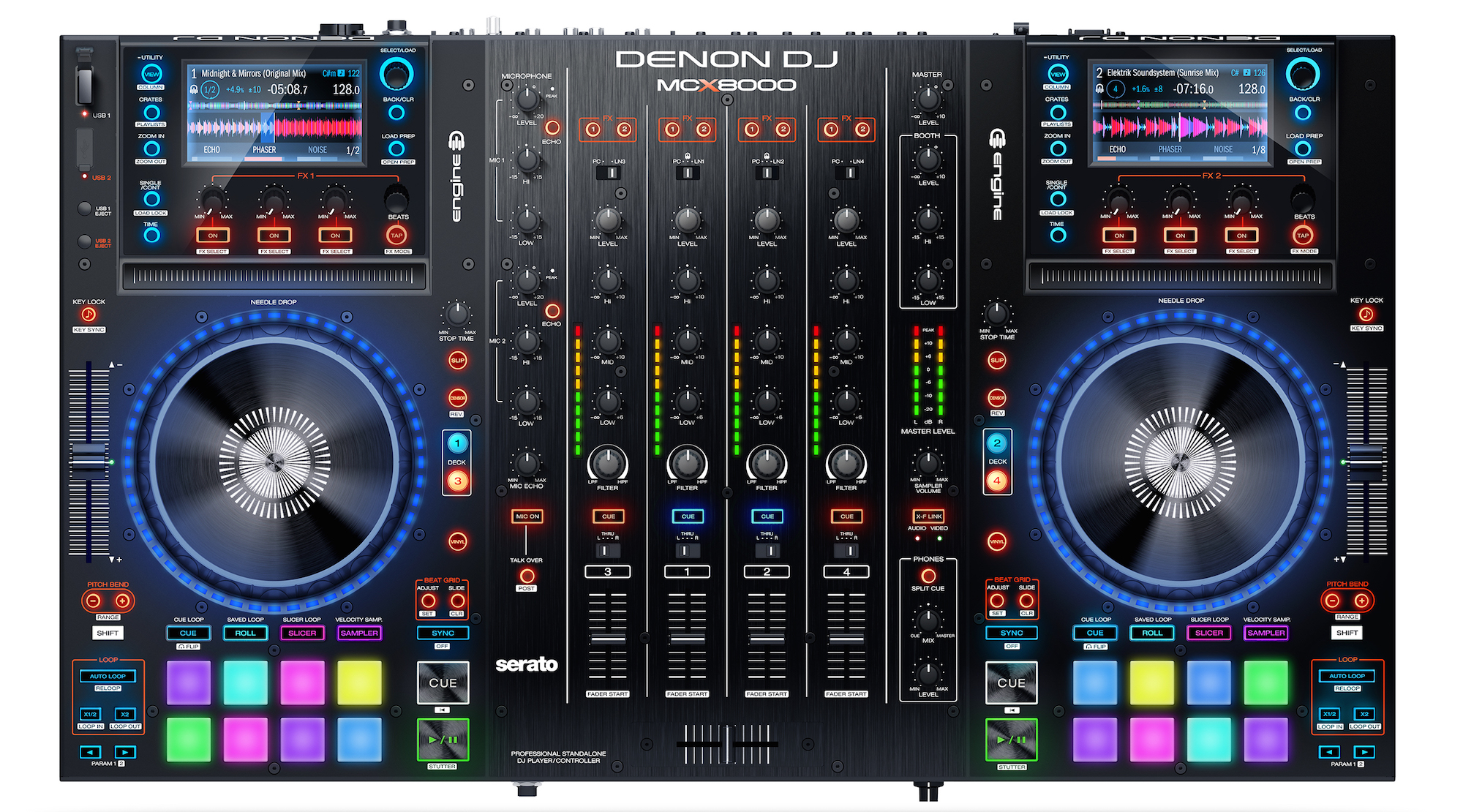
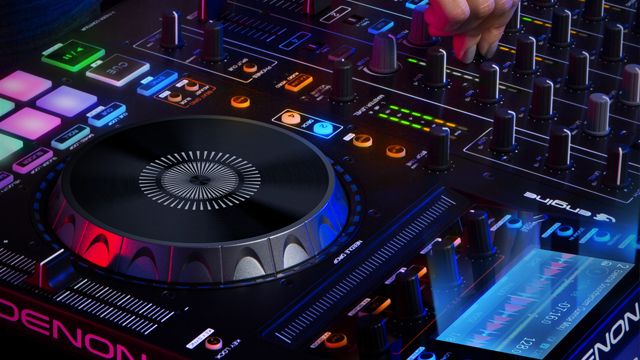
We saw a few leaked photos floating our forums last week, but Denon DJ has made the full announcement this morning: they’re unveiling the new MCX8000 DJ controller this week at NAMM 2016. Think of this controller as a cross between the Numark NV controller and the Pioneer DJ XDJ-RX system – it can run in standalone mode with an onboard Denon DJ Engine workflow, or as a highly integrated Serato DJ controller – or both. Keep reading for the specs and details so far.

  • DJ Gear: MCX8000 (official product page)
  • Manufacturer: Denon DJ
  • Price: $1299.00
  • Availability: February 2016

Denon DJ MCX8000 Top

Feature List:

Before we dive into some analysis, here’s what you need to know about the new Denon MCX8000:

  • Two high-resolution displays to show the playing tracks (they seem similar to the Numark NV)
  • Can run in standalone mode, playing tracks from 2 USB inputs using Denon DJ Engine without a laptop
  • Works with Serato DJ (included) – yes, this means the screen show the waveforms, browser, etc.
  • Four channel mixer with two microphone inputs
  • 3 Instant Effects for Engine playback or to apply to the line inputs (these seem to be Echo, Phaser, and Noise)
  • Velocity-sensitive performance pads (for cues, rolls, slicer, samples)

Denon DJ MCX8000 Rear

  • “Ethernet connection to control lighting and video” – we’re not entirely sure what this means yet, but it sounds exciting. Update: Denon writes “the Ethernet connection feature is now branded STAGE LINQ sends track information and BPMs to a lighting console to sync lights and video.”
  • Support for Serato DVS expansion (two switchable Phono/Line inputs on the back of the unit)
  • Inputs/Output: Booth Out (1 pair XLR), Master Out (1 pair balanced XLR, 1 pair of unbalanced RCA), 4 RCA line inputs, and an extra USB port for plugging in another controller (essentially a 1-port USB hub)

Denon Engine Back In Action
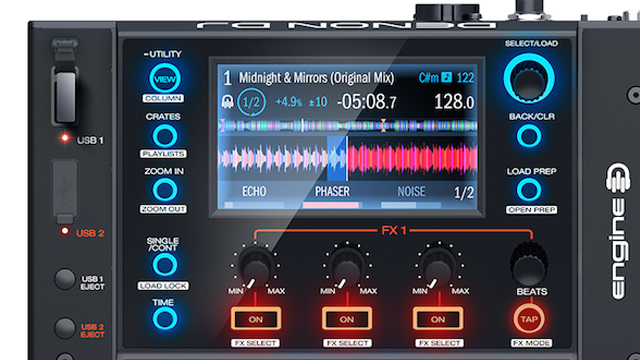
Denon Engine closeup on MCX8000

Denon DJ has been almost completely silent about Denon Engine and any developments on the media player front. For years they developed one of the only major alternatives to Pioneer’s CDJs, but the last player to be released was the SC3900, announced in 2012. Denon’s Rekordbox alternative for organizing/analyzing/sorting music was Engine, and that software is the basis on the onboard software on the new MCX8000.

The new version of Engine on the MCX8000 is clearly a significant upgrade to the platform. If this product was built with Engine in mind, the designers would want to make sure that any controls that work in Serato mode also have an equivalent function when in Engine mode. For example, the Slip and Censor buttons are clearly modeled after Serato functions, but it would be pretty silly if they were useless when running as standalone. Update: Denon says that almost every feature works in Engine: “Engine supports all features except: Sampler and Best Grid editing.”

But so far we don’t know that much about what the experience of using Engine is like. The press release from Denon simply says:

“DJs can use the MCX8000 with USB drives by opting to use Denon DJ Engine —without a computer connected! Engine is not required for USB playback but it greatly improves the overall experience. Engine enables the DJ to directly import Serato DJ crates and hot cues, as well as create their own— all from within Denon DJ’s Engine software.”

We’ll be testing out the MCX8000 on the NAMM floor and learning more about Engine

MCX8000 Design: Actually A Numark Product In Disguise?
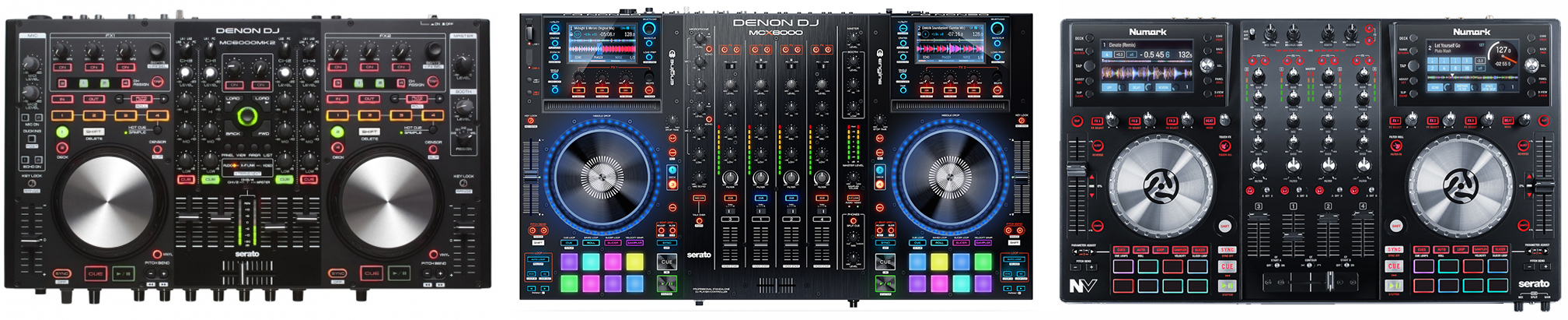
Denon MC6000MK2 (left), MCX8000 (center) and Numark NV (right). Not to scale.
Denon MC6000MK2 (left), MCX8000 (center) and Numark NV (right). Not to scale, click to zoom.

When inspecting the design of the new MCX8000 controller, it becomes clear that InMusic’s product design team as taken a new direction with the Denon line that is inspired by their colleagues at Numark, as well as Pioneer.

Notice how the MCX8000 has adopted the below-jogwheel transport section (cues, play, slicer mode, loop mode) of the Numark NV. The same goes for the screens, with clustered FX knobs right underneath. Also there’s a track strip, which has been a staple of top-of-the-line Numark products since the first NS7.

Make no mistake, the MCX8000 also looks a lot like Pioneer DJ’s controller offerings – the full color square performance pads, the mixer layout, and the illuminated jogwheels all expand on the design of DDJ line. Assuming Pioneer isn’t coming out with a new version of the XDJ-RX in the next few months, we’d say that they have something to be a bit worried about.

Stay tuned for more coverage of the new Denon DJ gear and all of the other new products at NAMM 2016 here on DJTT – you can see all the NAMM articles here, or follow us on Twitter or Instagram for up-to-the-minute updates and unique insights. 
Tags: denonDenon DJdenon engineenginemxc8000serato DJstandalonestandalone DJ controller
Share2Tweet2Share
Previous Post

POV DJ Sets Are Back: Strap On A GoPro and Mix

Next Post

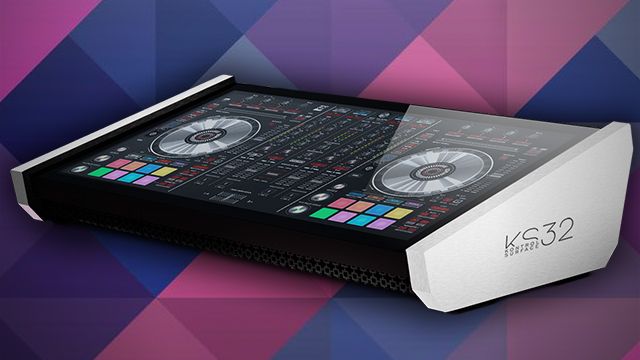
Smithson Martin Kontrol Surface 32: Touch Surface With Control Templates

Related Posts

Engine DJ 5.0: on-board stems on the System 1, RGB waveforms for everyone
Breaking News

Engine DJ 5.0: on-board stems on the System 1, RGB waveforms for everyone

May 13, 2026
A Prime 4+ and a Kontrol S3 intercut against eachother over a black background
Breaking News

InMusic just bought Native Instruments. So what now for Traktor?

May 8, 2026
Akai Launches MPC Live III Standalone With 8-Core Processor, Clip Matrix, Stems, and 3D Pads
Breaking News

Akai Launches MPC Live III Standalone With 8-Core Processor, Clip Matrix, Stems, and 3D Pads

October 2, 2025
Load More
Next Post
Kontrol Surface 32

Smithson Martin Kontrol Surface 32: Touch Surface With Control Templates

Want to reach DJTT's audience here?

Shoot an email to advertising@djtechtools.com

DJTT ads
DJTT newsletter
Midi Fighter
Chat with us
  • ABOUT DJTT
  • CONTACT
  • PRIVACY
  • MIDI FIGHTER HELP
  • ABOUT DJTT
  • JOBS
  • CONTACT US
  • ADVERTISE
  • PRIVACY POLICY
  • ACCESSIBILITY STATEMENT

© 2024 DJ Techtools all rights reserved by DJ TechTools on all content unless otherwise noted.

No Result
View All Result
  • Blog
    • DJ Gear
      • DIY Projects
      • Gear Reviews
      • New Products
      • Controllerism
    • Techniques + Tips
      • Beginner DJ
      • Advanced DJ
      • Producer
      • Finger Drummer
    • News + Culture
      • Editorials + Opinions
      • Artist Interviews
      • Performances + Routines
      • How I Play
    • DJ Software Tutorials
      • Serato Tips
      • CDJ Tips
      • Ableton Live Tips
  • Store
    • Run by real DJs, not a corporation
    • DJ Controllers
      • Midi Fighter Twister
      • Midi Fighter Spectra
      • Midi Fighter 64
      • View All
    • Accessories
      • Chroma USB Drive for DJs
      • Chroma Caps
      • Chroma Cables Audio
      • Chroma Cables USB-A
      • Chroma Cables: USB-C
      • DJTT Gift Card
      • Midi Fighter T-Shirt
      • Keyboard Covers
      • Earplugs by V-Moda
    • Production Gear
    • Soundcards & Mixers
  • Community
    • Popular Forums
      • General Discussion
      • Buy & Sell
      • Reviews
      • Mixes
      • Music Production
      • Show Your Setup
      • Off Topic
    • Handy Links
      • New Posts
      • Private Messages
      • Register
      • Search
    • Midi Maps
      • Traktor
      • Ableton
      • Serato DJ
      • Midi Fighter 3D
      • Midi Fighter Twister
      • Midi Fighter Spectra
  • Midi Fighter
  • Chroma

© 2024 DJ Techtools all rights reserved by DJ TechTools on all content unless otherwise noted.

This website uses cookies. By continuing to use this website you are giving consent to cookies being used. Visit our Privacy and Cookie Policy.