DJ TechTools
  • Blog
    • DJ Gear
      • DIY Projects
      • Gear Reviews
      • New Products
      • Controllerism
    • Techniques + Tips
      • Beginner DJ
      • Advanced DJ
      • Producer
      • Finger Drummer
    • News + Culture
      • Editorials + Opinions
      • Artist Interviews
      • Performances + Routines
      • How I Play
    • DJ Software Tutorials
      • Serato Tips
        • Traktor Tips
      • CDJ Tips
      • Ableton Live Tips
  • Store
    • Run by real DJs, not a corporation
    • DJ Controllers
      • Midi Fighter Twister
      • Midi Fighter Spectra
      • Midi Fighter 64
      • View All
    • Accessories
      • Chroma USB Drive for DJs
      • Chroma Caps
      • Chroma Cables Audio
      • Chroma Cables USB-A
      • Chroma Cables: USB-C
      • DJTT Gift Card
      • Midi Fighter T-Shirt
      • Keyboard Covers
      • Earplugs by V-Moda
    • Production Gear
    • Soundcards & Mixers
  • Community
    • Popular Forums
      • General Discussion
      • Buy & Sell
      • Reviews
      • Mixes
      • Music Production
      • Show Your Setup
      • Off Topic
    • Handy Links
      • New Posts
      • Private Messages
      • Register
      • Search
    • Midi Maps
      • Traktor
      • Ableton
      • Serato DJ
      • Midi Fighter 3D
      • Midi Fighter Twister
      • Midi Fighter Spectra
  • Midi Fighter
  • Chroma
No Result
View All Result
DJ TechTools
  • Blog
    • DJ Gear
      • DIY Projects
      • Gear Reviews
      • New Products
      • Controllerism
    • Techniques + Tips
      • Beginner DJ
      • Advanced DJ
      • Producer
      • Finger Drummer
    • News + Culture
      • Editorials + Opinions
      • Artist Interviews
      • Performances + Routines
      • How I Play
    • DJ Software Tutorials
      • Serato Tips
        • Traktor Tips
      • CDJ Tips
      • Ableton Live Tips
  • Store
    • Run by real DJs, not a corporation
    • DJ Controllers
      • Midi Fighter Twister
      • Midi Fighter Spectra
      • Midi Fighter 64
      • View All
    • Accessories
      • Chroma USB Drive for DJs
      • Chroma Caps
      • Chroma Cables Audio
      • Chroma Cables USB-A
      • Chroma Cables: USB-C
      • DJTT Gift Card
      • Midi Fighter T-Shirt
      • Keyboard Covers
      • Earplugs by V-Moda
    • Production Gear
    • Soundcards & Mixers
  • Community
    • Popular Forums
      • General Discussion
      • Buy & Sell
      • Reviews
      • Mixes
      • Music Production
      • Show Your Setup
      • Off Topic
    • Handy Links
      • New Posts
      • Private Messages
      • Register
      • Search
    • Midi Maps
      • Traktor
      • Ableton
      • Serato DJ
      • Midi Fighter 3D
      • Midi Fighter Twister
      • Midi Fighter Spectra
  • Midi Fighter
  • Chroma
No Result
View All Result
DJ TechTools

Playground App: An iOS Instrument That Gets Touch Control Right

Dan White by Dan White
January 22, 2016
in Controllerism, DJ Gear Announcements, iOS DJ Tips, NAMM 2016
Reading Time: 3 mins read
0
Playground iOS app NAMM 2016
345
VIEWS
Post on FacebookTweet thisUpvote on Reddit

The DJ industry isn’t as mobile device-obsessed at this NAMM as in recent years, but we did spot one unique app being shown in the always-awesome basement, a new iOS app called Playground. The free song player has done an excellent job of making playing music on an glass-screened mobile device fun – something that often many pad and knob-filled mobile performance tools miss the mark on.

Playground App for iOS


  • App: Playground
  • Developer: HLO S.A. (the team that brought us Beatsurfing back in 2012)
  • Price: Free – more songs are available in the app for $0.99
  • Availability: Now on iTunes App Store
  • Device Compatibility: iOS 8.4 or later (all devices)

An Intelligently Designed Touch Interface

Too many music apps made for touchscreen devices have knobs or controls that aren’t easy to use without a real-world object to grab. It makes it difficult and after a few minutes of playing, your fingers hurt from tapping against unrelenting glass repeatedly.

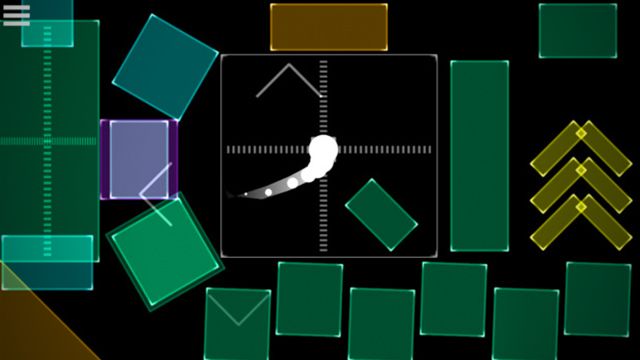
What the Playground developers get so right on this app is that playing music on an iPad isn’t fun when you have to try to turn a fiddly dial or repeatedly tap a pad on a glass screen. Instead, keeping your fingers on the device’s screen and gliding, swiping, sliding, and occasionally lifting and moving your fingers is how Playground works best. You find paths across buttons that sound interesting, not individual buttons you need to tap over and over.

It’s Easy To Sound Decent
playground-template-selector

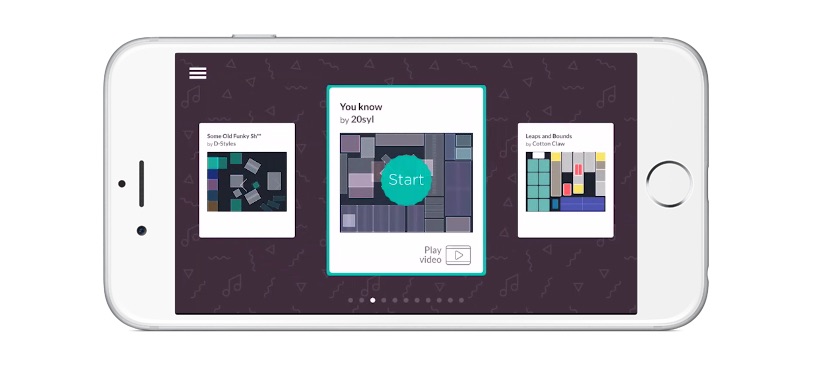
The other side of the Playground app is that the song templates on the app (a few are included for free, and more from notable artists like D-Styles, Free The Robots, and 20Sly are available for 99¢) are very well laid out and carefully quantized. Once you follow through the warm-up lesson, discovering different paths to travel through each song template starts to become intuitive.

The objects in each template are fun and unique – there are XY pads, shakers that you can grab and move around to hit other objects, switch up objects that change the sounds around it when activated or rearrange the objects on-screen, and many other concepts that are only possible on touch devices. Each Playground template is unique and has different types of playable elements to discover – it’s all part of the fun.

We’re hoping that Playground will continue to get more artists involved and making fun, unique playgrounds of sound for music lovers to play with. Our one dream feature: it would be really cool to see user-designable templates for some DIY action!

Want to see more new cool stuff. See all the NAMM 2016 articles here, or follow us Instagram for up-to-the-minute updates and unique insights. 
Tags: appIOSPlayground
Share3Tweet2Share
Previous Post

NAMM 2016: Zoom ARQ Aero Rhythmtrack

Next Post

ROLI Seaboard Rise and Grand: MIDI Keyboards Reimagined

Related Posts

free studio tools for quarantined producers
Production Tips

Tutorials and free tools for quarantined producers to beat the studio blues

March 18, 2020
Pioneer DJ's DDJ-400-S using Algoriddim djay Pro and Spotify
Breaking News

DDJ-400 Gets Algoriddim djay Support + DDJ-400-S Silver Edition

September 4, 2019
An iTunes Breakup Is Probably Coming
DJ Music Library Tips

An iTunes Breakup Is (Probably) Coming; Will This Impact DJs?

April 14, 2019
Load More
Next Post
ROLI Seaboard Grand

ROLI Seaboard Rise and Grand: MIDI Keyboards Reimagined

Want to reach DJTT's audience here?

Shoot an email to advertising@djtechtools.com

DJTT ads
DJTT newsletter
Midi Fighter
Chat with us
  • ABOUT DJTT
  • CONTACT
  • PRIVACY
  • MIDI FIGHTER HELP
  • ABOUT DJTT
  • JOBS
  • CONTACT US
  • ADVERTISE
  • PRIVACY POLICY
  • ACCESSIBILITY STATEMENT

© 2024 DJ Techtools all rights reserved by DJ TechTools on all content unless otherwise noted.

No Result
View All Result
  • Blog
    • DJ Gear
      • DIY Projects
      • Gear Reviews
      • New Products
      • Controllerism
    • Techniques + Tips
      • Beginner DJ
      • Advanced DJ
      • Producer
      • Finger Drummer
    • News + Culture
      • Editorials + Opinions
      • Artist Interviews
      • Performances + Routines
      • How I Play
    • DJ Software Tutorials
      • Serato Tips
      • CDJ Tips
      • Ableton Live Tips
  • Store
    • Run by real DJs, not a corporation
    • DJ Controllers
      • Midi Fighter Twister
      • Midi Fighter Spectra
      • Midi Fighter 64
      • View All
    • Accessories
      • Chroma USB Drive for DJs
      • Chroma Caps
      • Chroma Cables Audio
      • Chroma Cables USB-A
      • Chroma Cables: USB-C
      • DJTT Gift Card
      • Midi Fighter T-Shirt
      • Keyboard Covers
      • Earplugs by V-Moda
    • Production Gear
    • Soundcards & Mixers
  • Community
    • Popular Forums
      • General Discussion
      • Buy & Sell
      • Reviews
      • Mixes
      • Music Production
      • Show Your Setup
      • Off Topic
    • Handy Links
      • New Posts
      • Private Messages
      • Register
      • Search
    • Midi Maps
      • Traktor
      • Ableton
      • Serato DJ
      • Midi Fighter 3D
      • Midi Fighter Twister
      • Midi Fighter Spectra
  • Midi Fighter
  • Chroma

© 2024 DJ Techtools all rights reserved by DJ TechTools on all content unless otherwise noted.

This website uses cookies. By continuing to use this website you are giving consent to cookies being used. Visit our Privacy and Cookie Policy.