DJ TechTools
  • Blog
    • DJ Gear
      • DIY Projects
      • Gear Reviews
      • New Products
      • Controllerism
    • Techniques + Tips
      • Beginner DJ
      • Advanced DJ
      • Producer
      • Finger Drummer
    • News + Culture
      • Editorials + Opinions
      • Artist Interviews
      • Performances + Routines
      • How I Play
    • DJ Software Tutorials
      • Serato Tips
        • Traktor Tips
      • CDJ Tips
      • Ableton Live Tips
  • Store
    • Run by real DJs, not a corporation
    • DJ Controllers
      • Midi Fighter Twister
      • Midi Fighter Spectra
      • Midi Fighter 64
      • View All
    • Accessories
      • Chroma USB Drive for DJs
      • Chroma Caps
      • Chroma Cables Audio
      • Chroma Cables USB-A
      • Chroma Cables: USB-C
      • DJTT Gift Card
      • Midi Fighter T-Shirt
      • Keyboard Covers
      • Earplugs by V-Moda
    • Production Gear
    • Soundcards & Mixers
  • Community
    • Popular Forums
      • General Discussion
      • Buy & Sell
      • Reviews
      • Mixes
      • Music Production
      • Show Your Setup
      • Off Topic
    • Handy Links
      • New Posts
      • Private Messages
      • Register
      • Search
    • Midi Maps
      • Traktor
      • Ableton
      • Serato DJ
      • Midi Fighter 3D
      • Midi Fighter Twister
      • Midi Fighter Spectra
  • Midi Fighter
  • Chroma
No Result
View All Result
DJ TechTools
  • Blog
    • DJ Gear
      • DIY Projects
      • Gear Reviews
      • New Products
      • Controllerism
    • Techniques + Tips
      • Beginner DJ
      • Advanced DJ
      • Producer
      • Finger Drummer
    • News + Culture
      • Editorials + Opinions
      • Artist Interviews
      • Performances + Routines
      • How I Play
    • DJ Software Tutorials
      • Serato Tips
        • Traktor Tips
      • CDJ Tips
      • Ableton Live Tips
  • Store
    • Run by real DJs, not a corporation
    • DJ Controllers
      • Midi Fighter Twister
      • Midi Fighter Spectra
      • Midi Fighter 64
      • View All
    • Accessories
      • Chroma USB Drive for DJs
      • Chroma Caps
      • Chroma Cables Audio
      • Chroma Cables USB-A
      • Chroma Cables: USB-C
      • DJTT Gift Card
      • Midi Fighter T-Shirt
      • Keyboard Covers
      • Earplugs by V-Moda
    • Production Gear
    • Soundcards & Mixers
  • Community
    • Popular Forums
      • General Discussion
      • Buy & Sell
      • Reviews
      • Mixes
      • Music Production
      • Show Your Setup
      • Off Topic
    • Handy Links
      • New Posts
      • Private Messages
      • Register
      • Search
    • Midi Maps
      • Traktor
      • Ableton
      • Serato DJ
      • Midi Fighter 3D
      • Midi Fighter Twister
      • Midi Fighter Spectra
  • Midi Fighter
  • Chroma
No Result
View All Result
DJ TechTools

Ableton Live 9.6: Link’s Debut

Dean Zulueta by Dean Zulueta
February 4, 2016
in Breaking News, News, News + Culture
Reading Time: 2 mins read
0
Ableton Live 9.6: Link’s Debut
44
VIEWS
Post on FacebookTweet thisUpvote on Reddit

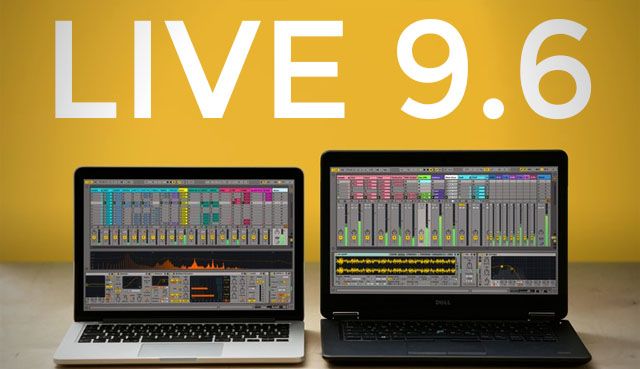
Ableton announced the release of Live 9.6 yesterday, bringing with it a plethora of improvements, from slicing audio to a Drum Rack, to extending Push 2 capabilities. Along with the in-house updates, Live 9.6 also comes with Ableton’s latest project Link, a tool for electronic musicians to integrate electronic instruments effortlessly within Live. The latest update improves upon the latest release of Live 9.5 when the Push 2 launched and adds more capabilities for iOS apps to be used within Live.

Link: The Missing Tool

For years iOS apps have been designed around the functionality of Ableton Live and most have great potential to take producers workflow to the next level. However, most of these apps need a solid wireless connection, a few MIDI cables, and even extra software to communicate with Live. The missing piece of technology is Link, which was created by Ableton, to make using iOS apps in the studio less of a headache and more of a creative endeavor.
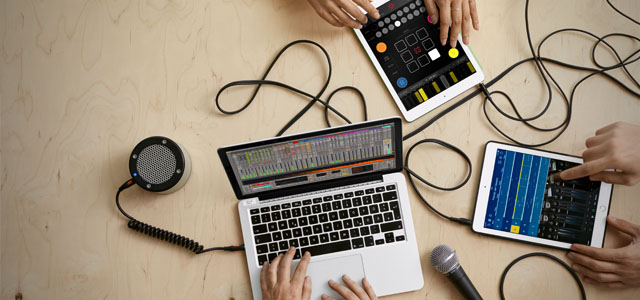
Link Small

Live is not only used by solo acts. Bands and groups are incorporating Live to maximize performances and with Link that process is even easier. The foundation of Link allows multiple instances of Live to be used together meaning that multiple laptops can be used to stop, play, and create sounds with in one Live Set. The beat, phase, and tempo can also be controlled by any instance and the rest of the pack will follow.

Furthermore, many iOS apps are adopting the technology which means that any iOS device on the same network, running a Link compatible app, can control elements within live. The list of apps that support the technology include Loopy, iElectribe, iMPC, and many more. The SDK is also open for developers so there is a high chance that more apps will support Link as producers play around with Live 9.6.

Live 9.6: Other Goodies

Link isn’t the only great thing about Live 9.6. The latest update also carries important improvements to the way the software handles samples and how users can customize their sound. The release notes are extensive and there are many improvements so below is a handfu that producers should be aware of before updating Live.

  • Link and The Bridge prevent each other from turning on when one is running.
  • For scripts, the Python framework has been updated to support Python 2.7.
  • Control surface support for Arturia KeyLab series, BeatStep, and MiniLab.
  • Tweaking Warp mode specific parameters in Simpler (grain, flux, etc.) are updated in real time.
  • Slicing audio to a Drum Rack is faster.
  • Added preference to re-enable random clip colors.
  • Updated fonts and added more special characters.
  • If a sample is offline, slicing to a MIDI track or Drum Rack is disabled.
  • Various bug fixes for crashing instances on Windows 10 and OSX 10.11
  • Push 2 is better optimized to run with Live 9.6 than previous versions

Live 9.6 is currently available to download for all Live 9 users, for free! 

Tags: AbletonAbleton LinkAbleton Live TipsAlbeton Live PusharturiaArturia MiniLabIOSios appsLinkLink Technologylive 9.5Live 9.6New Technologyproducerproduction newsproduction toolsPushpush 2software updatesupdatewireless control
ShareTweetShare
Previous Post

Rekordbox 4.0.6: MIDI Mapping Arrives In Performance Pack

Next Post

How I Play: EPROM Interview

Related Posts

Ableton launches Live 12 Suite rent-to-own plan – and it’s not a subscription
Ableton

Ableton launches Live 12 Suite rent-to-own plan – and it’s not a subscription

October 1, 2025
Control an entire studio with Midi Fighter Spectra (like Mad Zach)
Finger Drumming

Control an entire studio with Midi Fighter Spectra (like Mad Zach)

May 9, 2025
How I Play: Hybrasil’s DAWless live techno setup
How I Play

How I Play: Hybrasil’s DAWless live techno setup

October 3, 2024
Load More
Next Post
How I Play: EPROM interview

How I Play: EPROM Interview

Want to reach DJTT's audience here?

Shoot an email to advertising@djtechtools.com

DJTT ads
DJTT newsletter
Midi Fighter
Chat with us
  • ABOUT DJTT
  • CONTACT
  • PRIVACY
  • MIDI FIGHTER HELP
  • ABOUT DJTT
  • JOBS
  • CONTACT US
  • ADVERTISE
  • PRIVACY POLICY
  • ACCESSIBILITY STATEMENT

© 2024 DJ Techtools all rights reserved by DJ TechTools on all content unless otherwise noted.

No Result
View All Result
  • Blog
    • DJ Gear
      • DIY Projects
      • Gear Reviews
      • New Products
      • Controllerism
    • Techniques + Tips
      • Beginner DJ
      • Advanced DJ
      • Producer
      • Finger Drummer
    • News + Culture
      • Editorials + Opinions
      • Artist Interviews
      • Performances + Routines
      • How I Play
    • DJ Software Tutorials
      • Serato Tips
      • CDJ Tips
      • Ableton Live Tips
  • Store
    • Run by real DJs, not a corporation
    • DJ Controllers
      • Midi Fighter Twister
      • Midi Fighter Spectra
      • Midi Fighter 64
      • View All
    • Accessories
      • Chroma USB Drive for DJs
      • Chroma Caps
      • Chroma Cables Audio
      • Chroma Cables USB-A
      • Chroma Cables: USB-C
      • DJTT Gift Card
      • Midi Fighter T-Shirt
      • Keyboard Covers
      • Earplugs by V-Moda
    • Production Gear
    • Soundcards & Mixers
  • Community
    • Popular Forums
      • General Discussion
      • Buy & Sell
      • Reviews
      • Mixes
      • Music Production
      • Show Your Setup
      • Off Topic
    • Handy Links
      • New Posts
      • Private Messages
      • Register
      • Search
    • Midi Maps
      • Traktor
      • Ableton
      • Serato DJ
      • Midi Fighter 3D
      • Midi Fighter Twister
      • Midi Fighter Spectra
  • Midi Fighter
  • Chroma

© 2024 DJ Techtools all rights reserved by DJ TechTools on all content unless otherwise noted.

This website uses cookies. By continuing to use this website you are giving consent to cookies being used. Visit our Privacy and Cookie Policy.