DJ TechTools
  • Blog
    • DJ Gear
      • DIY Projects
      • Gear Reviews
      • New Products
      • Controllerism
    • Techniques + Tips
      • Beginner DJ
      • Advanced DJ
      • Producer
      • Finger Drummer
    • News + Culture
      • Editorials + Opinions
      • Artist Interviews
      • Performances + Routines
      • How I Play
    • DJ Software Tutorials
      • Serato Tips
        • Traktor Tips
      • CDJ Tips
      • Ableton Live Tips
  • Store
    • Run by real DJs, not a corporation
    • DJ Controllers
      • Midi Fighter Twister
      • Midi Fighter Spectra
      • Midi Fighter 64
      • View All
    • Accessories
      • Chroma USB Drive for DJs
      • Chroma Caps
      • Chroma Cables Audio
      • Chroma Cables USB-A
      • Chroma Cables: USB-C
      • DJTT Gift Card
      • Midi Fighter T-Shirt
      • Keyboard Covers
      • Earplugs by V-Moda
    • Production Gear
    • Soundcards & Mixers
  • Community
    • Popular Forums
      • General Discussion
      • Buy & Sell
      • Reviews
      • Mixes
      • Music Production
      • Show Your Setup
      • Off Topic
    • Handy Links
      • New Posts
      • Private Messages
      • Register
      • Search
    • Midi Maps
      • Traktor
      • Ableton
      • Serato DJ
      • Midi Fighter 3D
      • Midi Fighter Twister
      • Midi Fighter Spectra
  • Midi Fighter
  • Chroma
No Result
View All Result
DJ TechTools
  • Blog
    • DJ Gear
      • DIY Projects
      • Gear Reviews
      • New Products
      • Controllerism
    • Techniques + Tips
      • Beginner DJ
      • Advanced DJ
      • Producer
      • Finger Drummer
    • News + Culture
      • Editorials + Opinions
      • Artist Interviews
      • Performances + Routines
      • How I Play
    • DJ Software Tutorials
      • Serato Tips
        • Traktor Tips
      • CDJ Tips
      • Ableton Live Tips
  • Store
    • Run by real DJs, not a corporation
    • DJ Controllers
      • Midi Fighter Twister
      • Midi Fighter Spectra
      • Midi Fighter 64
      • View All
    • Accessories
      • Chroma USB Drive for DJs
      • Chroma Caps
      • Chroma Cables Audio
      • Chroma Cables USB-A
      • Chroma Cables: USB-C
      • DJTT Gift Card
      • Midi Fighter T-Shirt
      • Keyboard Covers
      • Earplugs by V-Moda
    • Production Gear
    • Soundcards & Mixers
  • Community
    • Popular Forums
      • General Discussion
      • Buy & Sell
      • Reviews
      • Mixes
      • Music Production
      • Show Your Setup
      • Off Topic
    • Handy Links
      • New Posts
      • Private Messages
      • Register
      • Search
    • Midi Maps
      • Traktor
      • Ableton
      • Serato DJ
      • Midi Fighter 3D
      • Midi Fighter Twister
      • Midi Fighter Spectra
  • Midi Fighter
  • Chroma
No Result
View All Result
DJ TechTools

Adding Expressive Delay To A Roland TR-8 In Ableton

Ean Golden by Ean Golden
February 29, 2016
in Ableton Live Tips, Advanced DJ Tips, Production Hardware, Production Tips
Reading Time: 2 mins read
0
Roland TR-8 Delay
112
VIEWS
Post on FacebookTweet thisUpvote on Reddit

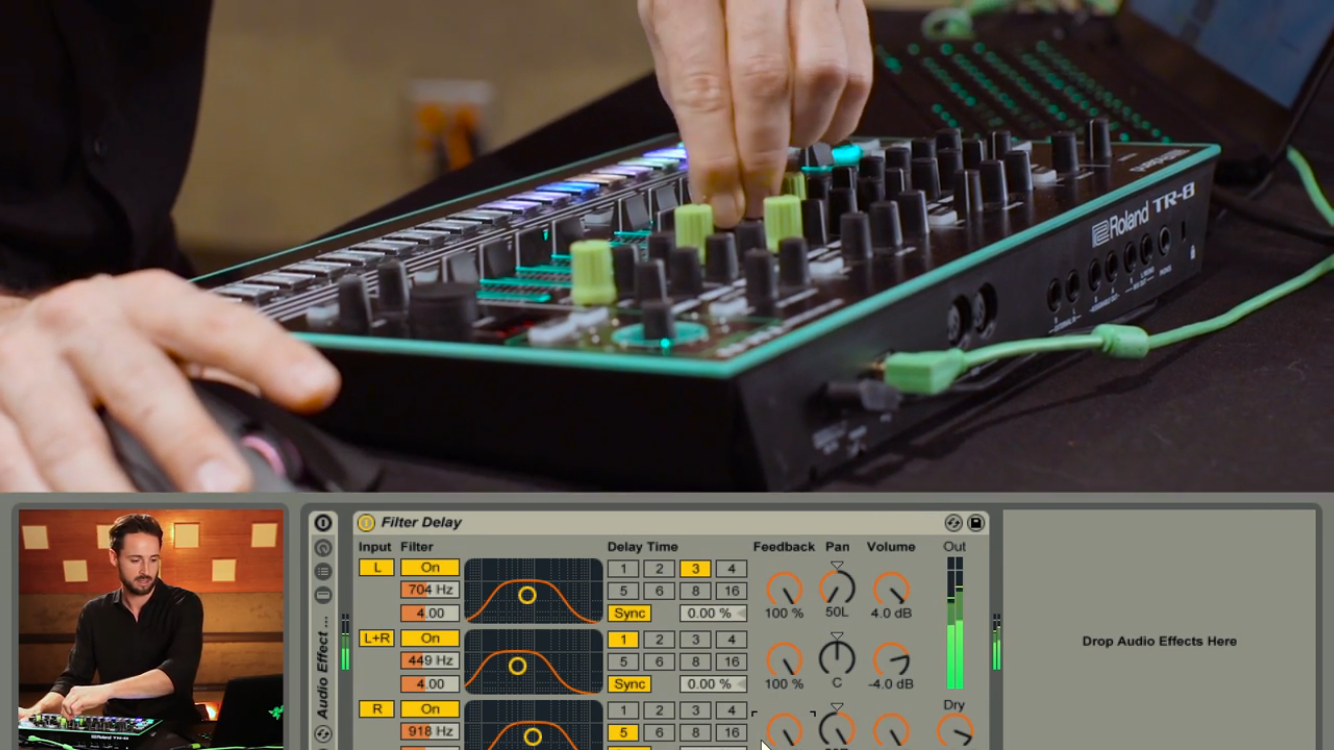
We’ve got a brand new video in Ean’s ongoing series about turing the Roland AIRA TR-8 into a super-charged performance and production tool by connecting it to Ableton Live. In part two, Ean shows off how a little bit of clever delay can dramatically change the sounds you’re playing. With some MIDI mapping magic, it becomes a wild and fun performance technique – watch the full video inside.

Adding Delay To A Roland TR-8 In Ableton

Want to see the first part of this series? Watch it here and see how a resonator can make the TR-8’s toms turn into an expressive synthesizer sound.

Basic Setup Instructions

As a reminder if you’re setting this up for yourself, here’s what Ean did in this video:

  • Connect the Roland TR-8 to Ableton Live via USB.
  • Send the TR-8’s audio output into Ableton Live – set up a new audio channel for each instrument on the TR-8.
  • Make sure the TR-8 is also set up as a MIDI input device in Ableton’s preferences – this allows you to MIDI map the controls on the device.
  • Add a Filter Delay audio effects to your Claps track.
  • Map all three Feedback, Left and Right Volume parameters to the Decay knob on your TR-8.
  • Turn Sync off for all time parameters and play with small values to get really interesting effects.
  • Map the Tune knob on the TR-8 to the time for Left and Right parameters (L: 1-20ms /R: 16-60ms are a nice starting point).
  • Add an EQ Eight audio effect and see which harsh frequencies are getting overpowered by looking at the spectrum.
  • Map the Frequency parameter to your Tune knob (don’t forget to tweak the frequency range you found before).
  • Map the Gain parameter to the Feedback knob and set it to 0 when it’s all the way down and -12db for max feedback (you can tweak this to your liking).

Gear Used In This Video

  • Razer Blade laptop (Read Ean’s review here)
  • Ableton Live 9
  • Roland AIRA TR-8 drum machine
  • Chroma Caps (to remind you which knobs are particularly important!)

Stay tuned to DJTT in the coming weeks for more tutorials from Ean on making music production more interesting and playable.


Tags: ableton liveairadelayean goldenmidi mappingRazerRoland TR-8
Share1Tweet1Share
Previous Post

Ean Golden Stems Mix + Walkthrough Video

Next Post

BPM Tool For The Mac Status Bar

Related Posts

Ableton launches Live 12 Suite rent-to-own plan – and it’s not a subscription
Ableton

Ableton launches Live 12 Suite rent-to-own plan – and it’s not a subscription

October 1, 2025
Use your Midi Fighter Twister as an Audio-Reactive Visualizer
Ableton Live Tips

Use your Midi Fighter Twister as an Audio-Reactive Visualizer

June 23, 2025
Control an entire studio with Midi Fighter Spectra (like Mad Zach)
Finger Drumming

Control an entire studio with Midi Fighter Spectra (like Mad Zach)

May 9, 2025
Load More
Next Post
BPM Tool For The Mac Status Bar

BPM Tool For The Mac Status Bar

Want to reach DJTT's audience here?

Shoot an email to advertising@djtechtools.com

DJTT ads
DJTT newsletter
Midi Fighter
Chat with us
  • ABOUT DJTT
  • CONTACT
  • PRIVACY
  • MIDI FIGHTER HELP
  • ABOUT DJTT
  • JOBS
  • CONTACT US
  • ADVERTISE
  • PRIVACY POLICY
  • ACCESSIBILITY STATEMENT

© 2024 DJ Techtools all rights reserved by DJ TechTools on all content unless otherwise noted.

No Result
View All Result
  • Blog
    • DJ Gear
      • DIY Projects
      • Gear Reviews
      • New Products
      • Controllerism
    • Techniques + Tips
      • Beginner DJ
      • Advanced DJ
      • Producer
      • Finger Drummer
    • News + Culture
      • Editorials + Opinions
      • Artist Interviews
      • Performances + Routines
      • How I Play
    • DJ Software Tutorials
      • Serato Tips
      • CDJ Tips
      • Ableton Live Tips
  • Store
    • Run by real DJs, not a corporation
    • DJ Controllers
      • Midi Fighter Twister
      • Midi Fighter Spectra
      • Midi Fighter 64
      • View All
    • Accessories
      • Chroma USB Drive for DJs
      • Chroma Caps
      • Chroma Cables Audio
      • Chroma Cables USB-A
      • Chroma Cables: USB-C
      • DJTT Gift Card
      • Midi Fighter T-Shirt
      • Keyboard Covers
      • Earplugs by V-Moda
    • Production Gear
    • Soundcards & Mixers
  • Community
    • Popular Forums
      • General Discussion
      • Buy & Sell
      • Reviews
      • Mixes
      • Music Production
      • Show Your Setup
      • Off Topic
    • Handy Links
      • New Posts
      • Private Messages
      • Register
      • Search
    • Midi Maps
      • Traktor
      • Ableton
      • Serato DJ
      • Midi Fighter 3D
      • Midi Fighter Twister
      • Midi Fighter Spectra
  • Midi Fighter
  • Chroma

© 2024 DJ Techtools all rights reserved by DJ TechTools on all content unless otherwise noted.

This website uses cookies. By continuing to use this website you are giving consent to cookies being used. Visit our Privacy and Cookie Policy.