DJ TechTools
  • Blog
    • DJ Gear
      • DIY Projects
      • Gear Reviews
      • New Products
      • Controllerism
    • Techniques + Tips
      • Beginner DJ
      • Advanced DJ
      • Producer
      • Finger Drummer
    • News + Culture
      • Editorials + Opinions
      • Artist Interviews
      • Performances + Routines
      • How I Play
    • DJ Software Tutorials
      • Serato Tips
        • Traktor Tips
      • CDJ Tips
      • Ableton Live Tips
  • Store
    • Run by real DJs, not a corporation
    • DJ Controllers
      • Midi Fighter Twister
      • Midi Fighter Spectra
      • Midi Fighter 64
      • View All
    • Accessories
      • Chroma USB Drive for DJs
      • Chroma Caps
      • Chroma Cables Audio
      • Chroma Cables USB-A
      • Chroma Cables: USB-C
      • DJTT Gift Card
      • Midi Fighter T-Shirt
      • Keyboard Covers
      • Earplugs by V-Moda
    • Production Gear
    • Soundcards & Mixers
  • Community
    • Popular Forums
      • General Discussion
      • Buy & Sell
      • Reviews
      • Mixes
      • Music Production
      • Show Your Setup
      • Off Topic
    • Handy Links
      • New Posts
      • Private Messages
      • Register
      • Search
    • Midi Maps
      • Traktor
      • Ableton
      • Serato DJ
      • Midi Fighter 3D
      • Midi Fighter Twister
      • Midi Fighter Spectra
  • Midi Fighter
  • Chroma
No Result
View All Result
DJ TechTools
  • Blog
    • DJ Gear
      • DIY Projects
      • Gear Reviews
      • New Products
      • Controllerism
    • Techniques + Tips
      • Beginner DJ
      • Advanced DJ
      • Producer
      • Finger Drummer
    • News + Culture
      • Editorials + Opinions
      • Artist Interviews
      • Performances + Routines
      • How I Play
    • DJ Software Tutorials
      • Serato Tips
        • Traktor Tips
      • CDJ Tips
      • Ableton Live Tips
  • Store
    • Run by real DJs, not a corporation
    • DJ Controllers
      • Midi Fighter Twister
      • Midi Fighter Spectra
      • Midi Fighter 64
      • View All
    • Accessories
      • Chroma USB Drive for DJs
      • Chroma Caps
      • Chroma Cables Audio
      • Chroma Cables USB-A
      • Chroma Cables: USB-C
      • DJTT Gift Card
      • Midi Fighter T-Shirt
      • Keyboard Covers
      • Earplugs by V-Moda
    • Production Gear
    • Soundcards & Mixers
  • Community
    • Popular Forums
      • General Discussion
      • Buy & Sell
      • Reviews
      • Mixes
      • Music Production
      • Show Your Setup
      • Off Topic
    • Handy Links
      • New Posts
      • Private Messages
      • Register
      • Search
    • Midi Maps
      • Traktor
      • Ableton
      • Serato DJ
      • Midi Fighter 3D
      • Midi Fighter Twister
      • Midi Fighter Spectra
  • Midi Fighter
  • Chroma
No Result
View All Result
DJ TechTools

Denon Engine 1.5 Launched: What’s New?

Dean Zulueta by Dean Zulueta
March 13, 2016
in DJ Gear Announcements, News, News + Culture
Reading Time: 3 mins read
0
Denon Engine 1.5 Launched: What’s New?
64
VIEWS
Post on FacebookTweet thisUpvote on Reddit

DJ gear manufacturers usually create controllers that are optimized for separate DJ software companies such as Traktor or Serato. Denon is taking a different approach with the release of their latest controller the MCX8000. When we first heard about the MCX8000 and Engine during NAMM 2016, Denon was really quiet about the software and how it would interact with the controller. Prior to current developments, Engine was Denon’s music organizational tool, similar to Pioneer’s Rekorbox. Later, Denon stated that the software would support all features of the MCX8000 besides the sampler and beat-gridding capabilities. Now, Denon is ready to elaborate on the Engine 1.5 software and what makes it more than just a playlist manager.
engine

The Purpose of Engine

With the release of the MCX8000, it is clear that Denon is looking towards the all-in-one solution when it comes to controllers in addition to developing music management software. The purpose of this is to make it easier for DJs to focus on the music and hardware and not the software as one would do with a traditional MIDI controller. (Similar to how many DJs depend on Pioneer gear and work within Rekordbox to manage their tracks.)

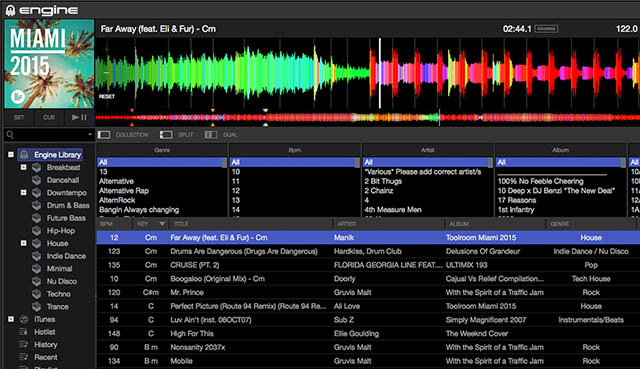
While this is nothing new, Denon is working to innovate their current model of managing music than using solely hardware to play. Engine brings in a friendly user interface and with advanced track preparation tools for beat gridding, looping, cueing, etc. Here are a few key features to highlight that makes Denon’s Engine unique.

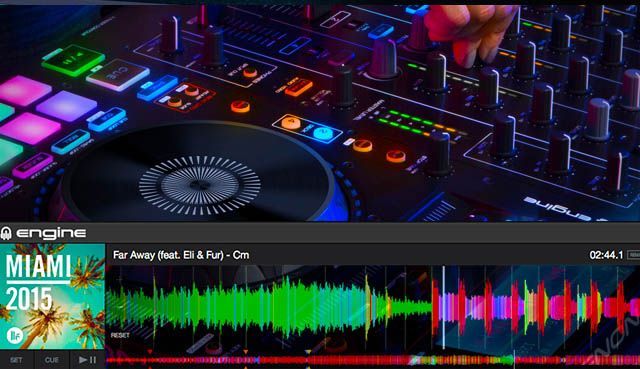
Color Waveforms: Engine incorporates color waveforms to not only make the software attractive to the eye, but the waveforms also double as a way to analyze a track quickly. Each waveform is a blend of the primary colors (red, green, blue) with each frequency band in a 3-EQ represented by a primary color. Red is low-end, green is the middle band, and blue is high-end. The blending of the colors allows the DJ to anticipate what type of sound will come from the track making for quick track analysis.

Serato DJ Hotcue Support: Denon is also giving current users the ability to migrate from Serato over to Engine by offering support for the transfer of DJ Hotcues. Simply drag any track that was hot cued in Serato into Engine and the data will transfer. Those tracks can then be used in standalone mode.

Extensive Track Support: With the over-saturated music market, it is so easy to accumulate thousands of tracks in a single collection. Engine supports up to 100,000 tracks in a single collection and 1,000 tracks in a single playlist. The Engine software is similar to a V6 when it comes track processing and handling.

Furthermore, lists can be dragged directly onto a flash drive and put into the MCX8000. The other supported media players are Denon’s SC3900 and SC2900.

The other important features include:

  • Create and analyze music database.
  • Set cue points in advanced.
  • Organize all of your tags and music files.
  • Improve GUI for the optimized workflow.
  • Up to 100,000 tracks.
  • Up to 512 Crates, each with 7 sub-layers.
  • Up to 512 playlists with 1000 tracks per playlist.

Engine isn’t going to replace Serato or Traktor, but with the way Denon is designing its products, a DJ won’t need a laptop. Back in the day, DJs spent time marking records with labels preparing for a gig was more than just charging a laptop and importing tracks from the Downloads folder. Denon’s new model with Engine has DJs more predisposed to preparing tracks for their all-in-one controllers without depending on a laptop in the booth, giving DJs an option over the Pioneer’s Rekordbox/CDJ duo.

Learn more about Denon’s Engine software here.

Tags: controllersdenondenon dj geardjDj softwareengineEngine 1.5MCX8000NAMM 2016No Laptopplaylist managementSC2900sc3900softwaeSoftwarestandalone controllers
ShareTweetShare
Previous Post

Pay To Play: NYC DJs Forced To Sell Tickets To Keep Their DJ Slots?

Next Post

DJ Music Store Price Comparison (2016 Edition)

Related Posts

A Prime 4+ and a Kontrol S3 intercut against eachother over a black background
Breaking News

InMusic just bought Native Instruments. So what now for Traktor?

May 8, 2026
Ableton launches Live 12 Suite rent-to-own plan – and it’s not a subscription
Ableton

Ableton launches Live 12 Suite rent-to-own plan – and it’s not a subscription

October 1, 2025
Rekordox Spotify
Breaking News

Spotify (finally) slides into Rekordbox, Serato, and Algoriddim djay (again) – for better or worse?

September 24, 2025
Load More
Next Post
DJ Music Store Price Comparison (2016 Edition)

DJ Music Store Price Comparison (2016 Edition)

Want to reach DJTT's audience here?

Shoot an email to advertising@djtechtools.com

DJTT ads
DJTT newsletter
Midi Fighter
Chat with us
  • ABOUT DJTT
  • CONTACT
  • PRIVACY
  • MIDI FIGHTER HELP
  • ABOUT DJTT
  • JOBS
  • CONTACT US
  • ADVERTISE
  • PRIVACY POLICY
  • ACCESSIBILITY STATEMENT

© 2024 DJ Techtools all rights reserved by DJ TechTools on all content unless otherwise noted.

No Result
View All Result
  • Blog
    • DJ Gear
      • DIY Projects
      • Gear Reviews
      • New Products
      • Controllerism
    • Techniques + Tips
      • Beginner DJ
      • Advanced DJ
      • Producer
      • Finger Drummer
    • News + Culture
      • Editorials + Opinions
      • Artist Interviews
      • Performances + Routines
      • How I Play
    • DJ Software Tutorials
      • Serato Tips
      • CDJ Tips
      • Ableton Live Tips
  • Store
    • Run by real DJs, not a corporation
    • DJ Controllers
      • Midi Fighter Twister
      • Midi Fighter Spectra
      • Midi Fighter 64
      • View All
    • Accessories
      • Chroma USB Drive for DJs
      • Chroma Caps
      • Chroma Cables Audio
      • Chroma Cables USB-A
      • Chroma Cables: USB-C
      • DJTT Gift Card
      • Midi Fighter T-Shirt
      • Keyboard Covers
      • Earplugs by V-Moda
    • Production Gear
    • Soundcards & Mixers
  • Community
    • Popular Forums
      • General Discussion
      • Buy & Sell
      • Reviews
      • Mixes
      • Music Production
      • Show Your Setup
      • Off Topic
    • Handy Links
      • New Posts
      • Private Messages
      • Register
      • Search
    • Midi Maps
      • Traktor
      • Ableton
      • Serato DJ
      • Midi Fighter 3D
      • Midi Fighter Twister
      • Midi Fighter Spectra
  • Midi Fighter
  • Chroma

© 2024 DJ Techtools all rights reserved by DJ TechTools on all content unless otherwise noted.

This website uses cookies. By continuing to use this website you are giving consent to cookies being used. Visit our Privacy and Cookie Policy.