DJ TechTools
  • Blog
    • DJ Gear
      • DIY Projects
      • Gear Reviews
      • New Products
      • Controllerism
    • Techniques + Tips
      • Beginner DJ
      • Advanced DJ
      • Producer
      • Finger Drummer
    • News + Culture
      • Editorials + Opinions
      • Artist Interviews
      • Performances + Routines
      • How I Play
    • DJ Software Tutorials
      • Serato Tips
        • Traktor Tips
      • CDJ Tips
      • Ableton Live Tips
  • Store
    • Run by real DJs, not a corporation
    • DJ Controllers
      • Midi Fighter Twister
      • Midi Fighter Spectra
      • Midi Fighter 64
      • View All
    • Accessories
      • Chroma USB Drive for DJs
      • Chroma Caps
      • Chroma Cables Audio
      • Chroma Cables USB-A
      • Chroma Cables: USB-C
      • DJTT Gift Card
      • Midi Fighter T-Shirt
      • Keyboard Covers
      • Earplugs by V-Moda
    • Production Gear
    • Soundcards & Mixers
  • Community
    • Popular Forums
      • General Discussion
      • Buy & Sell
      • Reviews
      • Mixes
      • Music Production
      • Show Your Setup
      • Off Topic
    • Handy Links
      • New Posts
      • Private Messages
      • Register
      • Search
    • Midi Maps
      • Traktor
      • Ableton
      • Serato DJ
      • Midi Fighter 3D
      • Midi Fighter Twister
      • Midi Fighter Spectra
  • Midi Fighter
  • Chroma
No Result
View All Result
DJ TechTools
  • Blog
    • DJ Gear
      • DIY Projects
      • Gear Reviews
      • New Products
      • Controllerism
    • Techniques + Tips
      • Beginner DJ
      • Advanced DJ
      • Producer
      • Finger Drummer
    • News + Culture
      • Editorials + Opinions
      • Artist Interviews
      • Performances + Routines
      • How I Play
    • DJ Software Tutorials
      • Serato Tips
        • Traktor Tips
      • CDJ Tips
      • Ableton Live Tips
  • Store
    • Run by real DJs, not a corporation
    • DJ Controllers
      • Midi Fighter Twister
      • Midi Fighter Spectra
      • Midi Fighter 64
      • View All
    • Accessories
      • Chroma USB Drive for DJs
      • Chroma Caps
      • Chroma Cables Audio
      • Chroma Cables USB-A
      • Chroma Cables: USB-C
      • DJTT Gift Card
      • Midi Fighter T-Shirt
      • Keyboard Covers
      • Earplugs by V-Moda
    • Production Gear
    • Soundcards & Mixers
  • Community
    • Popular Forums
      • General Discussion
      • Buy & Sell
      • Reviews
      • Mixes
      • Music Production
      • Show Your Setup
      • Off Topic
    • Handy Links
      • New Posts
      • Private Messages
      • Register
      • Search
    • Midi Maps
      • Traktor
      • Ableton
      • Serato DJ
      • Midi Fighter 3D
      • Midi Fighter Twister
      • Midi Fighter Spectra
  • Midi Fighter
  • Chroma
No Result
View All Result
DJ TechTools

Stream DJ Sets On Facebook Live or Periscope With Great DJ Audio

Dan White by Dan White
May 6, 2016
in Basic DJ Tips
Reading Time: 4 mins read
0
How To Live Stream DJ Sets On Facebook
463
VIEWS
Post on FacebookTweet thisUpvote on Reddit

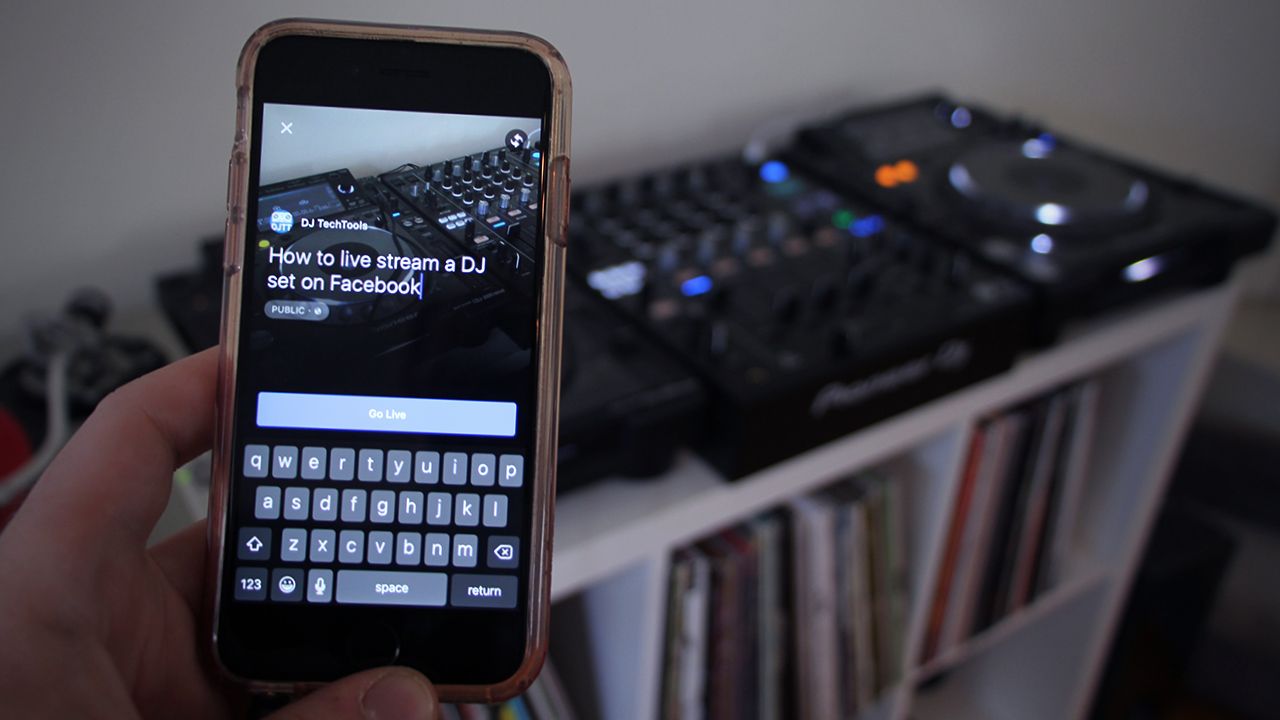
There’s a major emphasis live streaming video online right now, and as a result, social media posts that contain live video get more natural exposure. This is a big opportunity for DJs to reach more a wider audience, so in today’s article, learn how quickly stream DJ sets on Facebook Live, Periscope, and more with great-sounding DJ audio.

In this article we’ll share instructions on two ways of live streaming DJ sets:

  • On Facebook Live or Periscope, from a phone (single-cam supported, good DJ audio)
  • On Facebook Live from a computer (multi-cam supported, good DJ audio)

By default, using a streaming service from your phone has pretty crappy sound quality from the built-in mic – keep reading to find out how to make something professional.

Streaming a DJ Set From Your Phone
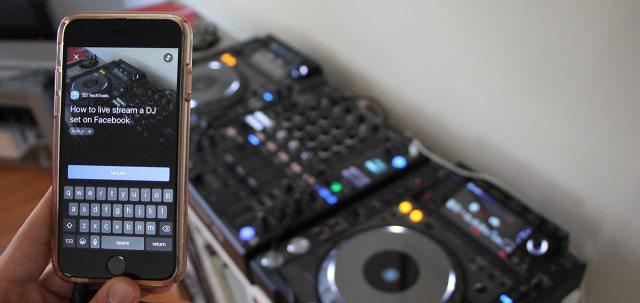
Livestream Facebook

To stream a DJ set on your phone, you’ll need:

  • Facebook or Periscope app
  • A solid internet connection (4G LTE is alright, dedicated Wi-Fi is best)
  • A connector cable from your Record Out (or equivalent) to a male 1/8″ plug
  • For iPhone: a special TRRS to TRS input cable with built-in Line to Mic attenuator ($28.50 on KV Connection or $19.95 on Amazon); you’ll need a different cable for other phones.

The process is pretty straightforward – you’ll want to plug the special TRRS > TRS cable into your iPhone’s audio jack – this will allow you to send good DJ audio into your phone, using the same audio path that headphones with a built-in mic use. By default, no phones are prepared to accept Line In level audio, so this cable will quickly solve that problem:
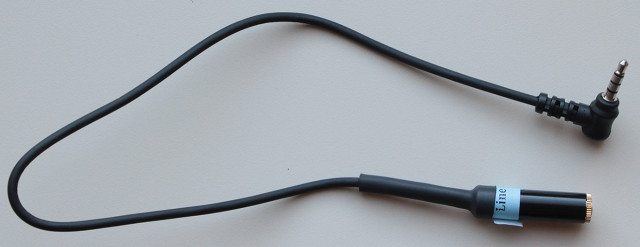
Attenuator Cable For Line In

To start a stream on Facebook Live, just make a new status update and hit the Live icon at the bottom of the status field. Once you’re live, you can quickly see comments that are made and the number of current viewers. Periscope works almost identically Facebook Live, and both platforms will use the mic-in audio if you use the cable mentioned above.
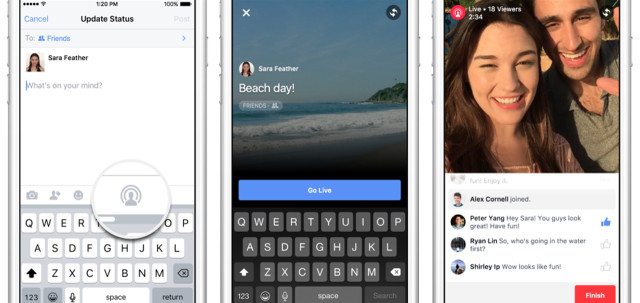
Turning on Facebook streaming

Pro-Tip #1: Battery Life – It’s worth pointing out that streaming live video on your phone over Wi-Fi or data will use a significant amount of power. We highly recommend you use a charging cable (plug it into your laptop, CDJ, or just a power strip) to avoid your phone dying in the middle of a set.

Pro-Tip #2: Great Looking Streams – To avoid a stream that looks like a DJ set out of the Blair Witch Project, use a tripod. There are a lot of very cheap adapters that allow any phone to attach to almost any tripod – we’ve tested this $7.95 adapter from Amazon with acceptable results.

Pro-Tip #3: Mind The Time Cap – With all Facebook Live streams, there’s a hard cap of 90 minutes max on a single stream. After that the stream will cut off – but you can start another one right away (you’ll just lose the viewers that you had).

Stream DJ Sets On Twitch/Chew.TV/Facebook From Your Computer
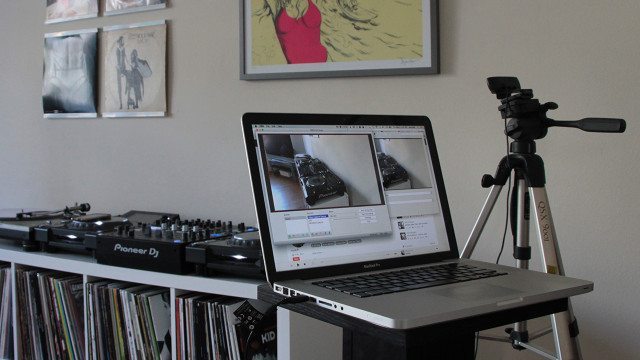
livestreaming-from-your-computer

If you’ve got a more permanent setup where you want to start streaming video, it makes a lot of sense to stream directly from your computer. There are a number of great platforms out there for this – like Twitch.TV and Chew.TV – that have their own niche audiences.

Excitingly, Facebook Live has joined those ranks with a recent update that allows multi-camera apps to stream directly into the platform. This is important because for many producers and DJs, your fans already use Facebook, so there’s no concerns about trying to get them to use something new.

To stream a DJ set from your computer, you’ll need:

  • a webcam (built-in webcams are not ideal – we recommend the $70 Logitech C920)
  • a broadcasting app (OBS is free and easy, Facebook also supports Livestream, Wirecast, Xsplit, and ffmpeg)
  • a solid internet connection (wired ethernet if possible)
  • an audio connection from your DJ setup to your computer
  • for Facebook, a Facebook Page (currently normal Facebook user accounts are not able to do this advanced streaming – see the full setup process here)

To get set up, you’ll need to make a new stream on the platform of your choice, and the platform will give you a unique set of URLs/stream keys that link your software to your specific stream. Here’s what the Facebook Live URLs look like (but each user has a unique set):
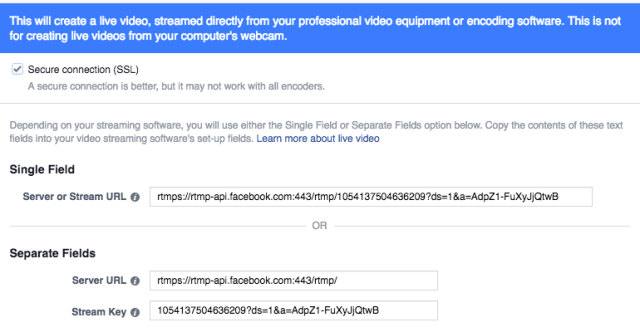
Facebook Stream Setup

Pro-Tip #1: Computer Overload: If you’re using a DJ software, we’d recommend against streaming from that same computer unless you have a very high-spec machine. Doing streaming video and a lot of audio manipulation on the same computer is asking for trouble, even though theoretically most recent computers should be able to handle it.

Here’s an example of an event livestreamed this week in this exact way – the Redbull Thre3style Finals in Berlin:

RED BULL THRE3STYLE GERMANY FINALS LIVETUNE IN!

Posted by ESKEI83 on Wednesday, May 4, 2016

Pro-Tip #2: Talk To Your Viewers: Something that Facebook heavily incorporates in their algorithms that expose people to content is the level of engagement on a post, and this goes for live streams as well. If you talk to people watching your live stream and they respond with comments, that makes it more likely that your stream will appear in more news feeds.

 What streams have you seen that were impressive or interesting on Facebook or Periscope? Share with us in the comments below. 
Tags: facebook livelive stream dj setslivestreamingperiscope
Share4Tweet2Share
Previous Post

How I DJ in VR: Grimecraft Interview

Next Post

Sets and Hecklers: What DJs Can Learn From Stand-Up Comedians

Related Posts

Interview: How John B turned his attic into a worldwide livestreaming powerhouse
Artist Features

Interview: How John B turned his attic into a worldwide livestreaming powerhouse

June 16, 2021
Mixcloud founder: here’s what DJs need to know about music copyright
Editorials and Opinions

Mixcloud founder: here’s what DJs need to know about music copyright

November 18, 2020
How one trio turned livestreaming into a sustainable COVID business
Editorials and Opinions

How one trio turned livestreaming into a sustainable COVID business

October 28, 2020
Load More
Next Post
What Can DJs Learn From Comedians

Sets and Hecklers: What DJs Can Learn From Stand-Up Comedians

Want to reach DJTT's audience here?

Shoot an email to advertising@djtechtools.com

DJTT ads
DJTT newsletter
Midi Fighter
Chat with us
  • ABOUT DJTT
  • CONTACT
  • PRIVACY
  • MIDI FIGHTER HELP
  • ABOUT DJTT
  • JOBS
  • CONTACT US
  • ADVERTISE
  • PRIVACY POLICY
  • ACCESSIBILITY STATEMENT

© 2024 DJ Techtools all rights reserved by DJ TechTools on all content unless otherwise noted.

No Result
View All Result
  • Blog
    • DJ Gear
      • DIY Projects
      • Gear Reviews
      • New Products
      • Controllerism
    • Techniques + Tips
      • Beginner DJ
      • Advanced DJ
      • Producer
      • Finger Drummer
    • News + Culture
      • Editorials + Opinions
      • Artist Interviews
      • Performances + Routines
      • How I Play
    • DJ Software Tutorials
      • Serato Tips
      • CDJ Tips
      • Ableton Live Tips
  • Store
    • Run by real DJs, not a corporation
    • DJ Controllers
      • Midi Fighter Twister
      • Midi Fighter Spectra
      • Midi Fighter 64
      • View All
    • Accessories
      • Chroma USB Drive for DJs
      • Chroma Caps
      • Chroma Cables Audio
      • Chroma Cables USB-A
      • Chroma Cables: USB-C
      • DJTT Gift Card
      • Midi Fighter T-Shirt
      • Keyboard Covers
      • Earplugs by V-Moda
    • Production Gear
    • Soundcards & Mixers
  • Community
    • Popular Forums
      • General Discussion
      • Buy & Sell
      • Reviews
      • Mixes
      • Music Production
      • Show Your Setup
      • Off Topic
    • Handy Links
      • New Posts
      • Private Messages
      • Register
      • Search
    • Midi Maps
      • Traktor
      • Ableton
      • Serato DJ
      • Midi Fighter 3D
      • Midi Fighter Twister
      • Midi Fighter Spectra
  • Midi Fighter
  • Chroma

© 2024 DJ Techtools all rights reserved by DJ TechTools on all content unless otherwise noted.

This website uses cookies. By continuing to use this website you are giving consent to cookies being used. Visit our Privacy and Cookie Policy.