DJ TechTools
  • Blog
    • DJ Gear
      • DIY Projects
      • Gear Reviews
      • New Products
      • Controllerism
    • Techniques + Tips
      • Beginner DJ
      • Advanced DJ
      • Producer
      • Finger Drummer
    • News + Culture
      • Editorials + Opinions
      • Artist Interviews
      • Performances + Routines
      • How I Play
    • DJ Software Tutorials
      • Serato Tips
        • Traktor Tips
      • CDJ Tips
      • Ableton Live Tips
  • Store
    • Run by real DJs, not a corporation
    • DJ Controllers
      • Midi Fighter Twister
      • Midi Fighter Spectra
      • Midi Fighter 64
      • View All
    • Accessories
      • Chroma USB Drive for DJs
      • Chroma Caps
      • Chroma Cables Audio
      • Chroma Cables USB-A
      • Chroma Cables: USB-C
      • DJTT Gift Card
      • Midi Fighter T-Shirt
      • Keyboard Covers
      • Earplugs by V-Moda
    • Production Gear
    • Soundcards & Mixers
  • Community
    • Popular Forums
      • General Discussion
      • Buy & Sell
      • Reviews
      • Mixes
      • Music Production
      • Show Your Setup
      • Off Topic
    • Handy Links
      • New Posts
      • Private Messages
      • Register
      • Search
    • Midi Maps
      • Traktor
      • Ableton
      • Serato DJ
      • Midi Fighter 3D
      • Midi Fighter Twister
      • Midi Fighter Spectra
  • Midi Fighter
  • Chroma
No Result
View All Result
DJ TechTools
  • Blog
    • DJ Gear
      • DIY Projects
      • Gear Reviews
      • New Products
      • Controllerism
    • Techniques + Tips
      • Beginner DJ
      • Advanced DJ
      • Producer
      • Finger Drummer
    • News + Culture
      • Editorials + Opinions
      • Artist Interviews
      • Performances + Routines
      • How I Play
    • DJ Software Tutorials
      • Serato Tips
        • Traktor Tips
      • CDJ Tips
      • Ableton Live Tips
  • Store
    • Run by real DJs, not a corporation
    • DJ Controllers
      • Midi Fighter Twister
      • Midi Fighter Spectra
      • Midi Fighter 64
      • View All
    • Accessories
      • Chroma USB Drive for DJs
      • Chroma Caps
      • Chroma Cables Audio
      • Chroma Cables USB-A
      • Chroma Cables: USB-C
      • DJTT Gift Card
      • Midi Fighter T-Shirt
      • Keyboard Covers
      • Earplugs by V-Moda
    • Production Gear
    • Soundcards & Mixers
  • Community
    • Popular Forums
      • General Discussion
      • Buy & Sell
      • Reviews
      • Mixes
      • Music Production
      • Show Your Setup
      • Off Topic
    • Handy Links
      • New Posts
      • Private Messages
      • Register
      • Search
    • Midi Maps
      • Traktor
      • Ableton
      • Serato DJ
      • Midi Fighter 3D
      • Midi Fighter Twister
      • Midi Fighter Spectra
  • Midi Fighter
  • Chroma
No Result
View All Result
DJ TechTools

Maschine 2.4.5: Manual Slicing + Improved Workflow

Dean Zulueta by Dean Zulueta
June 15, 2016
in DJ Gear Announcements, News, News + Culture
Reading Time: 2 mins read
0
Maschine 2.4.5: Manual Slicing + Improved Workflow
39
VIEWS
Post on FacebookTweet thisUpvote on Reddit

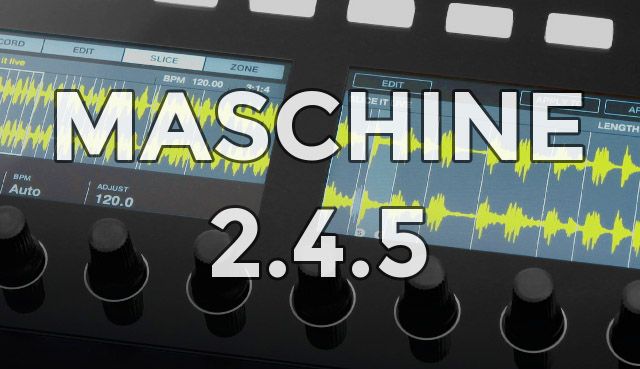
Native Instruments announced the arrival of the 2.4.5 update to their MASCHINE 2 software, enabling users to get even more out of the software. This update, available in the Service Center today, offers a new Manual Slicing feature, variable scene length, and the ability to save user defaults as well as general performance improvements. Read more below about what to expect from Maschine 2.4.5.


Manual Slicing and Variable Scene Length

The flagship feature of the 2.4.5 update is Manual Slicing, a new way for producers to cut up a sample in real-time. While in Manual Slicing mode a sample can be cut up by playing back the original sample and using the pads to add slices to different parts of the sample. This added functionality is a quick and intuitive way for producers to quickly chop up samples and is something many users will probably get a lot of use out of in this update.

In addition to Manual Slicing, Maschine users are now able to have variable scene lengths, making it easier for producers to create polyrhythms by setting scene lengths independently from the patterns that reside within the scene.

Other Fixes and Improvements

Another feature that has been long-awaited is the ability to save plug-in settings as defaults. Maschine 2.4.5 has a Save As Default function that allows any special plug-in settings to be the go-to setting for producers.

Exporting was also improved with the ability to export scenes into individual audio loops, which can also be exported in AIFF format in the new update. Entire song range can be exported now without setting a loop range first.

Users should also be aware of the following updates and changes to the software:

  • Eraser Tool now deletes a divider between slices instead of merging two slices
  • Browse by product group (category /vendor) via MASCHINE STUDIO
  • Remove all slices at once directly from the MASCHINE hardware to start again from scratch
  • Directly access audio and MIDI settings from the regular preferences dialog
  • “Pattern Grid” renamed to “Arrange Grid” and moved below the Group List in the software
  • In the Slicer, “Manual” mode is now the default
  • Added a field in preferences for custom names for export
  • “Slice” Button renamed to “Split” and turns into “Slice” when a slice is played back
  • Added a Loop control to the Transport in the software to enable and disable Loop playback
  • Browse directly from KOMPLETE KONTROL S-Series keyboard using the new Hardware Browse mode

Current Maschine 2 software owners can update for free on starting today. 

Want to get your hands on Maschine? Support DJTT and buy from the store!
Tags: Manual Slicingmaschinemaschine 2maschine 2.4.5maschine updatemaschine update 2016Maschine UsersNative InstrumentsNINI UpdateService Center Update
ShareTweetShare
Previous Post

Traktor + Serato DJs Locked Out Of DVS On DJM-900NXS2?

Next Post

Apps For DJs + Producers To Learn To Play Piano

Related Posts

A Prime 4+ and a Kontrol S3 intercut against eachother over a black background
Breaking News

InMusic just bought Native Instruments. So what now for Traktor?

May 8, 2026
Traktor MX2: Native Instruments’ New 2-Channel Controller
DJ Gear Announcements

Traktor MX2: Native Instruments’ New 2-Channel Controller

October 8, 2025
How I Play: Hybrasil’s DAWless live techno setup
How I Play

How I Play: Hybrasil’s DAWless live techno setup

October 3, 2024
Load More
Next Post
Apps For DJs and Producers To Learn To Play Piano

Apps For DJs + Producers To Learn To Play Piano

Want to reach DJTT's audience here?

Shoot an email to advertising@djtechtools.com

DJTT ads
DJTT newsletter
Midi Fighter
Chat with us
  • ABOUT DJTT
  • CONTACT
  • PRIVACY
  • MIDI FIGHTER HELP
  • ABOUT DJTT
  • JOBS
  • CONTACT US
  • ADVERTISE
  • PRIVACY POLICY
  • ACCESSIBILITY STATEMENT

© 2024 DJ Techtools all rights reserved by DJ TechTools on all content unless otherwise noted.

No Result
View All Result
  • Blog
    • DJ Gear
      • DIY Projects
      • Gear Reviews
      • New Products
      • Controllerism
    • Techniques + Tips
      • Beginner DJ
      • Advanced DJ
      • Producer
      • Finger Drummer
    • News + Culture
      • Editorials + Opinions
      • Artist Interviews
      • Performances + Routines
      • How I Play
    • DJ Software Tutorials
      • Serato Tips
      • CDJ Tips
      • Ableton Live Tips
  • Store
    • Run by real DJs, not a corporation
    • DJ Controllers
      • Midi Fighter Twister
      • Midi Fighter Spectra
      • Midi Fighter 64
      • View All
    • Accessories
      • Chroma USB Drive for DJs
      • Chroma Caps
      • Chroma Cables Audio
      • Chroma Cables USB-A
      • Chroma Cables: USB-C
      • DJTT Gift Card
      • Midi Fighter T-Shirt
      • Keyboard Covers
      • Earplugs by V-Moda
    • Production Gear
    • Soundcards & Mixers
  • Community
    • Popular Forums
      • General Discussion
      • Buy & Sell
      • Reviews
      • Mixes
      • Music Production
      • Show Your Setup
      • Off Topic
    • Handy Links
      • New Posts
      • Private Messages
      • Register
      • Search
    • Midi Maps
      • Traktor
      • Ableton
      • Serato DJ
      • Midi Fighter 3D
      • Midi Fighter Twister
      • Midi Fighter Spectra
  • Midi Fighter
  • Chroma

© 2024 DJ Techtools all rights reserved by DJ TechTools on all content unless otherwise noted.

This website uses cookies. By continuing to use this website you are giving consent to cookies being used. Visit our Privacy and Cookie Policy.