DJ TechTools
  • Blog
    • DJ Gear
      • DIY Projects
      • Gear Reviews
      • New Products
      • Controllerism
    • Techniques + Tips
      • Beginner DJ
      • Advanced DJ
      • Producer
      • Finger Drummer
    • News + Culture
      • Editorials + Opinions
      • Artist Interviews
      • Performances + Routines
      • How I Play
    • DJ Software Tutorials
      • Serato Tips
        • Traktor Tips
      • CDJ Tips
      • Ableton Live Tips
  • Store
    • Run by real DJs, not a corporation
    • DJ Controllers
      • Midi Fighter Twister
      • Midi Fighter Spectra
      • Midi Fighter 64
      • View All
    • Accessories
      • Chroma USB Drive for DJs
      • Chroma Caps
      • Chroma Cables Audio
      • Chroma Cables USB-A
      • Chroma Cables: USB-C
      • DJTT Gift Card
      • Midi Fighter T-Shirt
      • Keyboard Covers
      • Earplugs by V-Moda
    • Production Gear
    • Soundcards & Mixers
  • Community
    • Popular Forums
      • General Discussion
      • Buy & Sell
      • Reviews
      • Mixes
      • Music Production
      • Show Your Setup
      • Off Topic
    • Handy Links
      • New Posts
      • Private Messages
      • Register
      • Search
    • Midi Maps
      • Traktor
      • Ableton
      • Serato DJ
      • Midi Fighter 3D
      • Midi Fighter Twister
      • Midi Fighter Spectra
  • Midi Fighter
  • Chroma
No Result
View All Result
DJ TechTools
  • Blog
    • DJ Gear
      • DIY Projects
      • Gear Reviews
      • New Products
      • Controllerism
    • Techniques + Tips
      • Beginner DJ
      • Advanced DJ
      • Producer
      • Finger Drummer
    • News + Culture
      • Editorials + Opinions
      • Artist Interviews
      • Performances + Routines
      • How I Play
    • DJ Software Tutorials
      • Serato Tips
        • Traktor Tips
      • CDJ Tips
      • Ableton Live Tips
  • Store
    • Run by real DJs, not a corporation
    • DJ Controllers
      • Midi Fighter Twister
      • Midi Fighter Spectra
      • Midi Fighter 64
      • View All
    • Accessories
      • Chroma USB Drive for DJs
      • Chroma Caps
      • Chroma Cables Audio
      • Chroma Cables USB-A
      • Chroma Cables: USB-C
      • DJTT Gift Card
      • Midi Fighter T-Shirt
      • Keyboard Covers
      • Earplugs by V-Moda
    • Production Gear
    • Soundcards & Mixers
  • Community
    • Popular Forums
      • General Discussion
      • Buy & Sell
      • Reviews
      • Mixes
      • Music Production
      • Show Your Setup
      • Off Topic
    • Handy Links
      • New Posts
      • Private Messages
      • Register
      • Search
    • Midi Maps
      • Traktor
      • Ableton
      • Serato DJ
      • Midi Fighter 3D
      • Midi Fighter Twister
      • Midi Fighter Spectra
  • Midi Fighter
  • Chroma
No Result
View All Result
DJ TechTools

SoundSwitch: Beatgrid-Synced Lighting Automation For Serato DJ

Dan White by Dan White
July 25, 2016
in Breaking News, News
Reading Time: 3 mins read
0
SoundSwitch: Beatgrid-Synced Lighting Automation For Serato DJ
228
VIEWS
Post on FacebookTweet thisUpvote on Reddit

Not every DJ has a lighting designer and visuals team, but that doesn’t mean that unique lighting effects have to be out of reach. With the new SoundSwitch hardware/software package, DJs will be able to write lighting scripts for songs in their library – it’s like a DAW for lighting. When a track is played back with Serato DJ, the associated lighting cues and effects are played back automatically in time with the tracks in the mix.

  • Product: Soundswitch software and hardware DMX controller
  • Manufacturer: Onesixone Ltd (in New Zealand)
  • Price: $499 on the SoundSwitch site
  • Availability: Hardware set to launch August 12, software in Beta now
  • System Requirements: Serato DJ, Mac OS X 10.9 or later or Windows 7 or later, 5GB HD space, 4GB RAM

The team behind SoundSwitch is calling it a Digital Lighting Workstation, with clear aspirations for track-based customized lighting shows to become the new industry norm.

For many DJs (mobile, club, underground, etc), lighting is usually a luxury or an afterthought. But with SoundSwitch, you might spend even more time preparing your DJ library and designing interesting lighting shows for every song in your set.

Edit Mode: Preparing Songs In Soundswitch

SoundSwitch has a whole series of tutorials on their site showing how the software is used – and the whole thing seems fairly intuitive. The software is split into two parts – Edit Mode, and Performance mode. In Edit mode, you prepare your lighting fixtures and lighting scripts for each track.

The main screen in Edit Mode looks just like a DAW, but instead of instruments, they are lighting fixtures. For each fixture, there’s a track in SoundSwitch that controls the intensity and color of the unit. There’s also a Master track if you just want to send one identical signal out to every light.

What About Songs Not Prepared In SoundSwitch?

Many DJs might not have time to build a custom lighting track for every single song in their library that they might play. The solution for this from SoundSwitch is to have a few different Autoloops that can be used as a backup for such instances.

They’re just short loops of lighting scripts that can be triggered on the fly. You can set up to 32 lighting cue loops (eight loops in four different banks). These loops will play automatically in time with your beat grid if there isn’t an associated SoundSwitch script for the playing track.

Performance Mode: Playing Sync’d Songs

SoundSwitch is very preparation-focused. When it comes time to actually perform, the DJ only opens the Autoloops software, connects it as a “Serato Remote” in Serato DJ’s preferences, and mixes tracks as normal. SoundSwitch stays in the background and isn’t something you’ll be interacting with during a set.

SoundSwitch Hardware
Screen Shot 2016-07-25 at Jul 25.11.24 PM

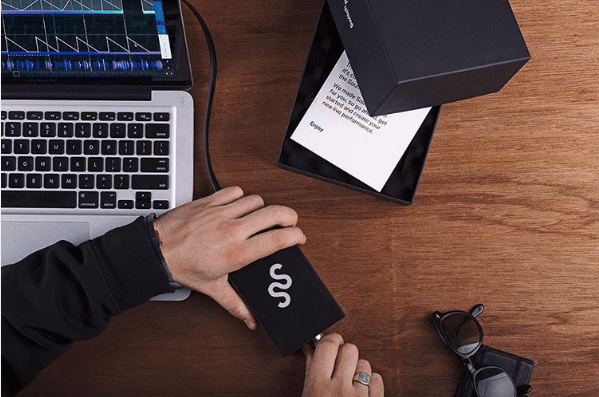
SoundSwitch requires their own proprietary DMX interface. It’s a small box, connected via USB to your computer, with a simple three-pin DMX connector on the side of it. For now, you can only use SoundSwitch with their own interface, but according to a support page on third-party hardware:

“There are a few things in the pipeline here at SoundSwitch HQ, which we are looking to get to you as soon as possible. All we can say at this stage is watch this space…”

In terms of DJ software that SoundSwitch is compatible with, it apparently works just fine with any of the Serato DJ supported hardware controllers and mixers. The software uses information from the DJ hardware to adjust the overall intensity, so it has to be a USB-connected mixing surface.

For Serato DJ users who are performing with external soundcards (specifically the SL2/3/4 or Denon DJ DS1), SoundSwitch isn’t supported – only because for now, the software uses channel faders and the crossfader to mix the lighting tracks. If audio manipulation is happening outside of Serato, it’s impossible to tell which track is going to the master output – unless those faders send MIDI back to SoundSwitch, which is on the dev wishlist for the future.

What are your thoughts on this solution for DJ lighting automation?
Would you use it? Let us know in the comments below. 
Tags: DMXlightinglighting showserato DJsoundswitch
Share2Tweet1Share
Previous Post

Ableton Live 9.7 Is Coming: Sampling Finally Gets An Upgrade

Next Post

Are DJ Turntables Outselling CDJs?

Related Posts

“No Deal”: New Zealand’s ComCom denies clearance for AlphaTheta’s Serato acquisition
Breaking News

“No Deal”: New Zealand’s ComCom denies clearance for AlphaTheta’s Serato acquisition

July 17, 2024
TIDAL blocked DJs from using Stems – but the next generation of DJ gear will likely make that irrelevant
DJ Gear

TIDAL blocked DJs from using Stems – but the next generation of DJ gear will likely make that irrelevant

January 18, 2024
Serato DJ 3.1 adds integrated accessory control of Serato Stems
Serato

Serato DJ 3.1 adds integrated accessory control of Serato Stems

December 5, 2023
Load More
Next Post
Are DJ Turntables Outselling CDJs

Are DJ Turntables Outselling CDJs?

Want to reach DJTT's audience here?

Shoot an email to advertising@djtechtools.com

DJTT ads
DJTT newsletter
Midi Fighter
Chat with us
  • ABOUT DJTT
  • CONTACT
  • PRIVACY
  • MIDI FIGHTER HELP
  • ABOUT DJTT
  • JOBS
  • CONTACT US
  • ADVERTISE
  • PRIVACY POLICY
  • ACCESSIBILITY STATEMENT

© 2024 DJ Techtools all rights reserved by DJ TechTools on all content unless otherwise noted.

No Result
View All Result
  • Blog
    • DJ Gear
      • DIY Projects
      • Gear Reviews
      • New Products
      • Controllerism
    • Techniques + Tips
      • Beginner DJ
      • Advanced DJ
      • Producer
      • Finger Drummer
    • News + Culture
      • Editorials + Opinions
      • Artist Interviews
      • Performances + Routines
      • How I Play
    • DJ Software Tutorials
      • Serato Tips
      • CDJ Tips
      • Ableton Live Tips
  • Store
    • Run by real DJs, not a corporation
    • DJ Controllers
      • Midi Fighter Twister
      • Midi Fighter Spectra
      • Midi Fighter 64
      • View All
    • Accessories
      • Chroma USB Drive for DJs
      • Chroma Caps
      • Chroma Cables Audio
      • Chroma Cables USB-A
      • Chroma Cables: USB-C
      • DJTT Gift Card
      • Midi Fighter T-Shirt
      • Keyboard Covers
      • Earplugs by V-Moda
    • Production Gear
    • Soundcards & Mixers
  • Community
    • Popular Forums
      • General Discussion
      • Buy & Sell
      • Reviews
      • Mixes
      • Music Production
      • Show Your Setup
      • Off Topic
    • Handy Links
      • New Posts
      • Private Messages
      • Register
      • Search
    • Midi Maps
      • Traktor
      • Ableton
      • Serato DJ
      • Midi Fighter 3D
      • Midi Fighter Twister
      • Midi Fighter Spectra
  • Midi Fighter
  • Chroma

© 2024 DJ Techtools all rights reserved by DJ TechTools on all content unless otherwise noted.

This website uses cookies. By continuing to use this website you are giving consent to cookies being used. Visit our Privacy and Cookie Policy.