DJ TechTools
  • Blog
    • DJ Gear
      • DIY Projects
      • Gear Reviews
      • New Products
      • Controllerism
    • Techniques + Tips
      • Beginner DJ
      • Advanced DJ
      • Producer
      • Finger Drummer
    • News + Culture
      • Editorials + Opinions
      • Artist Interviews
      • Performances + Routines
      • How I Play
    • DJ Software Tutorials
      • Serato Tips
        • Traktor Tips
      • CDJ Tips
      • Ableton Live Tips
  • Store
    • Run by real DJs, not a corporation
    • DJ Controllers
      • Midi Fighter Twister
      • Midi Fighter Spectra
      • Midi Fighter 64
      • View All
    • Accessories
      • Chroma USB Drive for DJs
      • Chroma Caps
      • Chroma Cables Audio
      • Chroma Cables USB-A
      • Chroma Cables: USB-C
      • DJTT Gift Card
      • Midi Fighter T-Shirt
      • Keyboard Covers
      • Earplugs by V-Moda
    • Production Gear
    • Soundcards & Mixers
  • Community
    • Popular Forums
      • General Discussion
      • Buy & Sell
      • Reviews
      • Mixes
      • Music Production
      • Show Your Setup
      • Off Topic
    • Handy Links
      • New Posts
      • Private Messages
      • Register
      • Search
    • Midi Maps
      • Traktor
      • Ableton
      • Serato DJ
      • Midi Fighter 3D
      • Midi Fighter Twister
      • Midi Fighter Spectra
  • Midi Fighter
  • Chroma
No Result
View All Result
DJ TechTools
  • Blog
    • DJ Gear
      • DIY Projects
      • Gear Reviews
      • New Products
      • Controllerism
    • Techniques + Tips
      • Beginner DJ
      • Advanced DJ
      • Producer
      • Finger Drummer
    • News + Culture
      • Editorials + Opinions
      • Artist Interviews
      • Performances + Routines
      • How I Play
    • DJ Software Tutorials
      • Serato Tips
        • Traktor Tips
      • CDJ Tips
      • Ableton Live Tips
  • Store
    • Run by real DJs, not a corporation
    • DJ Controllers
      • Midi Fighter Twister
      • Midi Fighter Spectra
      • Midi Fighter 64
      • View All
    • Accessories
      • Chroma USB Drive for DJs
      • Chroma Caps
      • Chroma Cables Audio
      • Chroma Cables USB-A
      • Chroma Cables: USB-C
      • DJTT Gift Card
      • Midi Fighter T-Shirt
      • Keyboard Covers
      • Earplugs by V-Moda
    • Production Gear
    • Soundcards & Mixers
  • Community
    • Popular Forums
      • General Discussion
      • Buy & Sell
      • Reviews
      • Mixes
      • Music Production
      • Show Your Setup
      • Off Topic
    • Handy Links
      • New Posts
      • Private Messages
      • Register
      • Search
    • Midi Maps
      • Traktor
      • Ableton
      • Serato DJ
      • Midi Fighter 3D
      • Midi Fighter Twister
      • Midi Fighter Spectra
  • Midi Fighter
  • Chroma
No Result
View All Result
DJ TechTools

Arturia DrumBrute: Mad Zach’s First Look + Feature Overview

Mad Zach by Mad Zach
November 21, 2016
in Production Hardware, Reviews
Reading Time: 3 mins read
0
Arturia DrumBrute: Mad Zach’s First Look + Feature Overview
56
VIEWS
Post on FacebookTweet thisUpvote on Reddit

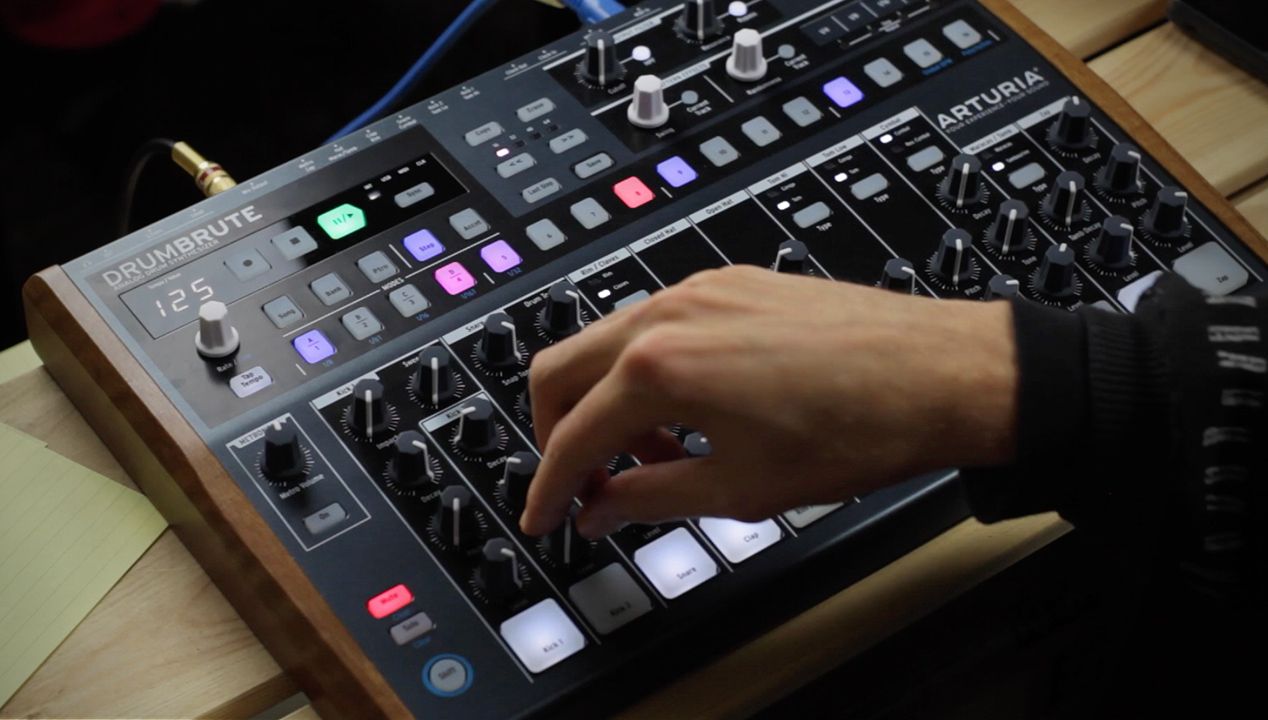
One of the best things about having outboard gear in a studio is being able to step away from the computer and focus more on your ears, and the moment. It just so happens that the hardware often sounds great as well. That’s why so much analog, standalone gear keeps hitting the market. The Arturia DrumBrute is a new drum machine that packs a punch at a budget-friendly $449. Keep reading to watch Mad Zach take it through the paces in this hands-on first look.

Arturia DrumBrute Review

Gear: DrumBrute analog drum machine
Manufacturer:
Arturia
Price:
$449
Availability:
 Nov 30th (reserve yours here!)
arturia-drumbrute-featured

Mad Zach’s Thoughts on the DrumBrute

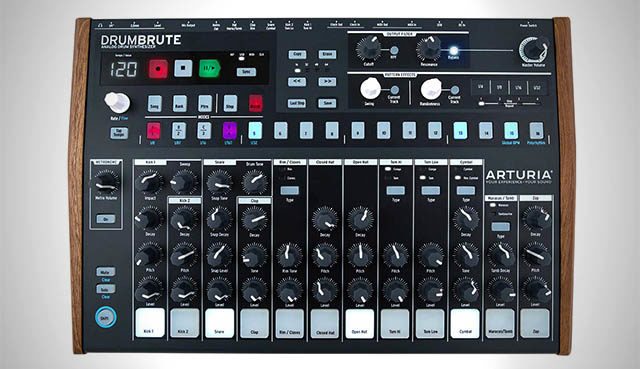
Birds Eye View: The strongest features of the DrumBrute are its workflow and functionality. It was fun to play, and delivers a number of innovative performance features. I thought the mute groups were cool, and liked being able to sequence quickly either by playing in patterns, or step sequencing. Also, very cool that you can run each sound out individually.

Personally I was slightly unimpressed by some of the sounds, for example the main kick and hats at long decay. I did like some of the other sounds, like the shakers and toms. I felt the unit would sound very nice paired with some analog saturation.

Build Quality: The DrumBrute is very similar in quality to a lot of other Arturia products (like the Beatstep Pro, MicroBrute, etc). If you’ve felt the knobs on those other units, you’ll know what to expect. It is designed in France, made in China.

Despite some aspects of the construction feeling a bit cheap, it does deliver fully on functionality, which at this price, is the best one could ask for. The step sequencing buttons left a bit to be desired (rather “smooshy” and cheap feeling) but ultimately served their purpose as well, and made quick work of some relatively dirty beats.

Sounds: The kicks are both fairly simple; one is punchy and the second is more of an 808 sub. The hi-hat sounds metallic when you open it up – which might be desirable to some users, but also unique.

Some of the drum slots have the ability to alternate between two different sounds that are sequenced independently – adding an extra set of sounds without needing more physical controls. The downside of this was that the same knobs control both sounds together, so you cannot tweak the two sounds separately. The filters were functional but not distinguished.

Sequencing Workflow: You can program beats in a few different ways:

  1. Select an instrument and then program it into the step sequencer in the top section
  2. Hit record and play live with the pad at the bottom of each slot. Depending on how hard you hit the pad, it is either an accented note or not.
  3. Hit the record button, select an instrument, and hold down the step repeat touch strip at the top to record patterns in – it’s quick and fun.

Connectivity: The DrumBrute can be synced via MIDI cable, USB MIDI, and click. It features a dedicated headphone out, as well as individual outputs (1/8″) for the sounds, and a full mix output. It also comes with an editor, which connects to your PC via USB and allows for preference adjustment, as well as pattern management and editing.
Want to see more of Mad Zach’s DJTT content? Check out all of his past articles here.

Tags: arturiadrum machinedrumbrutestandalone
ShareTweetShare
Previous Post

Review: Remotify Makes Ableton Control Surfaces Scripts A Snap

Next Post

2016 Black Friday / Cyber Monday Sale + $500 Giveaway

Related Posts

Akai Launches MPC Live III Standalone With 8-Core Processor, Clip Matrix, Stems, and 3D Pads
Breaking News

Akai Launches MPC Live III Standalone With 8-Core Processor, Clip Matrix, Stems, and 3D Pads

October 2, 2025
Meet the TR-1000: Roland’s new analog/digital drum machine with built-in sampling
Breaking News

Meet the TR-1000: Roland’s new analog/digital drum machine with built-in sampling

October 1, 2025
Breaking the Four by Four: a primer on playing in odd time signatures with drum machines
Production Tips

Breaking the Four by Four: a primer on playing in odd time signatures with drum machines

August 31, 2022
Load More
Next Post
DJ Techtools 2016 Black Friday Cyber Monday DJ Gear Sale

2016 Black Friday / Cyber Monday Sale + $500 Giveaway

Want to reach DJTT's audience here?

Shoot an email to advertising@djtechtools.com

DJTT ads
DJTT newsletter
Midi Fighter
Chat with us
  • ABOUT DJTT
  • CONTACT
  • PRIVACY
  • MIDI FIGHTER HELP
  • ABOUT DJTT
  • JOBS
  • CONTACT US
  • ADVERTISE
  • PRIVACY POLICY
  • ACCESSIBILITY STATEMENT

© 2024 DJ Techtools all rights reserved by DJ TechTools on all content unless otherwise noted.

No Result
View All Result
  • Blog
    • DJ Gear
      • DIY Projects
      • Gear Reviews
      • New Products
      • Controllerism
    • Techniques + Tips
      • Beginner DJ
      • Advanced DJ
      • Producer
      • Finger Drummer
    • News + Culture
      • Editorials + Opinions
      • Artist Interviews
      • Performances + Routines
      • How I Play
    • DJ Software Tutorials
      • Serato Tips
      • CDJ Tips
      • Ableton Live Tips
  • Store
    • Run by real DJs, not a corporation
    • DJ Controllers
      • Midi Fighter Twister
      • Midi Fighter Spectra
      • Midi Fighter 64
      • View All
    • Accessories
      • Chroma USB Drive for DJs
      • Chroma Caps
      • Chroma Cables Audio
      • Chroma Cables USB-A
      • Chroma Cables: USB-C
      • DJTT Gift Card
      • Midi Fighter T-Shirt
      • Keyboard Covers
      • Earplugs by V-Moda
    • Production Gear
    • Soundcards & Mixers
  • Community
    • Popular Forums
      • General Discussion
      • Buy & Sell
      • Reviews
      • Mixes
      • Music Production
      • Show Your Setup
      • Off Topic
    • Handy Links
      • New Posts
      • Private Messages
      • Register
      • Search
    • Midi Maps
      • Traktor
      • Ableton
      • Serato DJ
      • Midi Fighter 3D
      • Midi Fighter Twister
      • Midi Fighter Spectra
  • Midi Fighter
  • Chroma

© 2024 DJ Techtools all rights reserved by DJ TechTools on all content unless otherwise noted.

This website uses cookies. By continuing to use this website you are giving consent to cookies being used. Visit our Privacy and Cookie Policy.