DJ TechTools
  • Blog
    • DJ Gear
      • DIY Projects
      • Gear Reviews
      • New Products
      • Controllerism
    • Techniques + Tips
      • Beginner DJ
      • Advanced DJ
      • Producer
      • Finger Drummer
    • News + Culture
      • Editorials + Opinions
      • Artist Interviews
      • Performances + Routines
      • How I Play
    • DJ Software Tutorials
      • Serato Tips
        • Traktor Tips
      • CDJ Tips
      • Ableton Live Tips
  • Store
    • Run by real DJs, not a corporation
    • DJ Controllers
      • Midi Fighter Twister
      • Midi Fighter Spectra
      • Midi Fighter 64
      • View All
    • Accessories
      • Chroma USB Drive for DJs
      • Chroma Caps
      • Chroma Cables Audio
      • Chroma Cables USB-A
      • Chroma Cables: USB-C
      • DJTT Gift Card
      • Midi Fighter T-Shirt
      • Keyboard Covers
      • Earplugs by V-Moda
    • Production Gear
    • Soundcards & Mixers
  • Community
    • Popular Forums
      • General Discussion
      • Buy & Sell
      • Reviews
      • Mixes
      • Music Production
      • Show Your Setup
      • Off Topic
    • Handy Links
      • New Posts
      • Private Messages
      • Register
      • Search
    • Midi Maps
      • Traktor
      • Ableton
      • Serato DJ
      • Midi Fighter 3D
      • Midi Fighter Twister
      • Midi Fighter Spectra
  • Midi Fighter
  • Chroma
No Result
View All Result
DJ TechTools
  • Blog
    • DJ Gear
      • DIY Projects
      • Gear Reviews
      • New Products
      • Controllerism
    • Techniques + Tips
      • Beginner DJ
      • Advanced DJ
      • Producer
      • Finger Drummer
    • News + Culture
      • Editorials + Opinions
      • Artist Interviews
      • Performances + Routines
      • How I Play
    • DJ Software Tutorials
      • Serato Tips
        • Traktor Tips
      • CDJ Tips
      • Ableton Live Tips
  • Store
    • Run by real DJs, not a corporation
    • DJ Controllers
      • Midi Fighter Twister
      • Midi Fighter Spectra
      • Midi Fighter 64
      • View All
    • Accessories
      • Chroma USB Drive for DJs
      • Chroma Caps
      • Chroma Cables Audio
      • Chroma Cables USB-A
      • Chroma Cables: USB-C
      • DJTT Gift Card
      • Midi Fighter T-Shirt
      • Keyboard Covers
      • Earplugs by V-Moda
    • Production Gear
    • Soundcards & Mixers
  • Community
    • Popular Forums
      • General Discussion
      • Buy & Sell
      • Reviews
      • Mixes
      • Music Production
      • Show Your Setup
      • Off Topic
    • Handy Links
      • New Posts
      • Private Messages
      • Register
      • Search
    • Midi Maps
      • Traktor
      • Ableton
      • Serato DJ
      • Midi Fighter 3D
      • Midi Fighter Twister
      • Midi Fighter Spectra
  • Midi Fighter
  • Chroma
No Result
View All Result
DJ TechTools

CDJ-2000NXS2 1.6 Firmware Update from Pioneer DJ

DJ Deets by DJ Deets
January 14, 2017
in Breaking News, Controllerism, News, Pioneer
Reading Time: 2 mins read
0
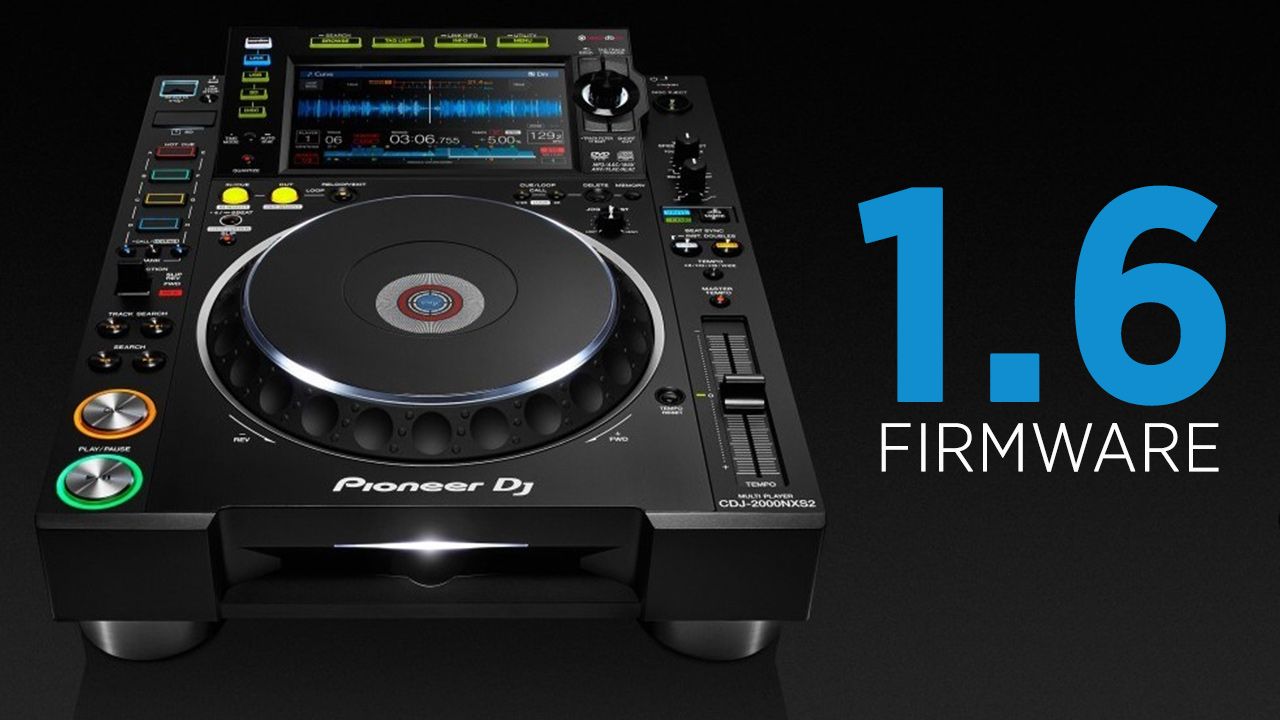
CDJ-2000NXS2 1.6 Firmware
107
VIEWS
Post on FacebookTweet thisUpvote on Reddit

This week, Pioneer DJ launched a new firmware update for their professional-grade CDJ-2000NXS2 multimedia player. This new update, version 1.6, stabilizes and adds several new features to the player. Keep reading for details.

CDJ-2000NXS2’s New 1.6 Firmware

Now fixed are problems that users of the players encountered while powering on, with slip mode, and adds a few new features as well.

[FIXED]
Some issues when powering up.
Some issues when using SLIP HOT CUE.

[NEW]
AUTO BEAT LOOP: 3, 6, 9 and 12 beats added.
Press and hold [LOOP MODE] for 1 second or longer to activate/deactivate.
8 beats (REV) and 8 beats (FWD) added in BEAT JUMP mode when used with a DDJ-SP1.

Download the 1.6 firmware here on Pioneer DJ’s site

For slip mode, the issue came when using hot cues. When slip mode (the feature that allows scratching, looping, etc, to be performed with the original track playing in the background in time) was activated and hot cues were triggered, the players were reported to have experienced slight glitches. This appears to be fixed in the new firmware.

This update brings in several new features to the players. It adds an Auto Beat loop of 3, 6, 9, or 12 beats when the Loop Mode button is pressed for more than one second. Secondly, version 1.60 adds an eight beat beat jump (both forwards and backwards) when the CDJ is connected to DDJ-SP1. Why this is only available with SP1s is incredibly unclear – Pioneer DJ continues to have incredibly disparate experiences across their media players depending on what model you own.

With the launch of the extremely competitive Denon DJ S5000 Prime , Pioneer DJ will hopefully be very active with their firmware updates. If they’re going to be against the SC5000, they need to squeeze every possible feature out of their players. With firmware updates, Pioneer can add new features to their existing hardware architecture without having to release an entirely new player.

By offering new features in current products, Pioneer dissuades current CDJ/XDJ users from purchasing competing players. Thus, until Pioneer releases their next major update to their media player range, might rely on releasing firmware updates for their players to stay on the cutting edge.
Wondering Pioneer DJ will announce next week at NAMM? Read our speculation here.

Tags: cdj-2000nxs2firmwarepioneer DJ
Share1Tweet1Share
Previous Post

Twister + Guitar + Launchpad = Future Guitar!

Next Post

Mad Zach Gets Hands-On With Maschine Jam

Related Posts

The DJM-V5 from AlphaTheta: 3 channels, 4-band EQ, V10 sound – no Beat FX or crossfader.
Breaking News

The DJM-V5 from AlphaTheta: 3 channels, 4-band EQ, V10 sound – no Beat FX or crossfader.

January 20, 2026
Rekordox Spotify
Breaking News

Spotify (finally) slides into Rekordbox, Serato, and Algoriddim djay (again) – for better or worse?

September 24, 2025
CDJ-3000x player by AlphaTheta
Breaking News

The CDJ-3000X is here: an iterative upgrade of the media player for $3,000 / £2,399

September 9, 2025
Load More
Next Post
Maschine Jam in the studio with Mad Zach review

Mad Zach Gets Hands-On With Maschine Jam

Want to reach DJTT's audience here?

Shoot an email to advertising@djtechtools.com

DJTT ads
DJTT newsletter
Midi Fighter
Chat with us
  • ABOUT DJTT
  • CONTACT
  • PRIVACY
  • MIDI FIGHTER HELP
  • ABOUT DJTT
  • JOBS
  • CONTACT US
  • ADVERTISE
  • PRIVACY POLICY
  • ACCESSIBILITY STATEMENT

© 2024 DJ Techtools all rights reserved by DJ TechTools on all content unless otherwise noted.

No Result
View All Result
  • Blog
    • DJ Gear
      • DIY Projects
      • Gear Reviews
      • New Products
      • Controllerism
    • Techniques + Tips
      • Beginner DJ
      • Advanced DJ
      • Producer
      • Finger Drummer
    • News + Culture
      • Editorials + Opinions
      • Artist Interviews
      • Performances + Routines
      • How I Play
    • DJ Software Tutorials
      • Serato Tips
      • CDJ Tips
      • Ableton Live Tips
  • Store
    • Run by real DJs, not a corporation
    • DJ Controllers
      • Midi Fighter Twister
      • Midi Fighter Spectra
      • Midi Fighter 64
      • View All
    • Accessories
      • Chroma USB Drive for DJs
      • Chroma Caps
      • Chroma Cables Audio
      • Chroma Cables USB-A
      • Chroma Cables: USB-C
      • DJTT Gift Card
      • Midi Fighter T-Shirt
      • Keyboard Covers
      • Earplugs by V-Moda
    • Production Gear
    • Soundcards & Mixers
  • Community
    • Popular Forums
      • General Discussion
      • Buy & Sell
      • Reviews
      • Mixes
      • Music Production
      • Show Your Setup
      • Off Topic
    • Handy Links
      • New Posts
      • Private Messages
      • Register
      • Search
    • Midi Maps
      • Traktor
      • Ableton
      • Serato DJ
      • Midi Fighter 3D
      • Midi Fighter Twister
      • Midi Fighter Spectra
  • Midi Fighter
  • Chroma

© 2024 DJ Techtools all rights reserved by DJ TechTools on all content unless otherwise noted.

This website uses cookies. By continuing to use this website you are giving consent to cookies being used. Visit our Privacy and Cookie Policy.