DJ TechTools
  • Blog
    • DJ Gear
      • DIY Projects
      • Gear Reviews
      • New Products
      • Controllerism
    • Techniques + Tips
      • Beginner DJ
      • Advanced DJ
      • Producer
      • Finger Drummer
    • News + Culture
      • Editorials + Opinions
      • Artist Interviews
      • Performances + Routines
      • How I Play
    • DJ Software Tutorials
      • Serato Tips
        • Traktor Tips
      • CDJ Tips
      • Ableton Live Tips
  • Store
    • Run by real DJs, not a corporation
    • DJ Controllers
      • Midi Fighter Twister
      • Midi Fighter Spectra
      • Midi Fighter 64
      • View All
    • Accessories
      • Chroma USB Drive for DJs
      • Chroma Caps
      • Chroma Cables Audio
      • Chroma Cables USB-A
      • Chroma Cables: USB-C
      • DJTT Gift Card
      • Midi Fighter T-Shirt
      • Keyboard Covers
      • Earplugs by V-Moda
    • Production Gear
    • Soundcards & Mixers
  • Community
    • Popular Forums
      • General Discussion
      • Buy & Sell
      • Reviews
      • Mixes
      • Music Production
      • Show Your Setup
      • Off Topic
    • Handy Links
      • New Posts
      • Private Messages
      • Register
      • Search
    • Midi Maps
      • Traktor
      • Ableton
      • Serato DJ
      • Midi Fighter 3D
      • Midi Fighter Twister
      • Midi Fighter Spectra
  • Midi Fighter
  • Chroma
No Result
View All Result
DJ TechTools
  • Blog
    • DJ Gear
      • DIY Projects
      • Gear Reviews
      • New Products
      • Controllerism
    • Techniques + Tips
      • Beginner DJ
      • Advanced DJ
      • Producer
      • Finger Drummer
    • News + Culture
      • Editorials + Opinions
      • Artist Interviews
      • Performances + Routines
      • How I Play
    • DJ Software Tutorials
      • Serato Tips
        • Traktor Tips
      • CDJ Tips
      • Ableton Live Tips
  • Store
    • Run by real DJs, not a corporation
    • DJ Controllers
      • Midi Fighter Twister
      • Midi Fighter Spectra
      • Midi Fighter 64
      • View All
    • Accessories
      • Chroma USB Drive for DJs
      • Chroma Caps
      • Chroma Cables Audio
      • Chroma Cables USB-A
      • Chroma Cables: USB-C
      • DJTT Gift Card
      • Midi Fighter T-Shirt
      • Keyboard Covers
      • Earplugs by V-Moda
    • Production Gear
    • Soundcards & Mixers
  • Community
    • Popular Forums
      • General Discussion
      • Buy & Sell
      • Reviews
      • Mixes
      • Music Production
      • Show Your Setup
      • Off Topic
    • Handy Links
      • New Posts
      • Private Messages
      • Register
      • Search
    • Midi Maps
      • Traktor
      • Ableton
      • Serato DJ
      • Midi Fighter 3D
      • Midi Fighter Twister
      • Midi Fighter Spectra
  • Midi Fighter
  • Chroma
No Result
View All Result
DJ TechTools

Twister + Guitar + Launchpad = Future Guitar!

Dan White by Dan White
January 12, 2017
in Controllerism
Reading Time: 8 mins read
0
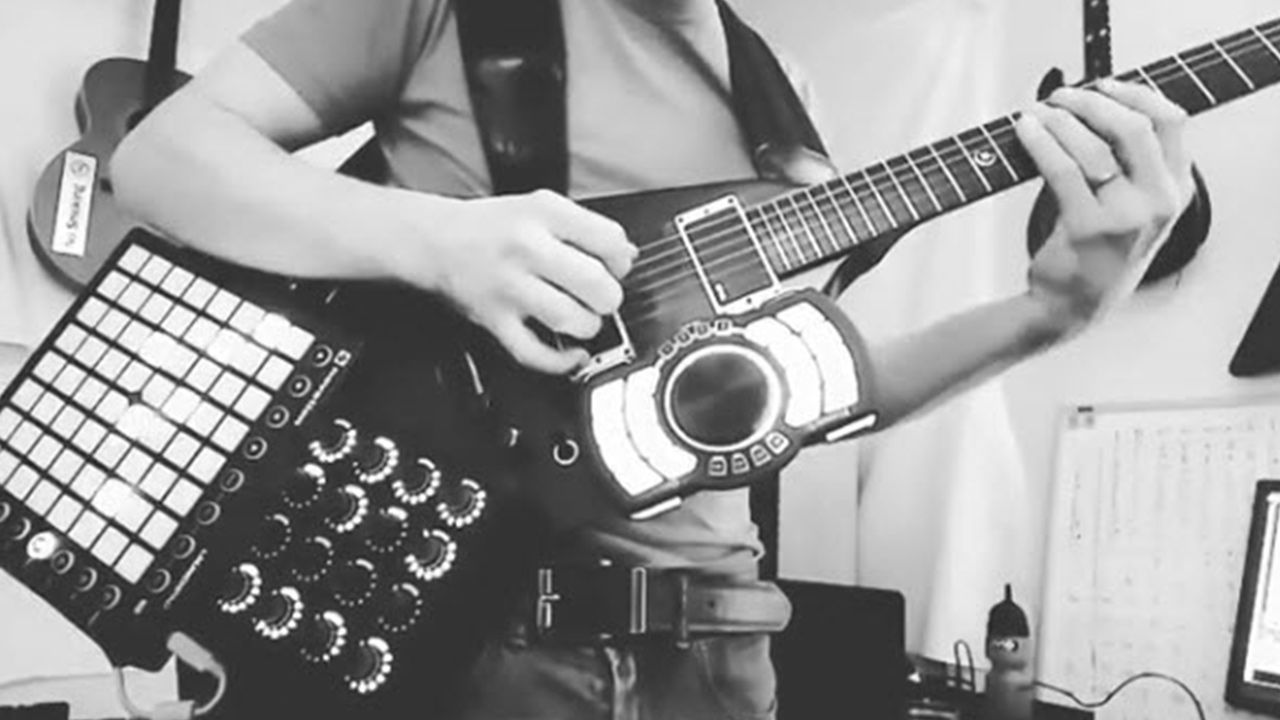
Jacob Orr's future guitar
58
VIEWS
Post on FacebookTweet thisUpvote on Reddit

The rise of MIDI instruments hasn’t been relegated to only DJs and dance music producers. We’ve seen a lot of unique live setups from musicians, and today we’ve asked Jacob Orr to share more about his Future Guitar – a MIDI-augmented axe.

Enjoy the concept of this instrument? Check out the Livid Guitar Wing. 

Jacob Orr’s Future Guitar

Making a beat #djtechtools #midifightertwister #novationlaunchpadmk2 #propellerheadsw

A video posted by Jacob Orr (@jacobiuswrex) on Dec 28, 2016 at 11:22am PST

Finally taking a break from programming this crazy hybrid guitar to actually try PLAYING it! Here is a short movement of single notes in E minor 😉

A video posted by Jacob Orr (@jacobiuswrex) on Dec 20, 2016 at 7:34pm PST

Here’s a sneak preview of the latest update to my “audio mode” , it features vu metering for 8 independent audio channels, the VU metering is displayed on the launchpad and the knobs of the midi fighter twister. In this clip I had already prerecorded 3 channels and I fade them in and then proceed to play a harmony part over them.

A video posted by Jacob Orr (@jacobiuswrex) on Dec 22, 2016 at 3:37pm PST

What Is The Future Guitar / Who Is Jacob Orr?

It’s with great pride that I get to introduce you to my Future Guitar! I’m a PLC technician/electrician/guitar player/composer from Metro Detroit – and I’ve been working on this project for almost an entire year.

The Future Guitar is basically a guitar with a couple MIDI controllers mounted on it. It’s very unconventional and complex. Explaining the entire thing might take a long time – so instead in this article I’ll skim over the basics of how it works and hopefully share with you some inspirational outside-the-box MIDI business:
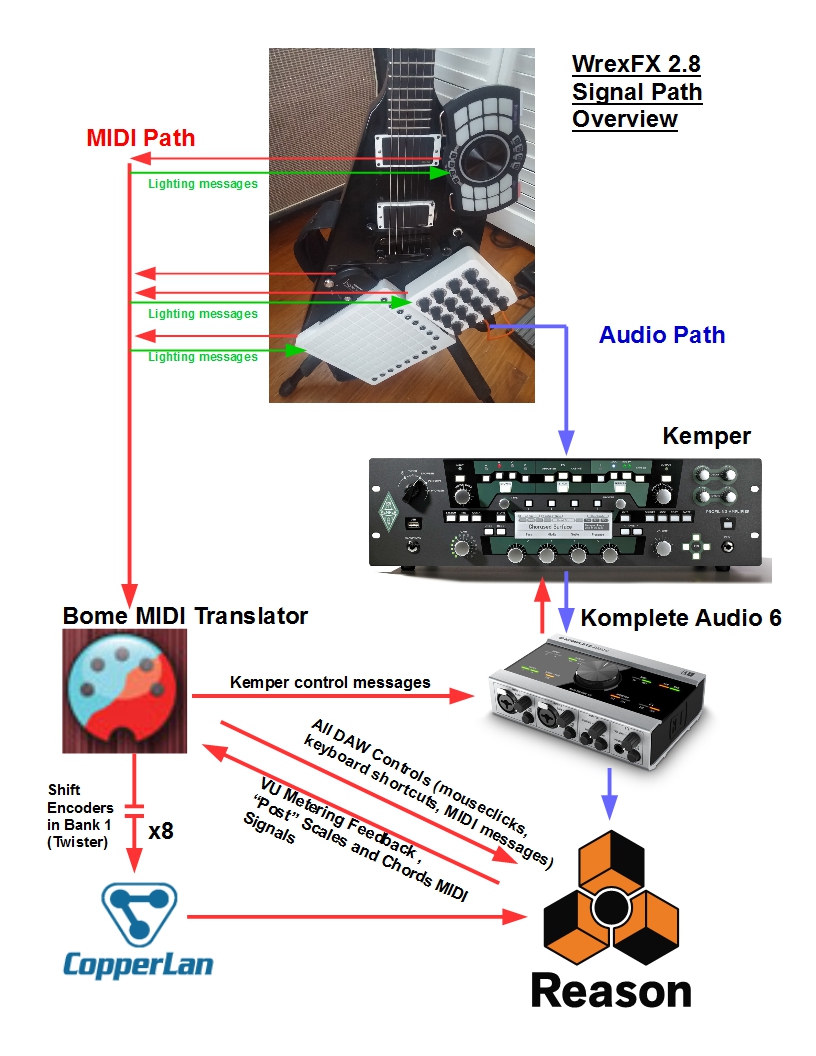
It all starts with USB MIDI and wireless MIDI. In my overview (above), the red lines represent the MIDI output of each device as it leaves the guitar. All MIDI devices are sent directly into Bome MIDI Translator (BMT).

The Twister is the easiest to program and most complex controller of all. This thing is hands down my favorite controller, with so much possibility packed into a small package. Since DJ Tech Tools added so many features (pre-mapped shift encoders, batch editing, super knobs, and a helpful PDF user manuals), it’s easier to start incorporating the unit than other controllers.

How Do All Of The MIDI Controllers Work?

Allow me to explain how all the MIDI controllers all work together and how the Twister fits into it all. I’ve also made a video that helps to explain how it works – the full walk through is about 17 minutes, but comprehensive:

Mode 1 –  “MIDI Record Mode”

This mode takes the MIDI from the Launchpad and the Fishman Triple Play, and combines it into one stream inside Bome. That stream is then split into eight separate channels of MIDI, going through Copperlan into Reason. I use Copperlan because it has so many virtual MIDI ports that I never worry about using them up – it’s awesome free software.
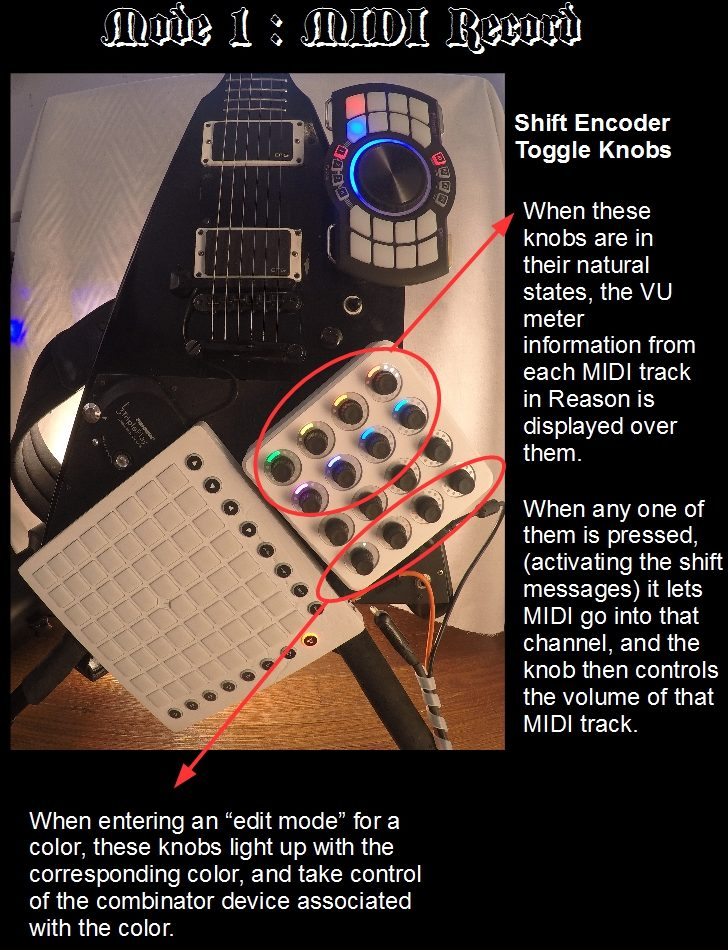
MIDI Record Mode

Before each channel can send its MIDI signal to its respective Combinator in Reason, it has to get through a switch. That’s what the first eight knobs in Bank 1 of the Twister are doing. They’re set on the “Shift Encoder Toggle” settings, so in their normal state, I display a VU meter on the encoder. In their “Shift” state, they control the volume of their track.

Each color is assigned a different folder of sounds that I can browse through. At the moment, I have just used eight of the folders of all the awesome new sounds that came with Reason 9.

  • Red for “Lead Sounds”
  • Orange for “Plucks and Mallets”
  • Yellow for “Arpeggios”
  • Green for “Strings and Voice”
  • Light Blue for “Pads”
  • Dark Blue for “Textures”
  • Purple for “Bass”
  • Pink for “Drums”

When I click knobs on the Twister, lights on the Orbit come on, and lights down the side of the Launchpad start cycling. The lights on the Orbit tell me which “switches” are currently letting MIDI through to combinators (aka: which sounds will be triggered when I play the guitar/Launchpad.)

The lights on the side of the Launchpad are telling me which track is selected in Reason out of my eight MIDI tracks.
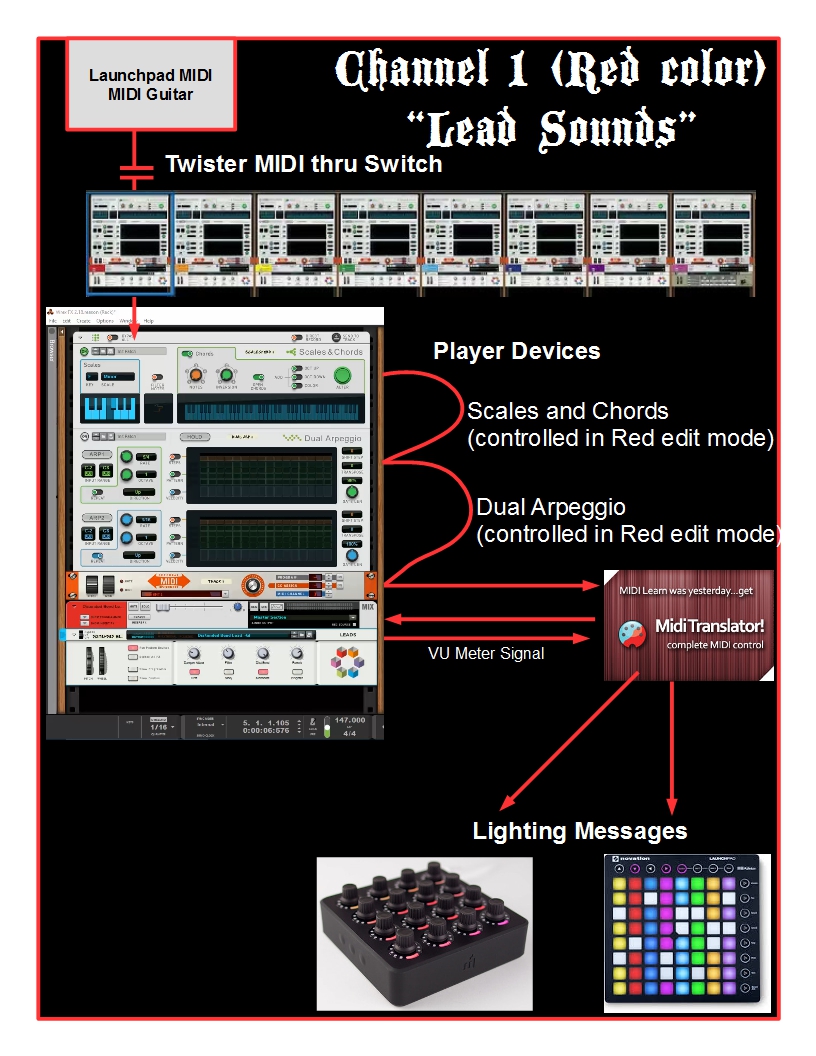
When I select a track, I can press its corresponding colored button on the Orbit. This brings me into an “edit mode” for that color.
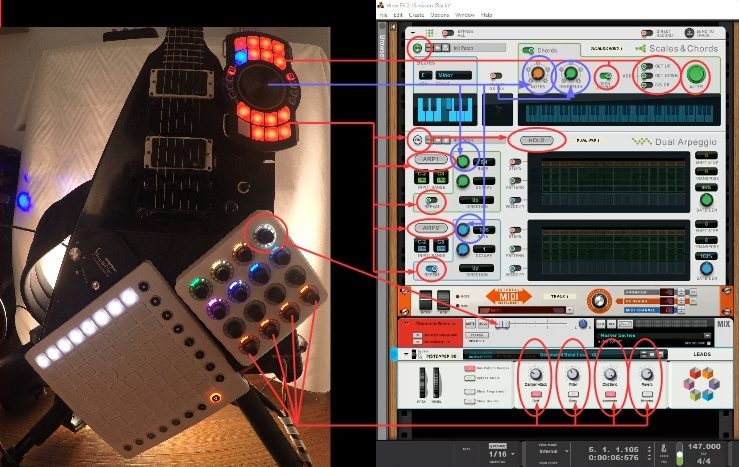
Red Mode infographic

In this edit mode, I have mapped twelve pads and four knobs to the “Player devices” (scales and chords/dual arpeggio). This edit mode is available for each color as well.

When entering edit mode, the last four switches of the Twister displays corresponding lights. When edit mode for a particular color is activated, the Twister’s last four buttons/encoders take control over the Combinator’s front four knobs and buttons! This creates very intuitive and fun control over the sounds and devices in Reason.

Mode 2: “Audio Record Mode”.

It’s basically a copy of MIDI record mode without as many bells and whistles (yet). I am changing the banks on the Twister with buttons on the Orbit.

Also, upon entering audio mode, Bome is sends the keyboard shortcut F7 to Reason. This focuses the Sequencer window. I do this to do automated mouse clicks in this mode. If I switched to this mode and click buttons on the Twister, it would send mouse clicks on the wrong screen.

The cool thing about this mode is that (as seen in the video), both the Twister and the Launchpad populate a kind of VU meter for the corresponding audio tracks.

Each of the eight knobs on the Twister in “bank 2/audio record mode” is setup as a super knob to:

  1. trick Reason into displaying the VU meter signal in proportion to how much volume the track is making, while:
  2. simultaneously controlling the actual level of the track’s volume.

If I click on a knob, it activates the VU metering and arms record for the track. In order for me to trick Reason to do this, I’m automating mouse clicks with Bome when I click the knobs of the Twister.

At the same time, in Bome I’ve mapped the same Twister buttons to activate/deactivate my custom VU metering through the Twister’s super knobs.

At the moment, this is all for audio mode. I plan to add a whole section of effects similar to MIDI record mode for some seriously wild audio manglings!

Mode 3: Kemper Controller

This mode is only setup for the Orbit – it’s still “under construction” for the Twister. The buttons on the Orbit each control something different on the Kemper Profiling Amplifier. I will probably add very guitar specific features to the Twister.

Bonus Instagram Videos: Here’s a couple of videos on my Instagram from my old program which I used to call “Launchloop”.

Super funky stuff #midifightertwister #novationlaunchpad #kemperamps #propellerheadsw

A video posted by Jacob Orr (@jacobiuswrex) on Nov 28, 2016 at 8:45pm PST

Acting like a dj with loops i recorded on my crazy guitar instrument. #djtechtools #midifightertwister #fishmantripleplay

A video posted by Jacob Orr (@jacobiuswrex) on Nov 19, 2016 at 8:17pm PST

And here’s a video walking through that old mapping completely:

Questions? Thoughts?

This creation is ever-evolving, if you have any questions about any aspect of how it works,  comment on this article and I’ll share more! Reach me here in the comments, or at jacobiuswrex [at] gmail.com. If you dig the concept and want to support, I’ve made a Patreon that I plan to start filling up soon.

Want to watch me learning how to play this thing as I create it? Check out my band King Orr Smith– we are an instrumental trio using new technology in improvised recording sessions that we film. Here’s one video:
Tags: future guitarjacob orrlaunchpadmidi fighter twisterorbit
ShareTweetShare
Previous Post

Bitwig Gets Updated: Studio 2 Coming Soon

Next Post

CDJ-2000NXS2 1.6 Firmware Update from Pioneer DJ

Related Posts

Use your Midi Fighter Twister as an Audio-Reactive Visualizer
Ableton Live Tips

Use your Midi Fighter Twister as an Audio-Reactive Visualizer

June 23, 2025
Midi Fighter Twister controlling Traktor Pro 4 Stem decks
DJ Techniques / Tips

Ean’s powerful Midi Fighter Twister mapping for Traktor Pro 4’s Stems + Pattern Player

July 17, 2024
Neural Mix control with Midi Fighter Twister
DJ Techniques / Tips

Neural Mix stem separation control with Midi Fighter Twisters + djay

October 14, 2020
Load More
Next Post
CDJ-2000NXS2 1.6 Firmware

CDJ-2000NXS2 1.6 Firmware Update from Pioneer DJ

Want to reach DJTT's audience here?

Shoot an email to advertising@djtechtools.com

DJTT ads
DJTT newsletter
Midi Fighter
Chat with us
  • ABOUT DJTT
  • CONTACT
  • PRIVACY
  • MIDI FIGHTER HELP
  • ABOUT DJTT
  • JOBS
  • CONTACT US
  • ADVERTISE
  • PRIVACY POLICY
  • ACCESSIBILITY STATEMENT

© 2024 DJ Techtools all rights reserved by DJ TechTools on all content unless otherwise noted.

No Result
View All Result
  • Blog
    • DJ Gear
      • DIY Projects
      • Gear Reviews
      • New Products
      • Controllerism
    • Techniques + Tips
      • Beginner DJ
      • Advanced DJ
      • Producer
      • Finger Drummer
    • News + Culture
      • Editorials + Opinions
      • Artist Interviews
      • Performances + Routines
      • How I Play
    • DJ Software Tutorials
      • Serato Tips
      • CDJ Tips
      • Ableton Live Tips
  • Store
    • Run by real DJs, not a corporation
    • DJ Controllers
      • Midi Fighter Twister
      • Midi Fighter Spectra
      • Midi Fighter 64
      • View All
    • Accessories
      • Chroma USB Drive for DJs
      • Chroma Caps
      • Chroma Cables Audio
      • Chroma Cables USB-A
      • Chroma Cables: USB-C
      • DJTT Gift Card
      • Midi Fighter T-Shirt
      • Keyboard Covers
      • Earplugs by V-Moda
    • Production Gear
    • Soundcards & Mixers
  • Community
    • Popular Forums
      • General Discussion
      • Buy & Sell
      • Reviews
      • Mixes
      • Music Production
      • Show Your Setup
      • Off Topic
    • Handy Links
      • New Posts
      • Private Messages
      • Register
      • Search
    • Midi Maps
      • Traktor
      • Ableton
      • Serato DJ
      • Midi Fighter 3D
      • Midi Fighter Twister
      • Midi Fighter Spectra
  • Midi Fighter
  • Chroma

© 2024 DJ Techtools all rights reserved by DJ TechTools on all content unless otherwise noted.

This website uses cookies. By continuing to use this website you are giving consent to cookies being used. Visit our Privacy and Cookie Policy.