DJ TechTools
  • Blog
    • DJ Gear
      • DIY Projects
      • Gear Reviews
      • New Products
      • Controllerism
    • Techniques + Tips
      • Beginner DJ
      • Advanced DJ
      • Producer
      • Finger Drummer
    • News + Culture
      • Editorials + Opinions
      • Artist Interviews
      • Performances + Routines
      • How I Play
    • DJ Software Tutorials
      • Serato Tips
        • Traktor Tips
      • CDJ Tips
      • Ableton Live Tips
  • Store
    • Run by real DJs, not a corporation
    • DJ Controllers
      • Midi Fighter Twister
      • Midi Fighter Spectra
      • Midi Fighter 64
      • View All
    • Accessories
      • Chroma USB Drive for DJs
      • Chroma Caps
      • Chroma Cables Audio
      • Chroma Cables USB-A
      • Chroma Cables: USB-C
      • DJTT Gift Card
      • Midi Fighter T-Shirt
      • Keyboard Covers
      • Earplugs by V-Moda
    • Production Gear
    • Soundcards & Mixers
  • Community
    • Popular Forums
      • General Discussion
      • Buy & Sell
      • Reviews
      • Mixes
      • Music Production
      • Show Your Setup
      • Off Topic
    • Handy Links
      • New Posts
      • Private Messages
      • Register
      • Search
    • Midi Maps
      • Traktor
      • Ableton
      • Serato DJ
      • Midi Fighter 3D
      • Midi Fighter Twister
      • Midi Fighter Spectra
  • Midi Fighter
  • Chroma
No Result
View All Result
DJ TechTools
  • Blog
    • DJ Gear
      • DIY Projects
      • Gear Reviews
      • New Products
      • Controllerism
    • Techniques + Tips
      • Beginner DJ
      • Advanced DJ
      • Producer
      • Finger Drummer
    • News + Culture
      • Editorials + Opinions
      • Artist Interviews
      • Performances + Routines
      • How I Play
    • DJ Software Tutorials
      • Serato Tips
        • Traktor Tips
      • CDJ Tips
      • Ableton Live Tips
  • Store
    • Run by real DJs, not a corporation
    • DJ Controllers
      • Midi Fighter Twister
      • Midi Fighter Spectra
      • Midi Fighter 64
      • View All
    • Accessories
      • Chroma USB Drive for DJs
      • Chroma Caps
      • Chroma Cables Audio
      • Chroma Cables USB-A
      • Chroma Cables: USB-C
      • DJTT Gift Card
      • Midi Fighter T-Shirt
      • Keyboard Covers
      • Earplugs by V-Moda
    • Production Gear
    • Soundcards & Mixers
  • Community
    • Popular Forums
      • General Discussion
      • Buy & Sell
      • Reviews
      • Mixes
      • Music Production
      • Show Your Setup
      • Off Topic
    • Handy Links
      • New Posts
      • Private Messages
      • Register
      • Search
    • Midi Maps
      • Traktor
      • Ableton
      • Serato DJ
      • Midi Fighter 3D
      • Midi Fighter Twister
      • Midi Fighter Spectra
  • Midi Fighter
  • Chroma
No Result
View All Result
DJ TechTools

Serato DJ Pro Tips: How To Install Audio Drivers Before A Gig

Marc Santaromana by Marc Santaromana
January 25, 2017
in DJ Techniques / Tips, Serato Tips
Reading Time: 3 mins read
0
Serato DJ Pro Tips: How To Install Audio Drivers Before A Gig
1.2k
VIEWS
Post on FacebookTweet thisUpvote on Reddit

We’re starting a brand new Serato DJ series focused around quick pro tips from real DJs. Today, Marc Santaromana shares a tip on how Serato users can install audio drivers before going to a venue. Learn why it’s so important and watch a quick video explanation inside.

Why Does Serato Even Have Drivers?

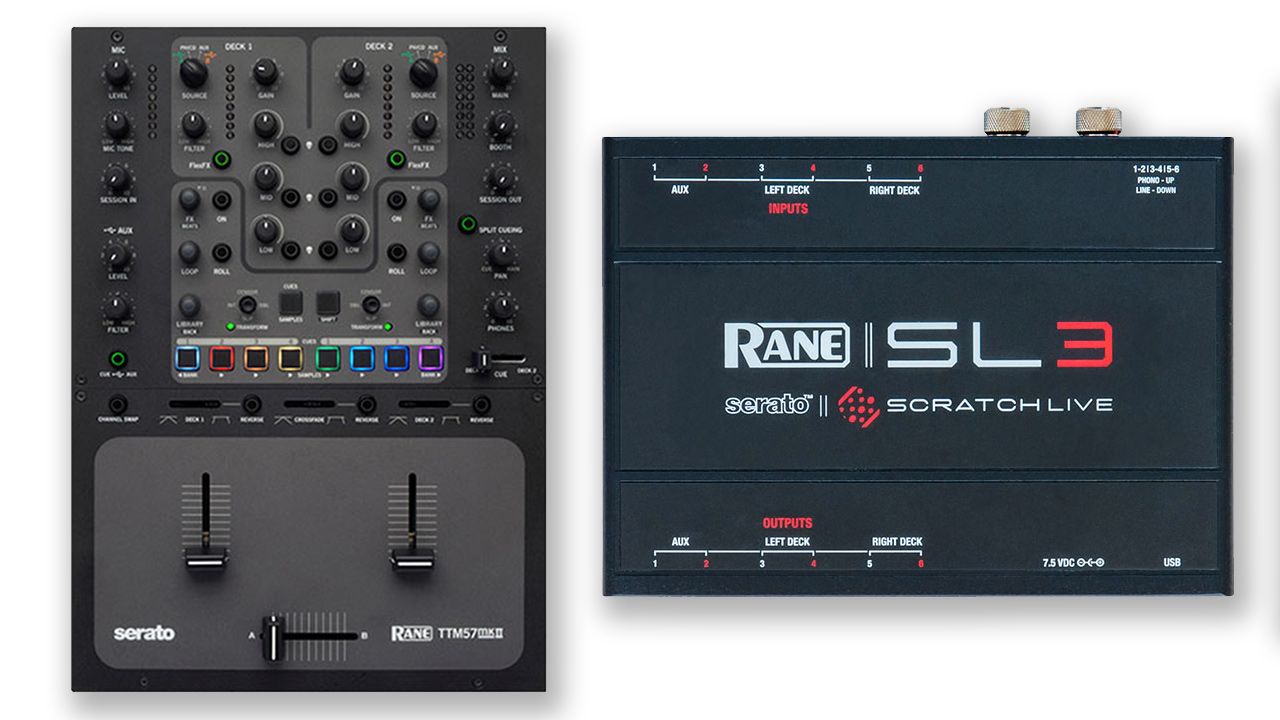
Serato has been one of the most popular DJ softwares for a long time. With the introduction of Serato DJ, they brought together DVS users with controller users. Combining Serato Scratch Live and Serato Itch allowed for more modern features, but this push forward wasn’t without growing pains. SSL users bragged about the ability to “plug and play” into any device with Scratch Live, but with Serato DJ this was no longer the case.

Unlike Scratch Live, Serato DJ asks DJs to install audio drivers when they plug in their computer instead of installing the drivers as part of the installation process. This can be problematic for DJs that show up to a gig and plug in a minute or two before the are supposed to get on, only to find out that they have to install something and restart their computer. By just taking a few minutes before a DJ leaves for a gig, DJs can have the plug and play experience that Scratch Live users loved.

Installing Serato DJ Audio Drivers On Mac
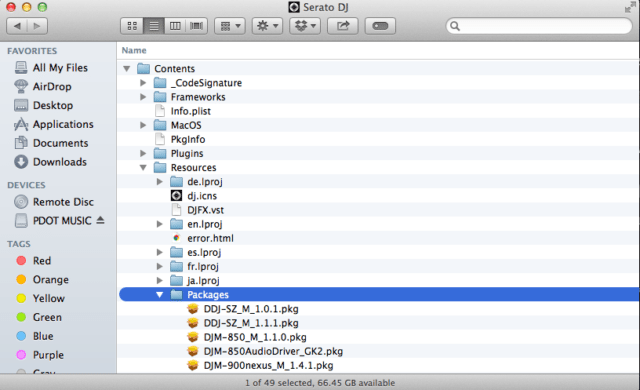
Installing all the Serato audio drivers on Mac can be done quite easily. Once you have Serato DJ installed you won’t need anything else. Follow these steps and you’ll be ready for any Serato hardware before you get to the gig:

  • Open the Applications folder
  • Locate the Serato DJ app
  • Right click or control click Serato DJ
  • Select “Show Package Contents”
  • Open the “Contents” folder
  • Open the “Resources” folder
  • Open the “Packages” folder
  • Install audio drivers

That’s it! Find the “hidden” folder and install the audio drivers for all the devices that you might use. Some drivers might require a restart so be aware and make sure you have enough time to complete that.

Installing Serato DJ Audio Drivers On PC
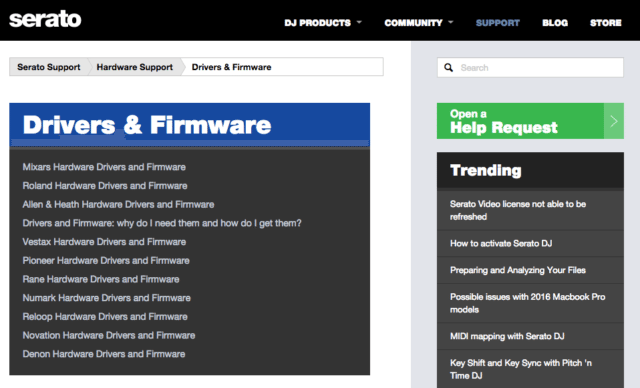
Installing the audio drivers on PC is more straightforward in some ways, but is also more of a chore. To download the PC drivers visit the following link and download the drivers from each manufacturer:

  • https://support.serato.com/hc/en-us/sections/200568160-Drivers-Firmware

The drivers are not included like with the Mac version, but a quick visit to this support site and you can grab all the drivers that you might need.

If you use Serato DJ, I recommend taking the short amount of time before you head out for a gig to make sure that all the necessary drivers are installed. This reduces the chances of a huge hardware headache when you get to a venue. One last thing to worry about so you can focus more on the important part, DJing.
Have an idea for a Serato DJ Pro Tip?
Email editor[at]djtechtools.com and let us know what it is.

Tags: driverspreparationserato DJ
Share9Tweet6Share
Previous Post

NAMM 2017: Full Of Prototypes + Missing DJ Brands

Next Post

Start DJing Now: Five Great Entry Level DJ Controllers Under $400

Related Posts

“No Deal”: New Zealand’s ComCom denies clearance for AlphaTheta’s Serato acquisition
Breaking News

“No Deal”: New Zealand’s ComCom denies clearance for AlphaTheta’s Serato acquisition

July 17, 2024
TIDAL blocked DJs from using Stems – but the next generation of DJ gear will likely make that irrelevant
DJ Gear

TIDAL blocked DJs from using Stems – but the next generation of DJ gear will likely make that irrelevant

January 18, 2024
Serato DJ 3.1 adds integrated accessory control of Serato Stems
Serato

Serato DJ 3.1 adds integrated accessory control of Serato Stems

December 5, 2023
Load More
Next Post
Entry Level DJ Controllers Under $400

Start DJing Now: Five Great Entry Level DJ Controllers Under $400

Want to reach DJTT's audience here?

Shoot an email to advertising@djtechtools.com

DJTT ads
DJTT newsletter
Midi Fighter
Chat with us
  • ABOUT DJTT
  • CONTACT
  • PRIVACY
  • MIDI FIGHTER HELP
  • ABOUT DJTT
  • JOBS
  • CONTACT US
  • ADVERTISE
  • PRIVACY POLICY
  • ACCESSIBILITY STATEMENT

© 2024 DJ Techtools all rights reserved by DJ TechTools on all content unless otherwise noted.

No Result
View All Result
  • Blog
    • DJ Gear
      • DIY Projects
      • Gear Reviews
      • New Products
      • Controllerism
    • Techniques + Tips
      • Beginner DJ
      • Advanced DJ
      • Producer
      • Finger Drummer
    • News + Culture
      • Editorials + Opinions
      • Artist Interviews
      • Performances + Routines
      • How I Play
    • DJ Software Tutorials
      • Serato Tips
      • CDJ Tips
      • Ableton Live Tips
  • Store
    • Run by real DJs, not a corporation
    • DJ Controllers
      • Midi Fighter Twister
      • Midi Fighter Spectra
      • Midi Fighter 64
      • View All
    • Accessories
      • Chroma USB Drive for DJs
      • Chroma Caps
      • Chroma Cables Audio
      • Chroma Cables USB-A
      • Chroma Cables: USB-C
      • DJTT Gift Card
      • Midi Fighter T-Shirt
      • Keyboard Covers
      • Earplugs by V-Moda
    • Production Gear
    • Soundcards & Mixers
  • Community
    • Popular Forums
      • General Discussion
      • Buy & Sell
      • Reviews
      • Mixes
      • Music Production
      • Show Your Setup
      • Off Topic
    • Handy Links
      • New Posts
      • Private Messages
      • Register
      • Search
    • Midi Maps
      • Traktor
      • Ableton
      • Serato DJ
      • Midi Fighter 3D
      • Midi Fighter Twister
      • Midi Fighter Spectra
  • Midi Fighter
  • Chroma

© 2024 DJ Techtools all rights reserved by DJ TechTools on all content unless otherwise noted.

This website uses cookies. By continuing to use this website you are giving consent to cookies being used. Visit our Privacy and Cookie Policy.