DJ TechTools
  • Blog
    • DJ Gear
      • DIY Projects
      • Gear Reviews
      • New Products
      • Controllerism
    • Techniques + Tips
      • Beginner DJ
      • Advanced DJ
      • Producer
      • Finger Drummer
    • News + Culture
      • Editorials + Opinions
      • Artist Interviews
      • Performances + Routines
      • How I Play
    • DJ Software Tutorials
      • Serato Tips
        • Traktor Tips
      • CDJ Tips
      • Ableton Live Tips
  • Store
    • Run by real DJs, not a corporation
    • DJ Controllers
      • Midi Fighter Twister
      • Midi Fighter Spectra
      • Midi Fighter 64
      • View All
    • Accessories
      • Chroma USB Drive for DJs
      • Chroma Caps
      • Chroma Cables Audio
      • Chroma Cables USB-A
      • Chroma Cables: USB-C
      • DJTT Gift Card
      • Midi Fighter T-Shirt
      • Keyboard Covers
      • Earplugs by V-Moda
    • Production Gear
    • Soundcards & Mixers
  • Community
    • Popular Forums
      • General Discussion
      • Buy & Sell
      • Reviews
      • Mixes
      • Music Production
      • Show Your Setup
      • Off Topic
    • Handy Links
      • New Posts
      • Private Messages
      • Register
      • Search
    • Midi Maps
      • Traktor
      • Ableton
      • Serato DJ
      • Midi Fighter 3D
      • Midi Fighter Twister
      • Midi Fighter Spectra
  • Midi Fighter
  • Chroma
No Result
View All Result
DJ TechTools
  • Blog
    • DJ Gear
      • DIY Projects
      • Gear Reviews
      • New Products
      • Controllerism
    • Techniques + Tips
      • Beginner DJ
      • Advanced DJ
      • Producer
      • Finger Drummer
    • News + Culture
      • Editorials + Opinions
      • Artist Interviews
      • Performances + Routines
      • How I Play
    • DJ Software Tutorials
      • Serato Tips
        • Traktor Tips
      • CDJ Tips
      • Ableton Live Tips
  • Store
    • Run by real DJs, not a corporation
    • DJ Controllers
      • Midi Fighter Twister
      • Midi Fighter Spectra
      • Midi Fighter 64
      • View All
    • Accessories
      • Chroma USB Drive for DJs
      • Chroma Caps
      • Chroma Cables Audio
      • Chroma Cables USB-A
      • Chroma Cables: USB-C
      • DJTT Gift Card
      • Midi Fighter T-Shirt
      • Keyboard Covers
      • Earplugs by V-Moda
    • Production Gear
    • Soundcards & Mixers
  • Community
    • Popular Forums
      • General Discussion
      • Buy & Sell
      • Reviews
      • Mixes
      • Music Production
      • Show Your Setup
      • Off Topic
    • Handy Links
      • New Posts
      • Private Messages
      • Register
      • Search
    • Midi Maps
      • Traktor
      • Ableton
      • Serato DJ
      • Midi Fighter 3D
      • Midi Fighter Twister
      • Midi Fighter Spectra
  • Midi Fighter
  • Chroma
No Result
View All Result
DJ TechTools

Mr. Bill: Beat Mashing + Scratching With Ableton, Midi Fighters

Dan White by Dan White
October 23, 2017
in Ableton Live Tips, DJTT Spotlight, Midi Fighter, Midi Fighter 3D, Midi Fighter Twister
Reading Time: 3 mins read
0
1.8k
VIEWS
Post on FacebookTweet thisUpvote on Reddit

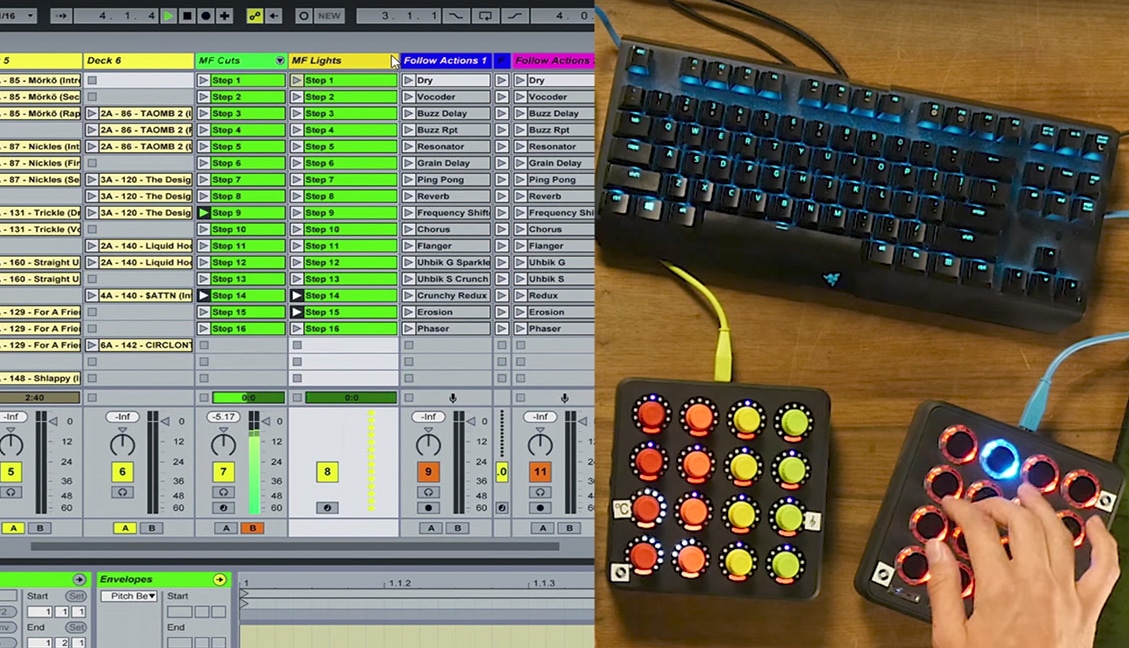
Today, we’re releasing an Ableton performance workflow walk through with finger drummer and producer Mr. Bill. He’s got a bunch of unique techniques in his Live sessions that any live performer will find inspiring. In this video, he shares three specific techniques: slicing up clips for finger drumming on the fly, scratching samples, and a few unique ways of applying rapid-fire effects.

You can watch the full video walk through above – or keep reading for a quick description of each. Mr. Bill is also making his full Live template available for purchase on his site:

Check Out Mr Bill’s “MIDI Masher” DJ Template here
Download Woulg’s Scratchy + Chain Selecta devices

Slicing Up Drops

The first technique that Mr. Bill focuses on in the video is all about being able to quickly slice up his tracks on a Midi Fighter. This allows him to do a quick on-the-fly remix, similar to how the Slicer effect works in Serato DJ.

It takes a bit of legwork – but basic idea behind process he uses in this Ableton set is:

  • Divide up each track into a number of individual clips with different start points (effectively cue points)
  • Put a Simpler on each clip with 16 slices for each quarter note in Slice mode (Ableton’s 9.7 update last year means Simpler can easily divide up a track)
  • Make a new MIDI channel with 16 MIDI notes that correspond to the Simpler’s slices, set Follow Actions on each clip to go to the next one so that it will keep playing once a slice is triggered
  • Use Chain Selector (a custom Live device) to allow the MIDI channel to follow whatever track is being played in the session already.

Mr. Bill mentions this being inspired by Daedelus’ Monome triggering technique – watch the classic video from 2010 here:

Scratchy
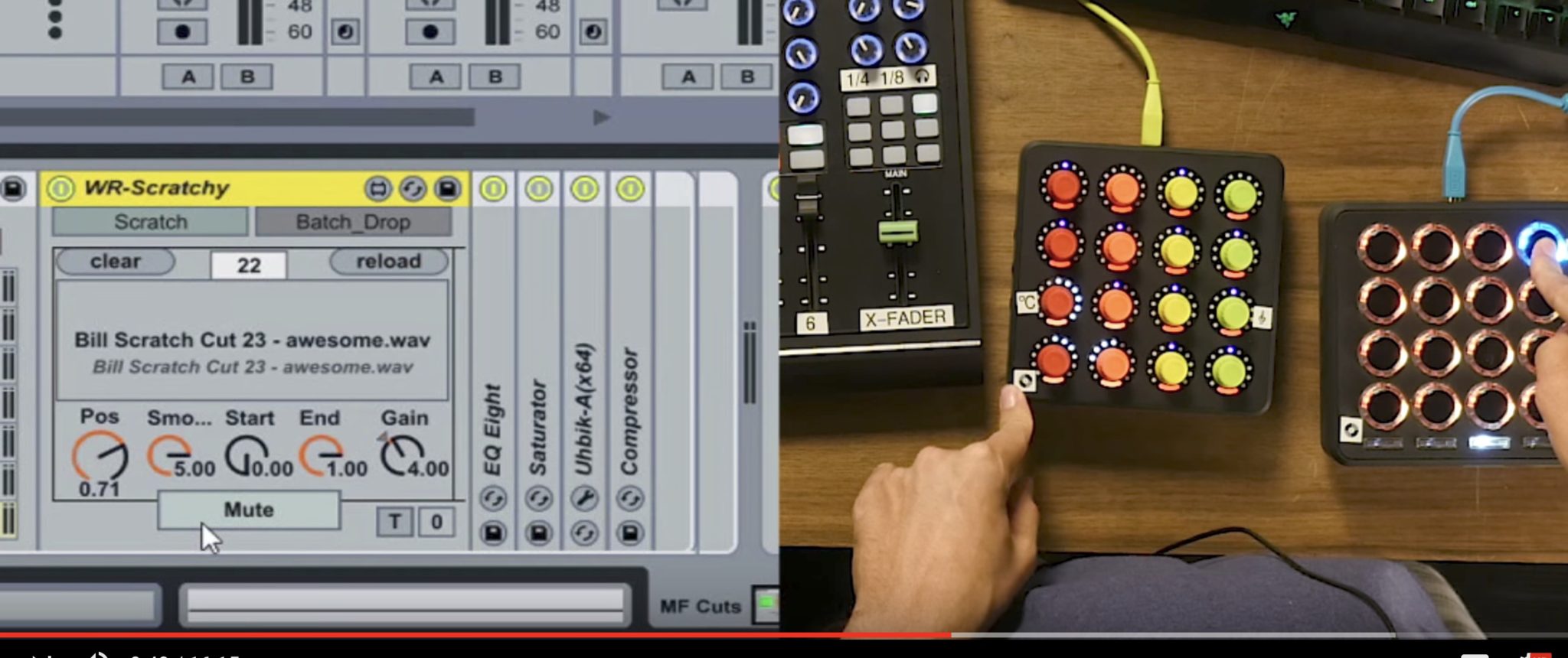
This is another custom Live device that effectively allows easy mapping of turntablism style parameters to any MIDI device. The device was designed by Woulg, and Bill has it mapped to the Midi Fighter 3D and the Twister for optimal control. You can control the clip position, select clips, and quickly mute/unmute the track to gate it like a turntable.

Effects Techniques
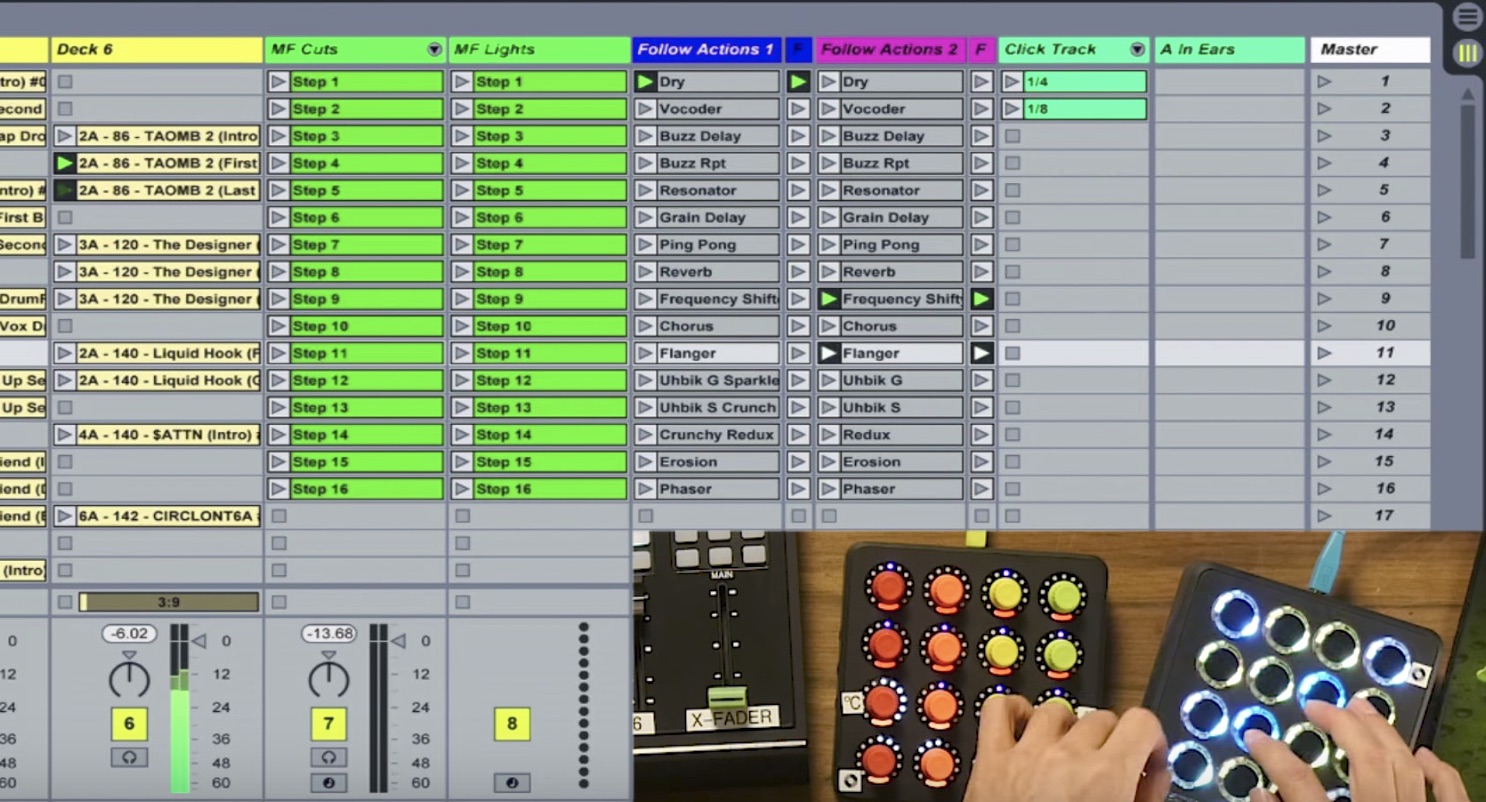
Bill shows off two special FX techniques in his Ableton set:

  • a bank on the Midi Fighter 3D that has a bunch of preset FX, one per each button. This allows him easily play FX in time with the track, quantized
  • a plug-in called Manipulator is mapped on the Midi Fighter Twister to allow applying effects on top of clip slicing
Gear Used

  • Ableton Live
  • Midi Fighter 3D
  • Midi Fighter Twister
  • Livid DS1
Have questions about Mr. Bill’s techniques featured in this video? Pop into the comments and he’ll reply to you there.
Tags: ableton liveHow I Playmidi fighter 3dmidi fighter twisterMr Billsimplerslicer
Share15Tweet9Share
Previous Post

Richie Hawtin, KiNK + More Discuss Role of Live Production In A DJ World

Next Post

How Machine Learning Will Affect DJing + Music Production

Dan White

Dan White

Dan White is the DJ TechTools managing editor. He's been DJing for over ten years, starting on Virtual DJ, then Serato Scratch Live, then Traktor Pro, and then CDJs. He also promotes and is a resident DJ for San Francisco's Zero Fucks. Have an awesome idea for an article? Hit him up.

Next Post
How Machine Learning Will Affect DJing + Music Production

How Machine Learning Will Affect DJing + Music Production

Want to reach DJTT's audience here?

Shoot an email to advertising@djtechtools.com

DJTT ads
DJTT newsletter
Midi Fighter
Chat with us
  • ABOUT DJTT
  • CONTACT
  • PRIVACY
  • MIDI FIGHTER HELP
  • ABOUT DJTT
  • JOBS
  • CONTACT US
  • ADVERTISE
  • PRIVACY POLICY
  • ACCESSIBILITY STATEMENT

© 2024 DJ Techtools all rights reserved by DJ TechTools on all content unless otherwise noted.

No Result
View All Result
  • Blog
    • DJ Gear
      • DIY Projects
      • Gear Reviews
      • New Products
      • Controllerism
    • Techniques + Tips
      • Beginner DJ
      • Advanced DJ
      • Producer
      • Finger Drummer
    • News + Culture
      • Editorials + Opinions
      • Artist Interviews
      • Performances + Routines
      • How I Play
    • DJ Software Tutorials
      • Serato Tips
      • CDJ Tips
      • Ableton Live Tips
  • Store
    • Run by real DJs, not a corporation
    • DJ Controllers
      • Midi Fighter Twister
      • Midi Fighter Spectra
      • Midi Fighter 64
      • View All
    • Accessories
      • Chroma USB Drive for DJs
      • Chroma Caps
      • Chroma Cables Audio
      • Chroma Cables USB-A
      • Chroma Cables: USB-C
      • DJTT Gift Card
      • Midi Fighter T-Shirt
      • Keyboard Covers
      • Earplugs by V-Moda
    • Production Gear
    • Soundcards & Mixers
  • Community
    • Popular Forums
      • General Discussion
      • Buy & Sell
      • Reviews
      • Mixes
      • Music Production
      • Show Your Setup
      • Off Topic
    • Handy Links
      • New Posts
      • Private Messages
      • Register
      • Search
    • Midi Maps
      • Traktor
      • Ableton
      • Serato DJ
      • Midi Fighter 3D
      • Midi Fighter Twister
      • Midi Fighter Spectra
  • Midi Fighter
  • Chroma

© 2024 DJ Techtools all rights reserved by DJ TechTools on all content unless otherwise noted.

This website uses cookies. By continuing to use this website you are giving consent to cookies being used. Visit our Privacy and Cookie Policy.