DJ TechTools
  • Blog
    • DJ Gear
      • DIY Projects
      • Gear Reviews
      • New Products
      • Controllerism
    • Techniques + Tips
      • Beginner DJ
      • Advanced DJ
      • Producer
      • Finger Drummer
    • News + Culture
      • Editorials + Opinions
      • Artist Interviews
      • Performances + Routines
      • How I Play
    • DJ Software Tutorials
      • Serato Tips
        • Traktor Tips
      • CDJ Tips
      • Ableton Live Tips
  • Store
    • Run by real DJs, not a corporation
    • DJ Controllers
      • Midi Fighter Twister
      • Midi Fighter Spectra
      • Midi Fighter 64
      • View All
    • Accessories
      • Chroma USB Drive for DJs
      • Chroma Caps
      • Chroma Cables Audio
      • Chroma Cables USB-A
      • Chroma Cables: USB-C
      • DJTT Gift Card
      • Midi Fighter T-Shirt
      • Keyboard Covers
      • Earplugs by V-Moda
    • Production Gear
    • Soundcards & Mixers
  • Community
    • Popular Forums
      • General Discussion
      • Buy & Sell
      • Reviews
      • Mixes
      • Music Production
      • Show Your Setup
      • Off Topic
    • Handy Links
      • New Posts
      • Private Messages
      • Register
      • Search
    • Midi Maps
      • Traktor
      • Ableton
      • Serato DJ
      • Midi Fighter 3D
      • Midi Fighter Twister
      • Midi Fighter Spectra
  • Midi Fighter
  • Chroma
No Result
View All Result
DJ TechTools
  • Blog
    • DJ Gear
      • DIY Projects
      • Gear Reviews
      • New Products
      • Controllerism
    • Techniques + Tips
      • Beginner DJ
      • Advanced DJ
      • Producer
      • Finger Drummer
    • News + Culture
      • Editorials + Opinions
      • Artist Interviews
      • Performances + Routines
      • How I Play
    • DJ Software Tutorials
      • Serato Tips
        • Traktor Tips
      • CDJ Tips
      • Ableton Live Tips
  • Store
    • Run by real DJs, not a corporation
    • DJ Controllers
      • Midi Fighter Twister
      • Midi Fighter Spectra
      • Midi Fighter 64
      • View All
    • Accessories
      • Chroma USB Drive for DJs
      • Chroma Caps
      • Chroma Cables Audio
      • Chroma Cables USB-A
      • Chroma Cables: USB-C
      • DJTT Gift Card
      • Midi Fighter T-Shirt
      • Keyboard Covers
      • Earplugs by V-Moda
    • Production Gear
    • Soundcards & Mixers
  • Community
    • Popular Forums
      • General Discussion
      • Buy & Sell
      • Reviews
      • Mixes
      • Music Production
      • Show Your Setup
      • Off Topic
    • Handy Links
      • New Posts
      • Private Messages
      • Register
      • Search
    • Midi Maps
      • Traktor
      • Ableton
      • Serato DJ
      • Midi Fighter 3D
      • Midi Fighter Twister
      • Midi Fighter Spectra
  • Midi Fighter
  • Chroma
No Result
View All Result
DJ TechTools

Spotify (finally) slides into Rekordbox, Serato, and Algoriddim djay (again) – for better or worse?

Rachel Black by Rachel Black
September 24, 2025
in Breaking News, DJ Music Library Tips, News + Culture
Reading Time: 5 mins read
1
Rekordox Spotify
1.9k
VIEWS
Post on FacebookTweet thisUpvote on Reddit

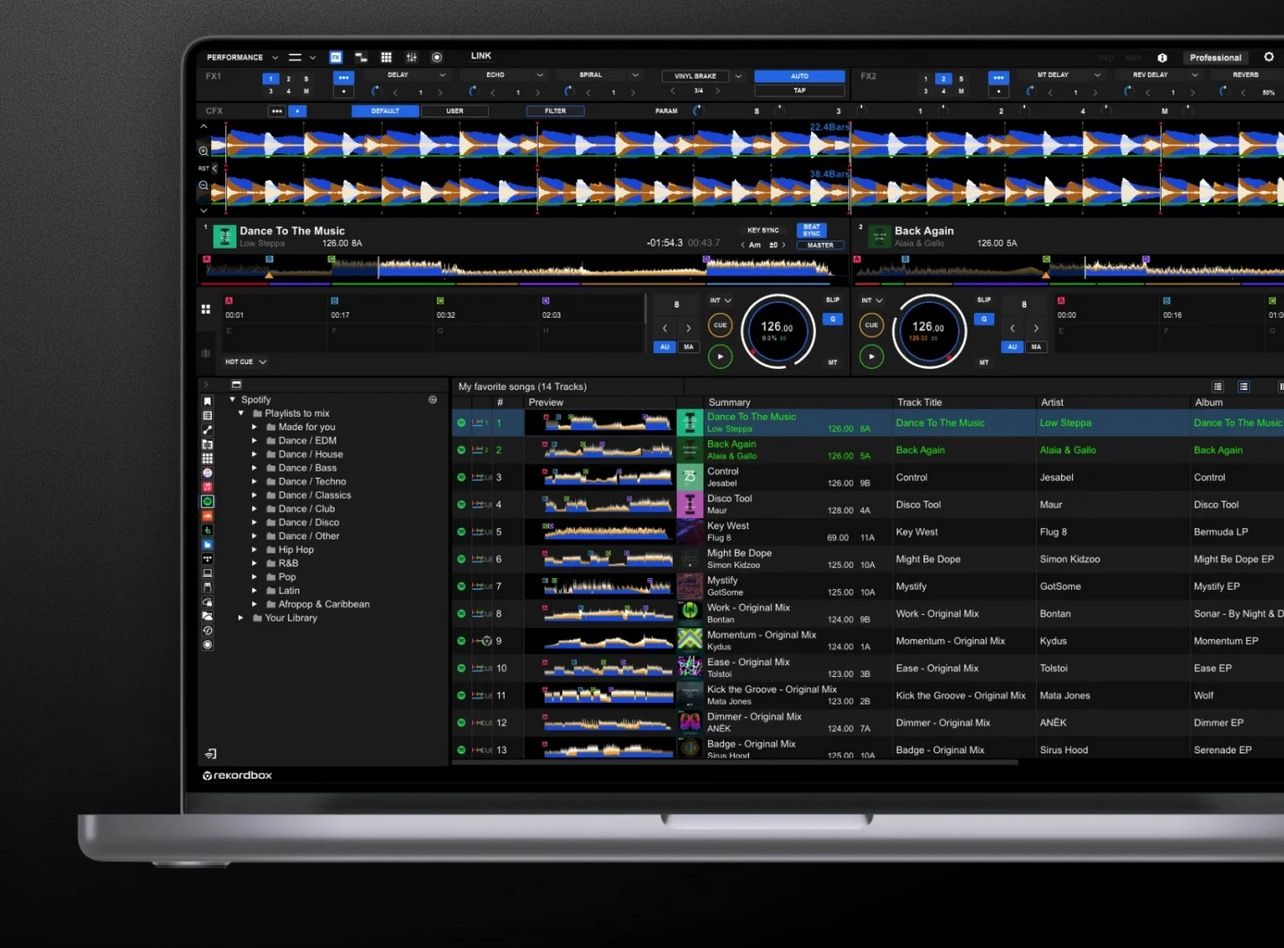
Spotify just made a return to DJ software: as of today, rekordbox users with a Premium subscription can stream tracks and playlists directly inside the software. The streaming service also has added integration to djay and Serato – but Traktor and VDJ seem “left behind. It’s the kind of update that promises convenience and discovery at your fingertips, but also raises questions about reliability, licensing, and what “crate-digging” even means when every DJ has the same 100 million-track library.

Editor’s note: yes, Spotify was once in djay ten years ago, and then they took it away in 2020. It was also in Virtual DJ, and removed in 2017.

How It Works
Spotify Premium subscribers can now log into rekordbox and stream the platform’s full catalog directly inside the software. Your Spotify playlists appear automatically in rekordbox’s library, synced just like crates. You can search, browse, and mix songs in real time, including editorial playlists and algorithmic recommendations. You can test mixes with your personal playlists, audition new tracks, or handle on-the-fly requests without needing to buy or download the song first.

Right now, integrations are limited to desktop versions of rekordbox, Serato, and Algoriddim’s djay, across 51 different countries. Standalone and CDJ/XDJ hardware support is not yet on the roadmap.
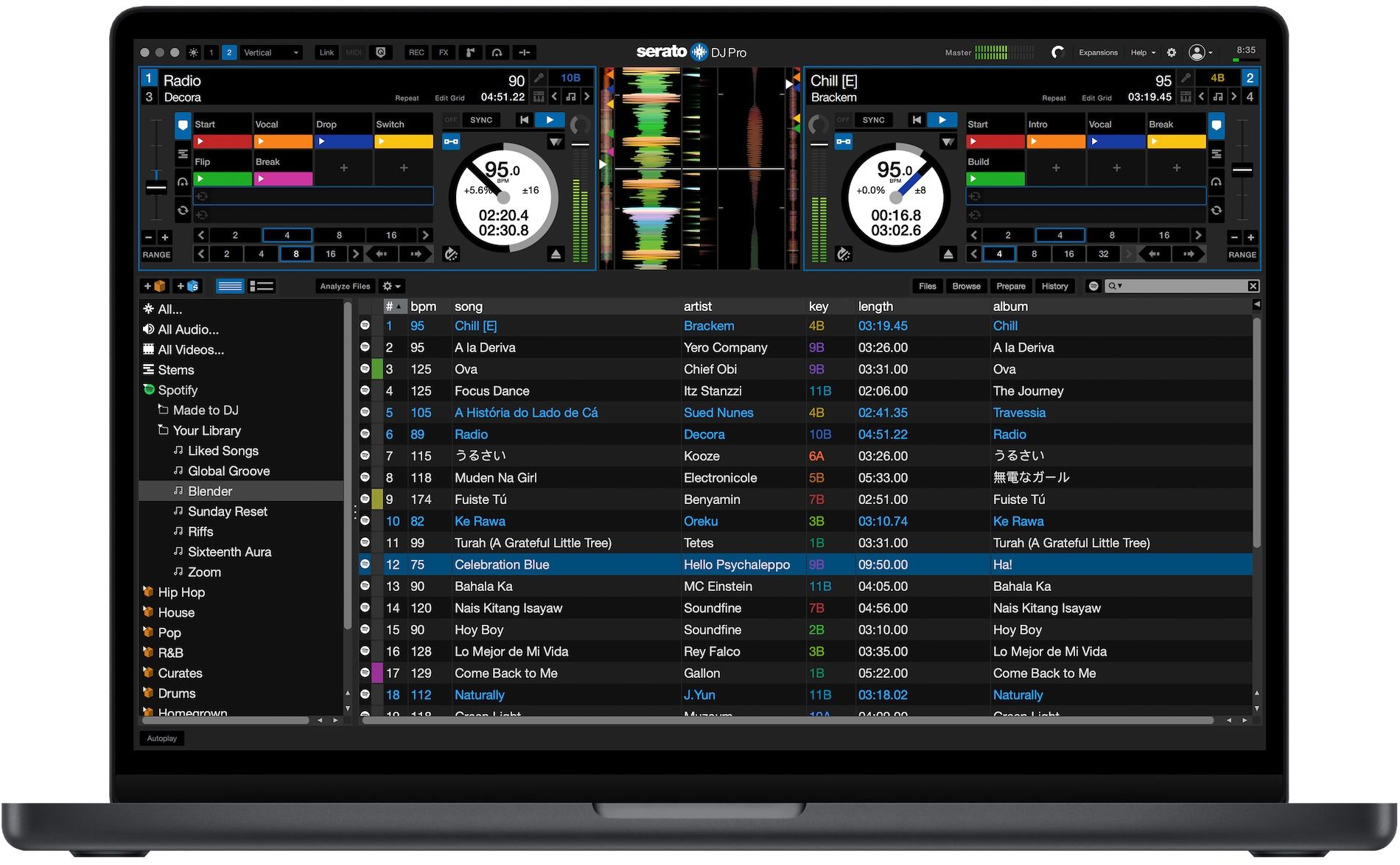
Spotify playlists right inside Serato DJ Pro

Unlike locally-stored audio files, however, Spotify streams don’t behave as fully editable audio assets. Cue points, hot loops, and stems are limited or unavailable, depending on licensing and technical agreements between each software company, Spotify, and the artists/labels/distribution companies. That means Spotify integration works best for practice, idea sketching, or casual gigs, and far less so for professional situations where precision and reliability are critical.

The Pros

For gear-heads and workflow nerds, there are a few real advantages here:

  • Playlist Sync: Your Spotify playlists automatically appear in rekordbox. No more exporting through Soundiiz, Beatport LINK conversions, or manual metadata wrangling.
  • Track Discovery: Spotify’s algorithmic playlists and user-curated lists open up a broad discovery channel inside rekordbox. You can audition tracks in context without having to commit to a purchase first.
  • Low-stakes Testing: DJs can test how unfamiliar genres, tempos, or mash-ups feel inside their set structure before deciding whether to invest in downloads.
  • Casual Flexibility: For small gigs, wedding receptions, or bar sets, this reduces the friction of dealing with requests or wide-audience playlists.

The Cons

Here’s where Spotify in rekordbox falls short for serious use:

  • No Offline Mode (Yet): Tracks must be streamed live. If your Wi-Fi connection drops, so does access to your library.
  • Metadata Control: Unlike local files, Spotify tracks don’t provide editable ID3 tags. That limits how you can organize and annotate your collection inside rekordbox.
  • Cue Points & Stems: Current integration doesn’t support full cue/loop memory or stem separation. In practice, this means you can play the track but can’t manipulate it to the same degree as local audio.
  • Licensing Gaps: Not every track in Spotify’s library is available for DJ use. Some will simply fail to load — an unavoidable frustration if you don’t double-check before a set.

What Gear-Focused DJs Should Watch For

  1. Caching Options: If AlphaTheta adds offline caching, this could become much more viable for live sets.
  2. Feature Parity: Will Spotify tracks eventually support cues, loops, and stems the same way local files do? That would be a real game-changer.
  3. Ecosystem Integration: Many DJs already rely on Tidal, Beatport, or SoundCloud integrations. Whether AlphaTheta and others finds a way to harmonize these platforms will decide how useful Spotify really feels in a multi-service workflow. Recent history with DJ streaming services suggests that there will likely be many barriers to using Spotify’s library easily with features like mix recording.
  4. Reliability Stress Tests: Early adopters will need to push this in real-world conditions to see if the latency, buffering, and library gaps are deal-breakers.

The Bigger Picture:

Spotify Premium is required (currently $10.99/month in the US), and this move follows Spotify’s new consumer-facing “mix your own playlist transitions” feature. In other words, Spotify is actively pushing from casual listening toward hands-on mixing.

For DJ culture, this is a double-edged sword. The workflow is more accessible than ever. Anyone with Spotify Premium can try DJing inside rekordbox, Serato, or djay. But it also standardizes the crate. Instead of digging rare records, DJs are increasingly drawing from the same 100M+ track pool. The art shifts from what you find to how you play it.

From a technical perspective, this integration matters most for workflow efficiency. It simplifies discovery, playlist testing, and casual mixing. But it’s not (yet) a replacement for owning and organizing your own files. From a cultural perspective, the move blurs the line between streaming and DJing. Finding rare tracks and organizing them into personal collections has always been central to DJ identity. Spotify integration makes that process more standardized, as every DJ has access to the same catalog. The individuality shifts from what you can find to how you play it.

Spotify in rekordbox (and others) is a sandbox, not a parachute. For professionals, it is another step toward streaming becoming viable, but not a replacement for local libraries just yet. It makes sense for casual sets, experimentation, and lowering the barrier for new DJs. But until DJ software companies deliver offline caching and deeper control, it’s unlikely to replace the reliability of local libraries in professional environments.

For gear-heads, this update is worth exploring, not because it’s ready to anchor your next festival set, but because it signals where DJ workflows may be headed. Streaming is inching closer to becoming a core part of performance, and this is one of the most significant steps yet.


Tags: alphathetaDj softwaredj streamingNewspioneerpioneer DJrekordboxspotify
Share16Tweet10Share
Previous Post

The CDJ-3000X is here: an iterative upgrade of the media player for $3,000 / £2,399

Next Post

Meet the TR-1000: Roland’s new analog/digital drum machine with built-in sampling

Related Posts

The DJM-V5 from AlphaTheta: 3 channels, 4-band EQ, V10 sound – no Beat FX or crossfader.
Breaking News

The DJM-V5 from AlphaTheta: 3 channels, 4-band EQ, V10 sound – no Beat FX or crossfader.

January 20, 2026
Ableton launches Live 12 Suite rent-to-own plan – and it’s not a subscription
Ableton

Ableton launches Live 12 Suite rent-to-own plan – and it’s not a subscription

October 1, 2025
Meet the TR-1000: Roland’s new analog/digital drum machine with built-in sampling
Breaking News

Meet the TR-1000: Roland’s new analog/digital drum machine with built-in sampling

October 1, 2025
Load More
Next Post
Meet the TR-1000: Roland’s new analog/digital drum machine with built-in sampling

Meet the TR-1000: Roland’s new analog/digital drum machine with built-in sampling

Want to reach DJTT's audience here?

Shoot an email to advertising@djtechtools.com

DJTT ads
DJTT newsletter
Midi Fighter
Chat with us
  • ABOUT DJTT
  • CONTACT
  • PRIVACY
  • MIDI FIGHTER HELP
  • ABOUT DJTT
  • JOBS
  • CONTACT US
  • ADVERTISE
  • PRIVACY POLICY

© 2024 DJ Techtools all rights reserved by DJ TechTools on all content unless otherwise noted.

No Result
View All Result
  • Blog
    • DJ Gear
      • DIY Projects
      • Gear Reviews
      • New Products
      • Controllerism
    • Techniques + Tips
      • Beginner DJ
      • Advanced DJ
      • Producer
      • Finger Drummer
    • News + Culture
      • Editorials + Opinions
      • Artist Interviews
      • Performances + Routines
      • How I Play
    • DJ Software Tutorials
      • Serato Tips
      • CDJ Tips
      • Ableton Live Tips
  • Store
    • Run by real DJs, not a corporation
    • DJ Controllers
      • Midi Fighter Twister
      • Midi Fighter Spectra
      • Midi Fighter 64
      • View All
    • Accessories
      • Chroma USB Drive for DJs
      • Chroma Caps
      • Chroma Cables Audio
      • Chroma Cables USB-A
      • Chroma Cables: USB-C
      • DJTT Gift Card
      • Midi Fighter T-Shirt
      • Keyboard Covers
      • Earplugs by V-Moda
    • Production Gear
    • Soundcards & Mixers
  • Community
    • Popular Forums
      • General Discussion
      • Buy & Sell
      • Reviews
      • Mixes
      • Music Production
      • Show Your Setup
      • Off Topic
    • Handy Links
      • New Posts
      • Private Messages
      • Register
      • Search
    • Midi Maps
      • Traktor
      • Ableton
      • Serato DJ
      • Midi Fighter 3D
      • Midi Fighter Twister
      • Midi Fighter Spectra
  • Midi Fighter
  • Chroma

© 2024 DJ Techtools all rights reserved by DJ TechTools on all content unless otherwise noted.

This website uses cookies. By continuing to use this website you are giving consent to cookies being used. Visit our Privacy and Cookie Policy.