DJ TechTools
  • Blog
    • DJ Gear
      • DIY Projects
      • Gear Reviews
      • New Products
      • Controllerism
    • Techniques + Tips
      • Beginner DJ
      • Advanced DJ
      • Producer
      • Finger Drummer
    • News + Culture
      • Editorials + Opinions
      • Artist Interviews
      • Performances + Routines
      • How I Play
    • DJ Software Tutorials
      • Serato Tips
        • Traktor Tips
      • CDJ Tips
      • Ableton Live Tips
  • Store
    • Run by real DJs, not a corporation
    • DJ Controllers
      • Midi Fighter Twister
      • Midi Fighter Spectra
      • Midi Fighter 64
      • View All
    • Accessories
      • Chroma USB Drive for DJs
      • Chroma Caps
      • Chroma Cables Audio
      • Chroma Cables USB-A
      • Chroma Cables: USB-C
      • DJTT Gift Card
      • Midi Fighter T-Shirt
      • Keyboard Covers
      • Earplugs by V-Moda
    • Production Gear
    • Soundcards & Mixers
  • Community
    • Popular Forums
      • General Discussion
      • Buy & Sell
      • Reviews
      • Mixes
      • Music Production
      • Show Your Setup
      • Off Topic
    • Handy Links
      • New Posts
      • Private Messages
      • Register
      • Search
    • Midi Maps
      • Traktor
      • Ableton
      • Serato DJ
      • Midi Fighter 3D
      • Midi Fighter Twister
      • Midi Fighter Spectra
  • Midi Fighter
  • Chroma
No Result
View All Result
DJ TechTools
  • Blog
    • DJ Gear
      • DIY Projects
      • Gear Reviews
      • New Products
      • Controllerism
    • Techniques + Tips
      • Beginner DJ
      • Advanced DJ
      • Producer
      • Finger Drummer
    • News + Culture
      • Editorials + Opinions
      • Artist Interviews
      • Performances + Routines
      • How I Play
    • DJ Software Tutorials
      • Serato Tips
        • Traktor Tips
      • CDJ Tips
      • Ableton Live Tips
  • Store
    • Run by real DJs, not a corporation
    • DJ Controllers
      • Midi Fighter Twister
      • Midi Fighter Spectra
      • Midi Fighter 64
      • View All
    • Accessories
      • Chroma USB Drive for DJs
      • Chroma Caps
      • Chroma Cables Audio
      • Chroma Cables USB-A
      • Chroma Cables: USB-C
      • DJTT Gift Card
      • Midi Fighter T-Shirt
      • Keyboard Covers
      • Earplugs by V-Moda
    • Production Gear
    • Soundcards & Mixers
  • Community
    • Popular Forums
      • General Discussion
      • Buy & Sell
      • Reviews
      • Mixes
      • Music Production
      • Show Your Setup
      • Off Topic
    • Handy Links
      • New Posts
      • Private Messages
      • Register
      • Search
    • Midi Maps
      • Traktor
      • Ableton
      • Serato DJ
      • Midi Fighter 3D
      • Midi Fighter Twister
      • Midi Fighter Spectra
  • Midi Fighter
  • Chroma
No Result
View All Result
DJ TechTools

Three Flux Mode Tricks For Playing Traktor Like An Instrument

Mad Zach by Mad Zach
August 30, 2013
in DJ Techniques / Tips, How-To Video Tutorials, Traktor Tips
Reading Time: 3 mins read
0
Three Flux Mode Tricks For Playing Traktor Like An Instrument
720
VIEWS
Post on FacebookTweet thisUpvote on Reddit

Though it came out almost a year ago, many digital DJs may not have noticed the Flux Mode feature available in Traktor Pro 2.6 and up. Flux Mode kind of works like an advanced Looper, allowing you to do all sorts of crazy tricks like jumping around hotcues or adding glitchy effects without accidentally backtracking in a song.

In today’s video DJ TechTools resident Mad Zach takes us on a journey through Flux Mode and explains some of his techniques for adding a little spice to a regular DJ routine:

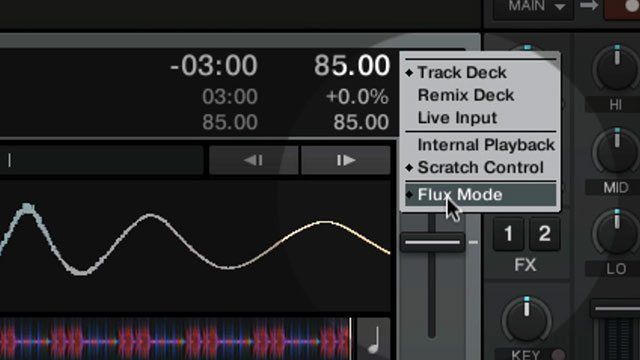
Flux Mode can be useful for a lot of performance oriented improvisations, almost letting you play your tracks like an instrument. To turn it on, right-click one of your decks in Traktor and select “Flux Mode”. If you run a Kontrol Z2 mixer there is a dedicated button for toggling this, but if not it might be a good idea to set up a mapping on your controller. As for tricks you can pull in Flux mode, here are some of Mad Zach’s signature moves:

#1: Casual Backspin

This one is great for adding a little slice and dice to your set. Having Flux Mode enabled will make it so that you can scratch on a track without losing your place. Some helpful tips for getting the most out of a Casual Backspin:

  • Use this technique only on beats, not a whole song. Your mix will get muddy otherwise.
  • When adding backspin be careful that the platter doesn’t keep spinning.
  • To get better platter control use your other hand to slow the side of the platter.

#2: The Impromptu Build

Builds can be created many different ways in a mix, but by using Flux Mode, a looper, and a one-shot riser you can create simple impressive climaxes. To start, set up a looper on one deck at 1 beat (for best results). On your other channel, load up a build or riser sample in a remix deck.

Since we’re in Flux Mode you can layer the beat repeat from the looper over your rise effect without having to worry about missing the next beat. At the same time you trigger the riser, engage the looper. Now you can do a beat roll on one track while the build up come through on the other.

#3: Alien LaserBots

Last but not least, we can take elements learned in the first two techniques and combine them to produce weird glitchy zaps and bleeps, perfect for some improv breaks in your performance. The Alien LaserBots effect mostly comes from looping/rolling a sample on the remix deck, but you can do the following with Flux Mode enabled to get really crazy results:

  • Use the platters to scratch your sample back and forth
  • Flick the pitch control up and down to get a nice wobbly sound
  • Layer in some effects like a reverb for extra trippyness

Once you turn off the looper, your song will pick up right where you left it.

Have any other Flux Mode tips or tricks? Share them with us in the comments. Also don’t forget you can find some of the sounds featured in Mad Zach’s videos by visiting the DJ TechTools store.

Tags: alien laserbotscasual backspinfluxflux modeimpromptu buildkontrol s4mad zachNative Instrumentsnative instruments traktor kontrol s4S4traktor 2.6traktor kontrol s4Traktor Tips
Share6Tweet4Share
Previous Post

Behind The Mix: Kyle Hall’s Mix For Resident Advisor’s Podcast

Next Post

USB Hubs for Studio and Mobile DJs

Related Posts

A Prime 4+ and a Kontrol S3 intercut against eachother over a black background
Breaking News

InMusic just bought Native Instruments. So what now for Traktor?

May 8, 2026
Traktor MX2: Native Instruments’ New 2-Channel Controller
DJ Gear Announcements

Traktor MX2: Native Instruments’ New 2-Channel Controller

October 8, 2025
Control an entire studio with Midi Fighter Spectra (like Mad Zach)
Finger Drumming

Control an entire studio with Midi Fighter Spectra (like Mad Zach)

May 9, 2025
Load More
Next Post
USB Hubs for Studio and Mobile DJs

USB Hubs for Studio and Mobile DJs

Want to reach DJTT's audience here?

Shoot an email to advertising@djtechtools.com

DJTT ads
DJTT newsletter
Midi Fighter
Chat with us
  • ABOUT DJTT
  • CONTACT
  • PRIVACY
  • MIDI FIGHTER HELP
  • ABOUT DJTT
  • JOBS
  • CONTACT US
  • ADVERTISE
  • PRIVACY POLICY
  • ACCESSIBILITY STATEMENT

© 2024 DJ Techtools all rights reserved by DJ TechTools on all content unless otherwise noted.

No Result
View All Result
  • Blog
    • DJ Gear
      • DIY Projects
      • Gear Reviews
      • New Products
      • Controllerism
    • Techniques + Tips
      • Beginner DJ
      • Advanced DJ
      • Producer
      • Finger Drummer
    • News + Culture
      • Editorials + Opinions
      • Artist Interviews
      • Performances + Routines
      • How I Play
    • DJ Software Tutorials
      • Serato Tips
      • CDJ Tips
      • Ableton Live Tips
  • Store
    • Run by real DJs, not a corporation
    • DJ Controllers
      • Midi Fighter Twister
      • Midi Fighter Spectra
      • Midi Fighter 64
      • View All
    • Accessories
      • Chroma USB Drive for DJs
      • Chroma Caps
      • Chroma Cables Audio
      • Chroma Cables USB-A
      • Chroma Cables: USB-C
      • DJTT Gift Card
      • Midi Fighter T-Shirt
      • Keyboard Covers
      • Earplugs by V-Moda
    • Production Gear
    • Soundcards & Mixers
  • Community
    • Popular Forums
      • General Discussion
      • Buy & Sell
      • Reviews
      • Mixes
      • Music Production
      • Show Your Setup
      • Off Topic
    • Handy Links
      • New Posts
      • Private Messages
      • Register
      • Search
    • Midi Maps
      • Traktor
      • Ableton
      • Serato DJ
      • Midi Fighter 3D
      • Midi Fighter Twister
      • Midi Fighter Spectra
  • Midi Fighter
  • Chroma

© 2024 DJ Techtools all rights reserved by DJ TechTools on all content unless otherwise noted.

This website uses cookies. By continuing to use this website you are giving consent to cookies being used. Visit our Privacy and Cookie Policy.