DJ TechTools
  • Blog
    • DJ Gear
      • DIY Projects
      • Gear Reviews
      • New Products
      • Controllerism
    • Techniques + Tips
      • Beginner DJ
      • Advanced DJ
      • Producer
      • Finger Drummer
    • News + Culture
      • Editorials + Opinions
      • Artist Interviews
      • Performances + Routines
      • How I Play
    • DJ Software Tutorials
      • Serato Tips
        • Traktor Tips
      • CDJ Tips
      • Ableton Live Tips
  • Store
    • Run by real DJs, not a corporation
    • DJ Controllers
      • Midi Fighter Twister
      • Midi Fighter Spectra
      • Midi Fighter 64
      • View All
    • Accessories
      • Chroma USB Drive for DJs
      • Chroma Caps
      • Chroma Cables Audio
      • Chroma Cables USB-A
      • Chroma Cables: USB-C
      • DJTT Gift Card
      • Midi Fighter T-Shirt
      • Keyboard Covers
      • Earplugs by V-Moda
    • Production Gear
    • Soundcards & Mixers
  • Community
    • Popular Forums
      • General Discussion
      • Buy & Sell
      • Reviews
      • Mixes
      • Music Production
      • Show Your Setup
      • Off Topic
    • Handy Links
      • New Posts
      • Private Messages
      • Register
      • Search
    • Midi Maps
      • Traktor
      • Ableton
      • Serato DJ
      • Midi Fighter 3D
      • Midi Fighter Twister
      • Midi Fighter Spectra
  • Midi Fighter
  • Chroma
No Result
View All Result
DJ TechTools
  • Blog
    • DJ Gear
      • DIY Projects
      • Gear Reviews
      • New Products
      • Controllerism
    • Techniques + Tips
      • Beginner DJ
      • Advanced DJ
      • Producer
      • Finger Drummer
    • News + Culture
      • Editorials + Opinions
      • Artist Interviews
      • Performances + Routines
      • How I Play
    • DJ Software Tutorials
      • Serato Tips
        • Traktor Tips
      • CDJ Tips
      • Ableton Live Tips
  • Store
    • Run by real DJs, not a corporation
    • DJ Controllers
      • Midi Fighter Twister
      • Midi Fighter Spectra
      • Midi Fighter 64
      • View All
    • Accessories
      • Chroma USB Drive for DJs
      • Chroma Caps
      • Chroma Cables Audio
      • Chroma Cables USB-A
      • Chroma Cables: USB-C
      • DJTT Gift Card
      • Midi Fighter T-Shirt
      • Keyboard Covers
      • Earplugs by V-Moda
    • Production Gear
    • Soundcards & Mixers
  • Community
    • Popular Forums
      • General Discussion
      • Buy & Sell
      • Reviews
      • Mixes
      • Music Production
      • Show Your Setup
      • Off Topic
    • Handy Links
      • New Posts
      • Private Messages
      • Register
      • Search
    • Midi Maps
      • Traktor
      • Ableton
      • Serato DJ
      • Midi Fighter 3D
      • Midi Fighter Twister
      • Midi Fighter Spectra
  • Midi Fighter
  • Chroma
No Result
View All Result
DJ TechTools

BLOCKS: Modular iOS Music Creation Gear From ROLI

Dan White by Dan White
November 1, 2016
in Controllerism
Reading Time: 3 mins read
0
ROLI BLOCK
118
VIEWS
Post on FacebookTweet thisUpvote on Reddit

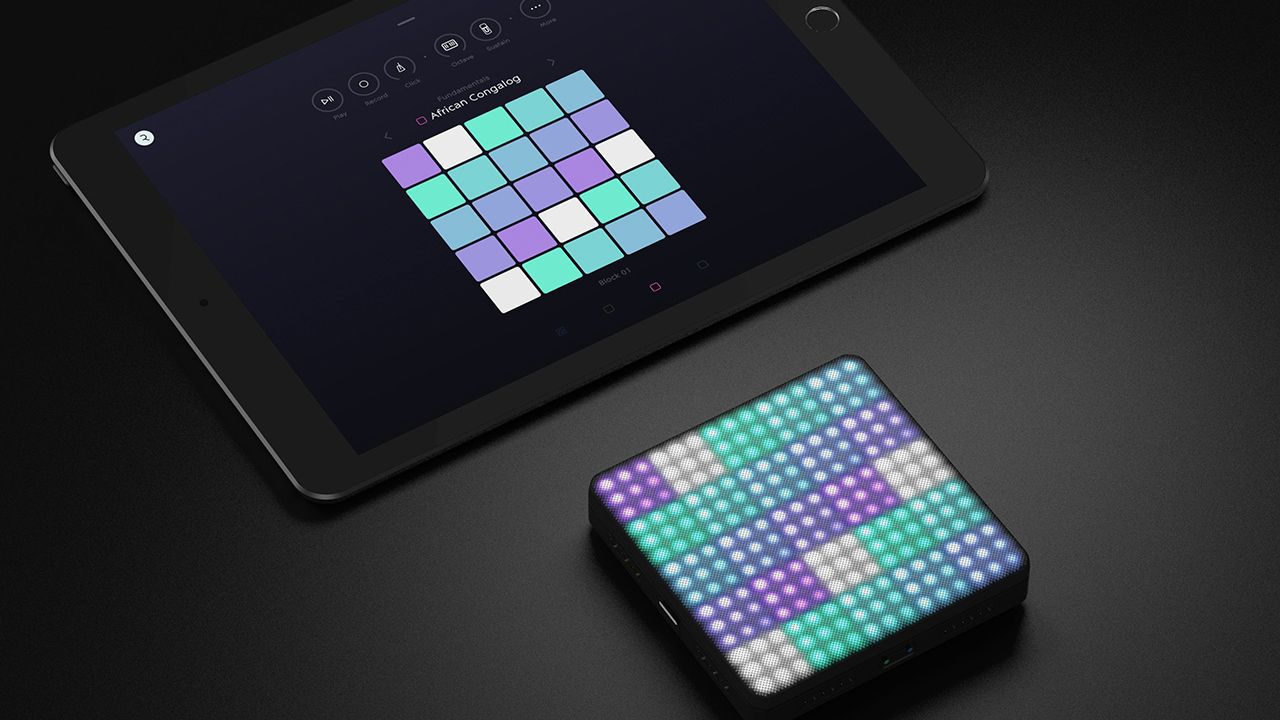
ROLI, the company behind the unique Seaboard RISE touch keyboards, rolled out a new product line today: BLOCKS. They’re modular control surfaces, quickly attached together to expand from a single touch pad to full array of modules. Keep reading to get a sense of BLOCKS and how they work with ROLI’s free iOS music creation app.

ROLI BLOCKS

These new devices are built for ROLI’s own iOS app, NOISE. The basic idea is a streamlined music creation app – something that sits comfortably between a DAW and a Kaossilator. The app has been out for a while – but until now it was focused on the on-screen experience.

With the new BLOCKS hardware, NOISE is gaining a system of control that’s unprecedented on iOS when it comes to music creation apps. It’s no surprise that one of the few places you’ll be able to buy any of the three control surfaces will be in Apple Stores around the world – these devices are aiming to be the ultimate music-creation accessory.

Lightpad, Live, Loop Blocks

There are three different pieces of hardware that are a part of the BLOCKS family: Lightpad, Live, and Loop. The Lightpad Block is the primary unit that a new user would start with. It will run $180, has 225 LEDs across its multi-touch surface that has some familiar power features as other ROLI touch products:

The Lightpad Block has a number of grid modes, each of which display a different colored grid of notes that helps guide process of writing melodies, playing drums, etc.

It sends MIDI over Bluetooth – so we suspect there will be a healthy community of people who get a Lightpad for their own setups that don’t use NOISE. But the intuitive control over the iOS app is likely to be the most attractive option for most consumers.
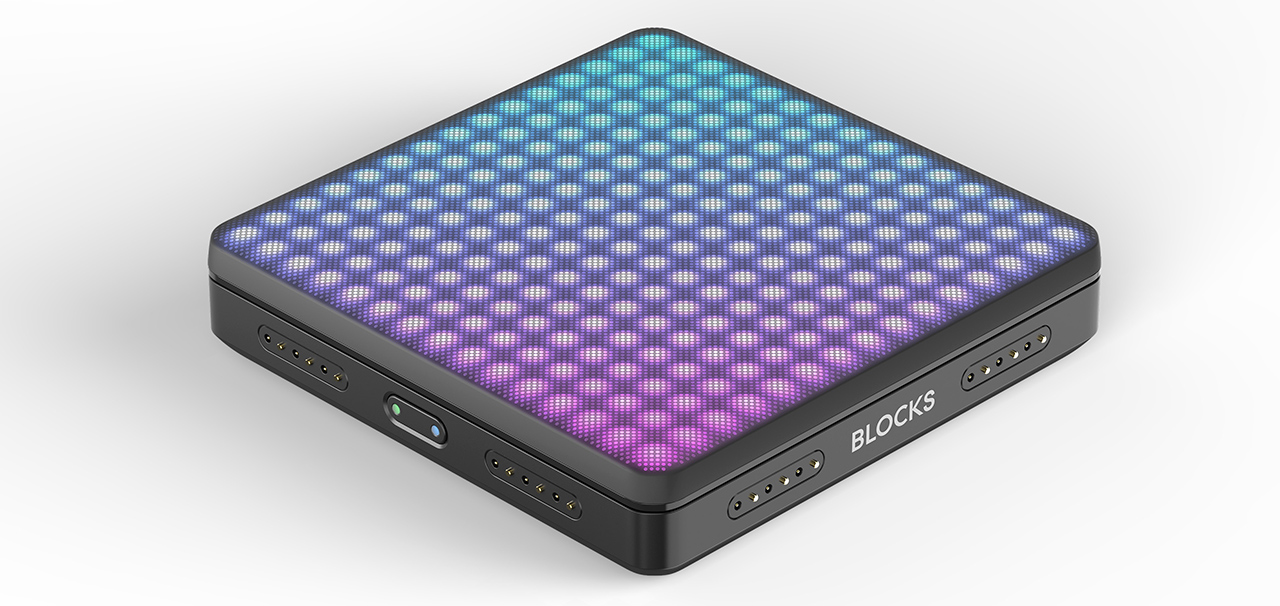
lightpad-block

Lightpad also is advertised as “5D” touch – by which ROLI means there are five different ways you can touch the surface to create sounds:

“Strike the surface to sound a note, as you would on a piano key or a drum. Glide your fingers from side to side to bend the pitch, as violinists do. Slide up and down to modulate the sound. Press into the surface to deepen sounds, like a saxophone player does by breathing more. Lift off the surface at different speeds to change a sound’s resonance.”

It’s all designed to be intuitive, instead of terrifying (something that a lot of first-time producers feel when they open Ableton and have no idea what they’re doing). The Lightpad adjusts to what you see on the iOS app, and even has a Learn Mode that visually suggest different types of gestures to craft musical ideas. As expected, all the input functions can be quantized and scale locked – ideal to always stay in tune with a project.

You can add a second Lightpad Block to the first to expand the playable space (see more about BLOCKS’ modular connections below). Alternatively, adding one of the two other Blocks (each of which are $80) allows even more secondary control:

Live Block

This secondary Live Block controller is designed for performing – allowing live producers to quickly “switch scales and octaves, trigger chords and arpeggios, and sustain notes in real time.”

Loop Block

The Loop Block is, as you might expect, more oriented for loop-based production work. You can quickly record loops / sequences, turn on the metronome, adjust BPM, quantize input, undo your last input, and more.

Modular BLOCKS: Keep Adding More

ROLI has thought the modularity of the BLOCKS through – with the ability to quickly connect each of the devices together. The Lightpad Blocks have magnetic “BLOCKS DNA connectors” on all four sides, meaning you can attach other Blocks however best suits your setup.

ROLI’s new BLOCKS are available now on their store – and soon, in Apple Stores as well. You can download the NOISE app for free on the App Store, and yes, it works without owning any of the Blocks or a Seaboard. 

Tags: BLOCKSNOIZEROLI
Share1Tweet1Share
Previous Post

Radius 2: A New 2-Channel Rotary Analog DJ Mixer

Next Post

DJ Player 9: An iOS DJ App Crowdsourced Over Slack

Related Posts

ROLI’s Seaboard RISE 2: seamless integration into the expressive world of MPE [REVIEW]
DJ Gear

ROLI’s Seaboard RISE 2: seamless integration into the expressive world of MPE [REVIEW]

November 27, 2023
ROLI is back with the Seaboard BLOCK M, a $350 compact MPE keyboard
DJ Gear

ROLI is back with the Seaboard BLOCK M, a $350 compact MPE keyboard

November 2, 2023
Beyond Pad Controllers: 6 Non-Traditional Interfaces for DJs
Controllerism

Beyond Pad Controllers: 6 Non-Traditional Interfaces for DJs

February 28, 2018
Load More
Next Post
DJ Player 9: An iOS DJ App Crowdsourced Over Slack

DJ Player 9: An iOS DJ App Crowdsourced Over Slack

Want to reach DJTT's audience here?

Shoot an email to advertising@djtechtools.com

DJTT ads
DJTT newsletter
Midi Fighter
Chat with us
  • ABOUT DJTT
  • CONTACT
  • PRIVACY
  • MIDI FIGHTER HELP
  • ABOUT DJTT
  • JOBS
  • CONTACT US
  • ADVERTISE
  • PRIVACY POLICY
  • ACCESSIBILITY STATEMENT

© 2024 DJ Techtools all rights reserved by DJ TechTools on all content unless otherwise noted.

No Result
View All Result
  • Blog
    • DJ Gear
      • DIY Projects
      • Gear Reviews
      • New Products
      • Controllerism
    • Techniques + Tips
      • Beginner DJ
      • Advanced DJ
      • Producer
      • Finger Drummer
    • News + Culture
      • Editorials + Opinions
      • Artist Interviews
      • Performances + Routines
      • How I Play
    • DJ Software Tutorials
      • Serato Tips
      • CDJ Tips
      • Ableton Live Tips
  • Store
    • Run by real DJs, not a corporation
    • DJ Controllers
      • Midi Fighter Twister
      • Midi Fighter Spectra
      • Midi Fighter 64
      • View All
    • Accessories
      • Chroma USB Drive for DJs
      • Chroma Caps
      • Chroma Cables Audio
      • Chroma Cables USB-A
      • Chroma Cables: USB-C
      • DJTT Gift Card
      • Midi Fighter T-Shirt
      • Keyboard Covers
      • Earplugs by V-Moda
    • Production Gear
    • Soundcards & Mixers
  • Community
    • Popular Forums
      • General Discussion
      • Buy & Sell
      • Reviews
      • Mixes
      • Music Production
      • Show Your Setup
      • Off Topic
    • Handy Links
      • New Posts
      • Private Messages
      • Register
      • Search
    • Midi Maps
      • Traktor
      • Ableton
      • Serato DJ
      • Midi Fighter 3D
      • Midi Fighter Twister
      • Midi Fighter Spectra
  • Midi Fighter
  • Chroma

© 2024 DJ Techtools all rights reserved by DJ TechTools on all content unless otherwise noted.

This website uses cookies. By continuing to use this website you are giving consent to cookies being used. Visit our Privacy and Cookie Policy.