DJ TechTools
  • Blog
    • DJ Gear
      • DIY Projects
      • Gear Reviews
      • New Products
      • Controllerism
    • Techniques + Tips
      • Beginner DJ
      • Advanced DJ
      • Producer
      • Finger Drummer
    • News + Culture
      • Editorials + Opinions
      • Artist Interviews
      • Performances + Routines
      • How I Play
    • DJ Software Tutorials
      • Serato Tips
        • Traktor Tips
      • CDJ Tips
      • Ableton Live Tips
  • Store
    • Run by real DJs, not a corporation
    • DJ Controllers
      • Midi Fighter Twister
      • Midi Fighter Spectra
      • Midi Fighter 64
      • View All
    • Accessories
      • Chroma USB Drive for DJs
      • Chroma Caps
      • Chroma Cables Audio
      • Chroma Cables USB-A
      • Chroma Cables: USB-C
      • DJTT Gift Card
      • Midi Fighter T-Shirt
      • Keyboard Covers
      • Earplugs by V-Moda
    • Production Gear
    • Soundcards & Mixers
  • Community
    • Popular Forums
      • General Discussion
      • Buy & Sell
      • Reviews
      • Mixes
      • Music Production
      • Show Your Setup
      • Off Topic
    • Handy Links
      • New Posts
      • Private Messages
      • Register
      • Search
    • Midi Maps
      • Traktor
      • Ableton
      • Serato DJ
      • Midi Fighter 3D
      • Midi Fighter Twister
      • Midi Fighter Spectra
  • Midi Fighter
  • Chroma
No Result
View All Result
DJ TechTools
  • Blog
    • DJ Gear
      • DIY Projects
      • Gear Reviews
      • New Products
      • Controllerism
    • Techniques + Tips
      • Beginner DJ
      • Advanced DJ
      • Producer
      • Finger Drummer
    • News + Culture
      • Editorials + Opinions
      • Artist Interviews
      • Performances + Routines
      • How I Play
    • DJ Software Tutorials
      • Serato Tips
        • Traktor Tips
      • CDJ Tips
      • Ableton Live Tips
  • Store
    • Run by real DJs, not a corporation
    • DJ Controllers
      • Midi Fighter Twister
      • Midi Fighter Spectra
      • Midi Fighter 64
      • View All
    • Accessories
      • Chroma USB Drive for DJs
      • Chroma Caps
      • Chroma Cables Audio
      • Chroma Cables USB-A
      • Chroma Cables: USB-C
      • DJTT Gift Card
      • Midi Fighter T-Shirt
      • Keyboard Covers
      • Earplugs by V-Moda
    • Production Gear
    • Soundcards & Mixers
  • Community
    • Popular Forums
      • General Discussion
      • Buy & Sell
      • Reviews
      • Mixes
      • Music Production
      • Show Your Setup
      • Off Topic
    • Handy Links
      • New Posts
      • Private Messages
      • Register
      • Search
    • Midi Maps
      • Traktor
      • Ableton
      • Serato DJ
      • Midi Fighter 3D
      • Midi Fighter Twister
      • Midi Fighter Spectra
  • Midi Fighter
  • Chroma
No Result
View All Result
DJ TechTools

DJ Player 9: An iOS DJ App Crowdsourced Over Slack

Dean Zulueta by Dean Zulueta
November 2, 2016
in News + Culture
Reading Time: 3 mins read
0
DJ Player 9: An iOS DJ App Crowdsourced Over Slack
52
VIEWS
Post on FacebookTweet thisUpvote on Reddit

DJ software isn’t easy to build. Developers and management have customer data that only goes so far when it comes to building a product DJs will enjoy using compared to others. For a small software company to go up against NI or Serato there are a lot more hurdles to overcome with (usually) a much smaller budget. This is a typical narrative, but not the narrative of DJ Player 9, which receives advice and design tips straight from a Slack community its own users.
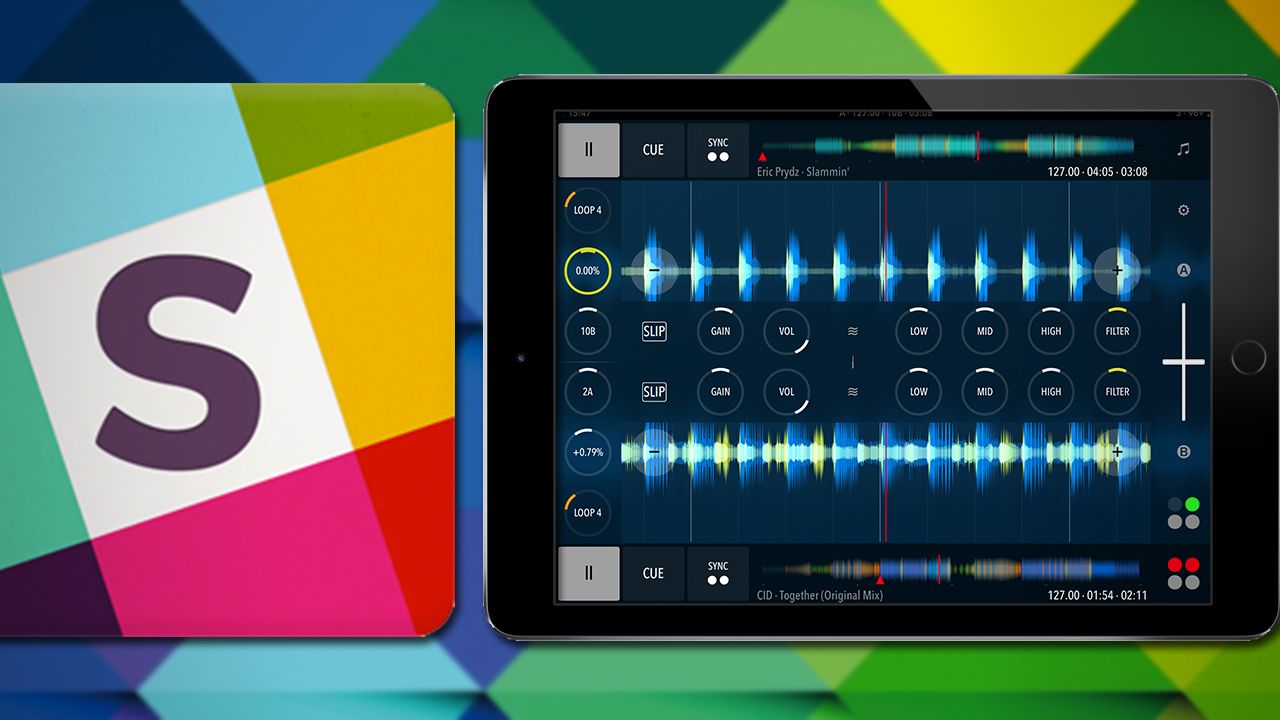
DJ Player 9 Crowdsource

Crowdsourcing a DJ App with Slack

In the Bay Area tech scene, Slack is a trendy app used for interoffice team communication. I’ve never seen it used in DJ context before hearing about DJ Player 9’s origin story. Since November 2015, creator Gábor Szántó has used Slack to connect his team with its users from 45 countries in 11 different time zones. From MIDI mappings to beta tests, the community of 1000+ members has contributed to the latest release. This progressive move takes the users right to the discussion table. DJs were able to give ideas, mock-ups, and even niche features that would eventually make it into the release candidate.

The final DJ Player 9 app is a child of this ecosystem and it has a strong foundation of users who are dedicated to testing and improving the software. The community is still alive and well today where users are contributing and talking about the app. Gábor wants to keep the conversation going because, “no ‘point zero’ version is perfect, and not every reasonable wish” is present.

DJ Player 9: What’s New

The press release claims DJ Player 9 is the “Formula 1” car for the DJ world – we’ll let you read the features and decide for yourself. The iOS app is DVS ready for any timecode vinyl and has MIDI support for a range of controllers with no manufacturer restrictions. The app also supports 4 decks and Native Instruments STEM tracks as well.

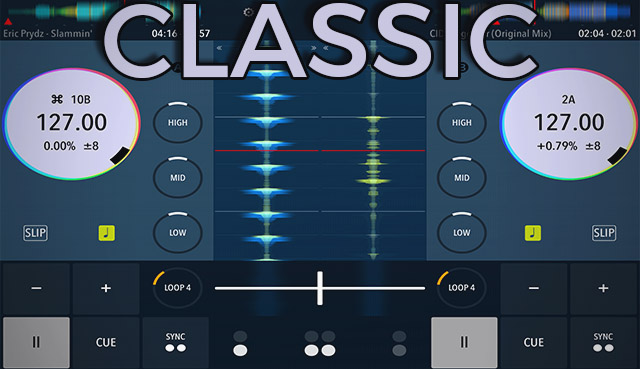
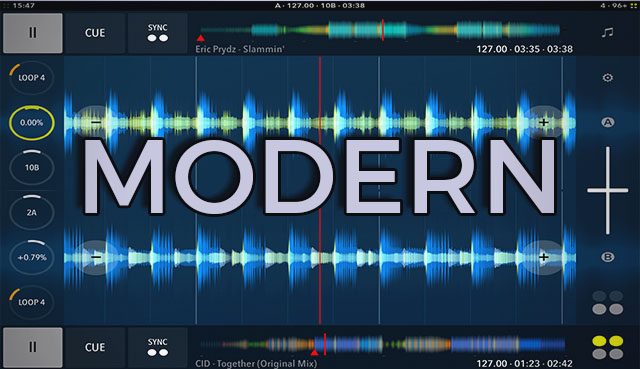
There are two major interface options when DJs use the app: Classic and Modern.
DJ Player 9

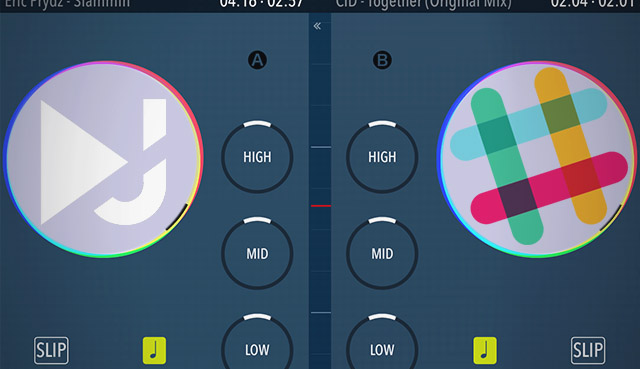
The Classic interface is the legacy of earlier versions of DJ Player. This version focuses on handheld capabilities with DVS and portablism in mind. The top level controls include Play, Cue, Sync and Loop with a +/- pitch control and 3 EQ knobs. A crossfader rests between both decks. The deck displays BPM, pitch changes, and key with a vertical waveform on the side and a smaller horizontal waveform above.
DJ Player 9

The Modern interface is more progressive with waveforms taking up a majority of the screen real estate. The waveform displays (for both views) now provide better track structure overview and beat localization. Immediate controls available within the Modern face are Play, Cue, Sync and Loop with a knob pitch and key control. A crossfader rests on the left side of the screen. EQ controls are available with a click of a button.

Each interface has a dedicated FX screen for each deck. The FX screen has three FX pads and a combo option to layer effects. Users can switch between Modern and Classic interfaces quickly using the Yin-Yang symbol at the top of the screen. As the interface has improved, the performance of the software has been maintained. Under the hood, analyzing tracks takes less time and the app runs at 60 FPS. The folks behind DJ Player 9 promise to provide better performance, better responsiveness, and a cleaner sound when compared to other DJ software.

Final Thoughts

As always with switching to a new DJ software, the heavy claims in press releases about performance, responsiveness, and features don’t really matter. DJs change software when they see other DJs using it, and the experience of the software is superior enough to convince them to put in the effort to learn something new.

DJ Player 9 is a unique breed. After being sent through exhaustive tests by dedicated users, the company now has a product that resonates with the DJs who use it. Other companies have open betas, however, rarely do consumers communicate compliments and issues directly to the creator.

The new version is well situated to be a strong contender in the ring of iOS DJ software. There’s the added bonus of having an open community of DJs who believe in the product, and the crowdsourced design makes this a unique entry.


DJ Player 9 is available now in the App Store for free, with required subscription of $1.67/month or $89.99 to remove trial notifications.

Tags: appappledj appDJ for iPaddj playerdj player 9dj player ios appDj softwareDVS AppiOS appipadiPad 2Iphoneiphone djMIDI appMIDI Controller AppMIDI iOSmobile software
ShareTweetShare
Previous Post

BLOCKS: Modular iOS Music Creation Gear From ROLI

Next Post

Ill Gates: 5 Studio Workflow Techniques

Related Posts

A Prime 4+ and a Kontrol S3 intercut against eachother over a black background
Breaking News

InMusic just bought Native Instruments. So what now for Traktor?

May 8, 2026
Ableton launches Live 12 Suite rent-to-own plan – and it’s not a subscription
Ableton

Ableton launches Live 12 Suite rent-to-own plan – and it’s not a subscription

October 1, 2025
Rekordox Spotify
Breaking News

Spotify (finally) slides into Rekordbox, Serato, and Algoriddim djay (again) – for better or worse?

September 24, 2025
Load More
Next Post
Ill Gates: 5 Studio Workflow Techniques

Ill Gates: 5 Studio Workflow Techniques

Want to reach DJTT's audience here?

Shoot an email to advertising@djtechtools.com

DJTT ads
DJTT newsletter
Midi Fighter
Chat with us
  • ABOUT DJTT
  • CONTACT
  • PRIVACY
  • MIDI FIGHTER HELP
  • ABOUT DJTT
  • JOBS
  • CONTACT US
  • ADVERTISE
  • PRIVACY POLICY
  • ACCESSIBILITY STATEMENT

© 2024 DJ Techtools all rights reserved by DJ TechTools on all content unless otherwise noted.

No Result
View All Result
  • Blog
    • DJ Gear
      • DIY Projects
      • Gear Reviews
      • New Products
      • Controllerism
    • Techniques + Tips
      • Beginner DJ
      • Advanced DJ
      • Producer
      • Finger Drummer
    • News + Culture
      • Editorials + Opinions
      • Artist Interviews
      • Performances + Routines
      • How I Play
    • DJ Software Tutorials
      • Serato Tips
      • CDJ Tips
      • Ableton Live Tips
  • Store
    • Run by real DJs, not a corporation
    • DJ Controllers
      • Midi Fighter Twister
      • Midi Fighter Spectra
      • Midi Fighter 64
      • View All
    • Accessories
      • Chroma USB Drive for DJs
      • Chroma Caps
      • Chroma Cables Audio
      • Chroma Cables USB-A
      • Chroma Cables: USB-C
      • DJTT Gift Card
      • Midi Fighter T-Shirt
      • Keyboard Covers
      • Earplugs by V-Moda
    • Production Gear
    • Soundcards & Mixers
  • Community
    • Popular Forums
      • General Discussion
      • Buy & Sell
      • Reviews
      • Mixes
      • Music Production
      • Show Your Setup
      • Off Topic
    • Handy Links
      • New Posts
      • Private Messages
      • Register
      • Search
    • Midi Maps
      • Traktor
      • Ableton
      • Serato DJ
      • Midi Fighter 3D
      • Midi Fighter Twister
      • Midi Fighter Spectra
  • Midi Fighter
  • Chroma

© 2024 DJ Techtools all rights reserved by DJ TechTools on all content unless otherwise noted.

This website uses cookies. By continuing to use this website you are giving consent to cookies being used. Visit our Privacy and Cookie Policy.