DJ TechTools
  • Blog
    • DJ Gear
      • DIY Projects
      • Gear Reviews
      • New Products
      • Controllerism
    • Techniques + Tips
      • Beginner DJ
      • Advanced DJ
      • Producer
      • Finger Drummer
    • News + Culture
      • Editorials + Opinions
      • Artist Interviews
      • Performances + Routines
      • How I Play
    • DJ Software Tutorials
      • Serato Tips
        • Traktor Tips
      • CDJ Tips
      • Ableton Live Tips
  • Store
    • Run by real DJs, not a corporation
    • DJ Controllers
      • Midi Fighter Twister
      • Midi Fighter Spectra
      • Midi Fighter 64
      • View All
    • Accessories
      • Chroma USB Drive for DJs
      • Chroma Caps
      • Chroma Cables Audio
      • Chroma Cables USB-A
      • Chroma Cables: USB-C
      • DJTT Gift Card
      • Midi Fighter T-Shirt
      • Keyboard Covers
      • Earplugs by V-Moda
    • Production Gear
    • Soundcards & Mixers
  • Community
    • Popular Forums
      • General Discussion
      • Buy & Sell
      • Reviews
      • Mixes
      • Music Production
      • Show Your Setup
      • Off Topic
    • Handy Links
      • New Posts
      • Private Messages
      • Register
      • Search
    • Midi Maps
      • Traktor
      • Ableton
      • Serato DJ
      • Midi Fighter 3D
      • Midi Fighter Twister
      • Midi Fighter Spectra
  • Midi Fighter
  • Chroma
No Result
View All Result
DJ TechTools
  • Blog
    • DJ Gear
      • DIY Projects
      • Gear Reviews
      • New Products
      • Controllerism
    • Techniques + Tips
      • Beginner DJ
      • Advanced DJ
      • Producer
      • Finger Drummer
    • News + Culture
      • Editorials + Opinions
      • Artist Interviews
      • Performances + Routines
      • How I Play
    • DJ Software Tutorials
      • Serato Tips
        • Traktor Tips
      • CDJ Tips
      • Ableton Live Tips
  • Store
    • Run by real DJs, not a corporation
    • DJ Controllers
      • Midi Fighter Twister
      • Midi Fighter Spectra
      • Midi Fighter 64
      • View All
    • Accessories
      • Chroma USB Drive for DJs
      • Chroma Caps
      • Chroma Cables Audio
      • Chroma Cables USB-A
      • Chroma Cables: USB-C
      • DJTT Gift Card
      • Midi Fighter T-Shirt
      • Keyboard Covers
      • Earplugs by V-Moda
    • Production Gear
    • Soundcards & Mixers
  • Community
    • Popular Forums
      • General Discussion
      • Buy & Sell
      • Reviews
      • Mixes
      • Music Production
      • Show Your Setup
      • Off Topic
    • Handy Links
      • New Posts
      • Private Messages
      • Register
      • Search
    • Midi Maps
      • Traktor
      • Ableton
      • Serato DJ
      • Midi Fighter 3D
      • Midi Fighter Twister
      • Midi Fighter Spectra
  • Midi Fighter
  • Chroma
No Result
View All Result
DJ TechTools

iTM DJ: iPhone MIDI for Djs

nico by nico
February 18, 2009
in Controllerism, DJ Software, Serato Tips, Traktor Tips
Reading Time: 2 mins read
0
iTM DJ: iPhone MIDI for Djs
152
VIEWS
Post on FacebookTweet thisUpvote on Reddit

Reviewed by: Nico

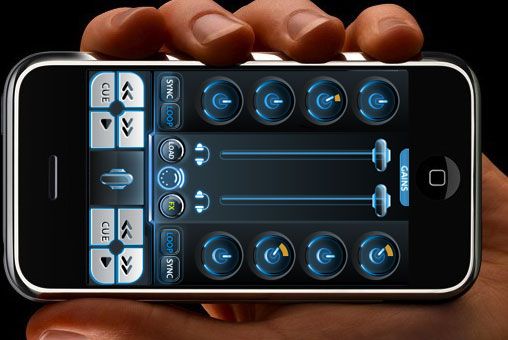
You may remember this previous article: Controllerism with an Iphone, where Dj Mei Lwun used the iTM Matrix to trigger samples from the dancefloor. Well, looks like the guys at iTM got inspired as they have just put out iTM DJ, a fully fledged controller for Dj software that runs on an iPhone. Check out the screenshots after the jump!

ITM DJ

Setup is really easy. You just have to run the iTouchMIDI client on your laptop (Which is available for mac and windows). Then turn on Wifi in the app and on the iPhone. Finally, you create a wireless network on the Mac, which is done by selecting ‘Create Network’ from the drop down menu from the WiFi widget in the menu bar.

That’s it! iTouchMIDI now appears as a valid MIDI interface in your Dj program, and can receive MIDI messages from the iTM DJ app from the iPhone, wirelessly. Configurable to your liking, you don’t have to follow how the interface is labeled, although the layout really makes sense. You can also download a .tks file for T3 and TPro from the website for instant gratification.
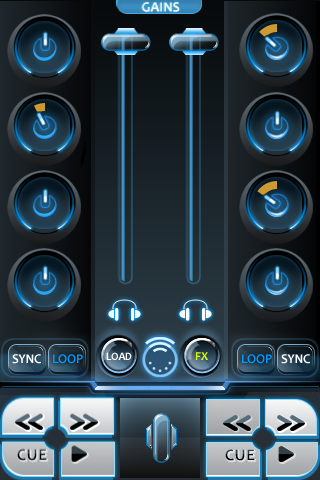
Along with the standard controls shown above, you have access to an additional set of 8 rotating dials by hitting the ‘Fx’ button, and 6 large buttons by hitting ‘Load’. The ‘Gains’ tab give you two more rotating dials. There is a crossfader available as well, which quickly appears and hide when you need it.
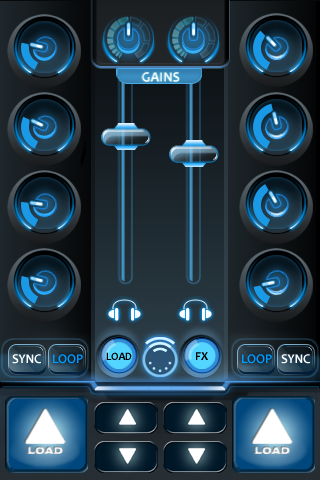
Overall, the app feels really solid and stable. The latency feels really, really low too, I had no problem cutting the sound in and out on the rhythm.

You can use as many fingers as you want, once a interface element is grabbed, moving the corresponding finger will do the job (albeit it obviously becomes cramped when you try to use more than 3!). The general knob sensitivity is adjustable. Putting the phone on airplane mode and turning WiFi back on works, and will take care of those pesky calls in the middle of a set.

So, if you are looking for a touch interface, or a first controller for your software, and already have an iPhone, then at 4.99€ this one is a no brainer. It works just fine as a standalone controller, I’ve had a lot of fun mixing with it, and walking around while doing so!

Pretty cool too to have as a backup or just to have a few more knobs available. It would also be lovely to use this as a remote to adjust the sound from the dance floor,  I think you can switch MIDI channels at the computer client level, so dial one channel to use it as a Dj controller, and switch to another to control a Live EQ4, inserted just before the main outs. There is a lot of potential in this. And why not even mix from the bar while you are chatting with that girl at the end of the night, you nerd 🙂

Next time, we’ll review TouchOSC for the iPhone.
Tags: controldjiphone appItm djmobileTipsTraktor Tips
Share1Tweet1Share
Previous Post

The Future of Control?

Next Post

The Shelves Have Been Bare

Related Posts

traktor-pro plus 3.8 pattern player controls
Dj and Production Tutorials

Review: Traktor Pro Plus 3.8 – After 8 months, is the subscription worth it?

April 20, 2023
Meet the Koala sampler app: a mobile production powerhouse, now with stems
DJ Gear

Meet the Koala sampler app: a mobile production powerhouse, now with stems

February 7, 2023
Tips for DJing in Extreme Cold: DJTT readers share their advice
DJ Techniques / Tips

Tips for DJing in Extreme Cold: DJTT readers share their advice

January 30, 2023
Load More
Next Post
The Shelves Have Been Bare

The Shelves Have Been Bare

Want to reach DJTT's audience here?

Shoot an email to advertising@djtechtools.com

DJTT ads
DJTT newsletter
Midi Fighter
Chat with us
  • ABOUT DJTT
  • CONTACT
  • PRIVACY
  • MIDI FIGHTER HELP
  • ABOUT DJTT
  • JOBS
  • CONTACT US
  • ADVERTISE
  • PRIVACY POLICY
  • ACCESSIBILITY STATEMENT

© 2024 DJ Techtools all rights reserved by DJ TechTools on all content unless otherwise noted.

No Result
View All Result
  • Blog
    • DJ Gear
      • DIY Projects
      • Gear Reviews
      • New Products
      • Controllerism
    • Techniques + Tips
      • Beginner DJ
      • Advanced DJ
      • Producer
      • Finger Drummer
    • News + Culture
      • Editorials + Opinions
      • Artist Interviews
      • Performances + Routines
      • How I Play
    • DJ Software Tutorials
      • Serato Tips
      • CDJ Tips
      • Ableton Live Tips
  • Store
    • Run by real DJs, not a corporation
    • DJ Controllers
      • Midi Fighter Twister
      • Midi Fighter Spectra
      • Midi Fighter 64
      • View All
    • Accessories
      • Chroma USB Drive for DJs
      • Chroma Caps
      • Chroma Cables Audio
      • Chroma Cables USB-A
      • Chroma Cables: USB-C
      • DJTT Gift Card
      • Midi Fighter T-Shirt
      • Keyboard Covers
      • Earplugs by V-Moda
    • Production Gear
    • Soundcards & Mixers
  • Community
    • Popular Forums
      • General Discussion
      • Buy & Sell
      • Reviews
      • Mixes
      • Music Production
      • Show Your Setup
      • Off Topic
    • Handy Links
      • New Posts
      • Private Messages
      • Register
      • Search
    • Midi Maps
      • Traktor
      • Ableton
      • Serato DJ
      • Midi Fighter 3D
      • Midi Fighter Twister
      • Midi Fighter Spectra
  • Midi Fighter
  • Chroma

© 2024 DJ Techtools all rights reserved by DJ TechTools on all content unless otherwise noted.

This website uses cookies. By continuing to use this website you are giving consent to cookies being used. Visit our Privacy and Cookie Policy.