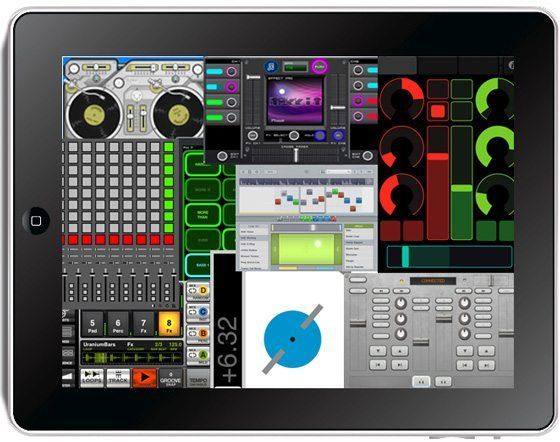
Upon its initial release the Ipad sparked up a lot of debate about its viability as a dj tool. Only a few months after its release there is a list of dj targeted apps but we are all wondering: Are they a total waste of money or actually worth a spin? To answer that question, I have been collecting Ipad apps by the dozens and searching for the best of the bunch. The results are a mixed bag. As you might suspect some really suck and some surprising contenders were actually a lot of fun. Check out which ones we liked after the break.
First, a disclaimer: I was hard pressed to find a lot of actual “dj apps” for the Ipad since its such a fresh product. To broaden the results we looked at anything related to djing that might be fun to use in that context.
THE GOOD
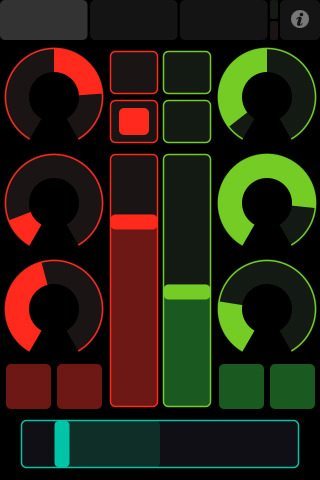 • Name: TouchOSC
• Price: $4.99
• Purpose: Customize your own Control interfaces and connect to OSC or Midi enabled software over WIFI
• Rating: Three Faders Up
• Summary: Your going to get the most bang for your buck with this app. Cant afford a Lemur? Join the crowd and try out the same concept with Touch OSC and an IPAD. I can see touch OSC becoming a solid platform for third party development of quirky non-commercial ideas. The licensing agreement is basically open source and allows you to re-package the software in almost any way.
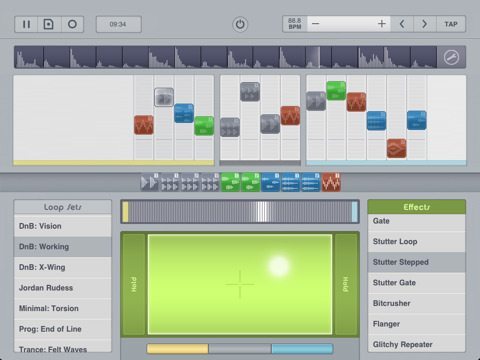 • Name: LoopTastic
• Price: $14.99
• Purpose: Mix and match loops and fade between scenes.
• Rating: Two Loops up
• Summary: These guys clearly put some thought into making the interface fun and coming up with original concepts on a musical interface. The built in loops actaully sound good, and it was fun to record riffs on the fly with the built in mic. The FX X/Y pad is fun to play with a long list of interesting sounding results. With 2 side by side arrangements and a crossfader to blend between them, its easy to create a longer musical story that might not quite be djing but gets close to it.
 • Name: ToneTable
• Price:$7.99
• Purpose: Provides Time code control over DVS systems.
• Rating: One Thumb Swipe Up
• Summary: Tonetable provides the clearest dj utility app that has the most potential to be used in some sort of a serious context. The tracking and timing of the “turntable” interface was surprisingly good. The boys from Inklen are clearly taking the app seriously- they just released a brand new 1.1 version, which added cool features like the playable pitch notes.
 • Name: Baby Decks
• Price: $24.99
• Purpose: Gives you 2 functional Turntables for scratching beats and samples
• Rating: One Scratch
• Summary: I am personally not much of a turntablist so this app does not hold much appeal for me but I liked how easy and simple everything was to use. The decks worked well and you can basically do scratches and transforms fairly well. There are several “scratch records” built right in that are easy to use and sounded good. IMO, $24.99 is way too much for an app with this functionality but then again perhaps the development was super costly.
THE DECENT
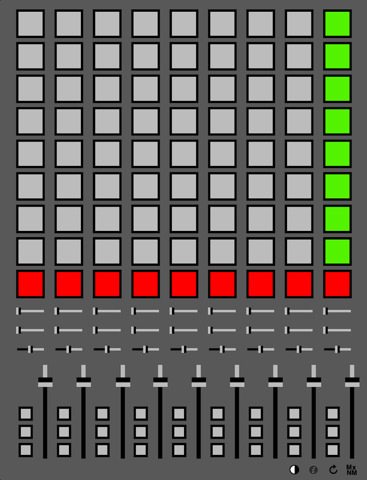
• Name: MxNM
• Price: $4.99
• Purpose: Midi Controller for Ableton Live over WIFI
• Rating: Neutral
• Summary:The interface wont win any graphic design awards with its uber minimal design but then again fancy looking faders don’t make them easier to move. When using a computer to computer wifi network you can get the latency on this app down to about 10ms (normally up to 200ms on regular wifi). At that level it is usable for making adjustments and clip launching although the tiny buttons are not exactly “playable”. For a very in-expensive clip launching tool- this one is a decent value.

• Name: Tek Kit
• Price: $4.99
• Purpose: Cross fade between 2 beat sequences that you customize
• Rating: Jury is still out
• Summary: You basically have 2 sequencers with drum, vocal and synth samples. Its really easy to lay out fresh patterns but the loop is only 1 bar long which gets reallllly old fast. One annoying thing- the iphone version seems to have more features so you may want to wait on a version 2 for the ipad.
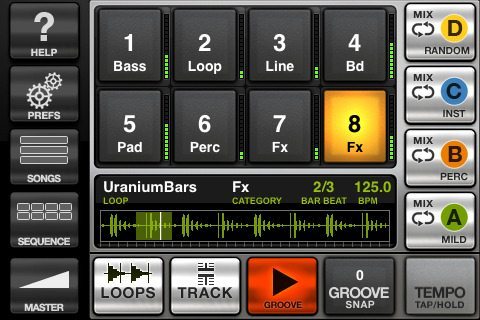 • Name: GrooveMaker
• Price: $4.99
• Purpose: Building and Arranging Electronic Music
• Rating: One Thumb Swipe Up
• Summary: If you would like to mess around with creating some mixes of various loops with zero chance of sounding bad this might not be a bad investment of $4.99. The loop’s production sounds are a little dated but for 30 minutes of fun- you get what you paid for. My only request- how about some FX?
THE BAD

• Name: Tremor
• Price: $19.99
• Rating: One Thumb Down
• Purpose: Mixing 4 Songs using 4 tiny turntable interfaces
• Summary: This app needs a lot of work. Its nearly impossible to load any usable music onto the decks and there is no music provided with the app. Several cool features (like the mic record) were broken in the tested version and the mini- decks are just plain silly. If you do decide to spend 19.99 on this- chances of disappointment are very high.
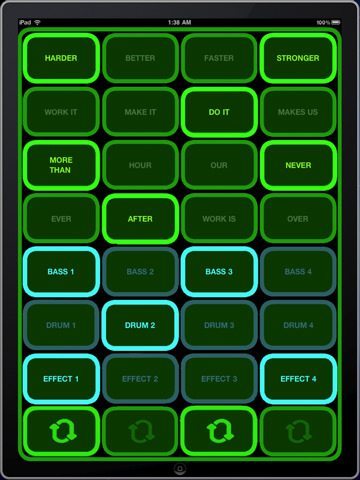 • Name: Daft Drum
• Price: .99 cents
• Rating: 2 thumbs down
• Purpose: re-mix daft punk’s “harder, faster, stronger”
• Summary: Spending the .99 on a single play at the arcade will get more milage than this app. The latency on the buttons makes this “app” totally un-playable and quite frankly a joke. I kinda want my 99 cents back. Was the iphone version this bad?
 • Name: DiddyMidiDj
• Price: $4.99
• Purpose: Connects to your laptop over WIFI and acts as a midi controller for Traktor Pro
• Rating: Two Thumbs Down
• Summary: Not only is the User interface amazingly ugly, but the latency is shocking. You press a buttons and if it works at all (which often times nothing did) then something might happen 2-4 seconds later. Its ok to release a simple app that’s still in development- just don’t charge for it.
And Just for fun..
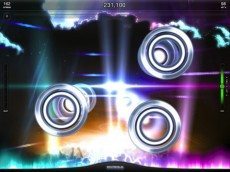 • Name: Tap Tap Radiation
• Price:Free (sound packs are around $2.99)
• Purpose: Tap along to your favorite tunes
• Rating: Two Taps Up
• Summary: If your looking for a quick and easy way to work on button timing and increase your “tap” speed this a really fun choice.

• Name: Inkstrumental
• Price:$2.99
• Purpose: Crazy Animated characters act out your personal sequences.
• Rating: Two Swipes Up
• Summary: Even though its technically not Ipad ready yet, the Inkstrumental grabbed me as the most fun music app out there that incorporated dj style “tapping” and sequencing. Well worth the $2.99, these guys nailed the art of making music fun, goofy and lovable all at the same time.
VERDICT
The IPad is not exactly a dj friendly platform yet with no access to the built in I-tunes library. Until that happens, I cant see too many of the bigger software guys jumping on the bandwagon and creating some real dj apps. There were a lot of cool individual moments in some of these apps but none of them really brought it all together in a “wow” moment. When that happens, we might begin to take Ipads seriously as a potential dj tool.