DJ TechTools
  • Blog
    • DJ Gear
      • DIY Projects
      • Gear Reviews
      • New Products
      • Controllerism
    • Techniques + Tips
      • Beginner DJ
      • Advanced DJ
      • Producer
      • Finger Drummer
    • News + Culture
      • Editorials + Opinions
      • Artist Interviews
      • Performances + Routines
      • How I Play
    • DJ Software Tutorials
      • Serato Tips
        • Traktor Tips
      • CDJ Tips
      • Ableton Live Tips
  • Store
    • Run by real DJs, not a corporation
    • DJ Controllers
      • Midi Fighter Twister
      • Midi Fighter Spectra
      • Midi Fighter 64
      • View All
    • Accessories
      • Chroma USB Drive for DJs
      • Chroma Caps
      • Chroma Cables Audio
      • Chroma Cables USB-A
      • Chroma Cables: USB-C
      • DJTT Gift Card
      • Midi Fighter T-Shirt
      • Keyboard Covers
      • Earplugs by V-Moda
    • Production Gear
    • Soundcards & Mixers
  • Community
    • Popular Forums
      • General Discussion
      • Buy & Sell
      • Reviews
      • Mixes
      • Music Production
      • Show Your Setup
      • Off Topic
    • Handy Links
      • New Posts
      • Private Messages
      • Register
      • Search
    • Midi Maps
      • Traktor
      • Ableton
      • Serato DJ
      • Midi Fighter 3D
      • Midi Fighter Twister
      • Midi Fighter Spectra
  • Midi Fighter
  • Chroma
No Result
View All Result
DJ TechTools
  • Blog
    • DJ Gear
      • DIY Projects
      • Gear Reviews
      • New Products
      • Controllerism
    • Techniques + Tips
      • Beginner DJ
      • Advanced DJ
      • Producer
      • Finger Drummer
    • News + Culture
      • Editorials + Opinions
      • Artist Interviews
      • Performances + Routines
      • How I Play
    • DJ Software Tutorials
      • Serato Tips
        • Traktor Tips
      • CDJ Tips
      • Ableton Live Tips
  • Store
    • Run by real DJs, not a corporation
    • DJ Controllers
      • Midi Fighter Twister
      • Midi Fighter Spectra
      • Midi Fighter 64
      • View All
    • Accessories
      • Chroma USB Drive for DJs
      • Chroma Caps
      • Chroma Cables Audio
      • Chroma Cables USB-A
      • Chroma Cables: USB-C
      • DJTT Gift Card
      • Midi Fighter T-Shirt
      • Keyboard Covers
      • Earplugs by V-Moda
    • Production Gear
    • Soundcards & Mixers
  • Community
    • Popular Forums
      • General Discussion
      • Buy & Sell
      • Reviews
      • Mixes
      • Music Production
      • Show Your Setup
      • Off Topic
    • Handy Links
      • New Posts
      • Private Messages
      • Register
      • Search
    • Midi Maps
      • Traktor
      • Ableton
      • Serato DJ
      • Midi Fighter 3D
      • Midi Fighter Twister
      • Midi Fighter Spectra
  • Midi Fighter
  • Chroma
No Result
View All Result
DJ TechTools

3 Hidden Tricks in Itch

Ean Golden by Ean Golden
June 9, 2010
in Advanced DJ Tips, DJ Software
Reading Time: 2 mins read
0
3 Hidden Tricks in Itch
42
VIEWS
Post on FacebookTweet thisUpvote on Reddit

The boys from Auckland are notoriously cheeky fellows and love to throw ‘easter eggs’ into their software for a good laugh. One of my favorites was the addition of pong to Serato Scratch and several other hidden features that required a bit of trickery to unlock. Sticking to this theme, there are also a few nice easter eggs in Itch that we will uncover in this article, along with an answer to the pressing question: “How can I midi-assign a controller in a software that does not support it?”

HIDDEN SUPER FILTER

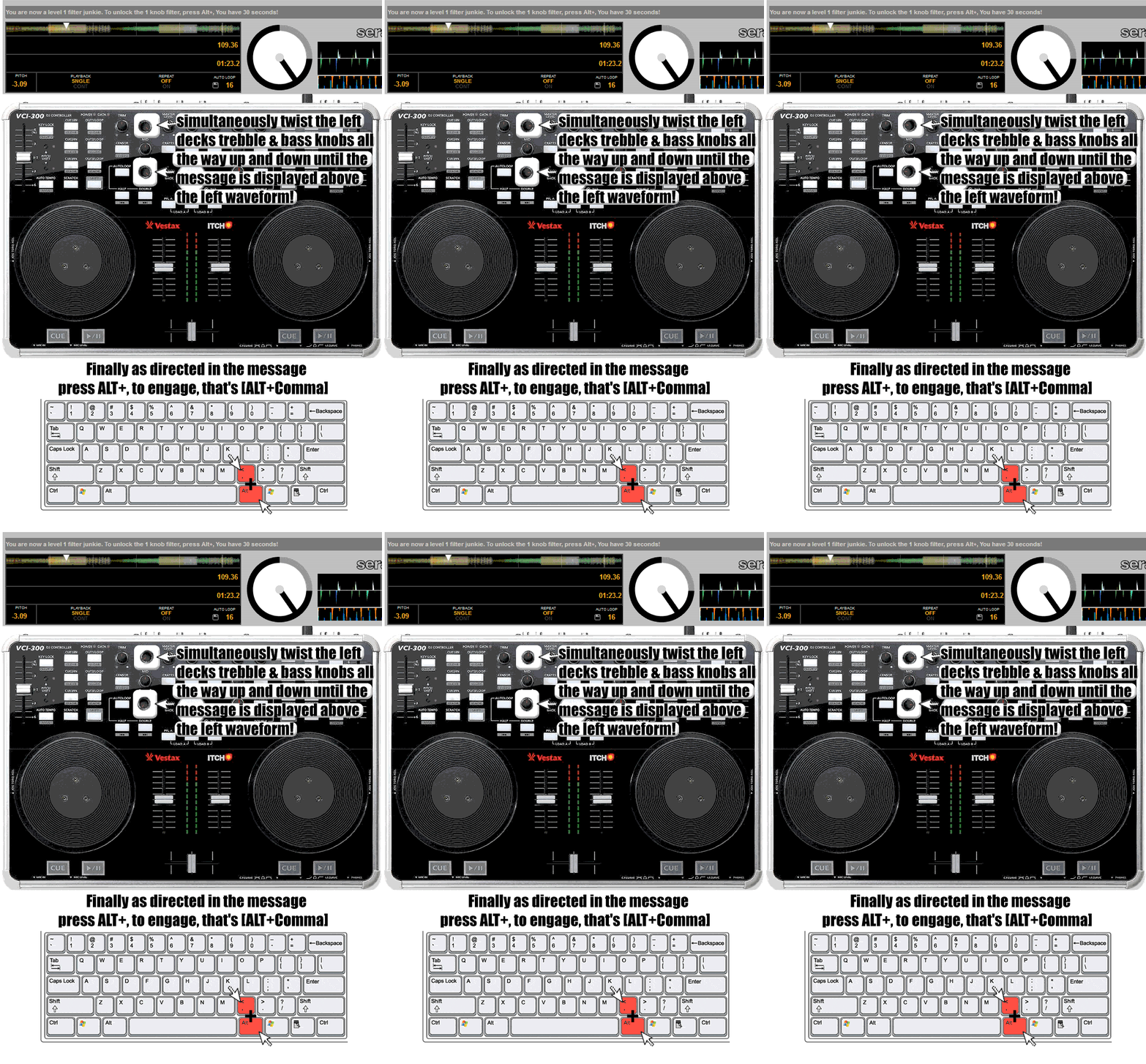
DJTechTools first introduced a super filter in controller land on our VCI-100SE and it was subsequently built right into Traktor. A super-handy tool, the super filter is a high pass and low pass filter combined in one knob — turn the knob to the right to cut the bass, and turn it to the left to cut the highs. Serato allows you to convert your bass EQ on the VCI-300 (and possibly other hardware) into a super filter by following these simple steps:

Twist the bass and treble knobs from 0-100% like a madman until a little message pops up on your screen.
DJ AM MODE

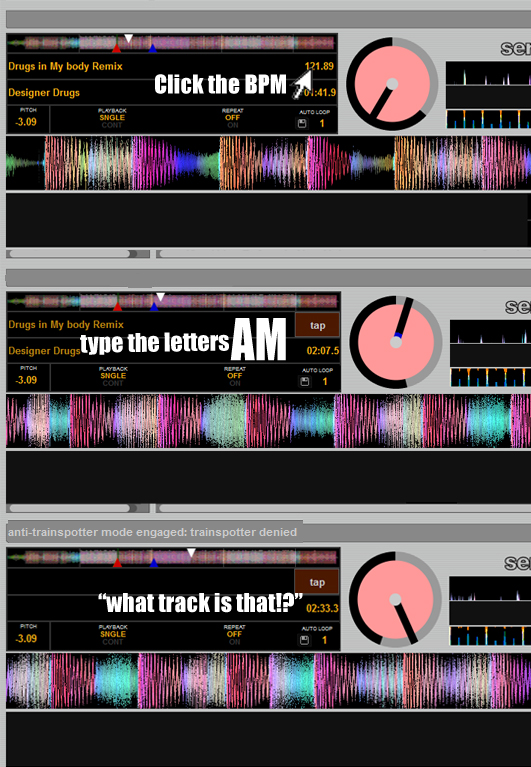
Tired of trainspotters ripping off that super rare remix that you ripped off your buddy, who ripped it off from hypem, which took it from a blog, which took it from the artist? Then fight back against the injustice and enable DJ AM MODE! This easter egg also exists in Serato Scratch and basically hides the track listing from peering eyes.
MIDI MAP IN ITCH

Our very own Pilmat turned heads last week when he claimed to have mapped external controllers (like the midi-fighter) to Itch, which only supports “approved” (translation-license fees paid) controllers. His secret? Terribly simple. He used Novation’s auto map software to convert midi signals into hotkeys and YES — you’re thinking ahead — Itch does support custom mapping of hotkeys. Bingo. Houston, we have lift-off.

To be honest, this inclusion is a bit of a tease. Phil is working on a complete article on how to pull off this trick using freeware midi-to-hotkey translation software and a full video walkthrough, which he will post on DJTechTools next week. In the mean time, keep mashing your buttons and twiddling those knobs. This is Ean von GoldenBurger signing off from Shuttle TechTools.

PS. Big ups to Steve Alois who provided the information for this article and the rad graphics explaining these tips!


Tags: am modedjfeaturefilterhiddenitchseratoSuper KnobTipstricks
ShareTweetShare
Previous Post

DJ Apps for the iPad

Next Post

Five Tips for a Glitch-Free Laptop Performance

Related Posts

The DJM-V5 from AlphaTheta: 3 channels, 4-band EQ, V10 sound – no Beat FX or crossfader.
Breaking News

The DJM-V5 from AlphaTheta: 3 channels, 4-band EQ, V10 sound – no Beat FX or crossfader.

January 20, 2026
66% of Serato just got bought: but not by AlphaTheta
Breaking News

66% of Serato just got bought: but not by AlphaTheta

April 1, 2025
PLX-CRSS12: Pioneer DJ finally made a hybrid turntable + motorized DVS controller
Breaking News

PLX-CRSS12: Pioneer DJ finally made a hybrid turntable + motorized DVS controller

August 1, 2023
Load More
Next Post
Five Tips for a Glitch-Free Laptop Performance

Five Tips for a Glitch-Free Laptop Performance

Want to reach DJTT's audience here?

Shoot an email to advertising@djtechtools.com

DJTT ads
DJTT newsletter
Midi Fighter
Chat with us
  • ABOUT DJTT
  • CONTACT
  • PRIVACY
  • MIDI FIGHTER HELP
  • ABOUT DJTT
  • JOBS
  • CONTACT US
  • ADVERTISE
  • PRIVACY POLICY
  • ACCESSIBILITY STATEMENT

© 2024 DJ Techtools all rights reserved by DJ TechTools on all content unless otherwise noted.

No Result
View All Result
  • Blog
    • DJ Gear
      • DIY Projects
      • Gear Reviews
      • New Products
      • Controllerism
    • Techniques + Tips
      • Beginner DJ
      • Advanced DJ
      • Producer
      • Finger Drummer
    • News + Culture
      • Editorials + Opinions
      • Artist Interviews
      • Performances + Routines
      • How I Play
    • DJ Software Tutorials
      • Serato Tips
      • CDJ Tips
      • Ableton Live Tips
  • Store
    • Run by real DJs, not a corporation
    • DJ Controllers
      • Midi Fighter Twister
      • Midi Fighter Spectra
      • Midi Fighter 64
      • View All
    • Accessories
      • Chroma USB Drive for DJs
      • Chroma Caps
      • Chroma Cables Audio
      • Chroma Cables USB-A
      • Chroma Cables: USB-C
      • DJTT Gift Card
      • Midi Fighter T-Shirt
      • Keyboard Covers
      • Earplugs by V-Moda
    • Production Gear
    • Soundcards & Mixers
  • Community
    • Popular Forums
      • General Discussion
      • Buy & Sell
      • Reviews
      • Mixes
      • Music Production
      • Show Your Setup
      • Off Topic
    • Handy Links
      • New Posts
      • Private Messages
      • Register
      • Search
    • Midi Maps
      • Traktor
      • Ableton
      • Serato DJ
      • Midi Fighter 3D
      • Midi Fighter Twister
      • Midi Fighter Spectra
  • Midi Fighter
  • Chroma

© 2024 DJ Techtools all rights reserved by DJ TechTools on all content unless otherwise noted.

This website uses cookies. By continuing to use this website you are giving consent to cookies being used. Visit our Privacy and Cookie Policy.