DJ TechTools
  • Blog
    • DJ Gear
      • DIY Projects
      • Gear Reviews
      • New Products
      • Controllerism
    • Techniques + Tips
      • Beginner DJ
      • Advanced DJ
      • Producer
      • Finger Drummer
    • News + Culture
      • Editorials + Opinions
      • Artist Interviews
      • Performances + Routines
      • How I Play
    • DJ Software Tutorials
      • Serato Tips
        • Traktor Tips
      • CDJ Tips
      • Ableton Live Tips
  • Store
    • Run by real DJs, not a corporation
    • DJ Controllers
      • Midi Fighter Twister
      • Midi Fighter Spectra
      • Midi Fighter 64
      • View All
    • Accessories
      • Chroma USB Drive for DJs
      • Chroma Caps
      • Chroma Cables Audio
      • Chroma Cables USB-A
      • Chroma Cables: USB-C
      • DJTT Gift Card
      • Midi Fighter T-Shirt
      • Keyboard Covers
      • Earplugs by V-Moda
    • Production Gear
    • Soundcards & Mixers
  • Community
    • Popular Forums
      • General Discussion
      • Buy & Sell
      • Reviews
      • Mixes
      • Music Production
      • Show Your Setup
      • Off Topic
    • Handy Links
      • New Posts
      • Private Messages
      • Register
      • Search
    • Midi Maps
      • Traktor
      • Ableton
      • Serato DJ
      • Midi Fighter 3D
      • Midi Fighter Twister
      • Midi Fighter Spectra
  • Midi Fighter
  • Chroma
No Result
View All Result
DJ TechTools
  • Blog
    • DJ Gear
      • DIY Projects
      • Gear Reviews
      • New Products
      • Controllerism
    • Techniques + Tips
      • Beginner DJ
      • Advanced DJ
      • Producer
      • Finger Drummer
    • News + Culture
      • Editorials + Opinions
      • Artist Interviews
      • Performances + Routines
      • How I Play
    • DJ Software Tutorials
      • Serato Tips
        • Traktor Tips
      • CDJ Tips
      • Ableton Live Tips
  • Store
    • Run by real DJs, not a corporation
    • DJ Controllers
      • Midi Fighter Twister
      • Midi Fighter Spectra
      • Midi Fighter 64
      • View All
    • Accessories
      • Chroma USB Drive for DJs
      • Chroma Caps
      • Chroma Cables Audio
      • Chroma Cables USB-A
      • Chroma Cables: USB-C
      • DJTT Gift Card
      • Midi Fighter T-Shirt
      • Keyboard Covers
      • Earplugs by V-Moda
    • Production Gear
    • Soundcards & Mixers
  • Community
    • Popular Forums
      • General Discussion
      • Buy & Sell
      • Reviews
      • Mixes
      • Music Production
      • Show Your Setup
      • Off Topic
    • Handy Links
      • New Posts
      • Private Messages
      • Register
      • Search
    • Midi Maps
      • Traktor
      • Ableton
      • Serato DJ
      • Midi Fighter 3D
      • Midi Fighter Twister
      • Midi Fighter Spectra
  • Midi Fighter
  • Chroma
No Result
View All Result
DJ TechTools

Midi Fighter Mappings for Serato Scratch Live

FlashFlooder by FlashFlooder
June 19, 2011
in Controllerism, Midi Fighter, Serato Tips, Video Posts
Reading Time: 3 mins read
0
Midi Fighter Mappings for Serato Scratch Live
44
VIEWS
Post on FacebookTweet thisUpvote on Reddit


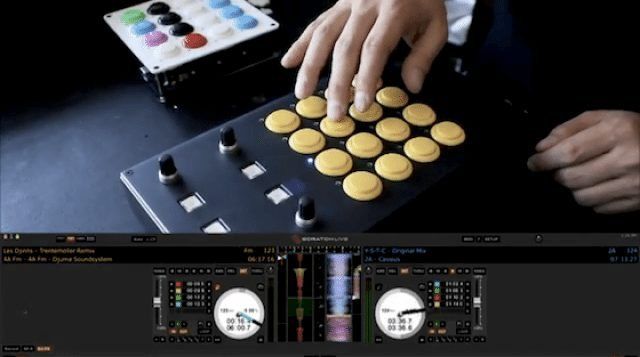
Serato Scratch is a very popular tool for DJs around the world but one area it lacks strength is in MIDI mapping capacity. For that reason, we set out to create a mapping for the Midi-Fighter that broke new technical ground. The Midi-Fighter mapping for Serato, does exactly that by using scripts to control modifiers (which don’t exist in Serato Scratch Live). This adds shift functionality to several elements including overwriting cue-points with the shift button. Check out our full walkthrough in the video above or continue reading for more details and links to the mappings.

Download the Midi Fighter Classic Serato Mapping

Download the Midi Fighter Pro Super Knob Serato Mapping

The Midi Fighter Serato mapping is broken into four different pages (by using the Midi Fighter’s built in “4 Banks Mode”), with each page having different functionality as follows:

  • Deck A mode
  • Deck B mode
  • Juggle mode
  • Sampler (SP-6) mode

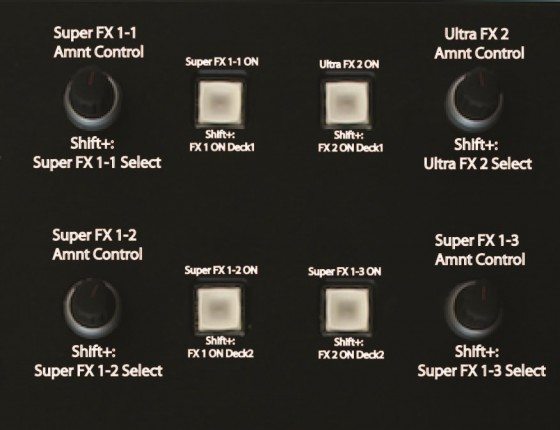
Both the MF Classic and the MF Pro Super Knob mappings share the same core functionality; however, the Super Knob mapping sets itself apart by allowing intuitive control of Serato’s built in DJ FX . With the Super Knob you can quickly and easily select, control, and activate three single effects and an “Ultra” effect all with the twist of a knob and the press of a button.  For a more detailed explanation of the Super Knob’s DJ FX control, see the visual layout below.
And now to the core functionality of our Midi-Fighter Serato mapping.

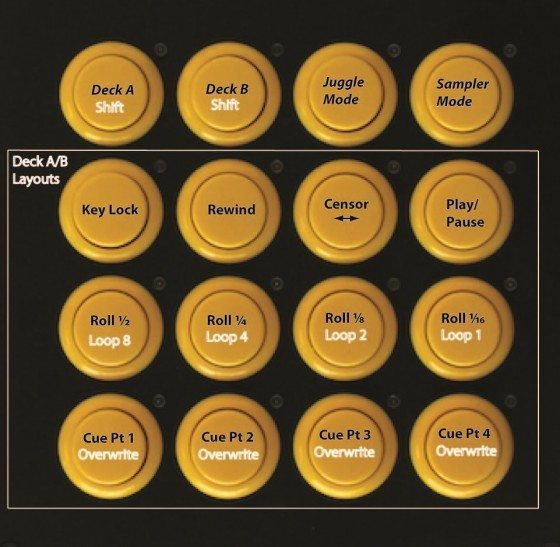
Deck A & B modes allow control of the associated decks cue points (triggering and overwriting), looping, loop rolls, and transport controls as can be seen below.
However, if one wanted to simultaneously trigger cue points on Decks A and B it would prove difficult switching back and forth quickly between the Deck A and B modes. As a result, Juggle Mode allows easy control of cue points for both decks in one page as can be seen below.
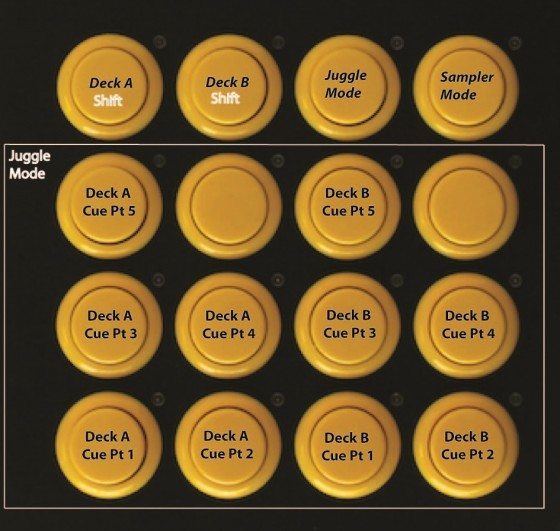
Lastly, the (fourth page) Sampler Mode allows for easy control of Serato’s SP-6, which can hold four banks of six samples (or 24 samples in total). With the Sampler mode you can add a little flare to your DJ sets by quickly triggering and looping samples as can be seen below.
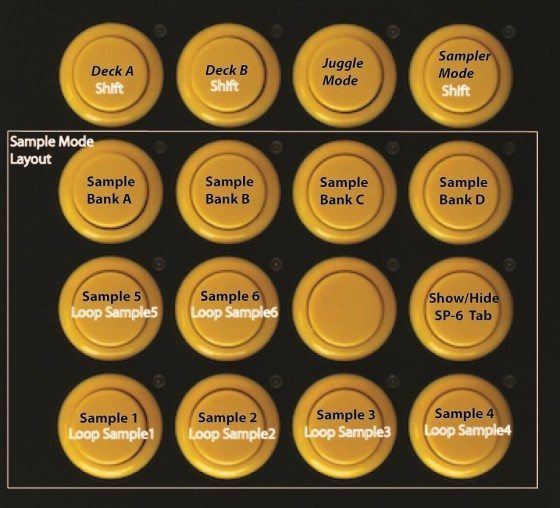
After having learned a few tricks to MIDI mapping in Serato, we plan on further iterating and developing Serato mappings for our Midi-Fighter Classic and Pro line of controllers. With that said, please give us some feedback in the associated forum threads (linked above) as we will take all your thoughts and recommendations into consideration for future Serato mappings to make them the best and most fun as we possibly can!
Tags: createhow tomappingMidi FightermodifierproScratch LiveseratoshiftSuper Knob
ShareTweetShare
Previous Post

Behind the Curtain: The DJTT Staff

Next Post

DIY MIDI: Still More Fun in 2011?

Related Posts

The DJM-V5 from AlphaTheta: 3 channels, 4-band EQ, V10 sound – no Beat FX or crossfader.
Breaking News

The DJM-V5 from AlphaTheta: 3 channels, 4-band EQ, V10 sound – no Beat FX or crossfader.

January 20, 2026
Use your Midi Fighter Twister as an Audio-Reactive Visualizer
Ableton Live Tips

Use your Midi Fighter Twister as an Audio-Reactive Visualizer

June 23, 2025
Control an entire studio with Midi Fighter Spectra (like Mad Zach)
Finger Drumming

Control an entire studio with Midi Fighter Spectra (like Mad Zach)

May 9, 2025
Load More
Next Post
DIY MIDI: Still More Fun in 2011?

DIY MIDI: Still More Fun in 2011?

Want to reach DJTT's audience here?

Shoot an email to advertising@djtechtools.com

DJTT ads
DJTT newsletter
Midi Fighter
Chat with us
  • ABOUT DJTT
  • CONTACT
  • PRIVACY
  • MIDI FIGHTER HELP
  • ABOUT DJTT
  • JOBS
  • CONTACT US
  • ADVERTISE
  • PRIVACY POLICY
  • ACCESSIBILITY STATEMENT

© 2024 DJ Techtools all rights reserved by DJ TechTools on all content unless otherwise noted.

No Result
View All Result
  • Blog
    • DJ Gear
      • DIY Projects
      • Gear Reviews
      • New Products
      • Controllerism
    • Techniques + Tips
      • Beginner DJ
      • Advanced DJ
      • Producer
      • Finger Drummer
    • News + Culture
      • Editorials + Opinions
      • Artist Interviews
      • Performances + Routines
      • How I Play
    • DJ Software Tutorials
      • Serato Tips
      • CDJ Tips
      • Ableton Live Tips
  • Store
    • Run by real DJs, not a corporation
    • DJ Controllers
      • Midi Fighter Twister
      • Midi Fighter Spectra
      • Midi Fighter 64
      • View All
    • Accessories
      • Chroma USB Drive for DJs
      • Chroma Caps
      • Chroma Cables Audio
      • Chroma Cables USB-A
      • Chroma Cables: USB-C
      • DJTT Gift Card
      • Midi Fighter T-Shirt
      • Keyboard Covers
      • Earplugs by V-Moda
    • Production Gear
    • Soundcards & Mixers
  • Community
    • Popular Forums
      • General Discussion
      • Buy & Sell
      • Reviews
      • Mixes
      • Music Production
      • Show Your Setup
      • Off Topic
    • Handy Links
      • New Posts
      • Private Messages
      • Register
      • Search
    • Midi Maps
      • Traktor
      • Ableton
      • Serato DJ
      • Midi Fighter 3D
      • Midi Fighter Twister
      • Midi Fighter Spectra
  • Midi Fighter
  • Chroma

© 2024 DJ Techtools all rights reserved by DJ TechTools on all content unless otherwise noted.

This website uses cookies. By continuing to use this website you are giving consent to cookies being used. Visit our Privacy and Cookie Policy.