A fader’s a fader, isn’t it? Well, no. A fader can run you back anything from the equivalent of a packet of sweets all the way up to a second hand car (not a very good one, admittedly, but still), and everything from their feel to their reliability and even what they’re actually capable of is at stake. Read on our little primer on just what it is you’re paying for.
VOLTAGE CONTROL
On most modern DJ mixers, the faders don’t directly control audio. Instead, they are used to create a value (usually by voltage control) which is then used by the amplifier section of the fader circuitry process volume (or indeed whatever else the fader is used for). This is great for audio quality, as it means that as the fader wears over time it’s only its ability to control the audio accurately that suffers, rather than the audio quality itself. If you’re planning on dusting off an old piece of kit that actually pushes the audio itself through the fader, you need to be aware that extra special attention needs to be paid to the fader’s physical condition.
Many mixers have circuitry that can dynamically alter the cut in curve, so that anything from a smooth gradient that takes half the fader’s length all the way down to a cut so sharp that it acts almost like a switch can be achieved. This is done by taking the values that are sent by the VCA circuitry for the fader and applying a ratio based calculation to them. When it comes to fader curve capability, MIDI is the great leveller. Because the VCA value can go into a MIDI circuit totally linearly and then the 0-127 MIDI values given any meaning at all, not only is VCA level curve control redundant on a device you’re designing with MIDI control in mind, but far less specialised faders can be used to achieve the same effects that require the most expensive faders in direct audio. Instant on/off is tough to achieve on a contact based fader because of the amp’s physical limitation when it comes to how quickly it can apply amplification to a signal over small amounts of change, but the same fader used to instruct a computer’s digital volume control can handle it with ease.
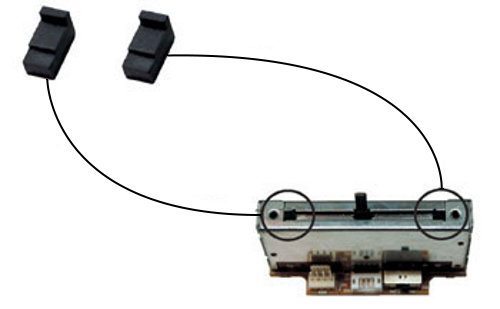
Feel aside, there are two big indicators of a fader’s quality: cut in and cut lag. Cut lag is the distance between the fader’s physical edge and the limits of its actual travel, and cut in is the distance it takes for the fader to go from off to on. Cut lag is a mechanical issue, and faders with a large amount of lag may ship as such to avoid issues with tolerance and reduce the preciseness of the manufacturing required, or may just be designed not to feel ‘twitchy’ if the use case they’re designed for isn’t end-to-end use. There are a number of ways around large lag, from manufacturer official methods – such as Vestax’s CLS-1 spacers that plug the gaps at the end of the fader – to good old homebrew mods involving scissors, credit card, and gaffer tape (and of course, if you’re anything like me, plasters/bandaids and tissues to mop up vital fluids spilled through inevitable careless snipping).
FADER TYPES
Carbon Track
- Cheap
- Small form factor
- Can have a ‘grainy’ feel
- Longevity issues
Examples: DJ mixers not designed for scratch markets, many MIDI controllers
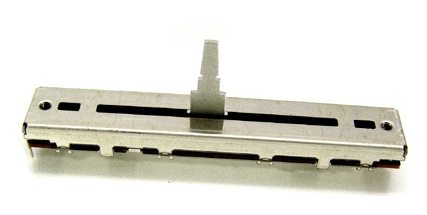
Low cost faders swipe a fader stem, which is held in place on a track not unlike cheap curtain rail, along a carbon track. The main problem with these faders is that their longevity is usually somewhat limited and the feel of the fader can be a bit sketchy, as carbon can become grainy in feel. However, they can be extremely cheap, which is a great cost saver for faders that don’t move much, have a miniscule form factor, and when you come out of the depths of the bargain bin carbon is used with newer, slide rail based design implementation in better mixers, too – including the Pioneer DJM900.
Conductive Plastic
- Smooth feel
- Long lasting
- Require intermittent cleaning
Examples: Vestax PCV, Pro X Fade
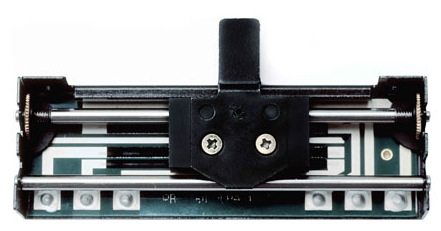
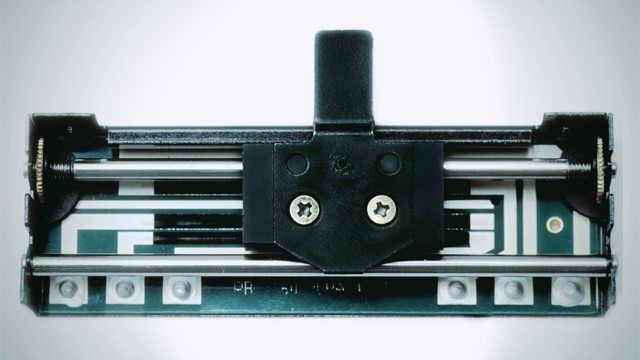
Conductive plastic has two big advantages over carbon: it’s more resistant to wear and it maintains a smoother feel. Most high end contact based faders use conductive plastic, and rather than directly dragging along a track below, the fader stem is connected to a main body that skates along rails whilst conductive prongs stick out and tickle the conductive track. This allows for a much smoother feel on the fader, as the rails can be lightly lubricated which allows the fader to slide smoothly, and the weight of the fader block itself provides a nice a nice inertial sensation. Unlike carbon track faders, which will wear out comparatively quickly due to failure of the parts, the longevity of conductive plastic faders means that there’s usually life in the fader after a clean is performed to maintain its smoothness.
When it comes to contactless faders, most share the rails based design idea that was established through contact fader technology because of the pleasant feel and low friction that the design provides. There are three main types of contactless faders found in the wild.
Optical Faders
- Low cost, contactless technology
- Most susceptible to environmental interference
- Issues with accuracy in low cost designs
Examples: Focus Fader, Infinium fader
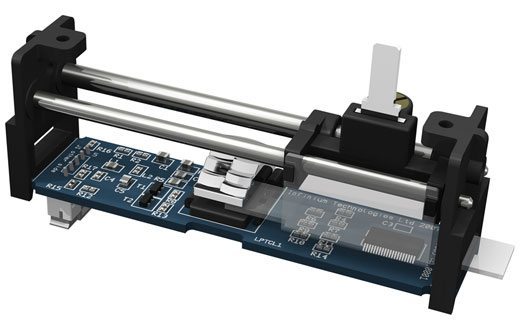
Optical faders are fairly low cost, but can be fragile and susceptible to environmental interference. Because they rely on optical sensors, anything that can potentially obscure the path of light and create false negatives, such as smoke and dirt, or fool the sensors and create false positives, such as disco lighting, can be a potential showstopper. Temperature can also have an effect on the fader, and actually create delays in response time. All optical faders are not created equal, too; the light sensing device can be designed as a photo resistor, transistor, or diode. Photo diodes are very quick and accurate, and thus perform very well, but they are much more expensive to implement than photo resistors. A photo resistor reacts quite slowly in comparison, and can lead to that ‘backwards spinning spokes’ effect where movement is not accurately transcribed.
Magnetic Faders
- Accurate
- Expensive
- Smooth contactless technology
Examples: Rane Magnetic Fader, Ecler Eternal Fader
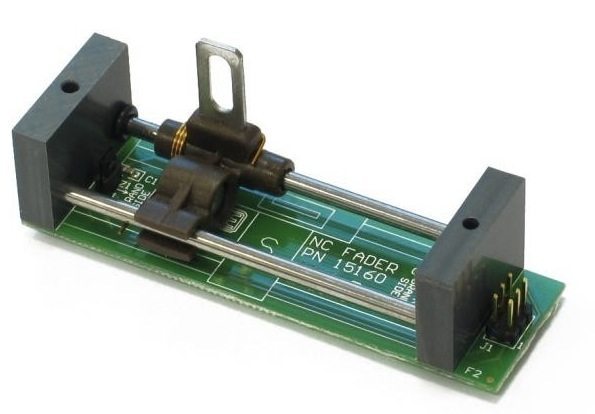
Magnetic faders create a voltage change based on the changing level of a magnetic field; sensors at either end of the fader track the position of the moving magnet attached to the fader stem. These faders are extremely accurate, and more or less impervious to environmental factors. However, they are also very expensive to develop.
Capacitance Faders
- Accurate
- Expensive
- Smooth contactless technology
Examples: Innofader
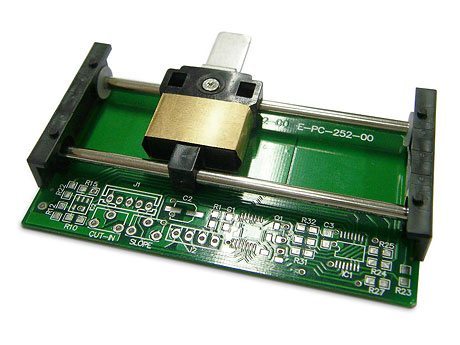
Capacitance based faders rely on the front and back walls of the fader housing, which contain circuitry that ‘reaches out’ to each other and creates a capacitive field that the fader block manipulates as it moves through. The quality of capacitive faders and magnetic faders is very similar, with both being extremely resistant to environmental influences.
MODS
One of the biggest issues for those of you considering modifying your equipment to upgrade faders is compatibility. One of the reasons that the Innofader is so expensive is because of the extensive research that has gone into providing compatibility with a wide range of mixers, as it’s not difficult to blow entire sections of your mixer or controller if you’re just jamming things in and hoping for the best.
When all’s said and done, faders are electrical components like any other, and compatibility is decided by the resistance of the fader along with power constraints – and, unfortunately, proprietary design when it comes to how the position of the fader is translated into the how the amp should amplify it. As there’s no real standard for wiring, you’ll also need to make sure that you’re not mixing up power rails. I’m sure we don’t need to state this, but keep an eye on the size of the fader you’re ordering too; it doesn’t take Will Hunting to figure out that a 60mm fader’s going to take more than a bit of clever arrangement to squeeze into a 45mm fader slot (although, of course, if you can make it fit some way or other the physical size isn’t nearly as big a consideration as resistance).
The bottom line is that you should do your research before you start modding in new faders into your kit – and that research may involve digging out your manual or scouring the internet for the schematics of the fader section – but switching a conductive plastic fader designed with scratch DJs in mind or even a non-contact fader can hugely improve the feel of your controllerism creation. Even better, if you’re putting a high quality fader into a circuit with MIDI functionality, you’ll be able to have the best of both worlds as the feel and longevity of the fader will go hand in hand with the flexibility of MIDI.
Editor’s note: Our Midi Fighter Pros‘ faders use a dual rail conductive plastic design – which we chose for longevity for all of you frantic fader freaks!