DJ TechTools
  • Blog
    • DJ Gear
      • DIY Projects
      • Gear Reviews
      • New Products
      • Controllerism
    • Techniques + Tips
      • Beginner DJ
      • Advanced DJ
      • Producer
      • Finger Drummer
    • News + Culture
      • Editorials + Opinions
      • Artist Interviews
      • Performances + Routines
      • How I Play
    • DJ Software Tutorials
      • Serato Tips
        • Traktor Tips
      • CDJ Tips
      • Ableton Live Tips
  • Store
    • Run by real DJs, not a corporation
    • DJ Controllers
      • Midi Fighter Twister
      • Midi Fighter Spectra
      • Midi Fighter 64
      • View All
    • Accessories
      • Chroma USB Drive for DJs
      • Chroma Caps
      • Chroma Cables Audio
      • Chroma Cables USB-A
      • Chroma Cables: USB-C
      • DJTT Gift Card
      • Midi Fighter T-Shirt
      • Keyboard Covers
      • Earplugs by V-Moda
    • Production Gear
    • Soundcards & Mixers
  • Community
    • Popular Forums
      • General Discussion
      • Buy & Sell
      • Reviews
      • Mixes
      • Music Production
      • Show Your Setup
      • Off Topic
    • Handy Links
      • New Posts
      • Private Messages
      • Register
      • Search
    • Midi Maps
      • Traktor
      • Ableton
      • Serato DJ
      • Midi Fighter 3D
      • Midi Fighter Twister
      • Midi Fighter Spectra
  • Midi Fighter
  • Chroma
No Result
View All Result
DJ TechTools
  • Blog
    • DJ Gear
      • DIY Projects
      • Gear Reviews
      • New Products
      • Controllerism
    • Techniques + Tips
      • Beginner DJ
      • Advanced DJ
      • Producer
      • Finger Drummer
    • News + Culture
      • Editorials + Opinions
      • Artist Interviews
      • Performances + Routines
      • How I Play
    • DJ Software Tutorials
      • Serato Tips
        • Traktor Tips
      • CDJ Tips
      • Ableton Live Tips
  • Store
    • Run by real DJs, not a corporation
    • DJ Controllers
      • Midi Fighter Twister
      • Midi Fighter Spectra
      • Midi Fighter 64
      • View All
    • Accessories
      • Chroma USB Drive for DJs
      • Chroma Caps
      • Chroma Cables Audio
      • Chroma Cables USB-A
      • Chroma Cables: USB-C
      • DJTT Gift Card
      • Midi Fighter T-Shirt
      • Keyboard Covers
      • Earplugs by V-Moda
    • Production Gear
    • Soundcards & Mixers
  • Community
    • Popular Forums
      • General Discussion
      • Buy & Sell
      • Reviews
      • Mixes
      • Music Production
      • Show Your Setup
      • Off Topic
    • Handy Links
      • New Posts
      • Private Messages
      • Register
      • Search
    • Midi Maps
      • Traktor
      • Ableton
      • Serato DJ
      • Midi Fighter 3D
      • Midi Fighter Twister
      • Midi Fighter Spectra
  • Midi Fighter
  • Chroma
No Result
View All Result
DJ TechTools

How to Fix Unwanted Jog Wheel Vibration In Clubs

Ean Golden by Ean Golden
November 7, 2011
in Advanced DJ Tips, Basic DJ Tips, Torq Tips, Traktor Tips, VCI-100 SE / Arcade
Reading Time: 3 mins read
0
How to Fix Unwanted Jog Wheel Vibration In Clubs
309
VIEWS
Post on FacebookTweet thisUpvote on Reddit

One rarely known but sometimes serious side effect of using controllers in clubs is jog wheel vibration. Without a motorized platter, some jog wheels can start to move in unwanted ways when introduced to heavy vibration. Unfortunately, big bass is a required environmental conditions of most clubs. This is not common to all controllers but if you happen to have this problem, here are a few ways to fix it.

Vibration in clubs has plagued DJ gear for years with turntables and needles alike falling prey to poorly built DJ booths. Various techniques have been employed to remedy the problem as it results in a serious problem when playing traditional vinyl: low end feedback. With DVS systems this is completely eliminated but controllers are now seeing issues as well.

“Severe bass in a room can cause a jog wheel to move in various directions, sending out unwanted pitch bend messages – instantly destroying a good mix.”

All controllers that have jog wheels are exposed to this risk, although some designs seem to be more susceptible than others. Here are the solutions we are aware of, in order of preference, based on the the least side effects.

Reduce vibration by providing cushion
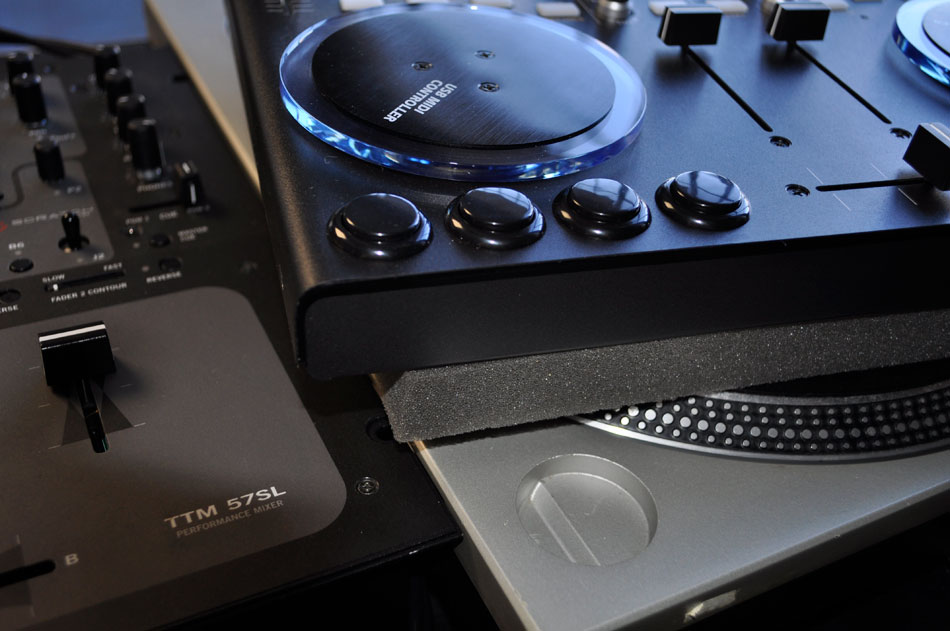
If planning on playing in a club, it is wise to bring along a thin layer of foam to provide a cushion of vibration. In almost all situations this will solve the problem of jog wheel rotation but can take a bit of room in your DJ bag. I particularly like the cushion because it also allows the controller to sit on top of turntable, which is often the only space available.

  • Pros: No performance downsides for the controller
  • Cons: Takes up room in the gig bag.
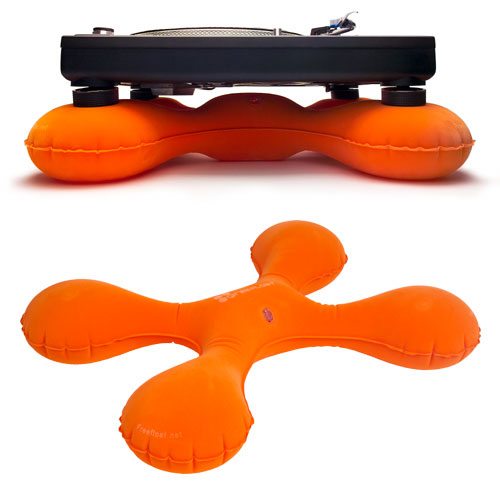
There is a unique product out there called the “free float” that was designed for turntables but might also work for controllers. It packs up smaller than a foam core, and may also provide additional cushion.

Tighten the jog wheels 

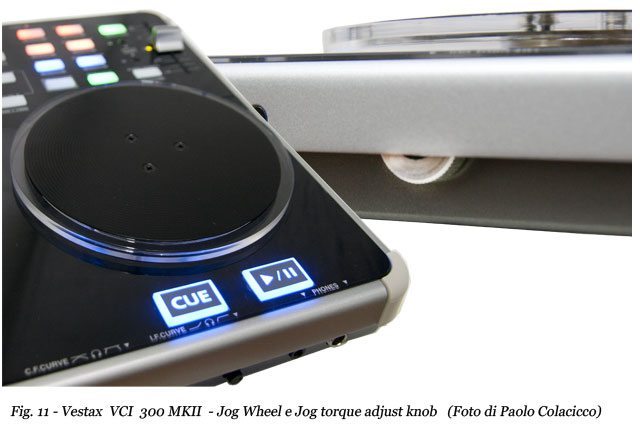
The fundamental problem is when the low end vibrations become more significant than the natural mechanical resistance. In laymans tems, the bass gets strong enough to move the jog wheels on their own. This can be easilly improved by increasing the jog wheel’s tension. Newer models of the VCI controllers, for example offer the ability to tighten their wheels making it difficult for them to turn accidentally.

  • Pros: Elimantes the problem permanently
  • Cons: Not available on s2, s4, and VCI-100. Changes the pitch bend response.

Put the jog wheels into FX mode 

For the VCI-100 controllers, DJ TechTools offers a mode where you can put the jog wheels into “FX mode” controlling effects instead of the decks. In this mode, slight movements will cause no effect on the mix and keep things running smoothly. We are about to release a special s2 and s4 mapping that will also enable jog wheel effects seen in my NI videos very soon!

  • Pros: Always on instant effects. Easy to toggle on/off
  • Cons: Disables transport control

Kill the jog wheels 
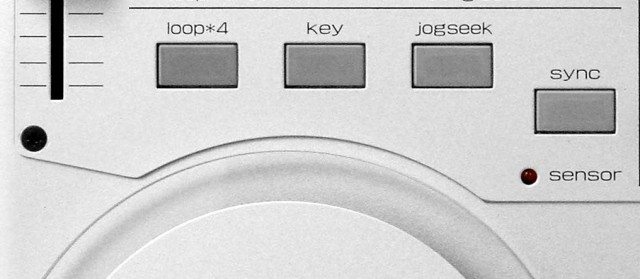
For the VCI-100, which was the first controller to show this problem, Vestax enabled a command that can turn off the wheels entirely. Just Press both “scratch or jog seek” buttons at the same time and look for the jog wheel lights to shut off (requires firmware 1.2 or above)

  • Pros: Truly gets to the source of the issue
  • Cons: You will lose all transport controls

Disable pitch bend

For many DJs that rely on sync and have quality beat grids, pitch bend controls may not even be required. In this case, you can go directly into the mapping files and remove the pitch bend commands entirely.

  • Pros: A permanent, non-hardware solution.
  • Cons: Removes all ability to pitch bend during a set.

What models have you experienced jog wheel vibration with? How did you fix it?

OVER TO YOU! 

Tags: Fixhow tojogs2S4vibrationwheel
Share2Tweet2Share
Previous Post

Virtual DJ and The One Square Off Against The Big Two

Next Post

Behind the Video: Q&A With DJ Unkut

Related Posts

Make your own DIY finger drumming routine with Midi Fighter 64 and Ableton
Ableton Live Tips

Make your own DIY finger drumming routine with Midi Fighter 64 and Ableton

July 11, 2024
Silent Discos: How to DJ in Silence
DJ Techniques / Tips

Silent Discos: How to DJ in Silence

August 29, 2017
DDJ to CDJs: Practicing For CDJs With A Pioneer DJ Controller
Basic DJ Tips

DDJ to CDJs: Practicing For CDJs With A Pioneer DJ Controller

July 23, 2017
Load More
Next Post
Behind the Video: Q&A With DJ Unkut

Behind the Video: Q&A With DJ Unkut

Want to reach DJTT's audience here?

Shoot an email to advertising@djtechtools.com

DJTT ads
DJTT newsletter
Midi Fighter
Chat with us
  • ABOUT DJTT
  • CONTACT
  • PRIVACY
  • MIDI FIGHTER HELP
  • ABOUT DJTT
  • JOBS
  • CONTACT US
  • ADVERTISE
  • PRIVACY POLICY
  • ACCESSIBILITY STATEMENT

© 2024 DJ Techtools all rights reserved by DJ TechTools on all content unless otherwise noted.

No Result
View All Result
  • Blog
    • DJ Gear
      • DIY Projects
      • Gear Reviews
      • New Products
      • Controllerism
    • Techniques + Tips
      • Beginner DJ
      • Advanced DJ
      • Producer
      • Finger Drummer
    • News + Culture
      • Editorials + Opinions
      • Artist Interviews
      • Performances + Routines
      • How I Play
    • DJ Software Tutorials
      • Serato Tips
      • CDJ Tips
      • Ableton Live Tips
  • Store
    • Run by real DJs, not a corporation
    • DJ Controllers
      • Midi Fighter Twister
      • Midi Fighter Spectra
      • Midi Fighter 64
      • View All
    • Accessories
      • Chroma USB Drive for DJs
      • Chroma Caps
      • Chroma Cables Audio
      • Chroma Cables USB-A
      • Chroma Cables: USB-C
      • DJTT Gift Card
      • Midi Fighter T-Shirt
      • Keyboard Covers
      • Earplugs by V-Moda
    • Production Gear
    • Soundcards & Mixers
  • Community
    • Popular Forums
      • General Discussion
      • Buy & Sell
      • Reviews
      • Mixes
      • Music Production
      • Show Your Setup
      • Off Topic
    • Handy Links
      • New Posts
      • Private Messages
      • Register
      • Search
    • Midi Maps
      • Traktor
      • Ableton
      • Serato DJ
      • Midi Fighter 3D
      • Midi Fighter Twister
      • Midi Fighter Spectra
  • Midi Fighter
  • Chroma

© 2024 DJ Techtools all rights reserved by DJ TechTools on all content unless otherwise noted.

This website uses cookies. By continuing to use this website you are giving consent to cookies being used. Visit our Privacy and Cookie Policy.