

DJ TechTools
  • Blog
    • DJ Gear
      • DIY Projects
      • Gear Reviews
      • New Products
      • Controllerism
    • Techniques + Tips
      • Beginner DJ
      • Advanced DJ
      • Producer
      • Finger Drummer
    • News + Culture
      • Editorials + Opinions
      • Artist Interviews
      • Performances + Routines
      • How I Play
    • DJ Software Tutorials
      • Serato Tips
        • Traktor Tips
      • CDJ Tips
      • Ableton Live Tips
  • Store
    • Run by real DJs, not a corporation
    • DJ Controllers
      • Midi Fighter Twister
      • Midi Fighter Spectra
      • Midi Fighter 64
      • View All
    • Accessories
      • Chroma USB Drive for DJs
      • Chroma Caps
      • Chroma Cables Audio
      • Chroma Cables USB-A
      • Chroma Cables: USB-C
      • DJTT Gift Card
      • Midi Fighter T-Shirt
      • Keyboard Covers
      • Earplugs by V-Moda
    • Production Gear
    • Soundcards & Mixers
  • Community
    • Popular Forums
      • General Discussion
      • Buy & Sell
      • Reviews
      • Mixes
      • Music Production
      • Show Your Setup
      • Off Topic
    • Handy Links
      • New Posts
      • Private Messages
      • Register
      • Search
    • Midi Maps
      • Traktor
      • Ableton
      • Serato DJ
      • Midi Fighter 3D
      • Midi Fighter Twister
      • Midi Fighter Spectra
  • Midi Fighter
  • Chroma
No Result
View All Result
DJ TechTools
  • Blog
    • DJ Gear
      • DIY Projects
      • Gear Reviews
      • New Products
      • Controllerism
    • Techniques + Tips
      • Beginner DJ
      • Advanced DJ
      • Producer
      • Finger Drummer
    • News + Culture
      • Editorials + Opinions
      • Artist Interviews
      • Performances + Routines
      • How I Play
    • DJ Software Tutorials
      • Serato Tips
        • Traktor Tips
      • CDJ Tips
      • Ableton Live Tips
  • Store
    • Run by real DJs, not a corporation
    • DJ Controllers
      • Midi Fighter Twister
      • Midi Fighter Spectra
      • Midi Fighter 64
      • View All
    • Accessories
      • Chroma USB Drive for DJs
      • Chroma Caps
      • Chroma Cables Audio
      • Chroma Cables USB-A
      • Chroma Cables: USB-C
      • DJTT Gift Card
      • Midi Fighter T-Shirt
      • Keyboard Covers
      • Earplugs by V-Moda
    • Production Gear
    • Soundcards & Mixers
  • Community
    • Popular Forums
      • General Discussion
      • Buy & Sell
      • Reviews
      • Mixes
      • Music Production
      • Show Your Setup
      • Off Topic
    • Handy Links
      • New Posts
      • Private Messages
      • Register
      • Search
    • Midi Maps
      • Traktor
      • Ableton
      • Serato DJ
      • Midi Fighter 3D
      • Midi Fighter Twister
      • Midi Fighter Spectra
  • Midi Fighter
  • Chroma
No Result
View All Result
DJ TechTools

Ableton DJing: Battle Style Effects Processors!

luis queral by luis queral
December 4, 2011
in Ableton Live Tips, Advanced DJ Tips, DJ Techniques / Tips, How-To Video Tutorials, Production Tips
Reading Time: 4 mins read
0
Ableton DJing: Battle Style Effects Processors!
472
VIEWS
Post on FacebookTweet thisUpvote on Reddit

Ableton Live is a remarkably powerful DJ tool, but people usually associate it with complicated layers of effects and loops. Those DJs that are more familiar (and possibly more comfortable) with a two decks and a mixer paradigm need not be afraid. Today’s article covers a very creative way to set up Ableton Live in a two deck fashion with two effects processors (in this case, Korg Kaoss pads) as your “decks” with a standard DJ mixer in between them.

Two FX Tables and a Microphone
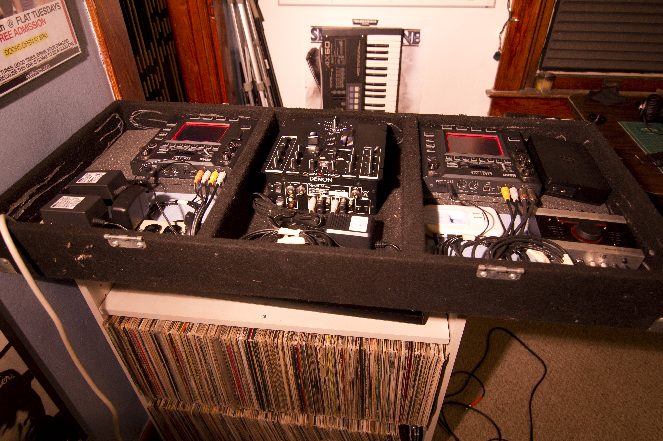
As you can see above, I have a two channel sound card from Native Instruments. Each channel is routed into a Kaoss pad and then back out into individual channels on the mixer. All fading, pre-cuing, and EQ happens in the analogue domain which gives this setup a familiar and decidedly analogue feel.

The focus here is on the hardware, each “deck”, and how they mix together. The laptop is no longer the focus. 

The benefits of such a setup are two-fold:

  1. Combining the strengths of digital and analogue in an easy-to-master 2 deck layout with real mixer controls.
  2. Using external effects processing to fatten up the sound, and layering interesting results in a zero-latency environment.

The internal effects in Ableton Live are incredibly versatile and expandable, and a crucial part of most production work. But when it comes to live performance, I’ve decided against using MIDI to control my effects and  instead I’ve chosen Korg’s Kaoss Pads ($399) as my go-to tool for manipulating live audio signals. Check out my full demo routine using two Kaoss Pads here!
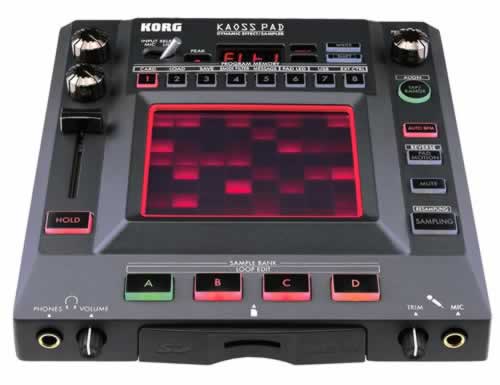
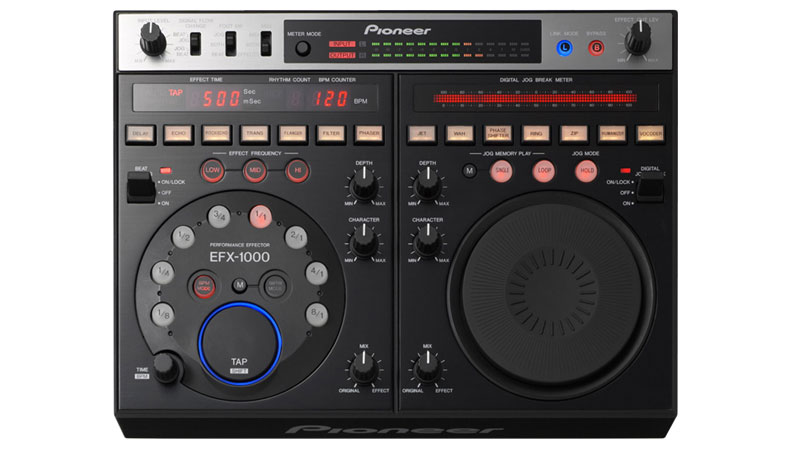
There are tons of options when it comes to external effects processors. Whether or not one is better than the other is completely subjective to the style of the DJ. For me, the most impressive parts of the Kaoss Pad are its interface, the large library of effects, and its lucrative sampling capabilities. Another very popular model for DJ processing on the fly is the Pioneer EFX-1000 ($899)
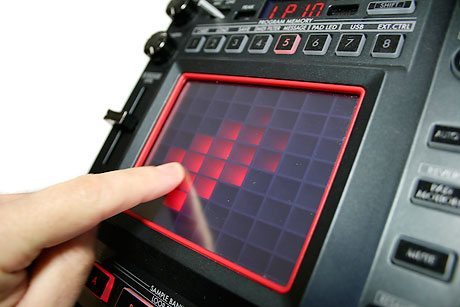
“The Kaoss Pad is particularly interesting because it can also be used as a MIDI controller to trigger your Ableton clips”

WHY GO WITH EXTERNAL FX?
With a program as robust as Ableton Live, why would anyone want to use an external hardware processor? Well there are several reasons:

Increases CPU Performance

  • Probably the biggest assets of utilizing external audio processing is that they eliminate the taxing demand of MIDI assignments and VST usage on your CPU. Back when I used MIDI for live performances (with my trusty MPD26), I used up to ten tracks, all with different types of effects loaded onto them. Even with 8GB of RAM and an i7 processor, my laptop was having trouble keeping up with all of my MIDI assignments. I even slimmed the number of tracks down to two (see below), and although Live ran noticeably smoother, it still wasn’t as punctual as I wanted it to be.
  • Universal Audio illustrates this concept with their optional ‘hardware accelerators’ for their digital effect suites. In an effort to ease processing demand, they use these aluminum boxes that essentially help your processor crunch more numbers, making them ideal for mobile recording and mastering.

Little to no Latency

  • Relating to CPU usage, hardware effects have virtually zero latency. Two big factors in audio latency arise from input and output issues, specifically DSP and DTA conversion. Digital Signal Processing (DSP), in the case of a hardware effect processor, converts the incoming analogue audio from your sound card to a digital signal so that it can be fooled around with. In regards to the output, DTA conversion does the opposite, converting those 1’s and 0’s back into an analogue signal, allowing you to plug your effects processor into your DJ mixer or a house mixer.
  • Case in Point: External effect units are designed to handle these operations quickly and efficiently so that your computer doesn’t have to.

Software Effects can get Corrupted

  • The number one reason that Live crashes on me is because of a bum VST (especially for naughty people who steal software effects). Having your computer crash on stage is very embarrassing, and I found it much relieving to rely on a stable piece of hardware for effects, rather than relying on software. After all, regardless of what external effect processor you use, you’ll be rest assured that it was designed for one purpose: manipulating live audio signals.

Conclusion

Using two external effects processors along with a analogue mixer not only simplifies Ableton’s potential for complexity but it provides a familiar look and layout for both the audience and performers. For those looking for a unique sound, many of these hardware processors contain great presets that are rarely heard. Globetrotting beat-boxer, Beardyman (above), relies on his voice and a bevy of analogue synths and effects to craft a totally original sound. Sometimes, going analogue might be one way to make a digital setup work.


Tags: ableton liveeffects processorskaoss pad effects
Share4Tweet2Share
Previous Post

Review: Native Instruments Maschine Mikro

Next Post

Resident Advisor Releases Top 100 DJs Poll Results

Related Posts

Ableton launches Live 12 Suite rent-to-own plan – and it’s not a subscription
Ableton

Ableton launches Live 12 Suite rent-to-own plan – and it’s not a subscription

October 1, 2025
Use your Midi Fighter Twister as an Audio-Reactive Visualizer
Ableton Live Tips

Use your Midi Fighter Twister as an Audio-Reactive Visualizer

June 23, 2025
Control an entire studio with Midi Fighter Spectra (like Mad Zach)
Finger Drumming

Control an entire studio with Midi Fighter Spectra (like Mad Zach)

May 9, 2025
Load More
Next Post
Resident Advisor Releases Top 100 DJs Poll Results

Resident Advisor Releases Top 100 DJs Poll Results

Want to reach DJTT's audience here?

Shoot an email to advertising@djtechtools.com

DJTT ads
DJTT newsletter
Midi Fighter
Chat with us
  • ABOUT DJTT
  • CONTACT
  • PRIVACY
  • MIDI FIGHTER HELP
  • ABOUT DJTT
  • JOBS
  • CONTACT US
  • ADVERTISE
  • PRIVACY POLICY
  • ACCESSIBILITY STATEMENT

© 2024 DJ Techtools all rights reserved by DJ TechTools on all content unless otherwise noted.

No Result
View All Result
  • Blog
    • DJ Gear
      • DIY Projects
      • Gear Reviews
      • New Products
      • Controllerism
    • Techniques + Tips
      • Beginner DJ
      • Advanced DJ
      • Producer
      • Finger Drummer
    • News + Culture
      • Editorials + Opinions
      • Artist Interviews
      • Performances + Routines
      • How I Play
    • DJ Software Tutorials
      • Serato Tips
      • CDJ Tips
      • Ableton Live Tips
  • Store
    • Run by real DJs, not a corporation
    • DJ Controllers
      • Midi Fighter Twister
      • Midi Fighter Spectra
      • Midi Fighter 64
      • View All
    • Accessories
      • Chroma USB Drive for DJs
      • Chroma Caps
      • Chroma Cables Audio
      • Chroma Cables USB-A
      • Chroma Cables: USB-C
      • DJTT Gift Card
      • Midi Fighter T-Shirt
      • Keyboard Covers
      • Earplugs by V-Moda
    • Production Gear
    • Soundcards & Mixers
  • Community
    • Popular Forums
      • General Discussion
      • Buy & Sell
      • Reviews
      • Mixes
      • Music Production
      • Show Your Setup
      • Off Topic
    • Handy Links
      • New Posts
      • Private Messages
      • Register
      • Search
    • Midi Maps
      • Traktor
      • Ableton
      • Serato DJ
      • Midi Fighter 3D
      • Midi Fighter Twister
      • Midi Fighter Spectra
  • Midi Fighter
  • Chroma

© 2024 DJ Techtools all rights reserved by DJ TechTools on all content unless otherwise noted.

This website uses cookies. By continuing to use this website you are giving consent to cookies being used. Visit our Privacy and Cookie Policy.


