DJ TechTools
  • Blog
    • DJ Gear
      • DIY Projects
      • Gear Reviews
      • New Products
      • Controllerism
    • Techniques + Tips
      • Beginner DJ
      • Advanced DJ
      • Producer
      • Finger Drummer
    • News + Culture
      • Editorials + Opinions
      • Artist Interviews
      • Performances + Routines
      • How I Play
    • DJ Software Tutorials
      • Serato Tips
        • Traktor Tips
      • CDJ Tips
      • Ableton Live Tips
  • Store
    • Run by real DJs, not a corporation
    • DJ Controllers
      • Midi Fighter Twister
      • Midi Fighter Spectra
      • Midi Fighter 64
      • View All
    • Accessories
      • Chroma USB Drive for DJs
      • Chroma Caps
      • Chroma Cables Audio
      • Chroma Cables USB-A
      • Chroma Cables: USB-C
      • DJTT Gift Card
      • Midi Fighter T-Shirt
      • Keyboard Covers
      • Earplugs by V-Moda
    • Production Gear
    • Soundcards & Mixers
  • Community
    • Popular Forums
      • General Discussion
      • Buy & Sell
      • Reviews
      • Mixes
      • Music Production
      • Show Your Setup
      • Off Topic
    • Handy Links
      • New Posts
      • Private Messages
      • Register
      • Search
    • Midi Maps
      • Traktor
      • Ableton
      • Serato DJ
      • Midi Fighter 3D
      • Midi Fighter Twister
      • Midi Fighter Spectra
  • Midi Fighter
  • Chroma
No Result
View All Result
DJ TechTools
  • Blog
    • DJ Gear
      • DIY Projects
      • Gear Reviews
      • New Products
      • Controllerism
    • Techniques + Tips
      • Beginner DJ
      • Advanced DJ
      • Producer
      • Finger Drummer
    • News + Culture
      • Editorials + Opinions
      • Artist Interviews
      • Performances + Routines
      • How I Play
    • DJ Software Tutorials
      • Serato Tips
        • Traktor Tips
      • CDJ Tips
      • Ableton Live Tips
  • Store
    • Run by real DJs, not a corporation
    • DJ Controllers
      • Midi Fighter Twister
      • Midi Fighter Spectra
      • Midi Fighter 64
      • View All
    • Accessories
      • Chroma USB Drive for DJs
      • Chroma Caps
      • Chroma Cables Audio
      • Chroma Cables USB-A
      • Chroma Cables: USB-C
      • DJTT Gift Card
      • Midi Fighter T-Shirt
      • Keyboard Covers
      • Earplugs by V-Moda
    • Production Gear
    • Soundcards & Mixers
  • Community
    • Popular Forums
      • General Discussion
      • Buy & Sell
      • Reviews
      • Mixes
      • Music Production
      • Show Your Setup
      • Off Topic
    • Handy Links
      • New Posts
      • Private Messages
      • Register
      • Search
    • Midi Maps
      • Traktor
      • Ableton
      • Serato DJ
      • Midi Fighter 3D
      • Midi Fighter Twister
      • Midi Fighter Spectra
  • Midi Fighter
  • Chroma
No Result
View All Result
DJ TechTools

5 Free VSTs That Every DJ Needs

luis queral by luis queral
January 1, 2012
in Ableton Live Tips, Advanced DJ Tips, DJ Software, DJ Techniques / Tips, Logic Tips, Torq Tips
Reading Time: 4 mins read
0
5 Free VSTs That Every DJ Needs
1.9k
VIEWS
Post on FacebookTweet thisUpvote on Reddit

Happy New Year, TechTools readers! We wanted to start this year off right, by doing the thing that we love to do best- giving you the heads up on some awesome tools that could help you take your DJ and production world to the next level. We’ve seen tons of examples of great ways to use traditional DJ effects in Traktor and Serato, but what about DJ programs that support VST effects, like Deckadance, Virtual DJ, Torq, and for the more production minded, Abelton? Our recent contributor Meatman has compiled a list of awesome effects that work best in the live DJ environment (although they may work great in the studio too!). And did we mention that they’re free?

Glitch
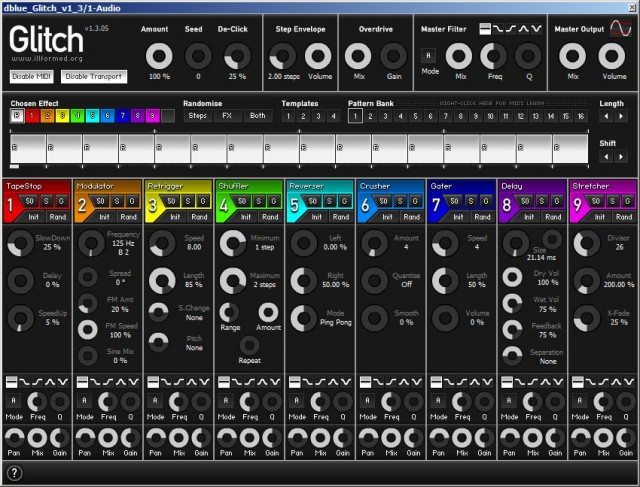
I’ll start it off with easily the most popular plug-in for live effects. It’s almost always on the top 10 in KVR’s plug-in ranks and gives you the flexibility to mangle your inputs inside and out. With it, you get a great ‘tape stop’ feature, bit crusher, gater, delay, chorus, shuffler (kind of like Ableton Live’s Beat Repeat effect), and a stretcher. Better yet, you can use that effect sequencer at the top to use multiple effects in sync with the beat (it’s 16 bars, or squares, long). You can also make your own presets, or, my favorite, randomize the sequencer. It’s because I love surprises.

:: DOWNLOAD ::

Classic Chorus
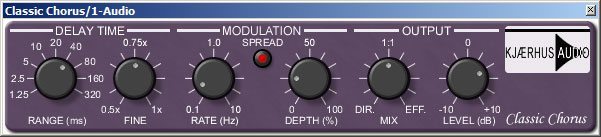
I’ve tried a lot of chorus plug-ins. Tons. Many of them were free, many of them weren’t free, but this one is probably one of the best sounding chorus plug-ins I’ve ever tried. With Classic Chorus you get great washy sounds without getting too distorted along with a solid set of parameters to fool around with.

Neat trick: Download Camel Crusher (below) and link up the distortion parameters to Classic Chorus’s modulation depth or the wet/dry knob for a gritty, spacy textured chorus.

I would also recommend checking the other plug-ins in the Classic series. It’s just a shame that Kjaerhus Audio isn’t around anymore!

:: DOWNLOAD ::

Tape Delay
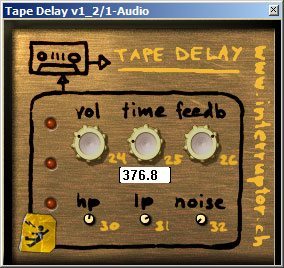
My all-time favorite delay plug-in. So simple, so elegant and if you love the soul-drenching delays of 70’s dub, you’ll love this plug-in. Keep the feedback low for short, stubby delays, or turn it up for long, drawn-out madness. Awesome for transitions, filler sounds, and whatever else you can think of.

:: DOWNLOAD ::

Camel Crusher
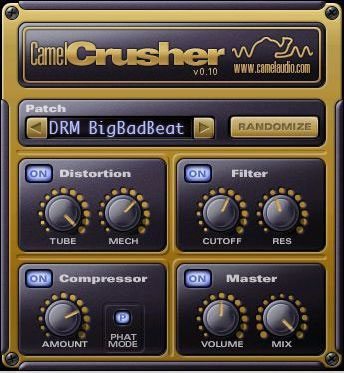
One of my favorite plug-in developers, Camel, gave out this goodie a while back. I think this is probably the best free bit crusher plug-in on the market. You get three effects: distortion, a filter, and a compressor each with their own parameters. Search through their presets first to get an idea of the different types of parameter and effect combinations.

If you’re rolling in the big bucks, might I suggest Camel Phat? A great, stable, versatile effect that has so many possibilities for MIDI heads, both in the studio and on stage.

:: DOWNLOAD ::

BlueCat Frequency Analysis 
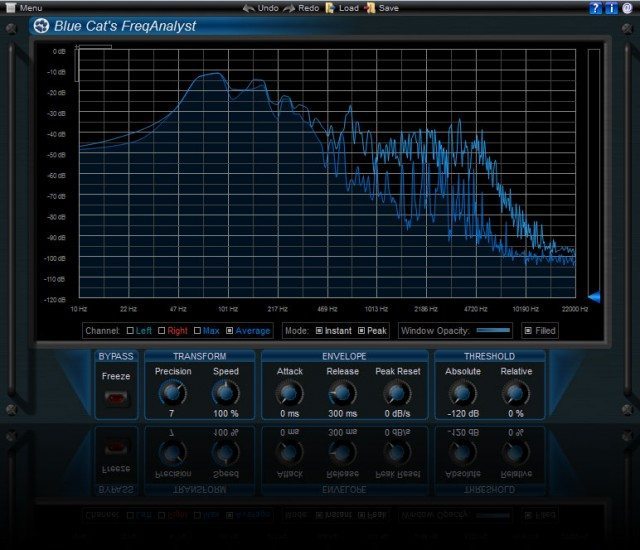
It never hurts to have frequency analysis. Not only is this a great tool for you, the DJ, but it’s even better for your audience. I can’t tell you how many times I’ve wanted to jump on stage and fool around with the DJ’s EQ because my ears were on the verge of bleeding.

Avoid someone doing that to you by using this free tool as a guide to what your sound looks like, and adjust how you see fit. If you use an analogue mixer, this won’t be of much use to you, but even then it still gives you a good idea of what your digital master-out sounds like, and helps you avoid clipping and bass-distortion.

:: DOWNLOAD ::

Did we miss any crucial VSTs that you use in a live setup? Let us know in the comments below! 
Tags: deckadance vstsdj vstsfree dj vstsglitchtorq vstsvirtual dj vsts
Share15Tweet9Share
Previous Post

A DJ’s Guide To An Awesome New Year’s Eve Set

Next Post

Ableton Live Tips: Launch Properties and Follow Actions

Related Posts

iZotope BreakTweaker Review: Rapidly Create Twisted Beats
How-To Video Tutorials

iZotope BreakTweaker Review: Rapidly Create Twisted Beats

February 25, 2014
Load More
Next Post
Ableton Live Tips: Launch Properties and Follow Actions

Ableton Live Tips: Launch Properties and Follow Actions

Want to reach DJTT's audience here?

Shoot an email to advertising@djtechtools.com

DJTT ads
DJTT newsletter
Midi Fighter
Chat with us
  • ABOUT DJTT
  • CONTACT
  • PRIVACY
  • MIDI FIGHTER HELP
  • ABOUT DJTT
  • JOBS
  • CONTACT US
  • ADVERTISE
  • PRIVACY POLICY
  • ACCESSIBILITY STATEMENT

© 2024 DJ Techtools all rights reserved by DJ TechTools on all content unless otherwise noted.

No Result
View All Result
  • Blog
    • DJ Gear
      • DIY Projects
      • Gear Reviews
      • New Products
      • Controllerism
    • Techniques + Tips
      • Beginner DJ
      • Advanced DJ
      • Producer
      • Finger Drummer
    • News + Culture
      • Editorials + Opinions
      • Artist Interviews
      • Performances + Routines
      • How I Play
    • DJ Software Tutorials
      • Serato Tips
      • CDJ Tips
      • Ableton Live Tips
  • Store
    • Run by real DJs, not a corporation
    • DJ Controllers
      • Midi Fighter Twister
      • Midi Fighter Spectra
      • Midi Fighter 64
      • View All
    • Accessories
      • Chroma USB Drive for DJs
      • Chroma Caps
      • Chroma Cables Audio
      • Chroma Cables USB-A
      • Chroma Cables: USB-C
      • DJTT Gift Card
      • Midi Fighter T-Shirt
      • Keyboard Covers
      • Earplugs by V-Moda
    • Production Gear
    • Soundcards & Mixers
  • Community
    • Popular Forums
      • General Discussion
      • Buy & Sell
      • Reviews
      • Mixes
      • Music Production
      • Show Your Setup
      • Off Topic
    • Handy Links
      • New Posts
      • Private Messages
      • Register
      • Search
    • Midi Maps
      • Traktor
      • Ableton
      • Serato DJ
      • Midi Fighter 3D
      • Midi Fighter Twister
      • Midi Fighter Spectra
  • Midi Fighter
  • Chroma

© 2024 DJ Techtools all rights reserved by DJ TechTools on all content unless otherwise noted.

This website uses cookies. By continuing to use this website you are giving consent to cookies being used. Visit our Privacy and Cookie Policy.