DJ TechTools
  • Blog
    • DJ Gear
      • DIY Projects
      • Gear Reviews
      • New Products
      • Controllerism
    • Techniques + Tips
      • Beginner DJ
      • Advanced DJ
      • Producer
      • Finger Drummer
    • News + Culture
      • Editorials + Opinions
      • Artist Interviews
      • Performances + Routines
      • How I Play
    • DJ Software Tutorials
      • Serato Tips
        • Traktor Tips
      • CDJ Tips
      • Ableton Live Tips
  • Store
    • Run by real DJs, not a corporation
    • DJ Controllers
      • Midi Fighter Twister
      • Midi Fighter Spectra
      • Midi Fighter 64
      • View All
    • Accessories
      • Chroma USB Drive for DJs
      • Chroma Caps
      • Chroma Cables Audio
      • Chroma Cables USB-A
      • Chroma Cables: USB-C
      • DJTT Gift Card
      • Midi Fighter T-Shirt
      • Keyboard Covers
      • Earplugs by V-Moda
    • Production Gear
    • Soundcards & Mixers
  • Community
    • Popular Forums
      • General Discussion
      • Buy & Sell
      • Reviews
      • Mixes
      • Music Production
      • Show Your Setup
      • Off Topic
    • Handy Links
      • New Posts
      • Private Messages
      • Register
      • Search
    • Midi Maps
      • Traktor
      • Ableton
      • Serato DJ
      • Midi Fighter 3D
      • Midi Fighter Twister
      • Midi Fighter Spectra
  • Midi Fighter
  • Chroma
No Result
View All Result
DJ TechTools
  • Blog
    • DJ Gear
      • DIY Projects
      • Gear Reviews
      • New Products
      • Controllerism
    • Techniques + Tips
      • Beginner DJ
      • Advanced DJ
      • Producer
      • Finger Drummer
    • News + Culture
      • Editorials + Opinions
      • Artist Interviews
      • Performances + Routines
      • How I Play
    • DJ Software Tutorials
      • Serato Tips
        • Traktor Tips
      • CDJ Tips
      • Ableton Live Tips
  • Store
    • Run by real DJs, not a corporation
    • DJ Controllers
      • Midi Fighter Twister
      • Midi Fighter Spectra
      • Midi Fighter 64
      • View All
    • Accessories
      • Chroma USB Drive for DJs
      • Chroma Caps
      • Chroma Cables Audio
      • Chroma Cables USB-A
      • Chroma Cables: USB-C
      • DJTT Gift Card
      • Midi Fighter T-Shirt
      • Keyboard Covers
      • Earplugs by V-Moda
    • Production Gear
    • Soundcards & Mixers
  • Community
    • Popular Forums
      • General Discussion
      • Buy & Sell
      • Reviews
      • Mixes
      • Music Production
      • Show Your Setup
      • Off Topic
    • Handy Links
      • New Posts
      • Private Messages
      • Register
      • Search
    • Midi Maps
      • Traktor
      • Ableton
      • Serato DJ
      • Midi Fighter 3D
      • Midi Fighter Twister
      • Midi Fighter Spectra
  • Midi Fighter
  • Chroma
No Result
View All Result
DJ TechTools

Mixed In Key Mashup: DJTT Staff Review

Dan White by Dan White
February 10, 2012
in DJ Software, DJ Software Tips, Reviews
Reading Time: 4 mins read
0
Mixed In Key Mashup: DJTT Staff Review
189
VIEWS
Post on FacebookTweet thisUpvote on Reddit

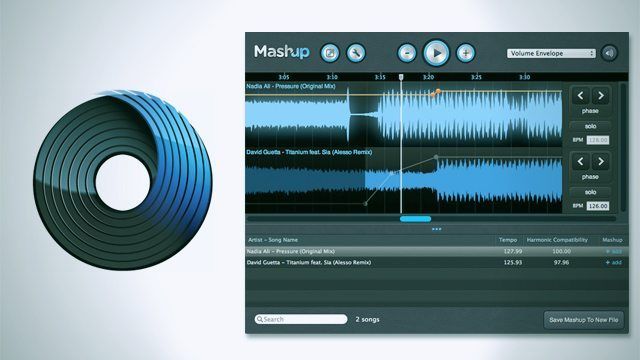
Released to the public earlier this week, Mixed In Key’s Mashup is a new simple audio program designed around the creation of super simple key-matched mashups. In addition to taking a look at the software’s features and foibles, we challenged some of the DJTT staff to try and make their own mashups with the tool in under ten minutes – read on for the results and reviews.

Mashed Tracks, Monsieur?

The process of getting started with Mashup is super simple. First, drag the tracks that you want to mash up or consider mashing up into the lower panel of the program, and it analyzes them, revealing the BPM (and once you’ve started a project, the Harmonic Compatibility). When you choose a song to start with, you drag it into the top window, and it lays it out on a beatgrid. Below, all of the other songs that you’ve analyzed then display a “Harmonic Compatibility” – essentially how close they match in key to your project on a scale of 0 – 100.
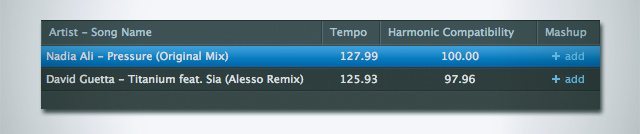
Taste aside, Guetta is determined to highly compatible.

Mashup gives you some very simple editing tools to get your idea into place.  You can adjust track BPMs and phase correct songs on an entire-song basis, as well as adjust four different envelopes (three band EQ and track volume) per track. That’s about where the editing tools end – and it’s at this point that we realized that this tool is by no means a replacement for professional DAWs, nor is it a replacement for a standard audio editor like Audacity or Cool Edit Pro.
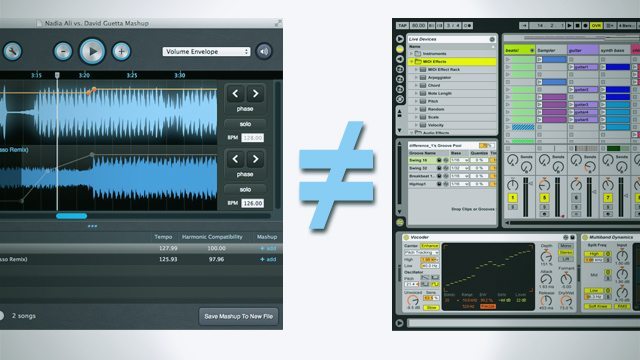
Apples and Oranges, folks.

What Mashup does really well is help budding producers conceptualize their ideas, or allow veterans to quickly play around with mashing two tracks together. It’s fun, but don’t expect to become the next Hood Internet after using this software. Quite honestly, we think it would make an awesome mobile app – mashing songs on the go, please!

Ten Minutes or Less: DJTT Makes Mashups

So we decided to challenge ourselves – myself, Zach and Mitch each had a crack at the program to see what we could whip up in less than ten minutes (the official Mashup webpage claims one can get a mashup rolling in just 5 minutes). We set a few basic rules for ourselves, and then got to work! Our results and impressions of the software are below.

Disclaimer from participants: It’s worth noting that these most certainly aren’t the best mashups in the world – we don’t claim to be world-class mashup producers, and especially considering we were only allowed ten minutes sitting down with a brand new piece of software. Although we’re sure that you’ll point out exactly what is and isn’t awesome about our mashups in the comments. We love you.

The Rules:

  • Less than ten minutes editing the actual mashup (more allowed for key analysis).
  • Can’t have used the software before.
  • No acapellas!
  • No additional editing besides silence trimming.

Dan (Managing Editor) 

Production Experience: Minimal at best.


Mashup Title:
Why Do You Get Naked?
Tracks Used: A1 Bassline – Why Do You / Hot Dolla ft. Shawty Redd – Get Naked
Talk About Making The Mashup: It felt like a really simple version of Mix Meister, just watered down. The autokey/BPM detection is nice, which allowed for easy trial and error of ideas. I knew going into the process that the program was brand new and not a complete DAW solution, so my expectations were relatively low.

Liked:

  • Simple alignment
  • Smart detection
  • Speed of idea trial

What Could Be Better:

  • Allow exporting into a more feature-filled DAW
  • Might be fun as a tablet app
  • Couldn’t slice tracks – I’m guessing because it’s just referencing files, not saving a full project file.
  • When zoomed
  • Need “save as” option for project files for making new variations

Mitch

Production Experience: Intermediate

Mashup Title: London Fly Son!
Tracks Used: The Clash – London Calling / Blondes – Spanish Fly (Brenmar Remix)
Talk About The Process: The workflow is enjoyable… however limited. The interface is nice due to this lacking though, nice and simple. With zero experience with the program I was able to figure it out in 2 minutes. Everything dragged and dropped right in, but the program had difficulty processing MP4 files. (Editor’s Note: This is probably iTunes’ fault.) Other than that, it is primarily self explanatory.

Liked:

  • Simplicity
  • Smooth zooming functionality

What Could Be Better:

  • Absolutely needs the ability to adjust phase sectionally (ie. in my mashup, The Clash – London Calling being played by a live drummer somewhat out of phase) requires minute adjustments at different points in the “mashing” track.
  • More adjustment options besides volume and EQ, like simple FX, maybe a reverse or gater.

Zach

Production Experience: Beginner

Mashup Title: Funky Big Booties
Tracks Used: Notorious BIG – Big Booty Hoes / Koan Sound – Funk Blaster
Talk About Making The Mashup: I found it very easy to use, but very limited. Needs a few more features to convince me to use it regularly.
Liked:

  • Ease of Use

What Could Be Better:

  • Adding the ability to warp or beatgrid different sections of the tracks.
  • Wanted to use cut, copy, and paste on tracks!

Mixed in Key Mashup is available now on Mac or PC for $39. For more information, visit their official page.
Think you’ve got the ultimate mashup? Show it off in the comments.  
Tags: making mashupsmashup softwaremixed in key mashup
Share2Tweet1Share
Previous Post

The VCI-100’s Last Hurrah: New Traktor Pro 2 Overlay

Next Post

Online DJ Scratch Schools Comparison: Which Is Right For You?

Related Posts

How To Make A Vocal Mashup
Ableton Live Tips

How To Make A DJ Edit (Part 2): Vocal Mashups

February 8, 2019
Mashup 2.0: Garageband For Mashups
Breaking News

Mashup 2.0: Garageband For Mashups

February 27, 2014
Mashup 1.5 Released, New Editing and Beat Matching Features
News

Mashup 1.5 Released, New Editing and Beat Matching Features

April 4, 2012
Load More
Next Post
Online DJ Scratch Schools Comparison: Which Is Right For You?

Online DJ Scratch Schools Comparison: Which Is Right For You?

Want to reach DJTT's audience here?

Shoot an email to advertising@djtechtools.com

DJTT ads
DJTT newsletter
Midi Fighter
Chat with us
  • ABOUT DJTT
  • CONTACT
  • PRIVACY
  • MIDI FIGHTER HELP
  • ABOUT DJTT
  • JOBS
  • CONTACT US
  • ADVERTISE
  • PRIVACY POLICY
  • ACCESSIBILITY STATEMENT

© 2024 DJ Techtools all rights reserved by DJ TechTools on all content unless otherwise noted.

No Result
View All Result
  • Blog
    • DJ Gear
      • DIY Projects
      • Gear Reviews
      • New Products
      • Controllerism
    • Techniques + Tips
      • Beginner DJ
      • Advanced DJ
      • Producer
      • Finger Drummer
    • News + Culture
      • Editorials + Opinions
      • Artist Interviews
      • Performances + Routines
      • How I Play
    • DJ Software Tutorials
      • Serato Tips
      • CDJ Tips
      • Ableton Live Tips
  • Store
    • Run by real DJs, not a corporation
    • DJ Controllers
      • Midi Fighter Twister
      • Midi Fighter Spectra
      • Midi Fighter 64
      • View All
    • Accessories
      • Chroma USB Drive for DJs
      • Chroma Caps
      • Chroma Cables Audio
      • Chroma Cables USB-A
      • Chroma Cables: USB-C
      • DJTT Gift Card
      • Midi Fighter T-Shirt
      • Keyboard Covers
      • Earplugs by V-Moda
    • Production Gear
    • Soundcards & Mixers
  • Community
    • Popular Forums
      • General Discussion
      • Buy & Sell
      • Reviews
      • Mixes
      • Music Production
      • Show Your Setup
      • Off Topic
    • Handy Links
      • New Posts
      • Private Messages
      • Register
      • Search
    • Midi Maps
      • Traktor
      • Ableton
      • Serato DJ
      • Midi Fighter 3D
      • Midi Fighter Twister
      • Midi Fighter Spectra
  • Midi Fighter
  • Chroma

© 2024 DJ Techtools all rights reserved by DJ TechTools on all content unless otherwise noted.

This website uses cookies. By continuing to use this website you are giving consent to cookies being used. Visit our Privacy and Cookie Policy.