


DJ TechTools
  • Blog
    • DJ Gear
      • DIY Projects
      • Gear Reviews
      • New Products
      • Controllerism
    • Techniques + Tips
      • Beginner DJ
      • Advanced DJ
      • Producer
      • Finger Drummer
    • News + Culture
      • Editorials + Opinions
      • Artist Interviews
      • Performances + Routines
      • How I Play
    • DJ Software Tutorials
      • Serato Tips
        • Traktor Tips
      • CDJ Tips
      • Ableton Live Tips
  • Store
    • Run by real DJs, not a corporation
    • DJ Controllers
      • Midi Fighter Twister
      • Midi Fighter Spectra
      • Midi Fighter 64
      • View All
    • Accessories
      • Chroma USB Drive for DJs
      • Chroma Caps
      • Chroma Cables Audio
      • Chroma Cables USB-A
      • Chroma Cables: USB-C
      • DJTT Gift Card
      • Midi Fighter T-Shirt
      • Keyboard Covers
      • Earplugs by V-Moda
    • Production Gear
    • Soundcards & Mixers
  • Community
    • Popular Forums
      • General Discussion
      • Buy & Sell
      • Reviews
      • Mixes
      • Music Production
      • Show Your Setup
      • Off Topic
    • Handy Links
      • New Posts
      • Private Messages
      • Register
      • Search
    • Midi Maps
      • Traktor
      • Ableton
      • Serato DJ
      • Midi Fighter 3D
      • Midi Fighter Twister
      • Midi Fighter Spectra
  • Midi Fighter
  • Chroma
No Result
View All Result
DJ TechTools
  • Blog
    • DJ Gear
      • DIY Projects
      • Gear Reviews
      • New Products
      • Controllerism
    • Techniques + Tips
      • Beginner DJ
      • Advanced DJ
      • Producer
      • Finger Drummer
    • News + Culture
      • Editorials + Opinions
      • Artist Interviews
      • Performances + Routines
      • How I Play
    • DJ Software Tutorials
      • Serato Tips
        • Traktor Tips
      • CDJ Tips
      • Ableton Live Tips
  • Store
    • Run by real DJs, not a corporation
    • DJ Controllers
      • Midi Fighter Twister
      • Midi Fighter Spectra
      • Midi Fighter 64
      • View All
    • Accessories
      • Chroma USB Drive for DJs
      • Chroma Caps
      • Chroma Cables Audio
      • Chroma Cables USB-A
      • Chroma Cables: USB-C
      • DJTT Gift Card
      • Midi Fighter T-Shirt
      • Keyboard Covers
      • Earplugs by V-Moda
    • Production Gear
    • Soundcards & Mixers
  • Community
    • Popular Forums
      • General Discussion
      • Buy & Sell
      • Reviews
      • Mixes
      • Music Production
      • Show Your Setup
      • Off Topic
    • Handy Links
      • New Posts
      • Private Messages
      • Register
      • Search
    • Midi Maps
      • Traktor
      • Ableton
      • Serato DJ
      • Midi Fighter 3D
      • Midi Fighter Twister
      • Midi Fighter Spectra
  • Midi Fighter
  • Chroma
No Result
View All Result
DJ TechTools

Ableton Contest: Win a Pre-Release Midi Fighter 3D

Mad Zach by Mad Zach
March 21, 2012
in Ableton Live Tips, DJ Contests, Midi Fighter, Midi Fighter 3D, Midi Fighter Pro, News, Video Posts
Reading Time: 4 mins read
0
Ableton Contest: Win a Pre-Release Midi Fighter 3D
53
VIEWS
Post on FacebookTweet thisUpvote on Reddit

To celebrate the fast-approaching release of our newest controller, we’re holding a contest to give you an exclusive opportunity to get a Midi Fighter 3D before they are public. For this special occasion, it seemed fitting that we challenge everyone to think creatively and explore what’s possible with electronic music performance. Continue reading to download a free Ableton Live sample pack that will turn your controllers into a true instrument!

We called upon our in-house Ableton specialist Mad Zach to create a killer rack of samples set up perfectly for Ableton’s drumrack. The 64 sample rack contains four banks of sounds optimized for live performance,  each with their own set of drums, synths, and one shot samples.

This layout showcases Ableton’s highly flexible instrument rack to create dynamic banks that pump and glue together in an totally interactive way.

The drum rack is turbo charged by our brand new firmware update for Midi Fighter and Midi Fighter Pro (see below) which unlocks hot new functionality, including the ability to switch between toggle and momentary MIDI assign modes. This allows you to finally utilize momentary FX in Ableton, a sweet new feature that was not previously possible on the Midi Fighters!

Ready to Rock?!

How do I enter?  Record your performance and  post a video reply to this video 

How do I Win? Create the most creative arrangement and performance of this free ableton drum rack ( Editor’s Note: this rack was free only available during the contest period – it’s available as a part of Mad Zach’s Soundpacks Volume I) 

How Long Should It Be? Keep it under two minutes, captain. Unfortunately, we don’t have hundreds of hours to watch 15 minute extravaganzas!

What’s Off Limits? Excessive use of other sample packs, drum racks or sounds – keep it focused on the included rack. Software other than Ableton Live.

When is the Contest Over?! The contest ends APRIL 4th and winners will be announced April 10th.

What Can I Use? Any controller or keyboard on the planet.

While we’re not going to require you to use a Midi Fighter, the rack was designed with a 4×4 grid in mind. That said, even if you don’t have a MIDI controller, you can still use your computer keyboard to trigger the samples. (Ableton keyboard mappings).

What Do I Win? Isn’t it clear? One of the very first Midi Fighter 3Ds!
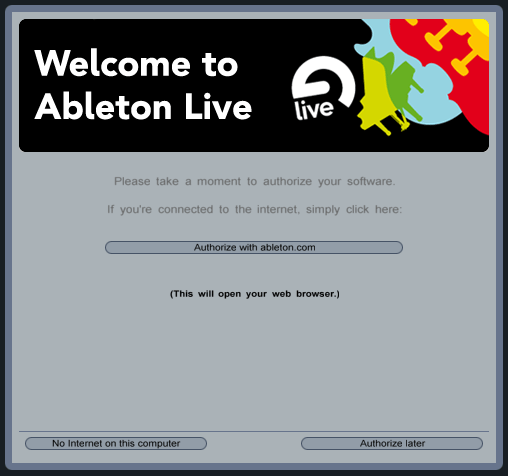

If you don’t currently have a copy of Live, fear not! You can still participate by downloading this trial version of the software from Ableton’s site. Although you will be limited by not being able to save, you can still use all the functionality of the software, including installing the drumrack.

Midi Fighter Firmware Update!
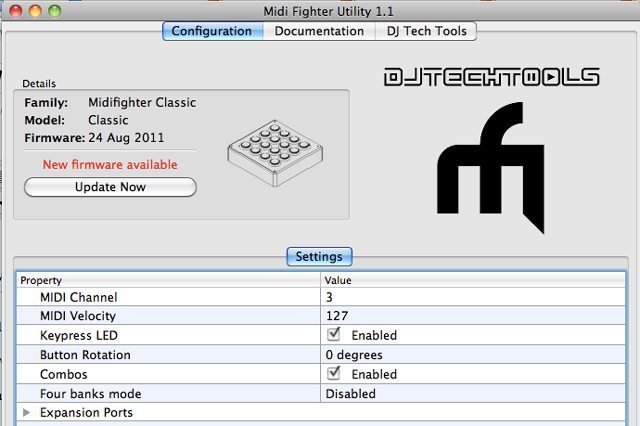
In order to milk the most out of your Midi Fighter Classic or Pro and make it work beautifully with Ableton, download the new configuration utility here. This new utility gives you the option of selecting a new Ableton focused firmware, simply select “Ableton Live” and load the new firmware to your Midi Fighter.  If you ever screw up your settings and have any issues you can always do a factory reset configuration in the utility tools menu bar.

Installing the Rack
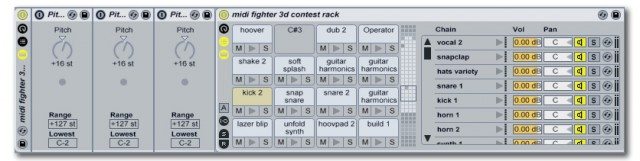
  1. Download the Midi Fighter 3d Contest Rack (Editor’s Note: this rack was free only available during the contest period – it’s available as a part of Mad Zach’s Soundpacks Volume I) 
  2. Quit Ableton Live (it must be installed)
  3. Double click the file and let Ableton open the live pack.
  4. Pick where you want to install the pack (i.e. music/ableton/projects).
  5. Head back to that location  (i.e. music/ableton/projects) in your file manager.
  6. Look for a project named “Midi Fighter 3D contest Rack” and open it.
  7. Save the instrument rack to your library by hitting the save icon.
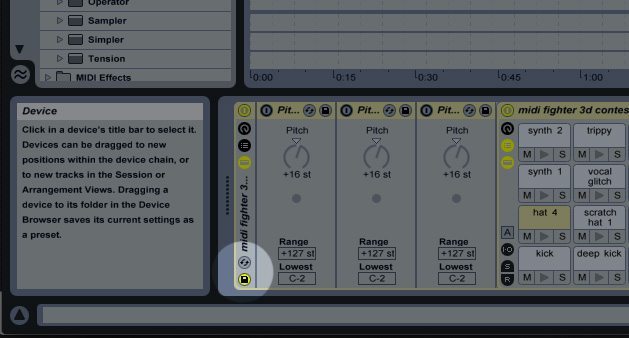
Switching banks…

To switch between banks, use the keyboard keys “z, x, and c” to turn on and off a series of three pitch objects. Each pitch object moves all the MIDI notes up 16 steps. If you have all the pitch objects on at once, that means you are in the last bank. Order does not affect the bank, only the number of pitch objects “on.”

Mad Zach - Author

Mad Zach is a maverick controllerist and producer, focused on bridging the gap between production and performance.

Follow Mad Zach on: Facebook SoundCloud Twitter YouTube

 

Tags: ableton drumrackableton liveableton midi fightermad zachmidi fighter 3d contest
ShareTweetShare
Previous Post

Is Planning a DJ Set Cheating?

Next Post

Reloop Beatmix Announced, Designed for Virtual DJ

Related Posts

Ableton launches Live 12 Suite rent-to-own plan – and it’s not a subscription
Ableton

Ableton launches Live 12 Suite rent-to-own plan – and it’s not a subscription

October 1, 2025
Use your Midi Fighter Twister as an Audio-Reactive Visualizer
Ableton Live Tips

Use your Midi Fighter Twister as an Audio-Reactive Visualizer

June 23, 2025
Control an entire studio with Midi Fighter Spectra (like Mad Zach)
Finger Drumming

Control an entire studio with Midi Fighter Spectra (like Mad Zach)

May 9, 2025
Load More
Next Post
Reloop Beatmix Announced, Designed for Virtual DJ

Reloop Beatmix Announced, Designed for Virtual DJ

Want to reach DJTT's audience here?

Shoot an email to advertising@djtechtools.com

DJTT ads
DJTT newsletter
Midi Fighter
Chat with us
  • ABOUT DJTT
  • CONTACT
  • PRIVACY
  • MIDI FIGHTER HELP
  • ABOUT DJTT
  • JOBS
  • CONTACT US
  • ADVERTISE
  • PRIVACY POLICY
  • ACCESSIBILITY STATEMENT

© 2024 DJ Techtools all rights reserved by DJ TechTools on all content unless otherwise noted.

No Result
View All Result
  • Blog
    • DJ Gear
      • DIY Projects
      • Gear Reviews
      • New Products
      • Controllerism
    • Techniques + Tips
      • Beginner DJ
      • Advanced DJ
      • Producer
      • Finger Drummer
    • News + Culture
      • Editorials + Opinions
      • Artist Interviews
      • Performances + Routines
      • How I Play
    • DJ Software Tutorials
      • Serato Tips
      • CDJ Tips
      • Ableton Live Tips
  • Store
    • Run by real DJs, not a corporation
    • DJ Controllers
      • Midi Fighter Twister
      • Midi Fighter Spectra
      • Midi Fighter 64
      • View All
    • Accessories
      • Chroma USB Drive for DJs
      • Chroma Caps
      • Chroma Cables Audio
      • Chroma Cables USB-A
      • Chroma Cables: USB-C
      • DJTT Gift Card
      • Midi Fighter T-Shirt
      • Keyboard Covers
      • Earplugs by V-Moda
    • Production Gear
    • Soundcards & Mixers
  • Community
    • Popular Forums
      • General Discussion
      • Buy & Sell
      • Reviews
      • Mixes
      • Music Production
      • Show Your Setup
      • Off Topic
    • Handy Links
      • New Posts
      • Private Messages
      • Register
      • Search
    • Midi Maps
      • Traktor
      • Ableton
      • Serato DJ
      • Midi Fighter 3D
      • Midi Fighter Twister
      • Midi Fighter Spectra
  • Midi Fighter
  • Chroma

© 2024 DJ Techtools all rights reserved by DJ TechTools on all content unless otherwise noted.

This website uses cookies. By continuing to use this website you are giving consent to cookies being used. Visit our Privacy and Cookie Policy.



