Traktor 2.5’s release date has finally come, and the new version of Native Instruments’ digital DJ software is ready for downloading now. If you own any version of Traktor 2.x, it’s a free upgrade for you. We’ve got our first impressions at some of the improvements and new features – as well as a few basic upgrading tips!
I WANT MY TRAKTOR 2.5
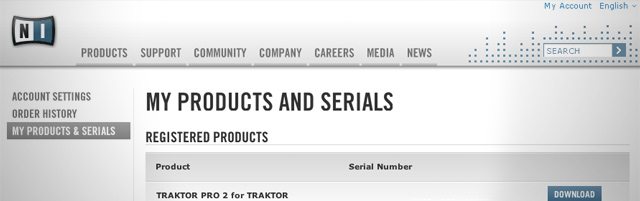
Ready for your free upgrade? You can grab 2.5 by opening up the Native Instruments Service Center application and checking the upgrade tab – but if for some reason it’s not there yet, some of our crafty DJTT forum members have found it hiding on NI’s site by logging into your user account and checking the “My Products and Serials” section.
BEFORE YOU UPGRADE!
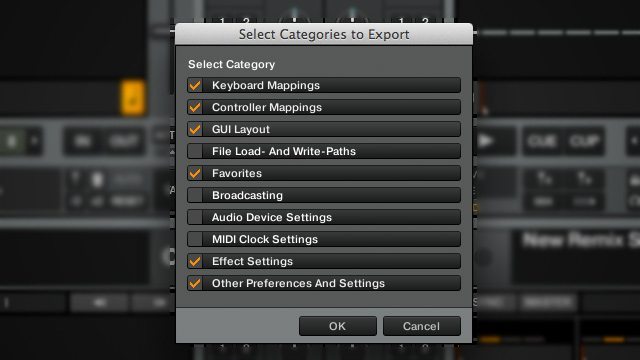
While 2.5 will automatically import all of your Traktor data into the new version, some users might prefer to start (relatively) fresh on this install. Either way, it’s a very smart idea to export all of your Traktor settings and ensure that you’ve got a copy of your personal preferences in the rare event that anything should go wrong in the install. Here’s how:
- Open Traktor Preferences
- Click the “Export” button
- Check everything you want to save!
- Export away.
This is a smart idea to do anytime you make a major change to Traktor (upgrade, new mappings, new controllers, etc) so that you’ll always be able to revert back to the way things were if you find you’ve messed up your settings.
IMPROVEMENT: BPM AND BEATGRID DETECTION
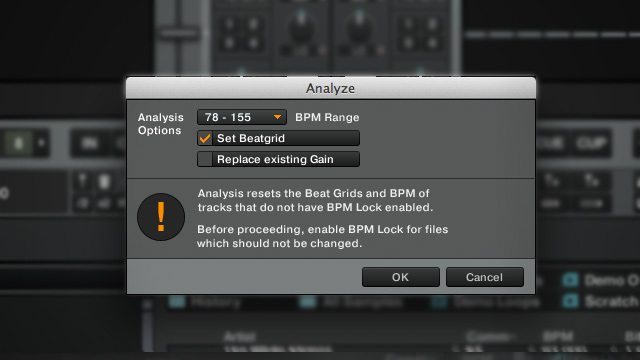
One of the major improvements that Native Instruments has been touting in this new version of track has been a complete rewrite of the tempo and beats per minute detection engine. Worth noting is the new window in the screenshot above that allows you to make a few adjustments to the analysis when you add a track to your Traktor collection.
We loaded in a number of new tracks into 2.5 to give it a test, and did notice a seemingly more accurate default detection on beats, but we’ll be interested to see if genres or tracks that Traktor has had trouble with in the past are detected a bit more precisely – let us know your experiences in the comments.
IMPROVEMENT: MAJOR PERFORMANCE UPGRADE
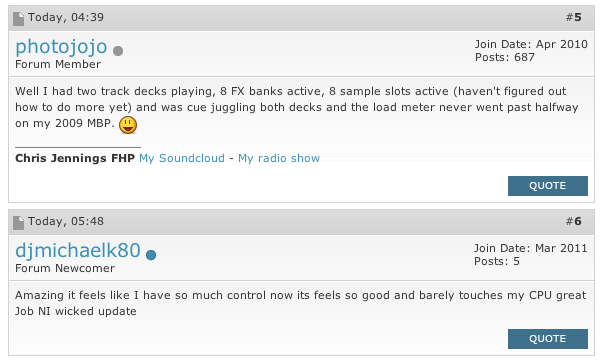
We’ve noticed (and so have others in the above NI forum posts) that while playing out a set on 2.5, the CPU load meter stayed much lower than in previous Traktor versions – perhaps even lower than we’ve seen since Traktor Pro 2 came out. There’s been serious behind-the-scenes optimization to Trakor, likely to accommodate for heavier FX usage and total active playing tracks/loops/samples with the new Remix Decks.
CHANGE: CONTROLLER MANAGER COMMANDS
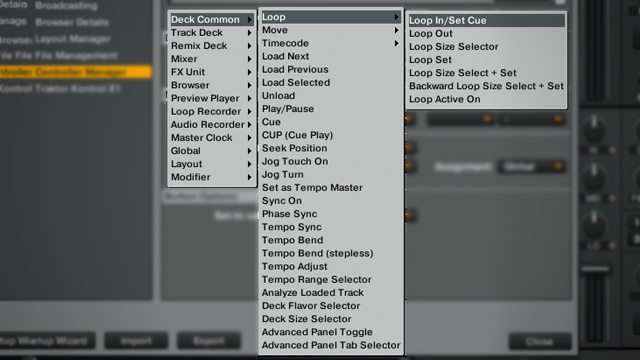
If you’re a mapping guru, you’ll be interested to know that Traktor has changed around the sorting and names of some of Controller Manager’s mappable commands. We haven’t seen any associated problems with mappings yet, so we’re hoping that the new labels are intelligent enough to be able to import mappings with the older commands with no issues.
Additionally, you can now use the “Learn” functionality on MIDI out commands – meaning that LED mapping is about to get a whole lot simpler.
Unfortunately, you still can’t expand the size of the Controller Manager window. Please, NI?
WHAT ABOUT THE REMIX DECKS?
The Remix Decks do work as advertised, and one of the cool features of the new BPM engine is that beatgrid detection on short loops and samples is drastically improved in this version of Traktor. This means that loop generation for the Remix Decks is fairly straightforward.
We’re holding off on a complete review of the Remix Decks until the middle of next week when the Traktor Kontrol F1 officially launches. Look forward to an in-depth analysis and assessment of the Remix Deck/F1 workflow!
PROMOTIONAL VIDEO TIME!
NI’s got a brand new video routine on the F1s with “Techno Explorer” and one of the brains behind Itch Clips, Stewart Walker. While the video doesn’t show off any new features we haven’t seen before, it is nice to see that the workflow is solid and sensible for less performative DJs (only in comparison to Shiftee’s F1 video) to play a set on.
FULL CHANGELIST
There have been a number of smaller tweaks in 2.5 – here’s the full list for you to peruse!
KEY FEATURES:
• Implementation of Remix Decks
• F1 integrationANALYSIS:
• Fully overworked tempo and beat detection
• Additional options dialog with predefined BPM ranges allows to customize the behavior of the analysis right before it is triggered
• Specialized BPM detection for loops, one-shots and files shorter than 20 secondsTHIRD PARTY CONTROLLERS:
• Stage one CDJ integration: Improved Jogweel and Joglight integration for Pioneer CDJ-2000, CDJ-900 and CDJ-400BROWSER / COLLECTION:
• Content of Remix Deck can be saved and reloaded as Remix Set managed in the Browser as a single entry
• Context menus in browser are now content type sensitive
• State of browser tree is recalled from previous session when starting TRAKTOR
• iTunes node now can always be opened by ignoring corrupt entries in iTunes xml
• Select-All feature moved from double-click on tree node to context menu, to avoid conflicts with double-click opening of folders
• Search in browser now includes path name
• Importing another collection now preserves favorites
• History playlists now contain duration of played tracks
• Exported playlists now contain correct path information to the contained files
• Browser status bar shows correct information about search results
• Horizontal scrolling in browser using a trackpad improvedCONTROLLER MANAGER:
• Fully reworked structure and consolidated wording of mappable Controller Manager entries
• Controller Manager now suggests corresponding output for the selected input to facilitate mapping of LED’s
• MIDI outputs (typically LED’s) can now be learned by pressing the corresponding MIDI button
• Added “Slot Play Type” and “Slot Trigger Type” to the list of modifier conditionsPREFERENCES:
• User defined Input/Output Routings are new saved between sessions
• The control panels of Traktor Audio interfaces can now be opened without interrupting audioTRACK DECKS:
• Repeatedly duplicating the same track is now totally seamless
• Stripe display for high resolution displays fixed
• Auto loops size now follows manual loops size which allows to adjust manual loops with the auto loop controls.MIXER:
• The channel filter curves have been shaped for smoother transitions around the neutral positionTIMECODE:
• Improved stability of MK2 timecode decoder
• Disabled processing of unused timecode decoders
• Timecode drift compensation and skipless mode are now also working at 45 RPM
• Exiting timecode CD rescue mode by skipping to start of CD Track 2 fixed
• Synchro-start is now correctly applied when staring playback of a deck, which has previously been stopped by stopping the timecode recordTRAKTOR KONTROL S4/S2:
• S4/S2 sample slot functionality matched to Remix Deck functionality
Overall, it seems like a solid upgrade to us, although we really wish that Native Instruments might have one more look over our Christmas Wishlist we wrote six months ago. What else have you noticed is or isn’t the this new version of Traktor?