DJ TechTools
  • Blog
    • DJ Gear
      • DIY Projects
      • Gear Reviews
      • New Products
      • Controllerism
    • Techniques + Tips
      • Beginner DJ
      • Advanced DJ
      • Producer
      • Finger Drummer
    • News + Culture
      • Editorials + Opinions
      • Artist Interviews
      • Performances + Routines
      • How I Play
    • DJ Software Tutorials
      • Serato Tips
        • Traktor Tips
      • CDJ Tips
      • Ableton Live Tips
  • Store
    • Run by real DJs, not a corporation
    • DJ Controllers
      • Midi Fighter Twister
      • Midi Fighter Spectra
      • Midi Fighter 64
      • View All
    • Accessories
      • Chroma USB Drive for DJs
      • Chroma Caps
      • Chroma Cables Audio
      • Chroma Cables USB-A
      • Chroma Cables: USB-C
      • DJTT Gift Card
      • Midi Fighter T-Shirt
      • Keyboard Covers
      • Earplugs by V-Moda
    • Production Gear
    • Soundcards & Mixers
  • Community
    • Popular Forums
      • General Discussion
      • Buy & Sell
      • Reviews
      • Mixes
      • Music Production
      • Show Your Setup
      • Off Topic
    • Handy Links
      • New Posts
      • Private Messages
      • Register
      • Search
    • Midi Maps
      • Traktor
      • Ableton
      • Serato DJ
      • Midi Fighter 3D
      • Midi Fighter Twister
      • Midi Fighter Spectra
  • Midi Fighter
  • Chroma
No Result
View All Result
DJ TechTools
  • Blog
    • DJ Gear
      • DIY Projects
      • Gear Reviews
      • New Products
      • Controllerism
    • Techniques + Tips
      • Beginner DJ
      • Advanced DJ
      • Producer
      • Finger Drummer
    • News + Culture
      • Editorials + Opinions
      • Artist Interviews
      • Performances + Routines
      • How I Play
    • DJ Software Tutorials
      • Serato Tips
        • Traktor Tips
      • CDJ Tips
      • Ableton Live Tips
  • Store
    • Run by real DJs, not a corporation
    • DJ Controllers
      • Midi Fighter Twister
      • Midi Fighter Spectra
      • Midi Fighter 64
      • View All
    • Accessories
      • Chroma USB Drive for DJs
      • Chroma Caps
      • Chroma Cables Audio
      • Chroma Cables USB-A
      • Chroma Cables: USB-C
      • DJTT Gift Card
      • Midi Fighter T-Shirt
      • Keyboard Covers
      • Earplugs by V-Moda
    • Production Gear
    • Soundcards & Mixers
  • Community
    • Popular Forums
      • General Discussion
      • Buy & Sell
      • Reviews
      • Mixes
      • Music Production
      • Show Your Setup
      • Off Topic
    • Handy Links
      • New Posts
      • Private Messages
      • Register
      • Search
    • Midi Maps
      • Traktor
      • Ableton
      • Serato DJ
      • Midi Fighter 3D
      • Midi Fighter Twister
      • Midi Fighter Spectra
  • Midi Fighter
  • Chroma
No Result
View All Result
DJ TechTools

Create Rockstar Style Analog Distortion Feedback in Ableton

Mad Zach by Mad Zach
May 27, 2012
in Ableton Live Tips, Ableton Videos, Advanced DJ Tips, How-To Video Tutorials, Video Posts, Videos
Reading Time: 3 mins read
0
Create Rockstar Style Analog Distortion Feedback in Ableton
625
VIEWS
Post on FacebookTweet thisUpvote on Reddit

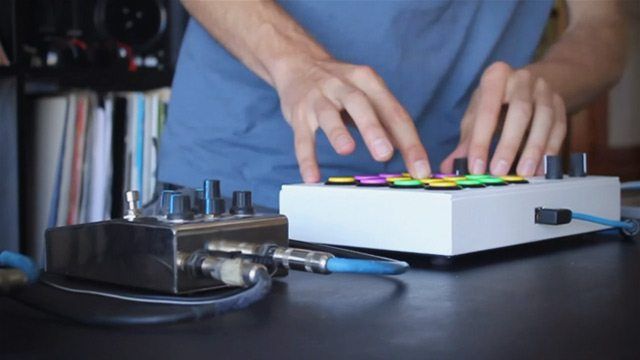
When sitting in front of a DAW with limitless software possibilities, it can be easy to forget that some of the coolest sounds and effects you can make can come from external effects processors. In today’s video, Mad Zach takes us through one of his favorite hardware wirings, an external distortion pedal setup. Check out the video, as well as an Ableton template and a equipment list, after the jump.

DISTORTION LIKE HENDRIX


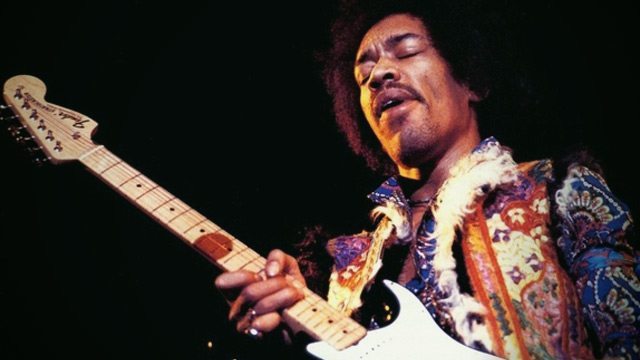
Distortion has been cool way longer than whomp. It was the staple of many an early rock pioneer, and its inception represents an important first step towards thinking of noise as music. According to Wikipedia, the first recorded creative use of feedback was by the Beatles in 1964 with their track, “I Feel Fine”, although in the year and half following the effect was extensively brandished by a veritable who’s who of rockers. Jimi Hendrix was, if not the first, one of the most important and well-known pioneers of feedback, a prime example of which was his performance of “Can You See Me?” at the Monterey Pop festival in which he used feedback for the entire guitar solo.
In a world of music dominated by heavy hitting headliners like Skrillex and Bassnectar, I began to wonder, how can one truly rock out without distortion and feedback? Today I’m going to be revealing a very exciting little trick you can do to create the kind of face-melting freak out performances that have been swept under the rug in recent years.

EQUIPMENT LIST:

  1. Audio interface with 2+ out/1+ input (in the video, a Edirol FA-66, similar to the Edirol FA-101 10 x 10)
  2. Distortion pedal or unit (software won’t work properly to create the same effect – compare some distortion pedals here)
  3. Cables for routing inputs/outputs
  4. Ableton Live or software with similar routing capabilities
  5. MIDI controller with knobs and/or sliders (in the video, I use the Midi Fighter Pro)
  6. Leopard print spandex jumper

MAKING IT WORK
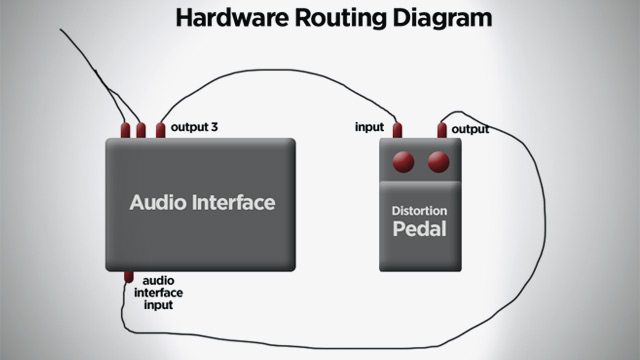
Route the audio coming from your instrument track (drums or instrument both work) to a dedicated output. I use output 3, but the main thing is that this be separate from your main output. Run this signal through your distortion pedal and back into input 1 on your interface. Create an audio track to receive this signal.

Next, create a return track that is routed to external output 3 (the same output used to route your instrument through the distortion pedal). Now, by sending your audio track (the one that receives audio from the distortion unit) to the return track that is ALSO routed to output 3, you can create feedback!

Confused? We’ve made a demo Ableton template (click to download) that shows exactly the routing used in the video.

Tips for making it awesome: It’s a fine dance – you don’t need to send very much signal to create the effect. You’ll want to play with filtering the signal going through the return track to get a dramatic effect similar to moving closer or farther to the “amp.” This is where you can really start to play the distortion and feedback like its own instrument.

Have external effects processors that you really enjoy using with your setup? Let us know what and how you wire them in the comments! 

Tags: ableton effectsableton livedawDigital audio workstationexternal pedalshow toJimi Hendrixskrillex
Share5Tweet3Share
Previous Post

Future DJing Technology? Leap Motion Control

Next Post

Featured Video: Nick Ngo’s Midi Fighter 3D Routine

Related Posts

Ableton launches Live 12 Suite rent-to-own plan – and it’s not a subscription
Ableton

Ableton launches Live 12 Suite rent-to-own plan – and it’s not a subscription

October 1, 2025
Use your Midi Fighter Twister as an Audio-Reactive Visualizer
Ableton Live Tips

Use your Midi Fighter Twister as an Audio-Reactive Visualizer

June 23, 2025
Control an entire studio with Midi Fighter Spectra (like Mad Zach)
Finger Drumming

Control an entire studio with Midi Fighter Spectra (like Mad Zach)

May 9, 2025
Load More
Next Post
Featured Video: Nick Ngo’s Midi Fighter 3D Routine

Featured Video: Nick Ngo's Midi Fighter 3D Routine

Want to reach DJTT's audience here?

Shoot an email to advertising@djtechtools.com

DJTT ads
DJTT newsletter
Midi Fighter
Chat with us
  • ABOUT DJTT
  • CONTACT
  • PRIVACY
  • MIDI FIGHTER HELP
  • ABOUT DJTT
  • JOBS
  • CONTACT US
  • ADVERTISE
  • PRIVACY POLICY
  • ACCESSIBILITY STATEMENT

© 2024 DJ Techtools all rights reserved by DJ TechTools on all content unless otherwise noted.

No Result
View All Result
  • Blog
    • DJ Gear
      • DIY Projects
      • Gear Reviews
      • New Products
      • Controllerism
    • Techniques + Tips
      • Beginner DJ
      • Advanced DJ
      • Producer
      • Finger Drummer
    • News + Culture
      • Editorials + Opinions
      • Artist Interviews
      • Performances + Routines
      • How I Play
    • DJ Software Tutorials
      • Serato Tips
      • CDJ Tips
      • Ableton Live Tips
  • Store
    • Run by real DJs, not a corporation
    • DJ Controllers
      • Midi Fighter Twister
      • Midi Fighter Spectra
      • Midi Fighter 64
      • View All
    • Accessories
      • Chroma USB Drive for DJs
      • Chroma Caps
      • Chroma Cables Audio
      • Chroma Cables USB-A
      • Chroma Cables: USB-C
      • DJTT Gift Card
      • Midi Fighter T-Shirt
      • Keyboard Covers
      • Earplugs by V-Moda
    • Production Gear
    • Soundcards & Mixers
  • Community
    • Popular Forums
      • General Discussion
      • Buy & Sell
      • Reviews
      • Mixes
      • Music Production
      • Show Your Setup
      • Off Topic
    • Handy Links
      • New Posts
      • Private Messages
      • Register
      • Search
    • Midi Maps
      • Traktor
      • Ableton
      • Serato DJ
      • Midi Fighter 3D
      • Midi Fighter Twister
      • Midi Fighter Spectra
  • Midi Fighter
  • Chroma

© 2024 DJ Techtools all rights reserved by DJ TechTools on all content unless otherwise noted.

This website uses cookies. By continuing to use this website you are giving consent to cookies being used. Visit our Privacy and Cookie Policy.