DJ TechTools
  • Blog
    • DJ Gear
      • DIY Projects
      • Gear Reviews
      • New Products
      • Controllerism
    • Techniques + Tips
      • Beginner DJ
      • Advanced DJ
      • Producer
      • Finger Drummer
    • News + Culture
      • Editorials + Opinions
      • Artist Interviews
      • Performances + Routines
      • How I Play
    • DJ Software Tutorials
      • Serato Tips
        • Traktor Tips
      • CDJ Tips
      • Ableton Live Tips
  • Store
    • Run by real DJs, not a corporation
    • DJ Controllers
      • Midi Fighter Twister
      • Midi Fighter Spectra
      • Midi Fighter 64
      • View All
    • Accessories
      • Chroma USB Drive for DJs
      • Chroma Caps
      • Chroma Cables Audio
      • Chroma Cables USB-A
      • Chroma Cables: USB-C
      • DJTT Gift Card
      • Midi Fighter T-Shirt
      • Keyboard Covers
      • Earplugs by V-Moda
    • Production Gear
    • Soundcards & Mixers
  • Community
    • Popular Forums
      • General Discussion
      • Buy & Sell
      • Reviews
      • Mixes
      • Music Production
      • Show Your Setup
      • Off Topic
    • Handy Links
      • New Posts
      • Private Messages
      • Register
      • Search
    • Midi Maps
      • Traktor
      • Ableton
      • Serato DJ
      • Midi Fighter 3D
      • Midi Fighter Twister
      • Midi Fighter Spectra
  • Midi Fighter
  • Chroma
No Result
View All Result
DJ TechTools
  • Blog
    • DJ Gear
      • DIY Projects
      • Gear Reviews
      • New Products
      • Controllerism
    • Techniques + Tips
      • Beginner DJ
      • Advanced DJ
      • Producer
      • Finger Drummer
    • News + Culture
      • Editorials + Opinions
      • Artist Interviews
      • Performances + Routines
      • How I Play
    • DJ Software Tutorials
      • Serato Tips
        • Traktor Tips
      • CDJ Tips
      • Ableton Live Tips
  • Store
    • Run by real DJs, not a corporation
    • DJ Controllers
      • Midi Fighter Twister
      • Midi Fighter Spectra
      • Midi Fighter 64
      • View All
    • Accessories
      • Chroma USB Drive for DJs
      • Chroma Caps
      • Chroma Cables Audio
      • Chroma Cables USB-A
      • Chroma Cables: USB-C
      • DJTT Gift Card
      • Midi Fighter T-Shirt
      • Keyboard Covers
      • Earplugs by V-Moda
    • Production Gear
    • Soundcards & Mixers
  • Community
    • Popular Forums
      • General Discussion
      • Buy & Sell
      • Reviews
      • Mixes
      • Music Production
      • Show Your Setup
      • Off Topic
    • Handy Links
      • New Posts
      • Private Messages
      • Register
      • Search
    • Midi Maps
      • Traktor
      • Ableton
      • Serato DJ
      • Midi Fighter 3D
      • Midi Fighter Twister
      • Midi Fighter Spectra
  • Midi Fighter
  • Chroma
No Result
View All Result
DJ TechTools

Beats To Cue: Using Traktor’s Countdown To Cue

Dan White by Dan White
March 22, 2013
in Basic DJ Tips, DJ Software Tips, DJ Techniques / Tips, Traktor Tips
Reading Time: 2 mins read
0
Beats To Cue: Using Traktor’s Countdown To Cue
692
VIEWS
Post on FacebookTweet thisUpvote on Reddit

Many DJs find themselves counting in their heads when mixing – but do you ever find yourself counting backwards? Today we’re featuring a guest video tip from forum member peedot, who explains how using a little-known feature in Traktor could make make your mixes that much better. Watch the video and learn more about the feature inside.

USING BEATS TO CUE

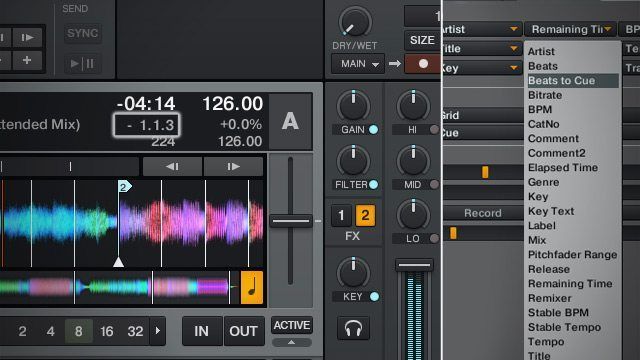
One of the first points to make here is that this feature is only useful if you’ve got your tracks well prepared, ideally with cue points that allow you to jump around between different major sections of the track. Beats To Cue shows three numbers in its field, which are (from left to right) phrase, bar, and beat. In the below image, there’s 2 phrases, 1 bar, and 3 beats until the next cue marker in James Blake’s “The Wilhelm Scream”.
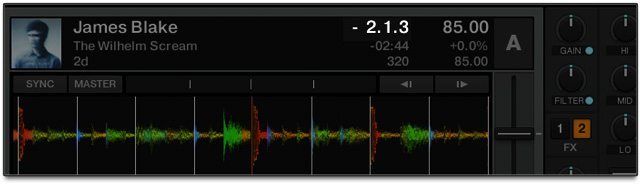
If you bring the “Bars Per Phase” (located in Preferences>Transport) down to 0 bars (as shown in the video above), the Beats To Cue field will only show Phrases and Beats – no bars. This simplifies the readout a bit.

If there’s no upcoming cue marker, the field will display a countdown to the final beat of the track.

IDEAL USES

As peedot notes in the video, having this feature enabled is extremely helpful for beginner DJs and veteran DJs alike who want to perfect their phrasing abilities – not to use as a crutch, but instead to reinforce how your mind should be thinking about tracks as you’re mixing them. This is best used with dance music that’s mostly structured in familiar 8 or 16 bar counts – you’ll find other genres are often way less predictable. 

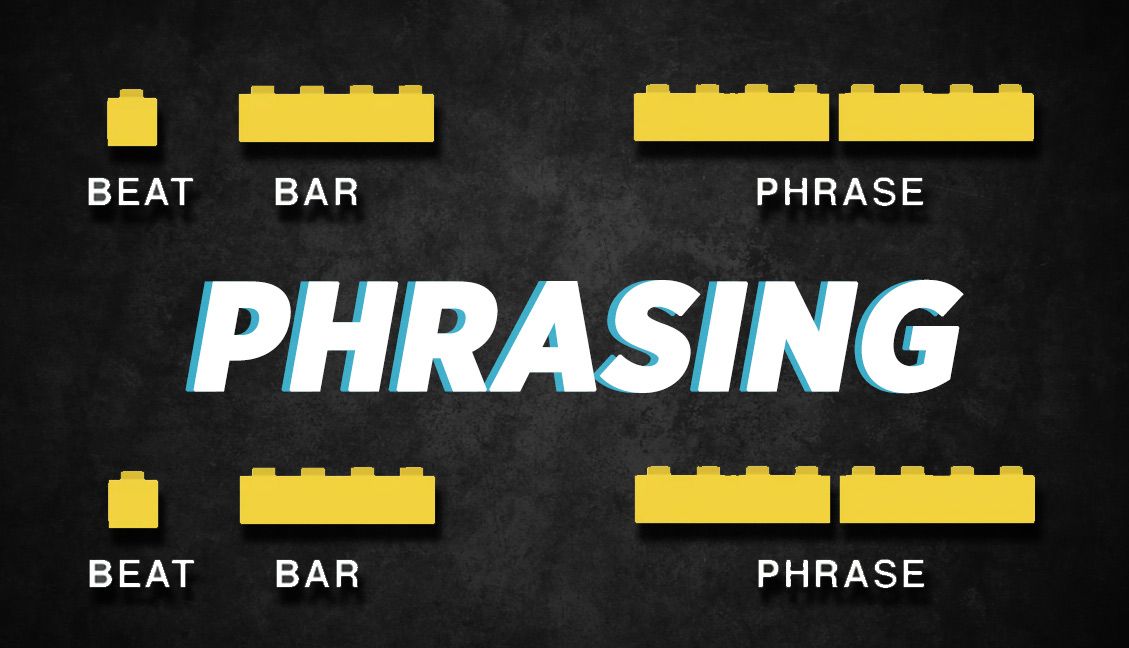
Read More: A more in-depth exploration on how phrasing structure works in Ean’s 2009 article.

What other uncommonly-used Traktor features have you discovered and used to improve your mixing style and/or skill? Let us know in the comments and we could feature them here. 
Tags: beats to cuemixing phrasesmixing tipsphrasingTraktor Tips
Share6Tweet4Share
Previous Post

Serato Misspells “Official”; Discounts Control Vinyl 40%

Next Post

Xonetacular’s Guide To Buying Second Hand Technics 1200s

Related Posts

DJ Fundamentals: How Phrasing Can Make or Break a DJ Mix
Advanced DJ Tips

DJ Fundamentals: How Phrasing Can Make or Break a DJ Mix

November 11, 2019
Traktor Pro 3.1
Breaking News

Traktor Pro 3.1 Released: Parallel Waveform Layouts, S8 + D2 Overmapping

February 20, 2019
Traktor Pro 3.0.2 update
News

Traktor 3.0.2: MIDI Map the S4MK3 + S2MK3

December 10, 2018
Load More
Next Post
Xonetacular’s Guide To Buying Second Hand Technics 1200s

Xonetacular's Guide To Buying Second Hand Technics 1200s

Want to reach DJTT's audience here?

Shoot an email to advertising@djtechtools.com

DJTT ads
DJTT newsletter
Midi Fighter
Chat with us
  • ABOUT DJTT
  • CONTACT
  • PRIVACY
  • MIDI FIGHTER HELP
  • ABOUT DJTT
  • JOBS
  • CONTACT US
  • ADVERTISE
  • PRIVACY POLICY
  • ACCESSIBILITY STATEMENT

© 2024 DJ Techtools all rights reserved by DJ TechTools on all content unless otherwise noted.

No Result
View All Result
  • Blog
    • DJ Gear
      • DIY Projects
      • Gear Reviews
      • New Products
      • Controllerism
    • Techniques + Tips
      • Beginner DJ
      • Advanced DJ
      • Producer
      • Finger Drummer
    • News + Culture
      • Editorials + Opinions
      • Artist Interviews
      • Performances + Routines
      • How I Play
    • DJ Software Tutorials
      • Serato Tips
      • CDJ Tips
      • Ableton Live Tips
  • Store
    • Run by real DJs, not a corporation
    • DJ Controllers
      • Midi Fighter Twister
      • Midi Fighter Spectra
      • Midi Fighter 64
      • View All
    • Accessories
      • Chroma USB Drive for DJs
      • Chroma Caps
      • Chroma Cables Audio
      • Chroma Cables USB-A
      • Chroma Cables: USB-C
      • DJTT Gift Card
      • Midi Fighter T-Shirt
      • Keyboard Covers
      • Earplugs by V-Moda
    • Production Gear
    • Soundcards & Mixers
  • Community
    • Popular Forums
      • General Discussion
      • Buy & Sell
      • Reviews
      • Mixes
      • Music Production
      • Show Your Setup
      • Off Topic
    • Handy Links
      • New Posts
      • Private Messages
      • Register
      • Search
    • Midi Maps
      • Traktor
      • Ableton
      • Serato DJ
      • Midi Fighter 3D
      • Midi Fighter Twister
      • Midi Fighter Spectra
  • Midi Fighter
  • Chroma

© 2024 DJ Techtools all rights reserved by DJ TechTools on all content unless otherwise noted.

This website uses cookies. By continuing to use this website you are giving consent to cookies being used. Visit our Privacy and Cookie Policy.