DJ TechTools
  • Blog
    • DJ Gear
      • DIY Projects
      • Gear Reviews
      • New Products
      • Controllerism
    • Techniques + Tips
      • Beginner DJ
      • Advanced DJ
      • Producer
      • Finger Drummer
    • News + Culture
      • Editorials + Opinions
      • Artist Interviews
      • Performances + Routines
      • How I Play
    • DJ Software Tutorials
      • Serato Tips
        • Traktor Tips
      • CDJ Tips
      • Ableton Live Tips
  • Store
    • Run by real DJs, not a corporation
    • DJ Controllers
      • Midi Fighter Twister
      • Midi Fighter Spectra
      • Midi Fighter 64
      • View All
    • Accessories
      • Chroma USB Drive for DJs
      • Chroma Caps
      • Chroma Cables Audio
      • Chroma Cables USB-A
      • Chroma Cables: USB-C
      • DJTT Gift Card
      • Midi Fighter T-Shirt
      • Keyboard Covers
      • Earplugs by V-Moda
    • Production Gear
    • Soundcards & Mixers
  • Community
    • Popular Forums
      • General Discussion
      • Buy & Sell
      • Reviews
      • Mixes
      • Music Production
      • Show Your Setup
      • Off Topic
    • Handy Links
      • New Posts
      • Private Messages
      • Register
      • Search
    • Midi Maps
      • Traktor
      • Ableton
      • Serato DJ
      • Midi Fighter 3D
      • Midi Fighter Twister
      • Midi Fighter Spectra
  • Midi Fighter
  • Chroma
No Result
View All Result
DJ TechTools
  • Blog
    • DJ Gear
      • DIY Projects
      • Gear Reviews
      • New Products
      • Controllerism
    • Techniques + Tips
      • Beginner DJ
      • Advanced DJ
      • Producer
      • Finger Drummer
    • News + Culture
      • Editorials + Opinions
      • Artist Interviews
      • Performances + Routines
      • How I Play
    • DJ Software Tutorials
      • Serato Tips
        • Traktor Tips
      • CDJ Tips
      • Ableton Live Tips
  • Store
    • Run by real DJs, not a corporation
    • DJ Controllers
      • Midi Fighter Twister
      • Midi Fighter Spectra
      • Midi Fighter 64
      • View All
    • Accessories
      • Chroma USB Drive for DJs
      • Chroma Caps
      • Chroma Cables Audio
      • Chroma Cables USB-A
      • Chroma Cables: USB-C
      • DJTT Gift Card
      • Midi Fighter T-Shirt
      • Keyboard Covers
      • Earplugs by V-Moda
    • Production Gear
    • Soundcards & Mixers
  • Community
    • Popular Forums
      • General Discussion
      • Buy & Sell
      • Reviews
      • Mixes
      • Music Production
      • Show Your Setup
      • Off Topic
    • Handy Links
      • New Posts
      • Private Messages
      • Register
      • Search
    • Midi Maps
      • Traktor
      • Ableton
      • Serato DJ
      • Midi Fighter 3D
      • Midi Fighter Twister
      • Midi Fighter Spectra
  • Midi Fighter
  • Chroma
No Result
View All Result
DJ TechTools

Building A DVS Timecode DJ Setup For $20

Dan White by Dan White
March 20, 2014
in Basic DJ Tips
Reading Time: 4 mins read
0
Building A DVS Timecode DJ Setup For $20
867
VIEWS
Post on FacebookTweet thisUpvote on Reddit

Many DJs own turntables or CDJs but don’t have the cash to start building out a full setup for control vinyl right away – so how can you test the waters of a DVS system without breaking the bank? Today we’re sharing a tip from DJTT reader ssamkange on how he built his own DVS setup for less than $7.

Editor’s Note: The process described below is for experimentation and budget setups – don’t expect to plug in at a club or festival with the low-end sound cards discussed in this article and to be impressed with the results. 

BUDGET CHALLENGE: HERE’S TWENTY BUCKS

Not a lot of gear-buying power.
  • Mixx DJ Software: free download
  • Timecode: free if you’re burning CDs (Serato), vinyl can be as cheap as $10
  • Cheap USB Soundcards: $5 – $8 (you’ll need two)
  • Y-Cables: $0  – 5 

Total: $10 if you’re good, but maxing at around $30 if you go “all out”.

In terms of sound sources, if you don’t already have them, scope your local used gear outlets, Craigslist or the DJTT Buy/Sell forum for two decks (turntables or CDJs) and a mixer. These are not included in the budget challenge. Odds are that if you’re reading this article, access to a computer isn’t an issue, so that’s not in the budget either.

CHEAP SOUNDCARDS
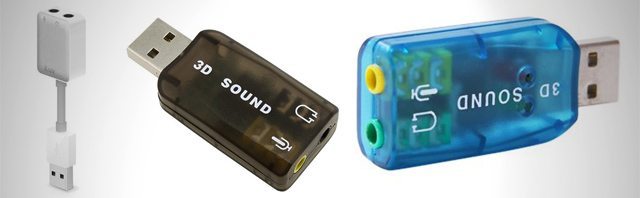
cheap-soundcards2
A sampling of the sub-$10 soundcards on the market.

This is the major DJ life hack in this project. Forget everything you’ve ever heard about sound cards – it is possible to get halfway decent audio out of a very low-cost USB soundcards. You also don’t need the most incredible soundcard ever for timecode control.  It likely won’t stand up to the test in a club or major festival environment, but to quote ssamkange‘s email:

[the setup] worked PERFECTLY. I did a proper hour with NO HICCUPS. Took it a step further. Did a house party and the whole night used my $7 DVS and it was all good.

Here’s a few rules for choosing a cheap soundcard:

  • Make sure the inputs and outputs are both stereo – mono will not work (read customer reviews to find out if it isn’t listed)
  • Buy two of the same soundcard – they’ll have consistent clocking, and  adjusting the latency settings will have the same result on each one.
  • Be ready for them to die. Most of these cheap soundcards have a handful of reviews mentioning an untimely demise. They’re cheaply made.

The three cards that we’ve sourced over on Amazon are the iLuv USB Audio Adapter ($9.99), CommonByte USB Sound Card ($3.49), and Virtual 5.1-surround USB 2.0 External Sound Card ($1.90).

ROUTING THE AUDIO
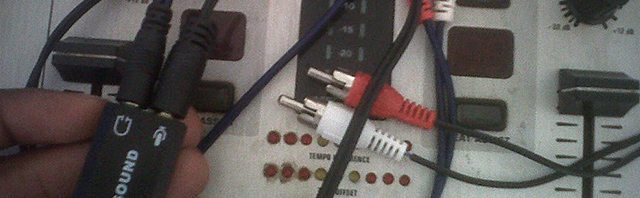
Standard Y-cables: you'll need four.
Standard Y-cables: you’ll need four.

In order to get these soundcards to work for your two-channel DVS setup, you’ll need to have four Y-Cables (Stereo RCA to 1/8″). This is two for each soundcard – one from the turntable/CDJ to the stereo line input, and one from the stereo output to your mixer.
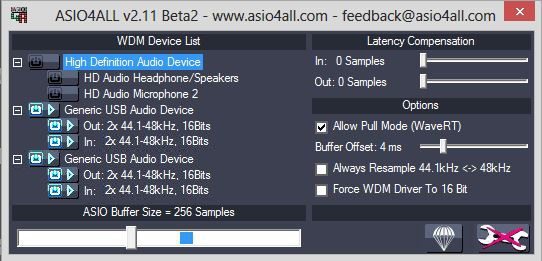
Adjusting latency settings is easy in ASIO4ALL

With the software discussed below, you’re able to route input and output audio across multiple soundcards. However, you may need to adjust the latency of the soundcards – and it’s a lot either to do this when they’re grouped together. We recommend combining them in ASIO4ALL (PC) or the built in Audio MIDI Setup utility on Mac OS X and adjusting the latency compensation/ Buffer Offset / Buffer Size until the latency is acceptable.  Ssamkange found it worked best when reducing the buffer size to 256 samples and using a 44100k sample rate.

SOFTWARE SELECTION
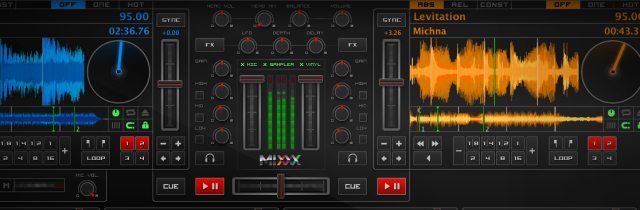
Perpetually free, Mixxx is the cheapest DJ software option.

The last step of getting this budget rig all working is on the software side of things. Serato and Traktor are out right away as they both require proprietary scratch soundcards. Virtual DJ will work fine, but to unlock timecode control will run $299 for the Pro version. This is where the free Mixxx DJ software is the best option. There’s free timecode control that works with Serato, Traktor, or Mixvibes control signals, and the ability to use multiple soundcards within the software’s settings.
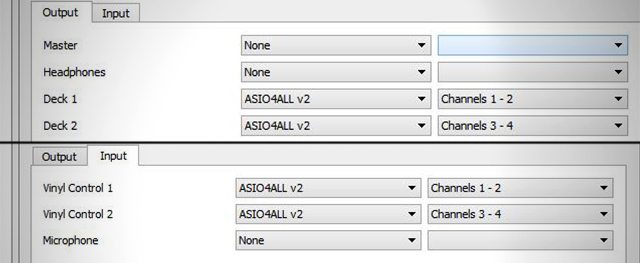
Routing the audio with the combined ASIO4ALL device

You’ll need to configure the settings to choose the soundcards’ (or combined audio device, if applicable) inputs as the timecode input, and the outputs as the master out (see image above). There’s also a place to adjust what type of time code is being used with the system, and additional latency control within the preferences if you’re still having issues.

Have your own extreme budget DJing solution that you use (or had to use in the past)? Let us know in the comments below how you made it happen without throwing down dough. 
Tags: budgetcheap soundcardsDVSfree dj softwaremixxMixxxsoundcardstimecode
Share7Tweet4Share
Previous Post

Routine: Carl Rag On The Just-Announced APC40 MKII

Next Post

Advanced Techniques For Using Serato DJ’s Slicer

Related Posts

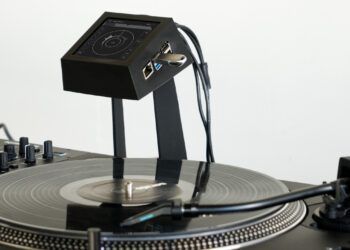
Devious Pocket: a €249 open-source DVS that ditches the laptop
Breaking News

Devious Pocket: a €249 open-source DVS that ditches the laptop

May 10, 2026
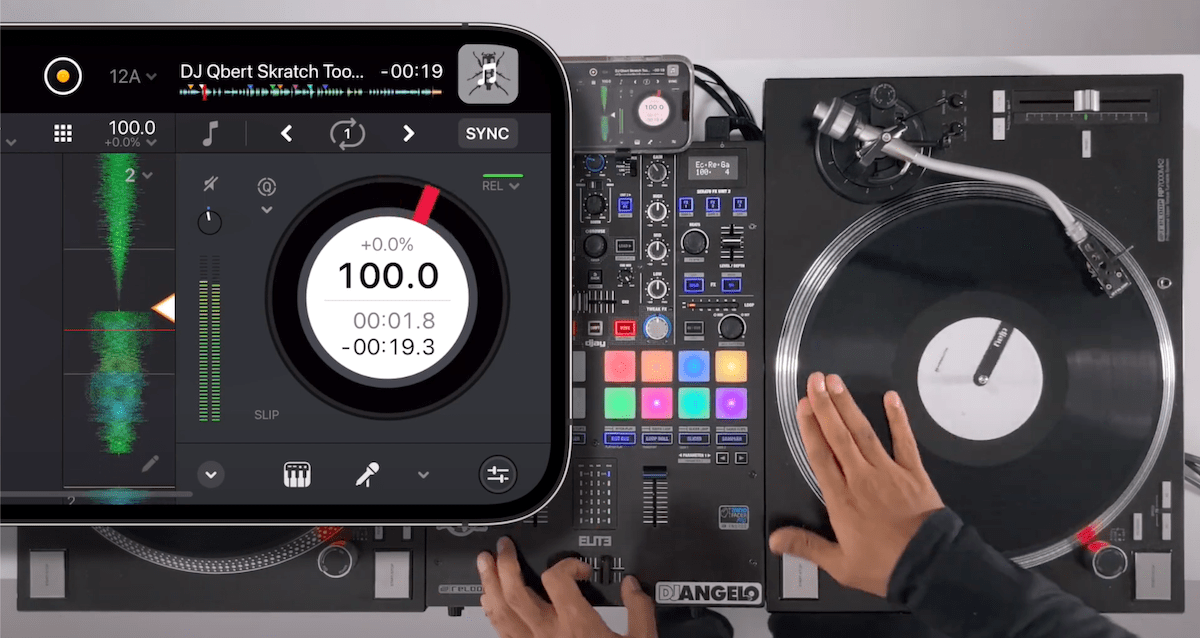
djay Pro on iPhone with DVS control
NAMM 2022

Algoriddim’s djay makes DVS on iPhone possible, integrates Neural Mix into their control vinyl

May 31, 2022
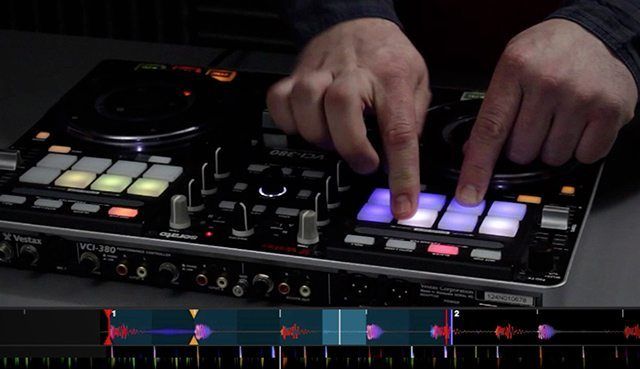
Mixxx 2.3 release
DJ Software

Mixxx – the free DJ software – gets a major update with 2.3.0 release

July 12, 2021
Load More
Next Post
Advanced Techniques For Using Serato DJ’s Slicer

Advanced Techniques For Using Serato DJ's Slicer

Want to reach DJTT's audience here?

Shoot an email to advertising@djtechtools.com

DJTT ads
DJTT newsletter
Midi Fighter
Chat with us
  • ABOUT DJTT
  • CONTACT
  • PRIVACY
  • MIDI FIGHTER HELP
  • ABOUT DJTT
  • JOBS
  • CONTACT US
  • ADVERTISE
  • PRIVACY POLICY
  • ACCESSIBILITY STATEMENT

© 2024 DJ Techtools all rights reserved by DJ TechTools on all content unless otherwise noted.

No Result
View All Result
  • Blog
    • DJ Gear
      • DIY Projects
      • Gear Reviews
      • New Products
      • Controllerism
    • Techniques + Tips
      • Beginner DJ
      • Advanced DJ
      • Producer
      • Finger Drummer
    • News + Culture
      • Editorials + Opinions
      • Artist Interviews
      • Performances + Routines
      • How I Play
    • DJ Software Tutorials
      • Serato Tips
      • CDJ Tips
      • Ableton Live Tips
  • Store
    • Run by real DJs, not a corporation
    • DJ Controllers
      • Midi Fighter Twister
      • Midi Fighter Spectra
      • Midi Fighter 64
      • View All
    • Accessories
      • Chroma USB Drive for DJs
      • Chroma Caps
      • Chroma Cables Audio
      • Chroma Cables USB-A
      • Chroma Cables: USB-C
      • DJTT Gift Card
      • Midi Fighter T-Shirt
      • Keyboard Covers
      • Earplugs by V-Moda
    • Production Gear
    • Soundcards & Mixers
  • Community
    • Popular Forums
      • General Discussion
      • Buy & Sell
      • Reviews
      • Mixes
      • Music Production
      • Show Your Setup
      • Off Topic
    • Handy Links
      • New Posts
      • Private Messages
      • Register
      • Search
    • Midi Maps
      • Traktor
      • Ableton
      • Serato DJ
      • Midi Fighter 3D
      • Midi Fighter Twister
      • Midi Fighter Spectra
  • Midi Fighter
  • Chroma

© 2024 DJ Techtools all rights reserved by DJ TechTools on all content unless otherwise noted.

This website uses cookies. By continuing to use this website you are giving consent to cookies being used. Visit our Privacy and Cookie Policy.