DJ TechTools
  • Blog
    • DJ Gear
      • DIY Projects
      • Gear Reviews
      • New Products
      • Controllerism
    • Techniques + Tips
      • Beginner DJ
      • Advanced DJ
      • Producer
      • Finger Drummer
    • News + Culture
      • Editorials + Opinions
      • Artist Interviews
      • Performances + Routines
      • How I Play
    • DJ Software Tutorials
      • Serato Tips
        • Traktor Tips
      • CDJ Tips
      • Ableton Live Tips
  • Store
    • Run by real DJs, not a corporation
    • DJ Controllers
      • Midi Fighter Twister
      • Midi Fighter Spectra
      • Midi Fighter 64
      • View All
    • Accessories
      • Chroma USB Drive for DJs
      • Chroma Caps
      • Chroma Cables Audio
      • Chroma Cables USB-A
      • Chroma Cables: USB-C
      • DJTT Gift Card
      • Midi Fighter T-Shirt
      • Keyboard Covers
      • Earplugs by V-Moda
    • Production Gear
    • Soundcards & Mixers
  • Community
    • Popular Forums
      • General Discussion
      • Buy & Sell
      • Reviews
      • Mixes
      • Music Production
      • Show Your Setup
      • Off Topic
    • Handy Links
      • New Posts
      • Private Messages
      • Register
      • Search
    • Midi Maps
      • Traktor
      • Ableton
      • Serato DJ
      • Midi Fighter 3D
      • Midi Fighter Twister
      • Midi Fighter Spectra
  • Midi Fighter
  • Chroma
No Result
View All Result
DJ TechTools
  • Blog
    • DJ Gear
      • DIY Projects
      • Gear Reviews
      • New Products
      • Controllerism
    • Techniques + Tips
      • Beginner DJ
      • Advanced DJ
      • Producer
      • Finger Drummer
    • News + Culture
      • Editorials + Opinions
      • Artist Interviews
      • Performances + Routines
      • How I Play
    • DJ Software Tutorials
      • Serato Tips
        • Traktor Tips
      • CDJ Tips
      • Ableton Live Tips
  • Store
    • Run by real DJs, not a corporation
    • DJ Controllers
      • Midi Fighter Twister
      • Midi Fighter Spectra
      • Midi Fighter 64
      • View All
    • Accessories
      • Chroma USB Drive for DJs
      • Chroma Caps
      • Chroma Cables Audio
      • Chroma Cables USB-A
      • Chroma Cables: USB-C
      • DJTT Gift Card
      • Midi Fighter T-Shirt
      • Keyboard Covers
      • Earplugs by V-Moda
    • Production Gear
    • Soundcards & Mixers
  • Community
    • Popular Forums
      • General Discussion
      • Buy & Sell
      • Reviews
      • Mixes
      • Music Production
      • Show Your Setup
      • Off Topic
    • Handy Links
      • New Posts
      • Private Messages
      • Register
      • Search
    • Midi Maps
      • Traktor
      • Ableton
      • Serato DJ
      • Midi Fighter 3D
      • Midi Fighter Twister
      • Midi Fighter Spectra
  • Midi Fighter
  • Chroma
No Result
View All Result
DJ TechTools

BPM Transition Trick: Using Loop Out Move

Ryan Dejaegher by Ryan Dejaegher
April 5, 2015
in Basic DJ Tips, Controllerism, DJ Techniques / Tips, How-To Video Tutorials
Reading Time: 2 mins read
0
BPM Transition Trick: Using Loop Out Move
217
VIEWS
Post on FacebookTweet thisUpvote on Reddit

One of the most frequent topics of discussions that pops up on the blog and on the forums is around transitions. With DJ software such as Traktor Pro 2 and Serato DJ, DJs have endless creative tools at their disposal to transition between tracks, even if they’re in completely different tempo ranges. Today Matthew Ray shares a cool transition trick that can be used to seamlessly switch from between different BPMs. Check out the video to see the transition in action.

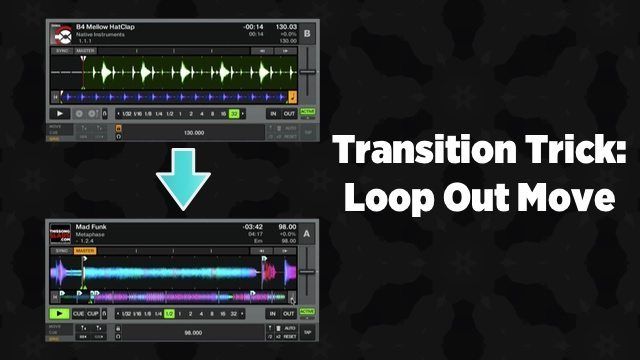
Transition Trick: Loop Out Move

Using a combination of loop adjustment, echo freeze, and a wide pitch range DJs can create a rising and falling effect to move between radically different BPMs. Although Traktor is being used in the video, this trick can be applied to any DJ software and can even be used with CDJs or the new XDJ-1000. There are a few steps to make this transition work:

  1. Turn off snap/quantize in Traktor (for Serato turn off quantize) – This will allow DJs to set loops that don’t snap to the beat grid
  2. Turn off sync for both decks – Now the pitch/tempo can freely be adjusted on the incoming track without affecting the other track
  3. Turn keylock off (master tempo on the CDJs) – Turning off keylock will make it easier to achieve the rising/falling effect
  4. Set tempo range to 100% (on CDJs set tempo range to “wide”) – With a wide tempo range DJs can make massive BPM transitions

Now it’s time to get creative. Find a part of the track that has a recognizable bassline, lead, or melody. Ideally it’ll be a section of the track that doesn’t have any drums. Once you’ve found a suitable section, set a really short loop (not too short though, otherwise there will be a noticeable rise in pitch). Now bring up the volume of the incoming track and slowly move the tempo fader up to create a rising effect. Use an echo freeze to mix out of the old track and bring the tempo fader of the incoming song back to it’s original tempo (this will create a falling effect). Adjust the loop out position, then exit the loop to drop the track into the familiar section to surprise your audience.

There are so many creative ways to transition between tracks. The important thing is to experiment and not be bound by “rules”. Just because 2 tracks are in completely different BPM ranges doesn’t mean they’re off limits. Think outside the box and maybe you’ll discover a new trick for transitioning that you can share with the DJ community.

For more transition tips and tricks check out these great articles:

  • 2 Powerful FX Chains for Easy Mix Transitions
  • How To Create A Custom DJ Tempo Transition Track
  • 6 Clever Ways To Easily Transition Between Multiple DJs

What are some of your tricks for big BPM transitions?

Share them in the comments below!

Tags: BPM Transitioncreative transitionsdj transitioninghow to transitionloop out movepioneer cdjserato DJTraktor Tipstransition tipstransition tricksVCi 400Vestax VCI 400
Share2Tweet1Share
Previous Post

Remixing Stems with Mad Zach

Next Post

Review: SuperSync – iTunes Libraries In Perfect Harmony

Related Posts

“No Deal”: New Zealand’s ComCom denies clearance for AlphaTheta’s Serato acquisition
Breaking News

“No Deal”: New Zealand’s ComCom denies clearance for AlphaTheta’s Serato acquisition

July 17, 2024
TIDAL blocked DJs from using Stems – but the next generation of DJ gear will likely make that irrelevant
DJ Gear

TIDAL blocked DJs from using Stems – but the next generation of DJ gear will likely make that irrelevant

January 18, 2024
Serato DJ 3.1 adds integrated accessory control of Serato Stems
Serato

Serato DJ 3.1 adds integrated accessory control of Serato Stems

December 5, 2023
Load More
Next Post
Review: SuperSync – iTunes Libraries In Perfect Harmony

Review: SuperSync - iTunes Libraries In Perfect Harmony

Want to reach DJTT's audience here?

Shoot an email to advertising@djtechtools.com

DJTT ads
DJTT newsletter
Midi Fighter
Chat with us
  • ABOUT DJTT
  • CONTACT
  • PRIVACY
  • MIDI FIGHTER HELP
  • ABOUT DJTT
  • JOBS
  • CONTACT US
  • ADVERTISE
  • PRIVACY POLICY
  • ACCESSIBILITY STATEMENT

© 2024 DJ Techtools all rights reserved by DJ TechTools on all content unless otherwise noted.

No Result
View All Result
  • Blog
    • DJ Gear
      • DIY Projects
      • Gear Reviews
      • New Products
      • Controllerism
    • Techniques + Tips
      • Beginner DJ
      • Advanced DJ
      • Producer
      • Finger Drummer
    • News + Culture
      • Editorials + Opinions
      • Artist Interviews
      • Performances + Routines
      • How I Play
    • DJ Software Tutorials
      • Serato Tips
      • CDJ Tips
      • Ableton Live Tips
  • Store
    • Run by real DJs, not a corporation
    • DJ Controllers
      • Midi Fighter Twister
      • Midi Fighter Spectra
      • Midi Fighter 64
      • View All
    • Accessories
      • Chroma USB Drive for DJs
      • Chroma Caps
      • Chroma Cables Audio
      • Chroma Cables USB-A
      • Chroma Cables: USB-C
      • DJTT Gift Card
      • Midi Fighter T-Shirt
      • Keyboard Covers
      • Earplugs by V-Moda
    • Production Gear
    • Soundcards & Mixers
  • Community
    • Popular Forums
      • General Discussion
      • Buy & Sell
      • Reviews
      • Mixes
      • Music Production
      • Show Your Setup
      • Off Topic
    • Handy Links
      • New Posts
      • Private Messages
      • Register
      • Search
    • Midi Maps
      • Traktor
      • Ableton
      • Serato DJ
      • Midi Fighter 3D
      • Midi Fighter Twister
      • Midi Fighter Spectra
  • Midi Fighter
  • Chroma

© 2024 DJ Techtools all rights reserved by DJ TechTools on all content unless otherwise noted.

This website uses cookies. By continuing to use this website you are giving consent to cookies being used. Visit our Privacy and Cookie Policy.