DJ TechTools
  • Blog
    • DJ Gear
      • DIY Projects
      • Gear Reviews
      • New Products
      • Controllerism
    • Techniques + Tips
      • Beginner DJ
      • Advanced DJ
      • Producer
      • Finger Drummer
    • News + Culture
      • Editorials + Opinions
      • Artist Interviews
      • Performances + Routines
      • How I Play
    • DJ Software Tutorials
      • Serato Tips
        • Traktor Tips
      • CDJ Tips
      • Ableton Live Tips
  • Store
    • Run by real DJs, not a corporation
    • DJ Controllers
      • Midi Fighter Twister
      • Midi Fighter Spectra
      • Midi Fighter 64
      • View All
    • Accessories
      • Chroma USB Drive for DJs
      • Chroma Caps
      • Chroma Cables Audio
      • Chroma Cables USB-A
      • Chroma Cables: USB-C
      • DJTT Gift Card
      • Midi Fighter T-Shirt
      • Keyboard Covers
      • Earplugs by V-Moda
    • Production Gear
    • Soundcards & Mixers
  • Community
    • Popular Forums
      • General Discussion
      • Buy & Sell
      • Reviews
      • Mixes
      • Music Production
      • Show Your Setup
      • Off Topic
    • Handy Links
      • New Posts
      • Private Messages
      • Register
      • Search
    • Midi Maps
      • Traktor
      • Ableton
      • Serato DJ
      • Midi Fighter 3D
      • Midi Fighter Twister
      • Midi Fighter Spectra
  • Midi Fighter
  • Chroma
No Result
View All Result
DJ TechTools
  • Blog
    • DJ Gear
      • DIY Projects
      • Gear Reviews
      • New Products
      • Controllerism
    • Techniques + Tips
      • Beginner DJ
      • Advanced DJ
      • Producer
      • Finger Drummer
    • News + Culture
      • Editorials + Opinions
      • Artist Interviews
      • Performances + Routines
      • How I Play
    • DJ Software Tutorials
      • Serato Tips
        • Traktor Tips
      • CDJ Tips
      • Ableton Live Tips
  • Store
    • Run by real DJs, not a corporation
    • DJ Controllers
      • Midi Fighter Twister
      • Midi Fighter Spectra
      • Midi Fighter 64
      • View All
    • Accessories
      • Chroma USB Drive for DJs
      • Chroma Caps
      • Chroma Cables Audio
      • Chroma Cables USB-A
      • Chroma Cables: USB-C
      • DJTT Gift Card
      • Midi Fighter T-Shirt
      • Keyboard Covers
      • Earplugs by V-Moda
    • Production Gear
    • Soundcards & Mixers
  • Community
    • Popular Forums
      • General Discussion
      • Buy & Sell
      • Reviews
      • Mixes
      • Music Production
      • Show Your Setup
      • Off Topic
    • Handy Links
      • New Posts
      • Private Messages
      • Register
      • Search
    • Midi Maps
      • Traktor
      • Ableton
      • Serato DJ
      • Midi Fighter 3D
      • Midi Fighter Twister
      • Midi Fighter Spectra
  • Midi Fighter
  • Chroma
No Result
View All Result
DJ TechTools

6 Clever Ways To Easily Transition Between Multiple DJs

Ean Golden by Ean Golden
May 13, 2012
in Advanced DJ Tips, Basic DJ Tips, Video Posts, Videos
Reading Time: 5 mins read
0
6 Clever Ways To Easily Transition Between Multiple DJs
378
VIEWS
Post on FacebookTweet thisUpvote on Reddit

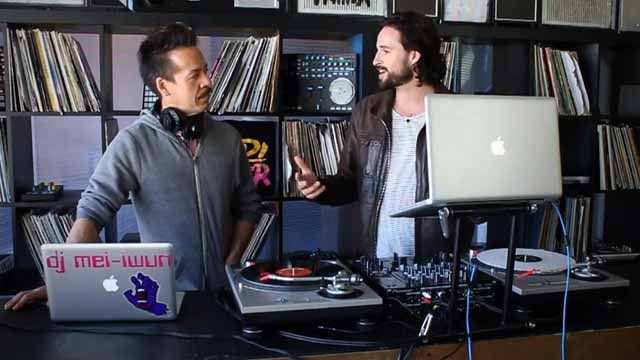
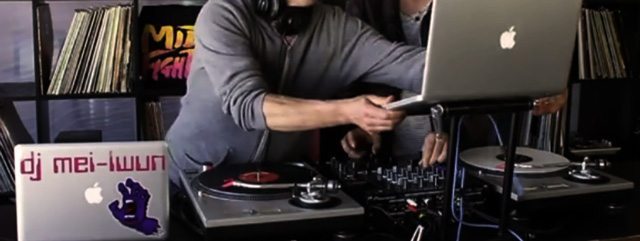
Have you ever found yourself trying to switch between two DJs that are sharing the same USB mixer, sound card or DVS interface? It’s a common problem in live scenarios, and having a few handy tools up your sleeve can help make a hairy switch seamless. DJTT comes to the rescue with six of our own creative ways to swap laptops while keeping the music rolling.

Ideally, you should have access to a Pioneer CDJ-1000 and be ready to go with a few longish mix CDs with at least 10-20 minutes of continuous music. Unfortunately, things never seem to go smoothly, so it often pays to be prepared with a solid backup plan. This seems to be especially true with Serato DJs who often rely on the same Serato interface the club has connected. Traktor DJs can also benefit by sharing sound cards and preventing any mid-set cable confusion.

Sometimes promoters will just let the music end between DJs to allow the next guy to plug in his computer and cue up the first song. While this can acknowledge the change over and create a natural break in the night, we generally prefer to keep the energy moving.

BIG TIP: If you are playing before someone it is considered courteous to do one-  if not all – of the following: 

  • Remove your headphones and walk away from the mixer at the beginning of your last song (dont stand and twiddle knobs, leaving the next poor guy with less than a minute to mix)
  • Pick a final song that is as long as possible
  • Bring down the energy a bit with the last tracks and create some space for the next DJ to bring it back up at their own pace.
  • Don’t dramatically change the tempo suddenly or put on track that doesn’t fit the mood or genre of the night.

Read More: How To DJ As A Team, VS/B2B-style and more

HERE ARE THE 6 TIPS PRESENTED IN THE VIDEO
1. The iPod/iPhone Third Deck 

Use an app like the Red Bull BPM DJ app, which has high-quality beatmatching features so you can mix into your iPhone and then let the other DJ remove their computer from the equation.

2. The Roll Loop 

Many mixers now have a “Roll” effect that grabs a small sample and repeats it like a short loop. Just set the length of the roll to the longest possible (usually 8 or more counts) and you can save a full loop of the playing song into memory on the mixer. One DJ TechTools reader suggested also setting the BPM of the effects at 1/2 the natural value. 61 instead of 122 for example, and then you can get a full 16 counts!

With a “Roll” saved on the mixer, the last DJ can unplug and the sound card is now free!

3. The Magic Scratch! 

We love the new Nexus “Noise” color effect. When combined with the crossfader and an echo, it produces a very believable scratch sound that comes from the mixer and requires no sound input. You can use the noise as a transitionary element to fill the gap between DJs for a dramatic and musical effect.

4. The Improv Echo Freeze

No mixers are equipped with the infamous echo freeze by default, but you can approximate it with some quick effects parameter tweeking.

  • Set an echo on the down beat
  • Kill the playing song
  • Quickly lengthen the echo to its longest value – often 1/1

This should keep the echo rolling for at least 10-20 seconds, which can sometimes be long enough to swap computers.

5. Dual Sound Cards

Check out the mixer installed at the club. Chances are higher than ever these days that it might have a sound card installed that you can use. If you are lucky and there is a Rane Sixty Two or Sixty Eight, those mixers are actually equipped with two discrete sound cards, so both DJs can be plugged in at the same time. This makes switching over a breeze.

6. Double-Sided Control Vinyl 

It always surprises me that many DVS DJs don’t realize there is double-sided control vinyl with an analogue song on one side and control vinyl on the other. This is the way I see most well-prepared Serato Scratch Live DJs switch between computers: by relying on good old fashioned analogue signals!  Stokyo stocks a wide range of Serato pressings with music on one side.

Here are some handy links to some of the gear mentioned in the video:
  • Rane Sixty-Two mixer review (dual USB port mixer in the video)
  • Pioneer DJM-900 mixer review (white noise scratch)
  • Red Bull BPM Pro DJ app (iPhone app in the video)
  • Donut Shop vinyl (J. Dilla / Serato timecode vinyl)
Do you have you own creative way to make the switch from one DJ to the next? We want to hear about it in the comments below! 
Ean Golden - Author

Ean Golden is the founder of Dj TechTools and a worldwide Dj specializing in controllers and new performance technology.

Follow Ean on: Twitter  Facebook   SoundCloud   YouTube 
Tags: djdj club tipsdj transitioningdjm-900multiple inputspioneer 900rane sixty-twored bull bpmScratch Liveswitching djs
Share3Tweet2Share
Previous Post

Tasty Sample Snacks For Your Weekend BBQs and DAWs

Next Post

Review: Allen & Heath Xone:K2

Related Posts

In The Mind Of A DJ: Jus-Ed Interview
Artist Features

In The Mind Of A DJ: Jus-Ed Interview

June 9, 2019
Top Blockchain-Based Projects That Support DJs + Producers
Business of DJing

Top Blockchain-Based Projects That Support DJs + Producers

November 5, 2018
DJM-REC: Pioneer DJ’s New Set Recorder for iOS
NAMM 2018

DJM-REC: Pioneer DJ’s New Set Recorder for iOS

January 23, 2018
Load More
Next Post
Review: Allen & Heath Xone:K2

Review: Allen & Heath Xone:K2

Want to reach DJTT's audience here?

Shoot an email to advertising@djtechtools.com

DJTT ads
DJTT newsletter
Midi Fighter
Chat with us
  • ABOUT DJTT
  • CONTACT
  • PRIVACY
  • MIDI FIGHTER HELP
  • ABOUT DJTT
  • JOBS
  • CONTACT US
  • ADVERTISE
  • PRIVACY POLICY
  • ACCESSIBILITY STATEMENT

© 2024 DJ Techtools all rights reserved by DJ TechTools on all content unless otherwise noted.

No Result
View All Result
  • Blog
    • DJ Gear
      • DIY Projects
      • Gear Reviews
      • New Products
      • Controllerism
    • Techniques + Tips
      • Beginner DJ
      • Advanced DJ
      • Producer
      • Finger Drummer
    • News + Culture
      • Editorials + Opinions
      • Artist Interviews
      • Performances + Routines
      • How I Play
    • DJ Software Tutorials
      • Serato Tips
      • CDJ Tips
      • Ableton Live Tips
  • Store
    • Run by real DJs, not a corporation
    • DJ Controllers
      • Midi Fighter Twister
      • Midi Fighter Spectra
      • Midi Fighter 64
      • View All
    • Accessories
      • Chroma USB Drive for DJs
      • Chroma Caps
      • Chroma Cables Audio
      • Chroma Cables USB-A
      • Chroma Cables: USB-C
      • DJTT Gift Card
      • Midi Fighter T-Shirt
      • Keyboard Covers
      • Earplugs by V-Moda
    • Production Gear
    • Soundcards & Mixers
  • Community
    • Popular Forums
      • General Discussion
      • Buy & Sell
      • Reviews
      • Mixes
      • Music Production
      • Show Your Setup
      • Off Topic
    • Handy Links
      • New Posts
      • Private Messages
      • Register
      • Search
    • Midi Maps
      • Traktor
      • Ableton
      • Serato DJ
      • Midi Fighter 3D
      • Midi Fighter Twister
      • Midi Fighter Spectra
  • Midi Fighter
  • Chroma

© 2024 DJ Techtools all rights reserved by DJ TechTools on all content unless otherwise noted.

This website uses cookies. By continuing to use this website you are giving consent to cookies being used. Visit our Privacy and Cookie Policy.