DJ TechTools
  • Blog
    • DJ Gear
      • DIY Projects
      • Gear Reviews
      • New Products
      • Controllerism
    • Techniques + Tips
      • Beginner DJ
      • Advanced DJ
      • Producer
      • Finger Drummer
    • News + Culture
      • Editorials + Opinions
      • Artist Interviews
      • Performances + Routines
      • How I Play
    • DJ Software Tutorials
      • Serato Tips
        • Traktor Tips
      • CDJ Tips
      • Ableton Live Tips
  • Store
    • Run by real DJs, not a corporation
    • DJ Controllers
      • Midi Fighter Twister
      • Midi Fighter Spectra
      • Midi Fighter 64
      • View All
    • Accessories
      • Chroma USB Drive for DJs
      • Chroma Caps
      • Chroma Cables Audio
      • Chroma Cables USB-A
      • Chroma Cables: USB-C
      • DJTT Gift Card
      • Midi Fighter T-Shirt
      • Keyboard Covers
      • Earplugs by V-Moda
    • Production Gear
    • Soundcards & Mixers
  • Community
    • Popular Forums
      • General Discussion
      • Buy & Sell
      • Reviews
      • Mixes
      • Music Production
      • Show Your Setup
      • Off Topic
    • Handy Links
      • New Posts
      • Private Messages
      • Register
      • Search
    • Midi Maps
      • Traktor
      • Ableton
      • Serato DJ
      • Midi Fighter 3D
      • Midi Fighter Twister
      • Midi Fighter Spectra
  • Midi Fighter
  • Chroma
No Result
View All Result
DJ TechTools
  • Blog
    • DJ Gear
      • DIY Projects
      • Gear Reviews
      • New Products
      • Controllerism
    • Techniques + Tips
      • Beginner DJ
      • Advanced DJ
      • Producer
      • Finger Drummer
    • News + Culture
      • Editorials + Opinions
      • Artist Interviews
      • Performances + Routines
      • How I Play
    • DJ Software Tutorials
      • Serato Tips
        • Traktor Tips
      • CDJ Tips
      • Ableton Live Tips
  • Store
    • Run by real DJs, not a corporation
    • DJ Controllers
      • Midi Fighter Twister
      • Midi Fighter Spectra
      • Midi Fighter 64
      • View All
    • Accessories
      • Chroma USB Drive for DJs
      • Chroma Caps
      • Chroma Cables Audio
      • Chroma Cables USB-A
      • Chroma Cables: USB-C
      • DJTT Gift Card
      • Midi Fighter T-Shirt
      • Keyboard Covers
      • Earplugs by V-Moda
    • Production Gear
    • Soundcards & Mixers
  • Community
    • Popular Forums
      • General Discussion
      • Buy & Sell
      • Reviews
      • Mixes
      • Music Production
      • Show Your Setup
      • Off Topic
    • Handy Links
      • New Posts
      • Private Messages
      • Register
      • Search
    • Midi Maps
      • Traktor
      • Ableton
      • Serato DJ
      • Midi Fighter 3D
      • Midi Fighter Twister
      • Midi Fighter Spectra
  • Midi Fighter
  • Chroma
No Result
View All Result
DJ TechTools

Setting Up and Using XDJ-1000s With Traktor Pro 2.8

Dan White by Dan White
June 2, 2015
in Basic DJ Tips, CDJ Tips, DJ Techniques / Tips
Reading Time: 2 mins read
0
Setting Up and Using XDJ-1000s With Traktor Pro 2.8
706
VIEWS
Post on FacebookTweet thisUpvote on Reddit

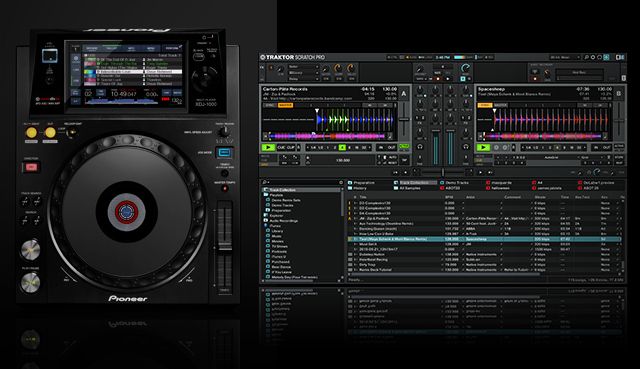
With the new version of Traktor coming out just a few weeks ago and opening up HID mode to the sub-$1000 Pioneer XDJ-1000s, times are changing. Suddenly, a relatively affordable CDJ-style setup is available that works very easily with Traktor. Learn how to set up and use the players with Traktor in this guide.

Connecting + Updating 

There’s three simple steps for getting a pair of XDJs ready for use with Traktor:

  • Update firmware on XDJs to at least 1.04:  it’s available here
  • Update Traktor to at least 2.8: use Service Center or download here
  • Plug them in: If you need to use the XDJ soundcards, make an aggregate device with these instructions

How The XDJ/Traktor Connection Works

Once properly connected, all you have to do on the XDJ-1000s is choose the deck you want to control, and then instantly all of the controls are mapped and ready to be used. There’s no setup needed, which is great! Thanks Pioneer and NI for making this so easy.

Features that work:

  • All playback controls
  • Browsing the collection / library and loading tracks
  • Looping and Beatjump
  • Quantize and Slip/Flux modes

Features that don’t work:

  • Reverse mode (there’s no reverse playback in Traktor)
  • Vinyl start/stop speed knob (there’s no way to achieve this in Traktor without FX)
  • Loop Jump mode (this should be very easy for Pioneer to get working…)
  • Detailed Waveform (but you’ve got a computer to look at the detail easily)

Our Review Of This Style Of Setup

This setup is at once versatile (thanks to Traktor and having a massive library of songs) and familiar (thanks to the CDJ layout). We’re big fans, especially considering the price point – and we suspect that Pioneer and NI might continue to add more features in that are missing like Loop Jump.

If you’re more interested in just seeing how the XDJs hold up on their own in standalone, check out our review here:

Tags: hid modesyncing traktor and XDJ-100sTraktor 2.8Traktor Tipsxdj-1000
Share6Tweet4Share
Previous Post

Thunderbolt 3 Will Have The Same Connector As USB-C; One Less Cable To Worry About!

Next Post

Launchpad Mk2 Revealed: Design Update + RGB Pads

Related Posts

traktor-pro plus 3.8 pattern player controls
Dj and Production Tutorials

Review: Traktor Pro Plus 3.8 – After 8 months, is the subscription worth it?

April 20, 2023
Traktor Pro 3.6 releases, as well as a feature roadmap…
Breaking News

Traktor Pro 3.6 releases, as well as a feature roadmap…

August 19, 2022
Traktor Pro 3.6 beta and iZotope's Ozone Maximizer side by side
NAMM 2022

Traktor’s new beta cycle has begun: 3.6 to include iZotope products, maybe NKS support?

May 30, 2022
Load More
Next Post
Launchpad Mk2 Revealed: Design Update + RGB Pads

Launchpad Mk2 Revealed: Design Update + RGB Pads

Want to reach DJTT's audience here?

Shoot an email to advertising@djtechtools.com

DJTT ads
DJTT newsletter
Midi Fighter
Chat with us
  • ABOUT DJTT
  • CONTACT
  • PRIVACY
  • MIDI FIGHTER HELP
  • ABOUT DJTT
  • JOBS
  • CONTACT US
  • ADVERTISE
  • PRIVACY POLICY
  • ACCESSIBILITY STATEMENT

© 2024 DJ Techtools all rights reserved by DJ TechTools on all content unless otherwise noted.

No Result
View All Result
  • Blog
    • DJ Gear
      • DIY Projects
      • Gear Reviews
      • New Products
      • Controllerism
    • Techniques + Tips
      • Beginner DJ
      • Advanced DJ
      • Producer
      • Finger Drummer
    • News + Culture
      • Editorials + Opinions
      • Artist Interviews
      • Performances + Routines
      • How I Play
    • DJ Software Tutorials
      • Serato Tips
      • CDJ Tips
      • Ableton Live Tips
  • Store
    • Run by real DJs, not a corporation
    • DJ Controllers
      • Midi Fighter Twister
      • Midi Fighter Spectra
      • Midi Fighter 64
      • View All
    • Accessories
      • Chroma USB Drive for DJs
      • Chroma Caps
      • Chroma Cables Audio
      • Chroma Cables USB-A
      • Chroma Cables: USB-C
      • DJTT Gift Card
      • Midi Fighter T-Shirt
      • Keyboard Covers
      • Earplugs by V-Moda
    • Production Gear
    • Soundcards & Mixers
  • Community
    • Popular Forums
      • General Discussion
      • Buy & Sell
      • Reviews
      • Mixes
      • Music Production
      • Show Your Setup
      • Off Topic
    • Handy Links
      • New Posts
      • Private Messages
      • Register
      • Search
    • Midi Maps
      • Traktor
      • Ableton
      • Serato DJ
      • Midi Fighter 3D
      • Midi Fighter Twister
      • Midi Fighter Spectra
  • Midi Fighter
  • Chroma

© 2024 DJ Techtools all rights reserved by DJ TechTools on all content unless otherwise noted.

This website uses cookies. By continuing to use this website you are giving consent to cookies being used. Visit our Privacy and Cookie Policy.