DJ TechTools
  • Blog
    • DJ Gear
      • DIY Projects
      • Gear Reviews
      • New Products
      • Controllerism
    • Techniques + Tips
      • Beginner DJ
      • Advanced DJ
      • Producer
      • Finger Drummer
    • News + Culture
      • Editorials + Opinions
      • Artist Interviews
      • Performances + Routines
      • How I Play
    • DJ Software Tutorials
      • Serato Tips
        • Traktor Tips
      • CDJ Tips
      • Ableton Live Tips
  • Store
    • Run by real DJs, not a corporation
    • DJ Controllers
      • Midi Fighter Twister
      • Midi Fighter Spectra
      • Midi Fighter 64
      • View All
    • Accessories
      • Chroma USB Drive for DJs
      • Chroma Caps
      • Chroma Cables Audio
      • Chroma Cables USB-A
      • Chroma Cables: USB-C
      • DJTT Gift Card
      • Midi Fighter T-Shirt
      • Keyboard Covers
      • Earplugs by V-Moda
    • Production Gear
    • Soundcards & Mixers
  • Community
    • Popular Forums
      • General Discussion
      • Buy & Sell
      • Reviews
      • Mixes
      • Music Production
      • Show Your Setup
      • Off Topic
    • Handy Links
      • New Posts
      • Private Messages
      • Register
      • Search
    • Midi Maps
      • Traktor
      • Ableton
      • Serato DJ
      • Midi Fighter 3D
      • Midi Fighter Twister
      • Midi Fighter Spectra
  • Midi Fighter
  • Chroma
No Result
View All Result
DJ TechTools
  • Blog
    • DJ Gear
      • DIY Projects
      • Gear Reviews
      • New Products
      • Controllerism
    • Techniques + Tips
      • Beginner DJ
      • Advanced DJ
      • Producer
      • Finger Drummer
    • News + Culture
      • Editorials + Opinions
      • Artist Interviews
      • Performances + Routines
      • How I Play
    • DJ Software Tutorials
      • Serato Tips
        • Traktor Tips
      • CDJ Tips
      • Ableton Live Tips
  • Store
    • Run by real DJs, not a corporation
    • DJ Controllers
      • Midi Fighter Twister
      • Midi Fighter Spectra
      • Midi Fighter 64
      • View All
    • Accessories
      • Chroma USB Drive for DJs
      • Chroma Caps
      • Chroma Cables Audio
      • Chroma Cables USB-A
      • Chroma Cables: USB-C
      • DJTT Gift Card
      • Midi Fighter T-Shirt
      • Keyboard Covers
      • Earplugs by V-Moda
    • Production Gear
    • Soundcards & Mixers
  • Community
    • Popular Forums
      • General Discussion
      • Buy & Sell
      • Reviews
      • Mixes
      • Music Production
      • Show Your Setup
      • Off Topic
    • Handy Links
      • New Posts
      • Private Messages
      • Register
      • Search
    • Midi Maps
      • Traktor
      • Ableton
      • Serato DJ
      • Midi Fighter 3D
      • Midi Fighter Twister
      • Midi Fighter Spectra
  • Midi Fighter
  • Chroma
No Result
View All Result
DJ TechTools

5 Ableton Keyboard Shortcuts for Productive Producers

Gary Harper by Gary Harper
August 10, 2015
in Ableton Live Tips, Production Tips
Reading Time: 3 mins read
0
ableton keyboard shortcuts
111
VIEWS
Post on FacebookTweet thisUpvote on Reddit

One of the most important things in making time spent in any repetitive software as efficient as possible is to learn as many handy keyboard shortcuts as possible. Knowing great shortcuts speeds up workflows and makes the software less of an obstacle and more of an extension of your mind.  Today Gary Harper shares his top five Ableton Live keyboard shortcuts in a quick tutorial.

If there’s a way to speed up my workflow in Ableton Live, I’m all for it! There’s no better way than learning the most useful shortcuts and using them repeatedly until it becomes second nature.

Ableton Keyboard Shortcuts Walkthrough:

This selection is by no means an exhaustive list and there are plenty more really useful ones. Sometimes it’s best to get to grips with a few, get them engraved in your mind then learn a few more!

Windows users – just replace CMD with CNTRL to get your shortcuts! 

  1. Adding new tracks (audio, MIDI and return): I use these constantly in both session and arrangement view.

    New audio track = CMD + T
    New MIDI track = CMD + Shift + T
    New Return track = CMD + Option + T

    BONUS TIP: If you’ve made a new track and added a bunch of instruments or effects and want another track with the same set-up – select the track and hit cmd/ctrl+D to duplicate the track and all it’s settings.

  1. ‘Detail view’ on/off: This one is great for when (like me) you’re working off a small screen/laptop. Also the space where you’d need to double-click the mouse to achieve the same task is very small and fiddly .

    Toggle Detail View on/off = CMD + Option + L

  1. Toggle between ‘Clip view’ and ‘Device view’: This is great when you need to make tweaks to your instrument of effects but also quickly amend MIDI notes or audio clips. It can be a little convoluted to do this without using the keyboard shortcut.

    Toggle Clip/Device views = Shift + Tab

  1. Add new MIDI clip: One of my favorite Ableton keyboard shortcuts! I love being able to simply click and drag an amount of bars. Such a time-saver over messing around with MIDI clip lengths in the ‘clip view’.

    Insert blank MIDI clip = CMD + Shift + M

  1. Toggle between Session and Arrangement views: Possibly the simplest and most-used. When working with samples in session view, it’s great to be able to click, hold, press ‘tab’ and drag the clip into Arrangement view. I can’t even imagine using Ableton without this one!

    Toggle Session/Arrangement views = Tab

Keyboard Shortcut Covers
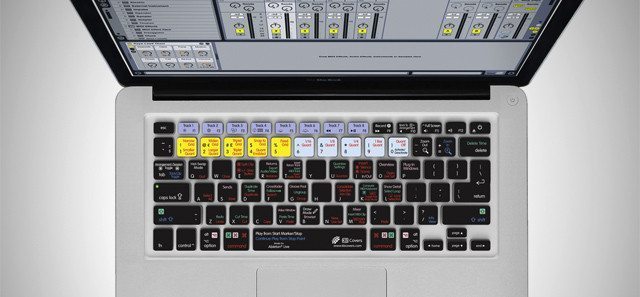
kbcovers-ableton

We actually offer in the DJTT store one of the best keyboard covers for learning to use Ableton’s shortcuts in the DJTT store – click here to grab one (there’s Traktor and Serato versions also). There’s also the added benefit that it also protects your keyboard from in-studio spills!

What are your favorite and most-used keyboard shortcuts? Are there any Ableton needs to include in the next version of Live? (Personally, I’d like to see a shortcut for showing/hiding a VST instrument window.)

Tags: Abletonkeyboard shortcutsproducingProductionproductivity tips for djs
Share1Tweet1Share
Previous Post

What Was It Like To DJ A British Rave In 1989?

Next Post

Pioneer’s DDJ-SB2: $249 Serato Controller for New DJs

Related Posts

Ableton launches Live 12 Suite rent-to-own plan – and it’s not a subscription
Ableton

Ableton launches Live 12 Suite rent-to-own plan – and it’s not a subscription

October 1, 2025
Control an entire studio with Midi Fighter Spectra (like Mad Zach)
Finger Drumming

Control an entire studio with Midi Fighter Spectra (like Mad Zach)

May 9, 2025
How I Play: Hybrasil’s DAWless live techno setup
How I Play

How I Play: Hybrasil’s DAWless live techno setup

October 3, 2024
Load More
Next Post
Pioneer’s DDJ-SB2: $249 Serato Controller for New DJs

Pioneer’s DDJ-SB2: $249 Serato Controller for New DJs

Want to reach DJTT's audience here?

Shoot an email to advertising@djtechtools.com

DJTT ads
DJTT newsletter
Midi Fighter
Chat with us
  • ABOUT DJTT
  • CONTACT
  • PRIVACY
  • MIDI FIGHTER HELP
  • ABOUT DJTT
  • JOBS
  • CONTACT US
  • ADVERTISE
  • PRIVACY POLICY
  • ACCESSIBILITY STATEMENT

© 2024 DJ Techtools all rights reserved by DJ TechTools on all content unless otherwise noted.

No Result
View All Result
  • Blog
    • DJ Gear
      • DIY Projects
      • Gear Reviews
      • New Products
      • Controllerism
    • Techniques + Tips
      • Beginner DJ
      • Advanced DJ
      • Producer
      • Finger Drummer
    • News + Culture
      • Editorials + Opinions
      • Artist Interviews
      • Performances + Routines
      • How I Play
    • DJ Software Tutorials
      • Serato Tips
      • CDJ Tips
      • Ableton Live Tips
  • Store
    • Run by real DJs, not a corporation
    • DJ Controllers
      • Midi Fighter Twister
      • Midi Fighter Spectra
      • Midi Fighter 64
      • View All
    • Accessories
      • Chroma USB Drive for DJs
      • Chroma Caps
      • Chroma Cables Audio
      • Chroma Cables USB-A
      • Chroma Cables: USB-C
      • DJTT Gift Card
      • Midi Fighter T-Shirt
      • Keyboard Covers
      • Earplugs by V-Moda
    • Production Gear
    • Soundcards & Mixers
  • Community
    • Popular Forums
      • General Discussion
      • Buy & Sell
      • Reviews
      • Mixes
      • Music Production
      • Show Your Setup
      • Off Topic
    • Handy Links
      • New Posts
      • Private Messages
      • Register
      • Search
    • Midi Maps
      • Traktor
      • Ableton
      • Serato DJ
      • Midi Fighter 3D
      • Midi Fighter Twister
      • Midi Fighter Spectra
  • Midi Fighter
  • Chroma

© 2024 DJ Techtools all rights reserved by DJ TechTools on all content unless otherwise noted.

This website uses cookies. By continuing to use this website you are giving consent to cookies being used. Visit our Privacy and Cookie Policy.