DJ TechTools
  • Blog
    • DJ Gear
      • DIY Projects
      • Gear Reviews
      • New Products
      • Controllerism
    • Techniques + Tips
      • Beginner DJ
      • Advanced DJ
      • Producer
      • Finger Drummer
    • News + Culture
      • Editorials + Opinions
      • Artist Interviews
      • Performances + Routines
      • How I Play
    • DJ Software Tutorials
      • Serato Tips
        • Traktor Tips
      • CDJ Tips
      • Ableton Live Tips
  • Store
    • Run by real DJs, not a corporation
    • DJ Controllers
      • Midi Fighter Twister
      • Midi Fighter Spectra
      • Midi Fighter 64
      • View All
    • Accessories
      • Chroma USB Drive for DJs
      • Chroma Caps
      • Chroma Cables Audio
      • Chroma Cables USB-A
      • Chroma Cables: USB-C
      • DJTT Gift Card
      • Midi Fighter T-Shirt
      • Keyboard Covers
      • Earplugs by V-Moda
    • Production Gear
    • Soundcards & Mixers
  • Community
    • Popular Forums
      • General Discussion
      • Buy & Sell
      • Reviews
      • Mixes
      • Music Production
      • Show Your Setup
      • Off Topic
    • Handy Links
      • New Posts
      • Private Messages
      • Register
      • Search
    • Midi Maps
      • Traktor
      • Ableton
      • Serato DJ
      • Midi Fighter 3D
      • Midi Fighter Twister
      • Midi Fighter Spectra
  • Midi Fighter
  • Chroma
No Result
View All Result
DJ TechTools
  • Blog
    • DJ Gear
      • DIY Projects
      • Gear Reviews
      • New Products
      • Controllerism
    • Techniques + Tips
      • Beginner DJ
      • Advanced DJ
      • Producer
      • Finger Drummer
    • News + Culture
      • Editorials + Opinions
      • Artist Interviews
      • Performances + Routines
      • How I Play
    • DJ Software Tutorials
      • Serato Tips
        • Traktor Tips
      • CDJ Tips
      • Ableton Live Tips
  • Store
    • Run by real DJs, not a corporation
    • DJ Controllers
      • Midi Fighter Twister
      • Midi Fighter Spectra
      • Midi Fighter 64
      • View All
    • Accessories
      • Chroma USB Drive for DJs
      • Chroma Caps
      • Chroma Cables Audio
      • Chroma Cables USB-A
      • Chroma Cables: USB-C
      • DJTT Gift Card
      • Midi Fighter T-Shirt
      • Keyboard Covers
      • Earplugs by V-Moda
    • Production Gear
    • Soundcards & Mixers
  • Community
    • Popular Forums
      • General Discussion
      • Buy & Sell
      • Reviews
      • Mixes
      • Music Production
      • Show Your Setup
      • Off Topic
    • Handy Links
      • New Posts
      • Private Messages
      • Register
      • Search
    • Midi Maps
      • Traktor
      • Ableton
      • Serato DJ
      • Midi Fighter 3D
      • Midi Fighter Twister
      • Midi Fighter Spectra
  • Midi Fighter
  • Chroma
No Result
View All Result
DJ TechTools

Uploading DJ Mixes to Mixcloud: Best Practices

Dan White by Dan White
August 28, 2015
in Basic DJ Tips
Reading Time: 3 mins read
0
Uploading DJ Mixes to Mixcloud: Best Practices
657
VIEWS
Post on FacebookTweet thisUpvote on Reddit

We’ve continued to cringe nearly weekly at new stories of Soundcloud’s demise as an ad-free place to safely host DJ content. For the sake of their content, we’ve heard from many who DJs are moving their mixes to Mixcloud. We asked the Mixcloud team to share exactly how best to prep a DJ mix for their platform, as well a few other bonus tips in today’s article.

Soundcloud to Mixcloud Transfer Tool
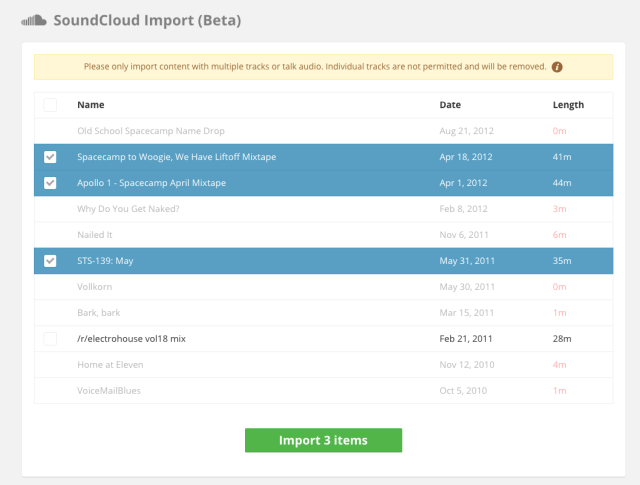
Mixcloud's simple import screen

First up is this handy tool (we mentioned it at launch earlier this year) that lets you instantly move all of DJ mixes from your Soundcloud account with just a few clicks. If you’re looking for the fastest and easiest way to throw a life-preserver to your Soundcloud content, this is it.

Click here to try the Soundcloud-to-Mixcloud import now.

All of your tracks that are over 10 minutes in length are instantly snatched up, with much of the metadata transferred as well. You’ll still need to add a tracklisting if you’ve got one.

Mixcloud Upload File Specifics
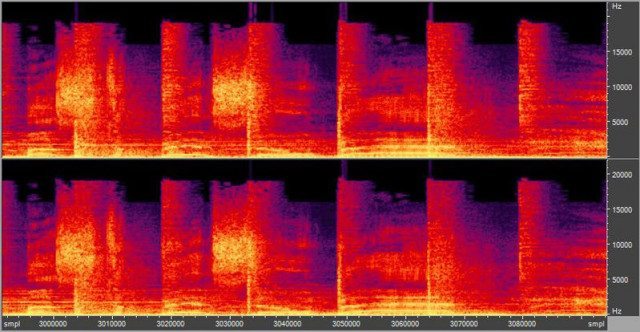
bitrates

One of the interesting things about a lot of sites like Mixcloud is that they apply their own compression algorithm to the files that they get. This often means a different format and a different bitrate than what’s been uploaded. We asked the Mixcloud team what file type is best to upload to their site to limit quality issues and delays – their response:

We usually tell people to go MP3 at least 192kbps CBR because VBR can be flaky. MP3 because AAC/MP4/OGG all need conversion before they can be streamed so there’s a delay before it becomes available

In the immediate/short term, there’s no major advantage going >192kbps.

Additionally interesting is that Mixcloud does hold on to all original copies of the DJ mixes that are uploaded – so even though you can’t access or play it, your full 320kbps mix is on their servers. Which leads us to…

Tell Mixcloud To Raise Their Bitrate

At DJTT we do our best to advocate for DJs and improve their experiences in booths, clubs, websites, on hardware and in software. In this case, we’ve learned something interesting about Mixcloud’s bitrate limitation (192 streaming audio at present): the streaming bitrate isn’t limited due to copyright licensing, but rather based on user demand.

It’s not limited due to licenses. Our streaming bitrate is based on a combination of factors to deliver the best user experience to the listener, taking into account platform (e.g. Apple bandwidth limits), data restrictions, file size and sound quality. We have also done a number of tests with listeners to learn where they can discern the difference.

We will consider higher bitrate in the future if we get clear feedback and user requests from our community for such a feature. Simple!

While distinguishing between 192 and 320 kbps might not be easy for a lot of people, for DJs (whose ears are constantly listening for “is this right?”) it’s often very noticeable. Retweet the below post and let them know you want to up the ante on their streaming:

Want @mixcloud to increase their streaming rate from 192kbps to 320kbps? RT this tweet or let them know yourself!

— DJ TechTools (@DJTechTools) August 25, 2015

Ready to record your DJ set? Here’s our guide on how to do it right. 

Tags: mixcloudqualitysoundcloud to mixclouduploading dj mixes
Share5Tweet3Share
Previous Post

Pitch Riding on Turntables: Throwback Thursday DJ Technique

Next Post

djay Pro Update Introduces Multi-touch Control

Related Posts

Mixcloud launches Tracks for producers to upload original music
News

Mixcloud launches Tracks for producers to upload original music

October 18, 2022
Beatsource + Mixcloud team up so you can record & share DJ sets online sans takedowns
DJ Software Tips

Beatsource + Mixcloud team up so you can record & share DJ sets online sans takedowns

September 15, 2021
Mixcloud founder: here’s what DJs need to know about music copyright
Editorials and Opinions

Mixcloud founder: here’s what DJs need to know about music copyright

November 18, 2020
Load More
Next Post
djay Pro Update Introduces Multi-touch Control

djay Pro Update Introduces Multi-touch Control

Want to reach DJTT's audience here?

Shoot an email to advertising@djtechtools.com

DJTT ads
DJTT newsletter
Midi Fighter
Chat with us
  • ABOUT DJTT
  • CONTACT
  • PRIVACY
  • MIDI FIGHTER HELP
  • ABOUT DJTT
  • JOBS
  • CONTACT US
  • ADVERTISE
  • PRIVACY POLICY
  • ACCESSIBILITY STATEMENT

© 2024 DJ Techtools all rights reserved by DJ TechTools on all content unless otherwise noted.

No Result
View All Result
  • Blog
    • DJ Gear
      • DIY Projects
      • Gear Reviews
      • New Products
      • Controllerism
    • Techniques + Tips
      • Beginner DJ
      • Advanced DJ
      • Producer
      • Finger Drummer
    • News + Culture
      • Editorials + Opinions
      • Artist Interviews
      • Performances + Routines
      • How I Play
    • DJ Software Tutorials
      • Serato Tips
      • CDJ Tips
      • Ableton Live Tips
  • Store
    • Run by real DJs, not a corporation
    • DJ Controllers
      • Midi Fighter Twister
      • Midi Fighter Spectra
      • Midi Fighter 64
      • View All
    • Accessories
      • Chroma USB Drive for DJs
      • Chroma Caps
      • Chroma Cables Audio
      • Chroma Cables USB-A
      • Chroma Cables: USB-C
      • DJTT Gift Card
      • Midi Fighter T-Shirt
      • Keyboard Covers
      • Earplugs by V-Moda
    • Production Gear
    • Soundcards & Mixers
  • Community
    • Popular Forums
      • General Discussion
      • Buy & Sell
      • Reviews
      • Mixes
      • Music Production
      • Show Your Setup
      • Off Topic
    • Handy Links
      • New Posts
      • Private Messages
      • Register
      • Search
    • Midi Maps
      • Traktor
      • Ableton
      • Serato DJ
      • Midi Fighter 3D
      • Midi Fighter Twister
      • Midi Fighter Spectra
  • Midi Fighter
  • Chroma

© 2024 DJ Techtools all rights reserved by DJ TechTools on all content unless otherwise noted.

This website uses cookies. By continuing to use this website you are giving consent to cookies being used. Visit our Privacy and Cookie Policy.