DJ TechTools
  • Blog
    • DJ Gear
      • DIY Projects
      • Gear Reviews
      • New Products
      • Controllerism
    • Techniques + Tips
      • Beginner DJ
      • Advanced DJ
      • Producer
      • Finger Drummer
    • News + Culture
      • Editorials + Opinions
      • Artist Interviews
      • Performances + Routines
      • How I Play
    • DJ Software Tutorials
      • Serato Tips
        • Traktor Tips
      • CDJ Tips
      • Ableton Live Tips
  • Store
    • Run by real DJs, not a corporation
    • DJ Controllers
      • Midi Fighter Twister
      • Midi Fighter Spectra
      • Midi Fighter 64
      • View All
    • Accessories
      • Chroma USB Drive for DJs
      • Chroma Caps
      • Chroma Cables Audio
      • Chroma Cables USB-A
      • Chroma Cables: USB-C
      • DJTT Gift Card
      • Midi Fighter T-Shirt
      • Keyboard Covers
      • Earplugs by V-Moda
    • Production Gear
    • Soundcards & Mixers
  • Community
    • Popular Forums
      • General Discussion
      • Buy & Sell
      • Reviews
      • Mixes
      • Music Production
      • Show Your Setup
      • Off Topic
    • Handy Links
      • New Posts
      • Private Messages
      • Register
      • Search
    • Midi Maps
      • Traktor
      • Ableton
      • Serato DJ
      • Midi Fighter 3D
      • Midi Fighter Twister
      • Midi Fighter Spectra
  • Midi Fighter
  • Chroma
No Result
View All Result
DJ TechTools
  • Blog
    • DJ Gear
      • DIY Projects
      • Gear Reviews
      • New Products
      • Controllerism
    • Techniques + Tips
      • Beginner DJ
      • Advanced DJ
      • Producer
      • Finger Drummer
    • News + Culture
      • Editorials + Opinions
      • Artist Interviews
      • Performances + Routines
      • How I Play
    • DJ Software Tutorials
      • Serato Tips
        • Traktor Tips
      • CDJ Tips
      • Ableton Live Tips
  • Store
    • Run by real DJs, not a corporation
    • DJ Controllers
      • Midi Fighter Twister
      • Midi Fighter Spectra
      • Midi Fighter 64
      • View All
    • Accessories
      • Chroma USB Drive for DJs
      • Chroma Caps
      • Chroma Cables Audio
      • Chroma Cables USB-A
      • Chroma Cables: USB-C
      • DJTT Gift Card
      • Midi Fighter T-Shirt
      • Keyboard Covers
      • Earplugs by V-Moda
    • Production Gear
    • Soundcards & Mixers
  • Community
    • Popular Forums
      • General Discussion
      • Buy & Sell
      • Reviews
      • Mixes
      • Music Production
      • Show Your Setup
      • Off Topic
    • Handy Links
      • New Posts
      • Private Messages
      • Register
      • Search
    • Midi Maps
      • Traktor
      • Ableton
      • Serato DJ
      • Midi Fighter 3D
      • Midi Fighter Twister
      • Midi Fighter Spectra
  • Midi Fighter
  • Chroma
No Result
View All Result
DJ TechTools

Odesi: Music Composition Software From Mixed In Key

Dan White by Dan White
December 9, 2015
in Breaking News, News, Production Tips
Reading Time: 3 mins read
0
Odesi Midi Composition Tool
207
VIEWS
Post on FacebookTweet thisUpvote on Reddit

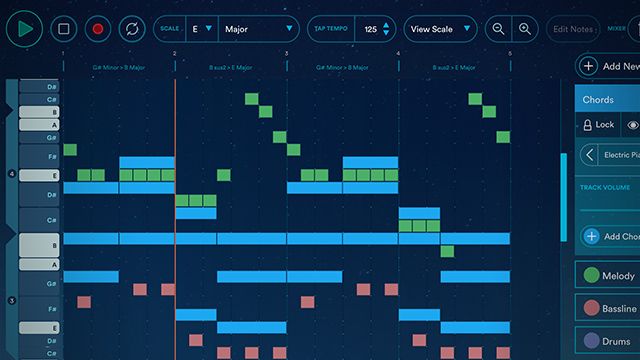
A brand new piece of software has been announced today from the team behind Mixed In Key, Flow, and Platinum Notes. Odesi is designed to be a quick MIDI-editor that allows any one creating music to quickly write melodies, basslines, chord progressions, and more. Watch how quickly you can create a simple chord progression below, and then keep reading for the full features.

  • Software: Odesi
  • Requirements: Web or OS X 10.10 (this Mac version allows use of Audio Units), internet connection
  • Price / Availability: $49

We’ve only had a chance to spend a few minutes with Odesi so far, but this “sonic sketchpad” is proving to be a lot of fun, especially for people with any formal music training. What’s great about it is that it suddenly is incredibly easy to develop an idea of what you want your song to be like, and then Odesi helps you stay in key and build smart chord progressions that fit with what you’re creating.

We can also see this being a major learning tool for those DJs and producers who don’t know much musical theory – and Mixed In Key has even started a series of videos showing how to recreate melodies, chords, and basslines from electronic music hits:

The main set of features are as follows:

  • Automatic “Snap-to-Key and Scale”: The default view shows which notes are allowed in a specific Key and Scale, making it impossible to go off-key in the composition
  • Chord Progressions: Odesi makes it easy to write custom chord progressions, or use a bank of 138 memorable progressions used in today’s popular music, with deep customization options
  • Rhythms: The musician can apply rhythms to both Chords and Basslines, creating endless combinations of intertwined rhythms. There is a bank of 138 highly-customizable ideas, discovered by Mixed In Key, in Pop music, Hip Hop, Rock, Caribbean and Latin music, as well as the most popular rhythms found in electronic music tracks produced from 1986 to today – starting with early Chicago House and ending with the latest Beatport top 100
  • Intelligent basslines: When the project contains a Chord Progression, the Bassline generator will adjust to match the chords, making it easy to experiment with different basslines without having to edit the MIDI notes with every chord change
  • MIDI Export: Odesi supports MIDI export to Ableton Live, Reason, Pro Tools, Logic and all other DAWs
    Access your sessions from anywhere: Odesi runs in a web browser, and is accessible anywhere, anytime. Older sessions will no longer be lost on external hard drives and buried in a closet. When a session is finished, Odesi automatically sends it as an email attachment for backup and safekeeping
  • Recording on the road: Odesi allows you to record melodies, chords and bass from both your MIDI controller and your computer keyboard. If you’re on a Macbook and don’t have a controller available, you can use the 1, 2, 3, 4, 5, 6, 7, 8, 9 keys to play the beats, and ASDFGHJ keys to play notes.
  • Sound banks pulled from today’s hottest music: Although the “grand piano” sound can be used in the web version, there is also a companion app for Mac OS X that extends Odesi with support for 117 different sounds, pulled from today’s hottest music. It contains pianos, leads basses and drum kits that sound crisp and “current.” The musician can put together an audio demo of the track without leaving Odesi when running Mac OS X 10.10 or newer.
  • Change Key and Scale anytime: Odesi can change the Key and Scale of the entire composition, even after the entire MIDI was already written. It’s possible to change the mood from Major to Minor, or to add a Blues feeling to the track. It makes it easier to adjust the composition to fit a vocalist’s range as well and experiment with different keys.

Learn more about the Odesi software here – and keep an eye out for a complete review on DJTT soon.  

Tags: mixed in keymusic compositionodesiproduction tools
Share2Tweet1Share
Previous Post

Djay Pro: Four Decks, iPad Pro Support, Video Mixing, Cloud Streaming

Next Post

The DJTT DJ Stickers Exchange

Related Posts

Ableton releases Note, an iOS app for making music on the go
Ableton

Ableton releases Note, an iOS app for making music on the go

October 19, 2022
Worth the wait: Nektar Aura’s latest software update is a beatmaker’s dream
DJ Software

Worth the wait: Nektar Aura’s latest software update is a beatmaker’s dream

September 21, 2022
Capturing a true pandemic-era album: dive into A Path Untold’s production of Sourcery
Artist Features

Capturing a true pandemic-era album: dive into A Path Untold’s production of Sourcery

August 2, 2022
Load More
Next Post
DJ Stickers

The DJTT DJ Stickers Exchange

Want to reach DJTT's audience here?

Shoot an email to advertising@djtechtools.com

DJTT ads
DJTT newsletter
Midi Fighter
Chat with us
  • ABOUT DJTT
  • CONTACT
  • PRIVACY
  • MIDI FIGHTER HELP
  • ABOUT DJTT
  • JOBS
  • CONTACT US
  • ADVERTISE
  • PRIVACY POLICY
  • ACCESSIBILITY STATEMENT

© 2024 DJ Techtools all rights reserved by DJ TechTools on all content unless otherwise noted.

No Result
View All Result
  • Blog
    • DJ Gear
      • DIY Projects
      • Gear Reviews
      • New Products
      • Controllerism
    • Techniques + Tips
      • Beginner DJ
      • Advanced DJ
      • Producer
      • Finger Drummer
    • News + Culture
      • Editorials + Opinions
      • Artist Interviews
      • Performances + Routines
      • How I Play
    • DJ Software Tutorials
      • Serato Tips
      • CDJ Tips
      • Ableton Live Tips
  • Store
    • Run by real DJs, not a corporation
    • DJ Controllers
      • Midi Fighter Twister
      • Midi Fighter Spectra
      • Midi Fighter 64
      • View All
    • Accessories
      • Chroma USB Drive for DJs
      • Chroma Caps
      • Chroma Cables Audio
      • Chroma Cables USB-A
      • Chroma Cables: USB-C
      • DJTT Gift Card
      • Midi Fighter T-Shirt
      • Keyboard Covers
      • Earplugs by V-Moda
    • Production Gear
    • Soundcards & Mixers
  • Community
    • Popular Forums
      • General Discussion
      • Buy & Sell
      • Reviews
      • Mixes
      • Music Production
      • Show Your Setup
      • Off Topic
    • Handy Links
      • New Posts
      • Private Messages
      • Register
      • Search
    • Midi Maps
      • Traktor
      • Ableton
      • Serato DJ
      • Midi Fighter 3D
      • Midi Fighter Twister
      • Midi Fighter Spectra
  • Midi Fighter
  • Chroma

© 2024 DJ Techtools all rights reserved by DJ TechTools on all content unless otherwise noted.

This website uses cookies. By continuing to use this website you are giving consent to cookies being used. Visit our Privacy and Cookie Policy.