DJ TechTools
  • Blog
    • DJ Gear
      • DIY Projects
      • Gear Reviews
      • New Products
      • Controllerism
    • Techniques + Tips
      • Beginner DJ
      • Advanced DJ
      • Producer
      • Finger Drummer
    • News + Culture
      • Editorials + Opinions
      • Artist Interviews
      • Performances + Routines
      • How I Play
    • DJ Software Tutorials
      • Serato Tips
        • Traktor Tips
      • CDJ Tips
      • Ableton Live Tips
  • Store
    • Run by real DJs, not a corporation
    • DJ Controllers
      • Midi Fighter Twister
      • Midi Fighter Spectra
      • Midi Fighter 64
      • View All
    • Accessories
      • Chroma USB Drive for DJs
      • Chroma Caps
      • Chroma Cables Audio
      • Chroma Cables USB-A
      • Chroma Cables: USB-C
      • DJTT Gift Card
      • Midi Fighter T-Shirt
      • Keyboard Covers
      • Earplugs by V-Moda
    • Production Gear
    • Soundcards & Mixers
  • Community
    • Popular Forums
      • General Discussion
      • Buy & Sell
      • Reviews
      • Mixes
      • Music Production
      • Show Your Setup
      • Off Topic
    • Handy Links
      • New Posts
      • Private Messages
      • Register
      • Search
    • Midi Maps
      • Traktor
      • Ableton
      • Serato DJ
      • Midi Fighter 3D
      • Midi Fighter Twister
      • Midi Fighter Spectra
  • Midi Fighter
  • Chroma
No Result
View All Result
DJ TechTools
  • Blog
    • DJ Gear
      • DIY Projects
      • Gear Reviews
      • New Products
      • Controllerism
    • Techniques + Tips
      • Beginner DJ
      • Advanced DJ
      • Producer
      • Finger Drummer
    • News + Culture
      • Editorials + Opinions
      • Artist Interviews
      • Performances + Routines
      • How I Play
    • DJ Software Tutorials
      • Serato Tips
        • Traktor Tips
      • CDJ Tips
      • Ableton Live Tips
  • Store
    • Run by real DJs, not a corporation
    • DJ Controllers
      • Midi Fighter Twister
      • Midi Fighter Spectra
      • Midi Fighter 64
      • View All
    • Accessories
      • Chroma USB Drive for DJs
      • Chroma Caps
      • Chroma Cables Audio
      • Chroma Cables USB-A
      • Chroma Cables: USB-C
      • DJTT Gift Card
      • Midi Fighter T-Shirt
      • Keyboard Covers
      • Earplugs by V-Moda
    • Production Gear
    • Soundcards & Mixers
  • Community
    • Popular Forums
      • General Discussion
      • Buy & Sell
      • Reviews
      • Mixes
      • Music Production
      • Show Your Setup
      • Off Topic
    • Handy Links
      • New Posts
      • Private Messages
      • Register
      • Search
    • Midi Maps
      • Traktor
      • Ableton
      • Serato DJ
      • Midi Fighter 3D
      • Midi Fighter Twister
      • Midi Fighter Spectra
  • Midi Fighter
  • Chroma
No Result
View All Result
DJ TechTools

Mixvibes Cross DJ 3.0: A Universal DJ App

Dean Zulueta by Dean Zulueta
January 7, 2016
in DJ Gear Announcements, News, News + Culture
Reading Time: 3 mins read
0
Mixvibes Cross DJ 3.0: A Universal DJ App
531
VIEWS
Post on FacebookTweet thisUpvote on Reddit

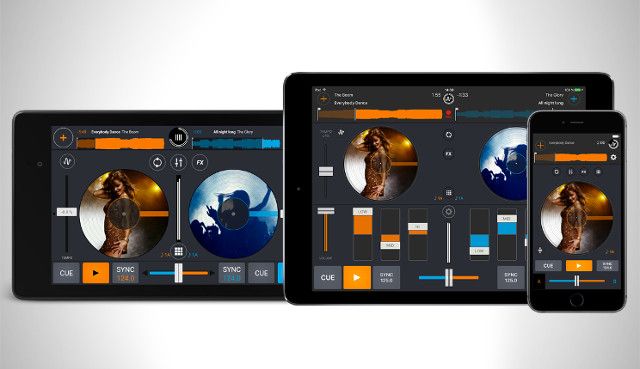
The ultimate goal for any DJ application is to optimally and efficiently handle audio. Mixvibes, the company behind Cross DJ, knows this and that is why the company is boasting a universal, redesigned update, Cross DJ 3.0, for iOS and Android devices. Cross DJ 3.0 includes a new audio engine for iOS, a fresh interface, and MIDI support for Android compatible controllers.

Cross DJ 3.0 for iOS
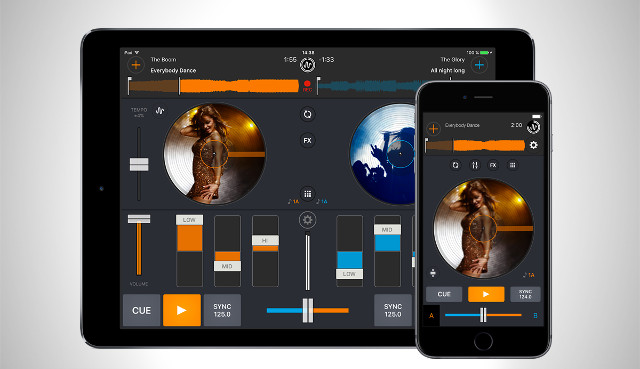
Cross DJ 3.0 ios

Cross DJ 3.0 really caters to the iOS DJ. First off, a DJ only has to buy Cross DJ 3.0 once to have it both on their iPhone and iPad. For $9.99, a DJ can rock a smaller version of the app on their commute to work and the more versatile iPad version in the DJ booth. Additionally, the iOS audio engine for the DJ app has been re-engineered to improve upon battery consumption, audio quality, and optimized recordings.

Beyond versatility and performance, the new Cross DJ 3.0 app looks clean too. Mixvibes worked to make the app appear consistent across both platforms (iPhone and iPad) which means the UI got an extensive facelift. The user can:

  • change the color scheme of each deck out of seven available colors
  • control their music in portrait or landscape mode
  • choose between big and small covers for the vinyl.

Along with the pretty features, Cross DJ 3.0 notifies the DJ when a loop, FX, sample, or EQ parameter is active which saves a lot of time and screen real estate considering the DJ can only see one parameter at a time.

Micro-Review: Cross DJ 3.0 on iPad

I had the privilege of playing around with the app on my iPhone and it was pretty intuitive. I tend to stream music so I thought I wouldn’t be able to test out the app very much, but to my surprise, Cross DJ 3.0 has Soundcloud integrated into the app. So instead of depending on a weak iPhone library, I could login into my Soundcloud account and stream music from my playlists.

I wasn’t able to get to crazy on the decks considering I was mixing on an iPhone 6, however, if I had my iPad I could have definitely thrown down a mini-set given that I had the essentials: EQ, fader, vinyl control, pitch control, BPM and key detection, loops, hot cues, FXs, and the added capability of being able to stream music from Soundcloud (which sounded pretty clear and loaded relatively quickly given my spotty WIFI connection).

Cross DJ 3.0 for Android
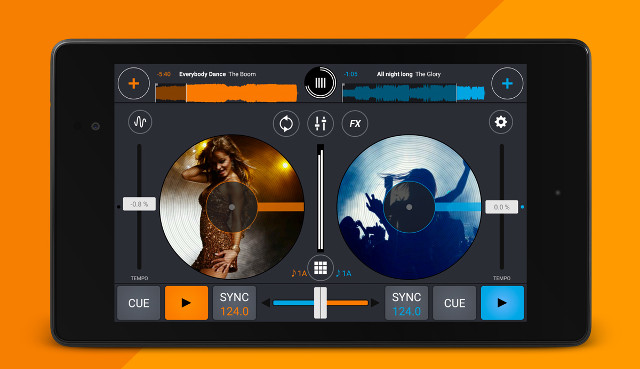
Cross DJ 3.0 android

For Android users, Mixvibes included added support for Android M devices and support for MIDI controllers. The new version of the Cross DJ app supports some solid intro controllers:

  • U-Mix Control 1&2
  • U-Mix Control Pro 1&2
  • Pioneer DDJ-WeGO 2&3
  • Pioneer DDJ-SB.

These aren’t top-tier controllers, but given that the operating system is a phone, it is a major bonus to have some real jogwheels and controls. Along hardware support, DJs can now pre-cue in stereo while outputting in stereo, at the same time, given that their Android M device contains multi-channel audio capabilities. Mixvibes also is boasting that many bugs were fixed in Cross DJ 3.0 for Android users.

Cross DJ 3.0 is a major improvement from Cross DJ 2.0 that came out last year and it is the type of improvement that makes the app something DJs should considering having around. Even if a DJ doesn’t want to mix professionally on a phone or tablet, the functionality of the app is something worth playing around with. After downloading Cross DJ 3.0 on my iPhone 6, I played around with it for almost an hour and I was thoroughly amused. Will I use it to DJ at my next gig? No. However, I am glad to have a set of decks in my pocket for when I want to mess around with some tunes.

Cross DJ 3.0 is available now in the App Store for $9.99 for all iOS devices.

For Android DJs, Cross DJ 3.0 is available for $5.99 in the Play store.
Tags: androidandroid Mandroid tabletapplecross djcross DJ 2.0cross dj 3.0dj androiddj appsdj ipaddj iphoneDj softwareGoogleIOSIphoneiPhone 6mixing softwareMixVibesmobile dj softwareSoftwaresoundcloud
Share4Tweet3Share
Previous Post

New Technics SL-1200G/GAE Turntables Will Cost $4,000

Next Post

From Ufo to Berghain, Berlin’s Rise To Clubbing Capital

Related Posts

A Prime 4+ and a Kontrol S3 intercut against eachother over a black background
Breaking News

InMusic just bought Native Instruments. So what now for Traktor?

May 8, 2026
Ableton launches Live 12 Suite rent-to-own plan – and it’s not a subscription
Ableton

Ableton launches Live 12 Suite rent-to-own plan – and it’s not a subscription

October 1, 2025
Rekordox Spotify
Breaking News

Spotify (finally) slides into Rekordbox, Serato, and Algoriddim djay (again) – for better or worse?

September 24, 2025
Load More
Next Post
From Ufo to Berghain, Berlin’s Rise To Clubbing Capital

From Ufo to Berghain, Berlin’s Rise To Clubbing Capital

Want to reach DJTT's audience here?

Shoot an email to advertising@djtechtools.com

DJTT ads
DJTT newsletter
Midi Fighter
Chat with us
  • ABOUT DJTT
  • CONTACT
  • PRIVACY
  • MIDI FIGHTER HELP
  • ABOUT DJTT
  • JOBS
  • CONTACT US
  • ADVERTISE
  • PRIVACY POLICY
  • ACCESSIBILITY STATEMENT

© 2024 DJ Techtools all rights reserved by DJ TechTools on all content unless otherwise noted.

No Result
View All Result
  • Blog
    • DJ Gear
      • DIY Projects
      • Gear Reviews
      • New Products
      • Controllerism
    • Techniques + Tips
      • Beginner DJ
      • Advanced DJ
      • Producer
      • Finger Drummer
    • News + Culture
      • Editorials + Opinions
      • Artist Interviews
      • Performances + Routines
      • How I Play
    • DJ Software Tutorials
      • Serato Tips
      • CDJ Tips
      • Ableton Live Tips
  • Store
    • Run by real DJs, not a corporation
    • DJ Controllers
      • Midi Fighter Twister
      • Midi Fighter Spectra
      • Midi Fighter 64
      • View All
    • Accessories
      • Chroma USB Drive for DJs
      • Chroma Caps
      • Chroma Cables Audio
      • Chroma Cables USB-A
      • Chroma Cables: USB-C
      • DJTT Gift Card
      • Midi Fighter T-Shirt
      • Keyboard Covers
      • Earplugs by V-Moda
    • Production Gear
    • Soundcards & Mixers
  • Community
    • Popular Forums
      • General Discussion
      • Buy & Sell
      • Reviews
      • Mixes
      • Music Production
      • Show Your Setup
      • Off Topic
    • Handy Links
      • New Posts
      • Private Messages
      • Register
      • Search
    • Midi Maps
      • Traktor
      • Ableton
      • Serato DJ
      • Midi Fighter 3D
      • Midi Fighter Twister
      • Midi Fighter Spectra
  • Midi Fighter
  • Chroma

© 2024 DJ Techtools all rights reserved by DJ TechTools on all content unless otherwise noted.

This website uses cookies. By continuing to use this website you are giving consent to cookies being used. Visit our Privacy and Cookie Policy.