DJ TechTools
  • Blog
    • DJ Gear
      • DIY Projects
      • Gear Reviews
      • New Products
      • Controllerism
    • Techniques + Tips
      • Beginner DJ
      • Advanced DJ
      • Producer
      • Finger Drummer
    • News + Culture
      • Editorials + Opinions
      • Artist Interviews
      • Performances + Routines
      • How I Play
    • DJ Software Tutorials
      • Serato Tips
        • Traktor Tips
      • CDJ Tips
      • Ableton Live Tips
  • Store
    • Run by real DJs, not a corporation
    • DJ Controllers
      • Midi Fighter Twister
      • Midi Fighter Spectra
      • Midi Fighter 64
      • View All
    • Accessories
      • Chroma USB Drive for DJs
      • Chroma Caps
      • Chroma Cables Audio
      • Chroma Cables USB-A
      • Chroma Cables: USB-C
      • DJTT Gift Card
      • Midi Fighter T-Shirt
      • Keyboard Covers
      • Earplugs by V-Moda
    • Production Gear
    • Soundcards & Mixers
  • Community
    • Popular Forums
      • General Discussion
      • Buy & Sell
      • Reviews
      • Mixes
      • Music Production
      • Show Your Setup
      • Off Topic
    • Handy Links
      • New Posts
      • Private Messages
      • Register
      • Search
    • Midi Maps
      • Traktor
      • Ableton
      • Serato DJ
      • Midi Fighter 3D
      • Midi Fighter Twister
      • Midi Fighter Spectra
  • Midi Fighter
  • Chroma
No Result
View All Result
DJ TechTools
  • Blog
    • DJ Gear
      • DIY Projects
      • Gear Reviews
      • New Products
      • Controllerism
    • Techniques + Tips
      • Beginner DJ
      • Advanced DJ
      • Producer
      • Finger Drummer
    • News + Culture
      • Editorials + Opinions
      • Artist Interviews
      • Performances + Routines
      • How I Play
    • DJ Software Tutorials
      • Serato Tips
        • Traktor Tips
      • CDJ Tips
      • Ableton Live Tips
  • Store
    • Run by real DJs, not a corporation
    • DJ Controllers
      • Midi Fighter Twister
      • Midi Fighter Spectra
      • Midi Fighter 64
      • View All
    • Accessories
      • Chroma USB Drive for DJs
      • Chroma Caps
      • Chroma Cables Audio
      • Chroma Cables USB-A
      • Chroma Cables: USB-C
      • DJTT Gift Card
      • Midi Fighter T-Shirt
      • Keyboard Covers
      • Earplugs by V-Moda
    • Production Gear
    • Soundcards & Mixers
  • Community
    • Popular Forums
      • General Discussion
      • Buy & Sell
      • Reviews
      • Mixes
      • Music Production
      • Show Your Setup
      • Off Topic
    • Handy Links
      • New Posts
      • Private Messages
      • Register
      • Search
    • Midi Maps
      • Traktor
      • Ableton
      • Serato DJ
      • Midi Fighter 3D
      • Midi Fighter Twister
      • Midi Fighter Spectra
  • Midi Fighter
  • Chroma
No Result
View All Result
DJ TechTools

Traktor Stem View: Everyone Can Now See + Map Stems

Dan White by Dan White
February 22, 2016
in DJ Software Tips, Traktor Tips
Reading Time: 2 mins read
0
Traktor Stem View: Everyone Can Now See + Map Stems
168
VIEWS
Post on FacebookTweet thisUpvote on Reddit

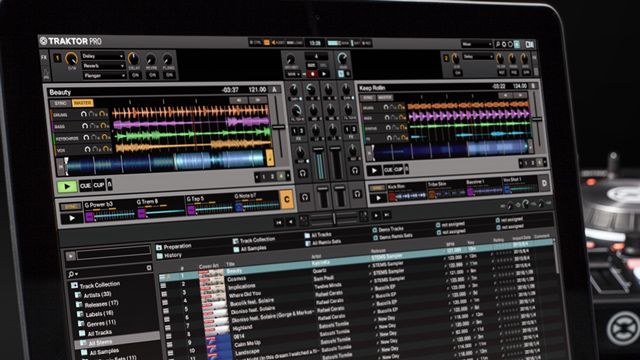
Native Instruments has released a new update to Traktor that allows anyone to see the full Stems files being played without special hardware and map the stem controls to any MIDI controller. This Traktor Stem View announcement also includes built-in support for Kontrol S4 users, a discount on Stems, and 65 free premium Stem tracks for everyone to download.

Traktor Pro 2.10.1 + Stem View:

Here’s the basic top-level overview of what NI is announcing this morning:

  • Traktor Pro 2.10.1 is out now – free update as usual.
  • Stems are now visible in the software interface
  • Traktor is making 65 Stem tracks available for free, and launching a 25% off sale on some online stores until Feb 29th, 2016 (a one week sale)
  • Kontrol S4 owners now have built-in control of Stem Decks (no mappings needed) including muting/volume/filter control

Traktor Stem View Performance

Traktor Stem View + Kontrol S4 Walkthrough Video

Native Instruments seems is especially touting built-in control of Stems for the Kontrol S4 – and with that controller having helped bring Traktor to users around the world, it’s no surprise that support for it was at the forefront of everyone’s mind. Watch as NI’s Eric Goldstein shares a walkthrough of how Stem View works, particularly with an S4:

To help kick off the new Stems view, Native Instruments has decided to wisely subsidize DJs with a solid pack of free content:

To make sure everyone can get going playing Stems, we are also giving away 65 premium Stem tracks for free, and our retail partners like Beatport are offering 25% discount of their Stems repertoire for one week only.

Here are the coupon codes to get the discounts at various sites:

  • Beatport: BPSTEMS25
  • Bleep: BLEEPSTEMS
  • Juno: STEMS25
  • Traxsource: PBC-70B7DD1273895166
  • whatpeopleplay: 25wPS1Em
  • Wasabeat: automatic discount

Get the free Stems, discount codes for 25% off, and more details about Stem View in Traktor here on NI’s site.

Want to control Stems with a Midi Fighter Twister? Here’s how! 
Tags: Kontrolkontrol s4stemsstems filestraktor pro 2.10.1traktor stem viewTraktor Tips
Share1Tweet1Share
Previous Post

Recording A Layered String Section For Electronic Productions

Next Post

The Early History Of The Turntable / Phonograph: La Voix du Passé

Related Posts

Engine DJ 5.0: on-board stems on the System 1, RGB waveforms for everyone
Breaking News

Engine DJ 5.0: on-board stems on the System 1, RGB waveforms for everyone

May 13, 2026
Akai Launches MPC Live III Standalone With 8-Core Processor, Clip Matrix, Stems, and 3D Pads
Breaking News

Akai Launches MPC Live III Standalone With 8-Core Processor, Clip Matrix, Stems, and 3D Pads

October 2, 2025
Serato DJ 3.1 adds integrated accessory control of Serato Stems
Serato

Serato DJ 3.1 adds integrated accessory control of Serato Stems

December 5, 2023
Load More
Next Post
The Early History Of The Turntable / Phonograph: La Voix du Passé

The Early History Of The Turntable / Phonograph: La Voix du Passé

Want to reach DJTT's audience here?

Shoot an email to advertising@djtechtools.com

DJTT ads
DJTT newsletter
Midi Fighter
Chat with us
  • ABOUT DJTT
  • CONTACT
  • PRIVACY
  • MIDI FIGHTER HELP
  • ABOUT DJTT
  • JOBS
  • CONTACT US
  • ADVERTISE
  • PRIVACY POLICY
  • ACCESSIBILITY STATEMENT

© 2024 DJ Techtools all rights reserved by DJ TechTools on all content unless otherwise noted.

No Result
View All Result
  • Blog
    • DJ Gear
      • DIY Projects
      • Gear Reviews
      • New Products
      • Controllerism
    • Techniques + Tips
      • Beginner DJ
      • Advanced DJ
      • Producer
      • Finger Drummer
    • News + Culture
      • Editorials + Opinions
      • Artist Interviews
      • Performances + Routines
      • How I Play
    • DJ Software Tutorials
      • Serato Tips
      • CDJ Tips
      • Ableton Live Tips
  • Store
    • Run by real DJs, not a corporation
    • DJ Controllers
      • Midi Fighter Twister
      • Midi Fighter Spectra
      • Midi Fighter 64
      • View All
    • Accessories
      • Chroma USB Drive for DJs
      • Chroma Caps
      • Chroma Cables Audio
      • Chroma Cables USB-A
      • Chroma Cables: USB-C
      • DJTT Gift Card
      • Midi Fighter T-Shirt
      • Keyboard Covers
      • Earplugs by V-Moda
    • Production Gear
    • Soundcards & Mixers
  • Community
    • Popular Forums
      • General Discussion
      • Buy & Sell
      • Reviews
      • Mixes
      • Music Production
      • Show Your Setup
      • Off Topic
    • Handy Links
      • New Posts
      • Private Messages
      • Register
      • Search
    • Midi Maps
      • Traktor
      • Ableton
      • Serato DJ
      • Midi Fighter 3D
      • Midi Fighter Twister
      • Midi Fighter Spectra
  • Midi Fighter
  • Chroma

© 2024 DJ Techtools all rights reserved by DJ TechTools on all content unless otherwise noted.

This website uses cookies. By continuing to use this website you are giving consent to cookies being used. Visit our Privacy and Cookie Policy.