DJ TechTools
  • Blog
    • DJ Gear
      • DIY Projects
      • Gear Reviews
      • New Products
      • Controllerism
    • Techniques + Tips
      • Beginner DJ
      • Advanced DJ
      • Producer
      • Finger Drummer
    • News + Culture
      • Editorials + Opinions
      • Artist Interviews
      • Performances + Routines
      • How I Play
    • DJ Software Tutorials
      • Serato Tips
        • Traktor Tips
      • CDJ Tips
      • Ableton Live Tips
  • Store
    • Run by real DJs, not a corporation
    • DJ Controllers
      • Midi Fighter Twister
      • Midi Fighter Spectra
      • Midi Fighter 64
      • View All
    • Accessories
      • Chroma USB Drive for DJs
      • Chroma Caps
      • Chroma Cables Audio
      • Chroma Cables USB-A
      • Chroma Cables: USB-C
      • DJTT Gift Card
      • Midi Fighter T-Shirt
      • Keyboard Covers
      • Earplugs by V-Moda
    • Production Gear
    • Soundcards & Mixers
  • Community
    • Popular Forums
      • General Discussion
      • Buy & Sell
      • Reviews
      • Mixes
      • Music Production
      • Show Your Setup
      • Off Topic
    • Handy Links
      • New Posts
      • Private Messages
      • Register
      • Search
    • Midi Maps
      • Traktor
      • Ableton
      • Serato DJ
      • Midi Fighter 3D
      • Midi Fighter Twister
      • Midi Fighter Spectra
  • Midi Fighter
  • Chroma
No Result
View All Result
DJ TechTools
  • Blog
    • DJ Gear
      • DIY Projects
      • Gear Reviews
      • New Products
      • Controllerism
    • Techniques + Tips
      • Beginner DJ
      • Advanced DJ
      • Producer
      • Finger Drummer
    • News + Culture
      • Editorials + Opinions
      • Artist Interviews
      • Performances + Routines
      • How I Play
    • DJ Software Tutorials
      • Serato Tips
        • Traktor Tips
      • CDJ Tips
      • Ableton Live Tips
  • Store
    • Run by real DJs, not a corporation
    • DJ Controllers
      • Midi Fighter Twister
      • Midi Fighter Spectra
      • Midi Fighter 64
      • View All
    • Accessories
      • Chroma USB Drive for DJs
      • Chroma Caps
      • Chroma Cables Audio
      • Chroma Cables USB-A
      • Chroma Cables: USB-C
      • DJTT Gift Card
      • Midi Fighter T-Shirt
      • Keyboard Covers
      • Earplugs by V-Moda
    • Production Gear
    • Soundcards & Mixers
  • Community
    • Popular Forums
      • General Discussion
      • Buy & Sell
      • Reviews
      • Mixes
      • Music Production
      • Show Your Setup
      • Off Topic
    • Handy Links
      • New Posts
      • Private Messages
      • Register
      • Search
    • Midi Maps
      • Traktor
      • Ableton
      • Serato DJ
      • Midi Fighter 3D
      • Midi Fighter Twister
      • Midi Fighter Spectra
  • Midi Fighter
  • Chroma
No Result
View All Result
DJ TechTools

Ill Gates: 5 Studio Workflow Techniques

Dan White by Dan White
November 3, 2016
in Production Tips
Reading Time: 3 mins read
0
Ill Gates: 5 Studio Workflow Techniques
257
VIEWS
Post on FacebookTweet thisUpvote on Reddit

When ill.Gates waxes poetic on music production processes, it’s clear that he’s spent uncountable hours in the studio. In today’s video, he shares some of his most valuable tips for anyone taking on the creative process of producing. Learn why “it’s not over until someone kills a puppy” is reasonable music writing advice – watch the full video inside.

ill.Gates’: How To Optimize Your Studio Workflow

In the above video, ill.Gates gives an incredibly detailed overview of five tips that have changed his own creative process in the studio when music making. Here’s a quick summary of the major points he makes:

Divide Studio Sessions Into “Day” and “Night” Sessions

  • Time spent in the studio is incredibly valuable – but if you do everything at once it will be too overwhelming
  • Split your sessions into Writing and Prep sessions
  • Prep/Nighttime: Shorter amount of time, good for sound design, plugins, making sounds and kits, organizing library, practicing finger drumming (essentially anything isn’t writing music). This is more about exploring and experimentation.
  • Writing/Daytime: Treat this like you would a job – wake up early, focus entirely on writing the music for a long period. Get as much writing done as possible in one session!

The Three Production Phases

  • Phase 1: Saying Yes – This is when you’re creating new ideas, jamming. Putting down as many ideas as possible. Add as many things as you want to your project.
  • Phase 2: Saying No – Arrange the above ideas into a track “by subtracting, not by adding”. Delete stuff from the first stage – you can’t incorporate all of your ideas into one song.

“A good song should do one thing really well, not all the things.”

  • Phase 3: Finishing Up – Finalize everything – flatten it down to audio stems. Mix rendered audio instead of live instruments (for the sake of processing power). Correct timing, and tidy things up. Mix again with fancy plugins and make small edits to your stems where needed (reverse things, pitch shift, etc).

Make Your Studio Ergonomic
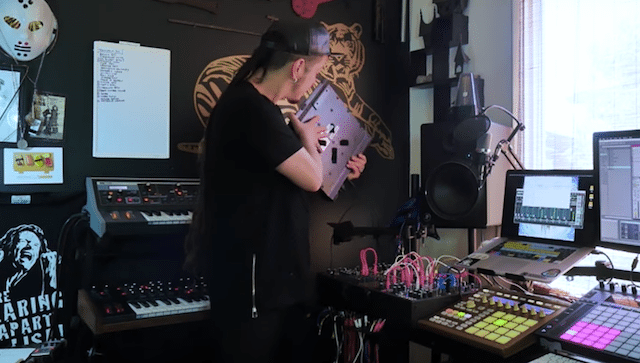
All of the gear in his studio is velcro'd on monitor mounts/trees
All of the gear in his studio is velcro’d on monitor mounts/trees
  • ill.Gates likes to stand up for phase 1 – when jamming – not be sitting down. This is common in a lot of creative practices.
  • Buy monitor arms / trees and attach your various gear to. There are a number of low-cost options on Amazon – which tilt and rotate fully. Many pieces of gear won’t have VESA mounts on the back of them, so try using heavy-duty Velcro instead!

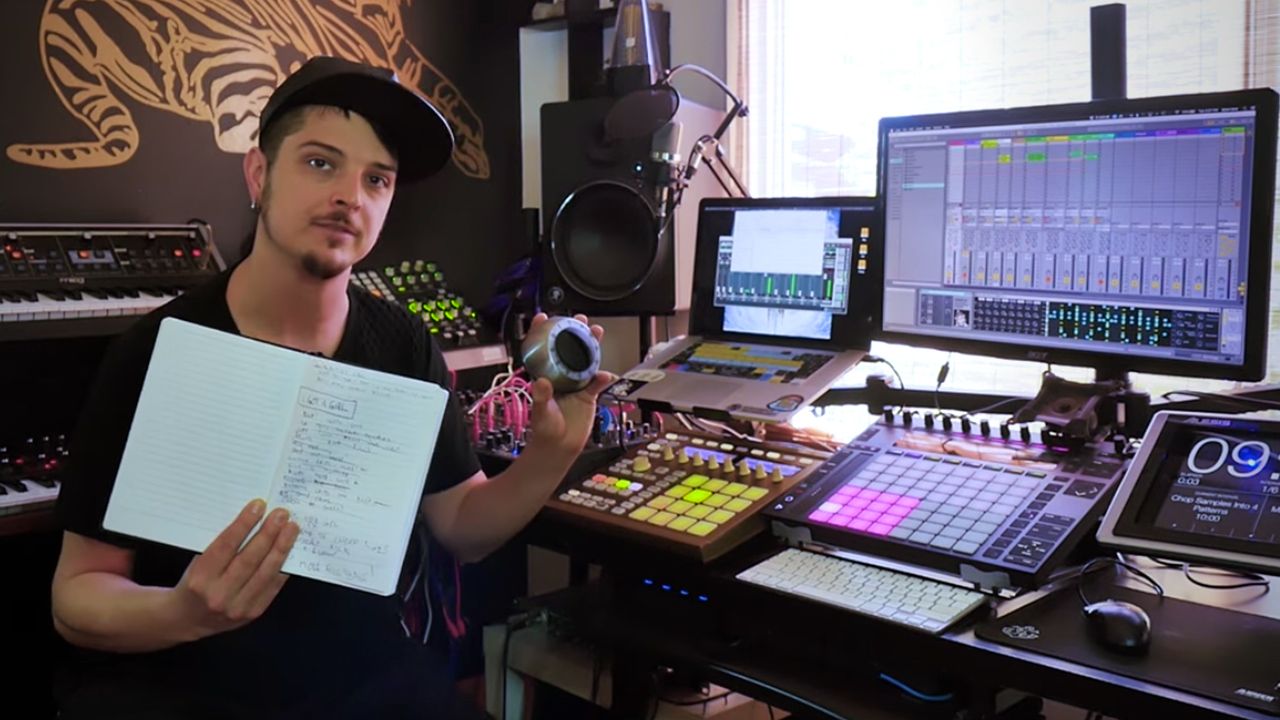
Timeboxing + Recipes
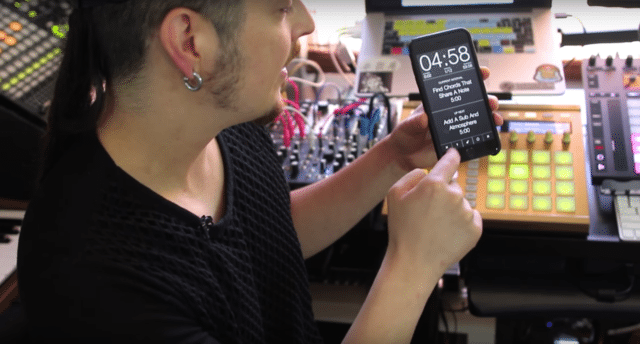
The Seconds Pro app in action
  • Make a list of everything that needs to happen to your track
  • Set a timer (simple mechanical kitchen timers like this one work well!)
  • Cross off as many things on the list as possible
  • You might recognize this as a simplified version of the Pomodoro technique
  • You can also use your phone – ill.Gates recommends interval timers – he specifically uses Seconds Pro ($4.99 on the App Store) which allows you to allocate specific amounts of time for different studio tasks.
  • Apps allow you to unit the kitchen timer and the list – to make what ill.Gates calls a recipe (can you tell he loves cooking analogies?)

Find more ill.Gates’ studio advice on ProducerDJ.com – including his Ill Methodology tutorial series. 

Want to own some of ill.Gates’ original finger drumming soundpacks? Check out the packs he released with DJ Techtools here. 

Tags: efficiencyill gatesmusic productionProductionstudiotechniques
Share2Tweet1Share
Previous Post

DJ Player 9: An iOS DJ App Crowdsourced Over Slack

Next Post

Sharing DJ Mixes On Facebook + YouTube

Related Posts

Control an entire studio with Midi Fighter Spectra (like Mad Zach)
Finger Drumming

Control an entire studio with Midi Fighter Spectra (like Mad Zach)

May 9, 2025
Ableton Live 12 is here: new Performance Packs, sounds, MIDI tools + a refreshed workflow and more
Ableton

Ableton Live 12 is here: new Performance Packs, sounds, MIDI tools + a refreshed workflow and more

March 8, 2024
Breaking writer’s block: A producer’s guide to sparking inspiration
DJ Techniques / Tips

Breaking writer’s block: A producer’s guide to sparking inspiration

October 9, 2023
Load More
Next Post
Sharing DJ Mixes On YouTube, Facebook

Sharing DJ Mixes On Facebook + YouTube

Want to reach DJTT's audience here?

Shoot an email to advertising@djtechtools.com

DJTT ads
DJTT newsletter
Midi Fighter
Chat with us
  • ABOUT DJTT
  • CONTACT
  • PRIVACY
  • MIDI FIGHTER HELP
  • ABOUT DJTT
  • JOBS
  • CONTACT US
  • ADVERTISE
  • PRIVACY POLICY
  • ACCESSIBILITY STATEMENT

© 2024 DJ Techtools all rights reserved by DJ TechTools on all content unless otherwise noted.

No Result
View All Result
  • Blog
    • DJ Gear
      • DIY Projects
      • Gear Reviews
      • New Products
      • Controllerism
    • Techniques + Tips
      • Beginner DJ
      • Advanced DJ
      • Producer
      • Finger Drummer
    • News + Culture
      • Editorials + Opinions
      • Artist Interviews
      • Performances + Routines
      • How I Play
    • DJ Software Tutorials
      • Serato Tips
      • CDJ Tips
      • Ableton Live Tips
  • Store
    • Run by real DJs, not a corporation
    • DJ Controllers
      • Midi Fighter Twister
      • Midi Fighter Spectra
      • Midi Fighter 64
      • View All
    • Accessories
      • Chroma USB Drive for DJs
      • Chroma Caps
      • Chroma Cables Audio
      • Chroma Cables USB-A
      • Chroma Cables: USB-C
      • DJTT Gift Card
      • Midi Fighter T-Shirt
      • Keyboard Covers
      • Earplugs by V-Moda
    • Production Gear
    • Soundcards & Mixers
  • Community
    • Popular Forums
      • General Discussion
      • Buy & Sell
      • Reviews
      • Mixes
      • Music Production
      • Show Your Setup
      • Off Topic
    • Handy Links
      • New Posts
      • Private Messages
      • Register
      • Search
    • Midi Maps
      • Traktor
      • Ableton
      • Serato DJ
      • Midi Fighter 3D
      • Midi Fighter Twister
      • Midi Fighter Spectra
  • Midi Fighter
  • Chroma

© 2024 DJ Techtools all rights reserved by DJ TechTools on all content unless otherwise noted.

This website uses cookies. By continuing to use this website you are giving consent to cookies being used. Visit our Privacy and Cookie Policy.