DJ TechTools
  • Blog
    • DJ Gear
      • DIY Projects
      • Gear Reviews
      • New Products
      • Controllerism
    • Techniques + Tips
      • Beginner DJ
      • Advanced DJ
      • Producer
      • Finger Drummer
    • News + Culture
      • Editorials + Opinions
      • Artist Interviews
      • Performances + Routines
      • How I Play
    • DJ Software Tutorials
      • Serato Tips
        • Traktor Tips
      • CDJ Tips
      • Ableton Live Tips
  • Store
    • Run by real DJs, not a corporation
    • DJ Controllers
      • Midi Fighter Twister
      • Midi Fighter Spectra
      • Midi Fighter 64
      • View All
    • Accessories
      • Chroma USB Drive for DJs
      • Chroma Caps
      • Chroma Cables Audio
      • Chroma Cables USB-A
      • Chroma Cables: USB-C
      • DJTT Gift Card
      • Midi Fighter T-Shirt
      • Keyboard Covers
      • Earplugs by V-Moda
    • Production Gear
    • Soundcards & Mixers
  • Community
    • Popular Forums
      • General Discussion
      • Buy & Sell
      • Reviews
      • Mixes
      • Music Production
      • Show Your Setup
      • Off Topic
    • Handy Links
      • New Posts
      • Private Messages
      • Register
      • Search
    • Midi Maps
      • Traktor
      • Ableton
      • Serato DJ
      • Midi Fighter 3D
      • Midi Fighter Twister
      • Midi Fighter Spectra
  • Midi Fighter
  • Chroma
No Result
View All Result
DJ TechTools
  • Blog
    • DJ Gear
      • DIY Projects
      • Gear Reviews
      • New Products
      • Controllerism
    • Techniques + Tips
      • Beginner DJ
      • Advanced DJ
      • Producer
      • Finger Drummer
    • News + Culture
      • Editorials + Opinions
      • Artist Interviews
      • Performances + Routines
      • How I Play
    • DJ Software Tutorials
      • Serato Tips
        • Traktor Tips
      • CDJ Tips
      • Ableton Live Tips
  • Store
    • Run by real DJs, not a corporation
    • DJ Controllers
      • Midi Fighter Twister
      • Midi Fighter Spectra
      • Midi Fighter 64
      • View All
    • Accessories
      • Chroma USB Drive for DJs
      • Chroma Caps
      • Chroma Cables Audio
      • Chroma Cables USB-A
      • Chroma Cables: USB-C
      • DJTT Gift Card
      • Midi Fighter T-Shirt
      • Keyboard Covers
      • Earplugs by V-Moda
    • Production Gear
    • Soundcards & Mixers
  • Community
    • Popular Forums
      • General Discussion
      • Buy & Sell
      • Reviews
      • Mixes
      • Music Production
      • Show Your Setup
      • Off Topic
    • Handy Links
      • New Posts
      • Private Messages
      • Register
      • Search
    • Midi Maps
      • Traktor
      • Ableton
      • Serato DJ
      • Midi Fighter 3D
      • Midi Fighter Twister
      • Midi Fighter Spectra
  • Midi Fighter
  • Chroma
No Result
View All Result
DJ TechTools

DIY: Upgrade A 12 Year Old CDJ-1000MK3: SD Card, RGB Waveform, Slip Mode

Dan White by Dan White
May 21, 2018
in DIY + Hacks
Reading Time: 4 mins read
0
DIY: Upgrade A 12 Year Old CDJ-1000MK3: SD Card, RGB Waveform, Slip Mode
228
SHARES
11.2k
VIEWS
Post on FacebookTweet thisUpvote on Reddit

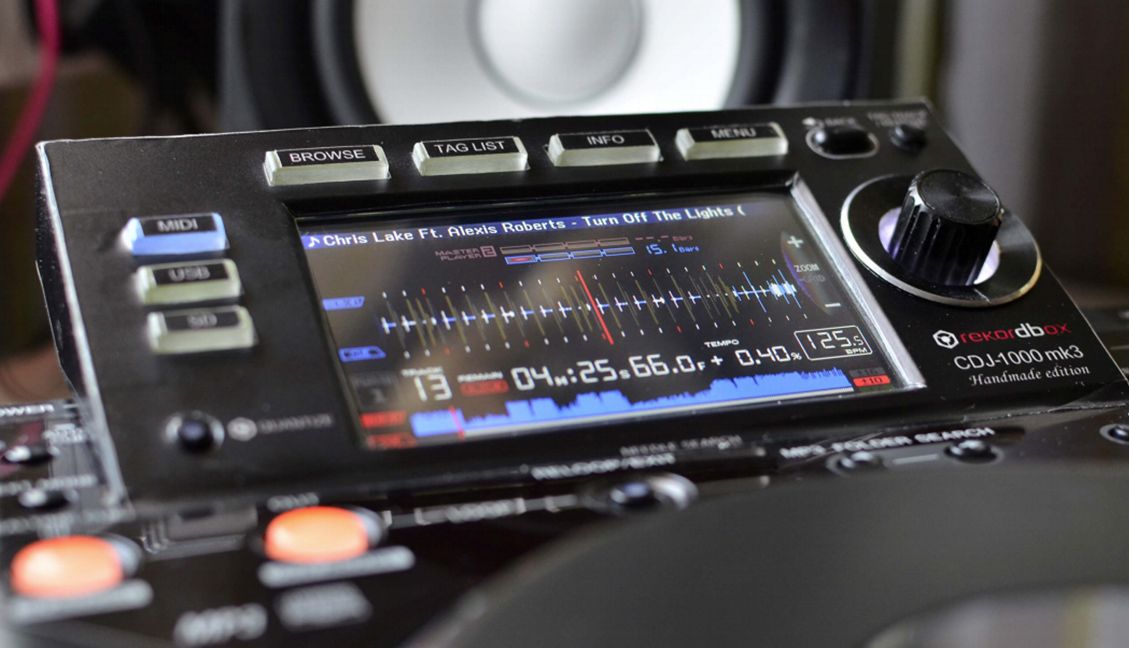
Tired of the excessive electronic waste that comes with DJ gear lust? Consider instead the idea of breathing new life into old pieces of digital DJ gear, giving them modern features and functionality. Today’s project by Andrei Anatska is one we first previewed last summer: taking a CDJ-1000MK3 and replacing the display and some of the boards inside to create NXS-style display and control – all for less than $100 a unit. Keep reading to learn more about this project and get the instructions!

CDJ-1000MK3 Handmade Edition

First, watch a demo of the finished mod:

This project has been in the making for a while. We first shared Andrei’s original concept for the mod last year on DJTT, which takes an old Pioneer DJ CDJ-1000mk3 and gives it a very modern upgrade that would feel familiar to almost any current digital DJ. The concept resonated with so many that he kept working on the project and at the end of April he released the firmware as well as an instruction manual for fellow DIYers to do it themselves.

We’ll talk more about the DIY process below, but if you want to just jump right in here’s the relevant links:

  • Download the firmware on Github
  • Download the self-assembly manual

Features Of The Upgrade

As a reminder – here’s what the user interface and screen of the CDJ-1000mk3 looked like when it was first introduced back in 2006:
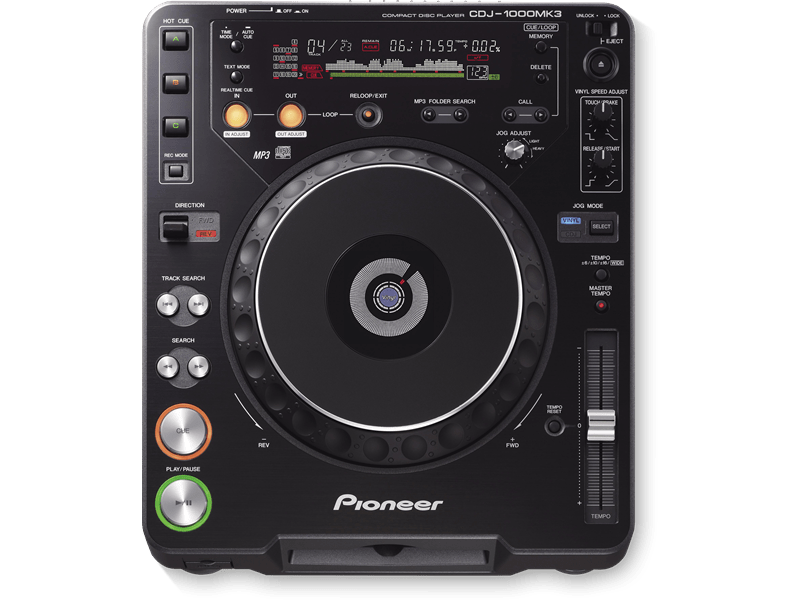
If anything, it feels like it should be called the CDJ-1000mk4 after this extensive modification.The upgrade is significant, bringing the following features and controls, effectively recreating the NXS CDJ experience:

  • Playlist browsing and sorting
  • Tag List to hold crates
  • Detailed waveforms – both a static overview and a zoomable, scrolling waveform
  • Beatgrids + phase meters
  • WAV file support (right now, those are the only type of files supported – no MP3)
  • Slip Mode (activated using the Master Tempo button)
  • Touchscreen strip search to move around in the track

The work to do a custom firmware for a device like this is no small matter – you can follow along the many changes Andrei has implemented along the way on the Github project’s changelog.

A few things are not implemented in the basic mod now that are pointed out in the manual:

  • Media: Micro SD Cards only supported right now, plans in place to add USB flash drive support
  • Rekordbox support: Much of reading from a Rekordbox database is working, but right now all playlists on a Rekordbox drive get merged into one – more work planned on this
  • No supported MIDI in/out or Pro DJ Link (linking together two devices to share audio library)
  • Master Tempo: The board used has a weaker microcontroller than used on CDJ-2000s, so it can’t do certain realtime algorithms – and master tempo (key lock) is one of them.

The DIY Process

To do this process yourself, you’ll need about $100 in parts (all listed in the manual), the biggest expense of which is a touchscreen ST microcontroller board which runs $54.

If you want to buy a used but functional CDJ-1000mk3 to start this project from, recent prices on eBay seem to indicate you could get one for about $250 – or a pair of them for as low as $400.
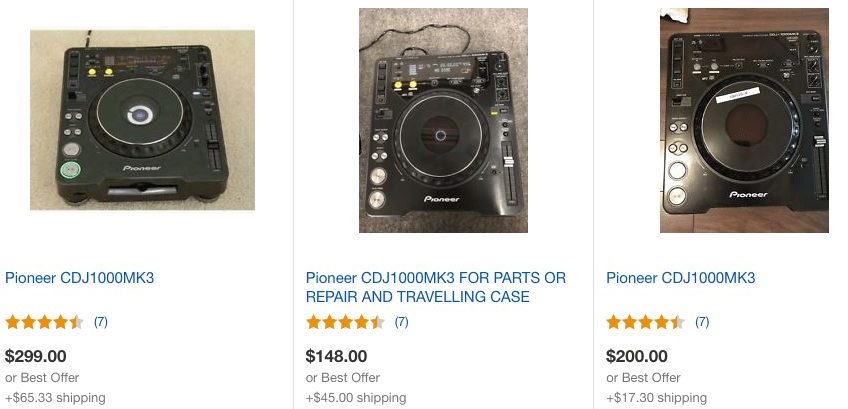
Prices of a CDJ-1000mk3 on eBay right now..

To actually take on the process of modding a CDJ-1000mk3 in this project, you’ll want to have at least some experience with electronics and soldering. It’s not a super complicated process – but that’s only because Andrei has done an amazing job of documenting it in his guide.
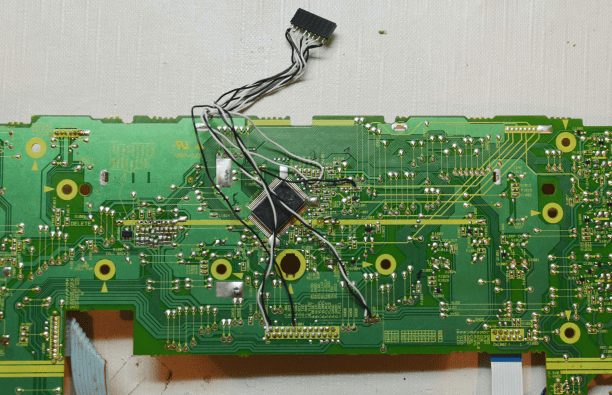
Soldering wires onto the original CDJs circuit board

The final step in the process is probably the most challenging: making a PCB and case for the new display. You can have the PCB made using an online service or make it at home, but this might be the biggest obstacle for someone who is more novice in electronics. That said, Andrei has included files for manufacturing the PCB – so it shouldn’t be too difficult.
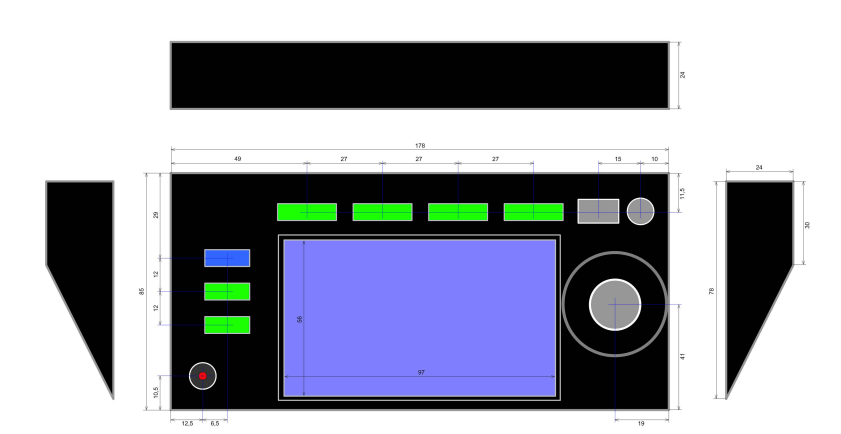
He’s also included specifications for the size and design of the display board’s case – which is cut out of black plastic. That’s where the “Handmade Edition” name comes from, right?
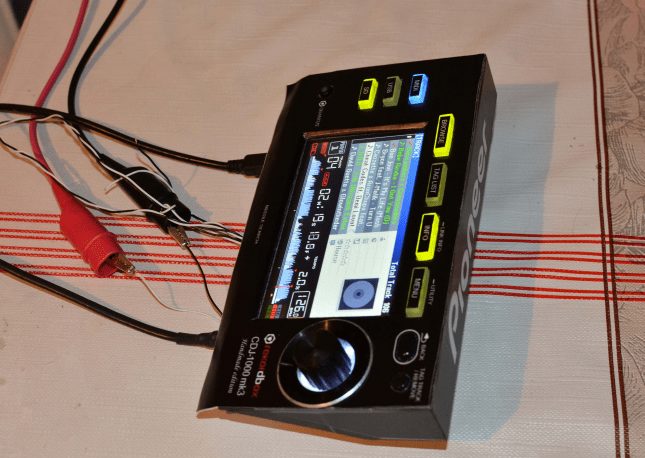
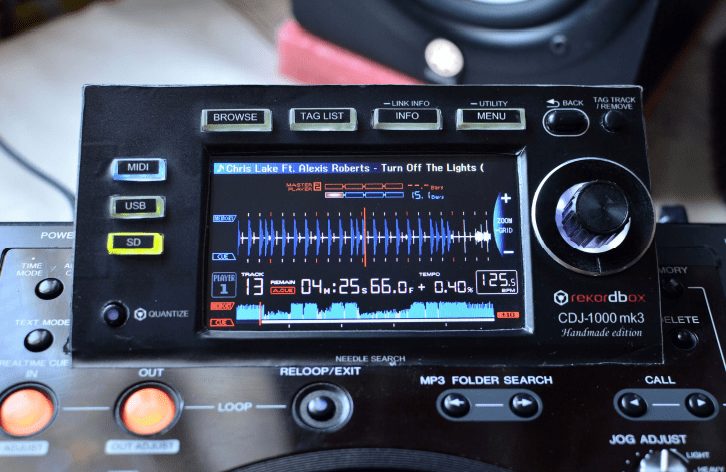
The completed display module before mounting it to the CDJ chassis
The finished mod, mounted and installed

Need help, have questions or ideas? Share them in the comments below – we’ll ask Andrei to keep an eye on the comments section and reply 🙂
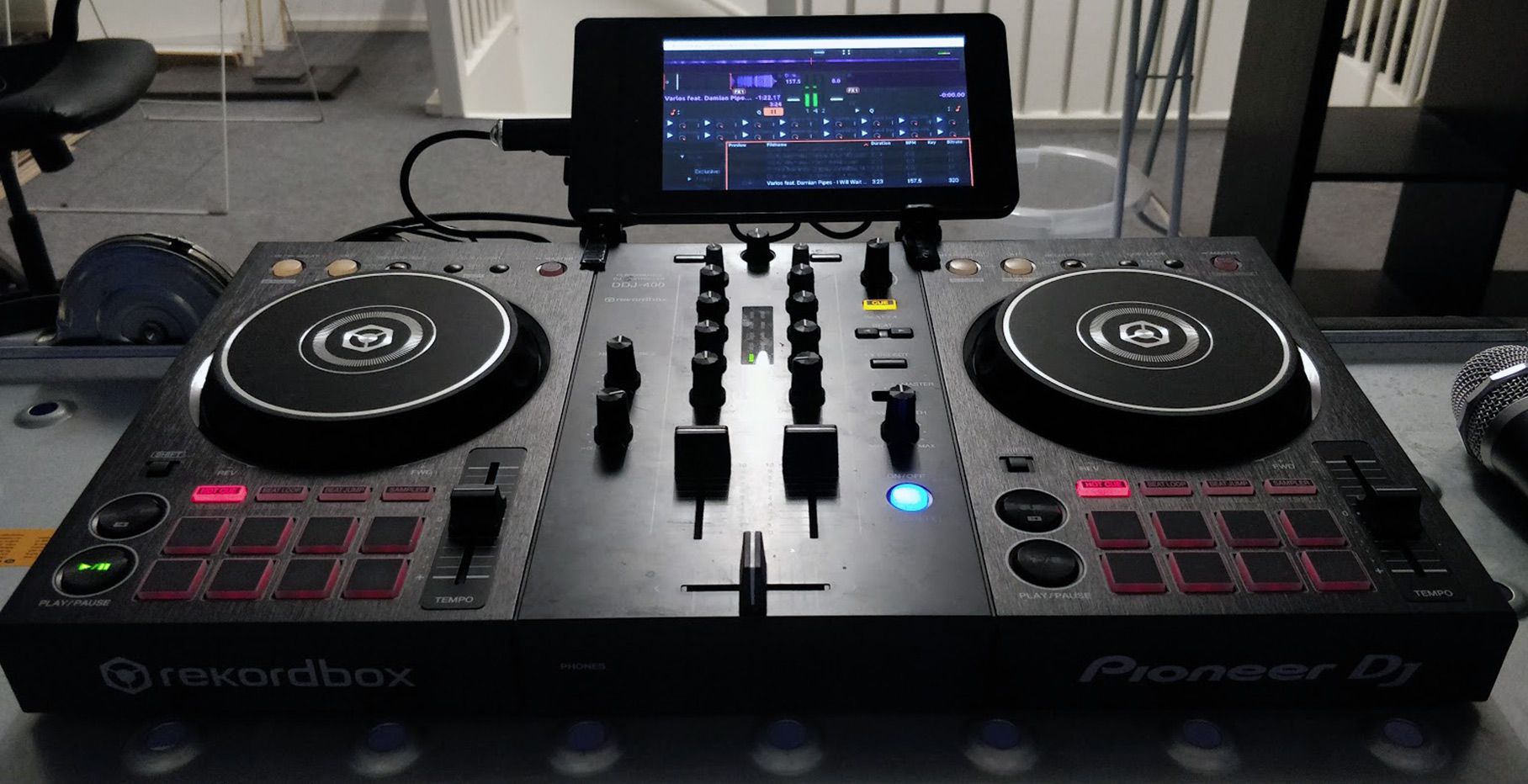
Check out more DIY projects + hacks for DJs here

Tags: cdj modcdj-1000mk3DIYdiy mods
Share90Tweet56Share
Previous Post

Artist Spotlight: Mambo Brothers on the Evolution of Ibiza and DJing

Next Post

Beatport’s Roadmap: Breaking Up “Top 10” With Hype Charts; Adding Subscription + Streaming Models

Related Posts

Standalone DDJ-400
DIY + Hacks

Building a standalone DDJ-400 with a Raspberry Pi and Mixxx

November 5, 2020
DIY split cue for mixers that don't ahve it
DIY + Hacks

How to make a DIY Split Cue in (almost) any mixer

January 29, 2020
TDJ ONE CDJ mod for tapes
DIY + Hacks

TDJ ONE: a ridiculous tape-player mod of a CDJ

January 23, 2020
Load More
Next Post
Beatport's 2019 Roadmap

Beatport's Roadmap: Breaking Up "Top 10" With Hype Charts; Adding Subscription + Streaming Models

Want to reach DJTT's audience here?

Shoot an email to advertising@djtechtools.com

DJTT ads
DJTT newsletter
Midi Fighter
Chat with us
  • ABOUT DJTT
  • CONTACT
  • PRIVACY
  • MIDI FIGHTER HELP
  • ABOUT DJTT
  • JOBS
  • CONTACT US
  • ADVERTISE
  • PRIVACY POLICY
  • ACCESSIBILITY STATEMENT

© 2024 DJ Techtools all rights reserved by DJ TechTools on all content unless otherwise noted.

No Result
View All Result
  • Blog
    • DJ Gear
      • DIY Projects
      • Gear Reviews
      • New Products
      • Controllerism
    • Techniques + Tips
      • Beginner DJ
      • Advanced DJ
      • Producer
      • Finger Drummer
    • News + Culture
      • Editorials + Opinions
      • Artist Interviews
      • Performances + Routines
      • How I Play
    • DJ Software Tutorials
      • Serato Tips
      • CDJ Tips
      • Ableton Live Tips
  • Store
    • Run by real DJs, not a corporation
    • DJ Controllers
      • Midi Fighter Twister
      • Midi Fighter Spectra
      • Midi Fighter 64
      • View All
    • Accessories
      • Chroma USB Drive for DJs
      • Chroma Caps
      • Chroma Cables Audio
      • Chroma Cables USB-A
      • Chroma Cables: USB-C
      • DJTT Gift Card
      • Midi Fighter T-Shirt
      • Keyboard Covers
      • Earplugs by V-Moda
    • Production Gear
    • Soundcards & Mixers
  • Community
    • Popular Forums
      • General Discussion
      • Buy & Sell
      • Reviews
      • Mixes
      • Music Production
      • Show Your Setup
      • Off Topic
    • Handy Links
      • New Posts
      • Private Messages
      • Register
      • Search
    • Midi Maps
      • Traktor
      • Ableton
      • Serato DJ
      • Midi Fighter 3D
      • Midi Fighter Twister
      • Midi Fighter Spectra
  • Midi Fighter
  • Chroma

© 2024 DJ Techtools all rights reserved by DJ TechTools on all content unless otherwise noted.

This website uses cookies. By continuing to use this website you are giving consent to cookies being used. Visit our Privacy and Cookie Policy.