
DJ TechTools
  • Blog
    • DJ Gear
      • DIY Projects
      • Gear Reviews
      • New Products
      • Controllerism
    • Techniques + Tips
      • Beginner DJ
      • Advanced DJ
      • Producer
      • Finger Drummer
    • News + Culture
      • Editorials + Opinions
      • Artist Interviews
      • Performances + Routines
      • How I Play
    • DJ Software Tutorials
      • Serato Tips
        • Traktor Tips
      • CDJ Tips
      • Ableton Live Tips
  • Store
    • Run by real DJs, not a corporation
    • DJ Controllers
      • Midi Fighter Twister
      • Midi Fighter Spectra
      • Midi Fighter 64
      • View All
    • Accessories
      • Chroma USB Drive for DJs
      • Chroma Caps
      • Chroma Cables Audio
      • Chroma Cables USB-A
      • Chroma Cables: USB-C
      • DJTT Gift Card
      • Midi Fighter T-Shirt
      • Keyboard Covers
      • Earplugs by V-Moda
    • Production Gear
    • Soundcards & Mixers
  • Community
    • Popular Forums
      • General Discussion
      • Buy & Sell
      • Reviews
      • Mixes
      • Music Production
      • Show Your Setup
      • Off Topic
    • Handy Links
      • New Posts
      • Private Messages
      • Register
      • Search
    • Midi Maps
      • Traktor
      • Ableton
      • Serato DJ
      • Midi Fighter 3D
      • Midi Fighter Twister
      • Midi Fighter Spectra
  • Midi Fighter
  • Chroma
No Result
View All Result
DJ TechTools
  • Blog
    • DJ Gear
      • DIY Projects
      • Gear Reviews
      • New Products
      • Controllerism
    • Techniques + Tips
      • Beginner DJ
      • Advanced DJ
      • Producer
      • Finger Drummer
    • News + Culture
      • Editorials + Opinions
      • Artist Interviews
      • Performances + Routines
      • How I Play
    • DJ Software Tutorials
      • Serato Tips
        • Traktor Tips
      • CDJ Tips
      • Ableton Live Tips
  • Store
    • Run by real DJs, not a corporation
    • DJ Controllers
      • Midi Fighter Twister
      • Midi Fighter Spectra
      • Midi Fighter 64
      • View All
    • Accessories
      • Chroma USB Drive for DJs
      • Chroma Caps
      • Chroma Cables Audio
      • Chroma Cables USB-A
      • Chroma Cables: USB-C
      • DJTT Gift Card
      • Midi Fighter T-Shirt
      • Keyboard Covers
      • Earplugs by V-Moda
    • Production Gear
    • Soundcards & Mixers
  • Community
    • Popular Forums
      • General Discussion
      • Buy & Sell
      • Reviews
      • Mixes
      • Music Production
      • Show Your Setup
      • Off Topic
    • Handy Links
      • New Posts
      • Private Messages
      • Register
      • Search
    • Midi Maps
      • Traktor
      • Ableton
      • Serato DJ
      • Midi Fighter 3D
      • Midi Fighter Twister
      • Midi Fighter Spectra
  • Midi Fighter
  • Chroma
No Result
View All Result
DJ TechTools

Korg Nano Multi Pad Mod

Keith by Keith
May 15, 2009
in Advanced DJ Tips, Controllerism, DJ Controllers, DJ Software, How-To Video Tutorials, Traktor Tips
Reading Time: 3 mins read
0
Korg Nano Multi Pad Mod
359
VIEWS
Post on FacebookTweet thisUpvote on Reddit

The NanoPAD by Korg is an easy choice for extra midi control with its compact form and low price. Lately, with lots of performance videos popping up its seems just about everyone has picked up a nano pad or 2!

The only limitation of the NanoPad, besides its slightly shoddy construction which tends to break is that there are only 2 virtual knobs. This little modification is useful for everyone that would like to get more analogue control out of the pad. By using Bome’s midi translator and the free files bellow, you can enhance the abilities of the touch-pad  and instead control 26 knobs with scene set 3 and another 26 with scene set 4.

The Bomes Basics

In short,  the Korg NanoPAD touch-pad has an X and Y axis (direction of touch),  which can each be assigned to one cc message. Add 4 scene sets and you can control a maximum of 8 knobs, but that requires cycling through the scene-sets,  which is not very realistic in a performance.

Each button on the Korg Nano pad can be set up to act like a shift controller so when the first button is held down the X/Y pad is controlling 2 completely new faders. Add all 12 buttons and you can have 24 virtual faders on just one scene. Label each button for a specific task and suddenly you have 24 very dedicated faders for different tasks.

In this Bomes translation I have set this up on Scene 3 and 4, leaving scene one for normal use.

For the usage with Traktor you only need the live scene data as you can assign the cc code in the midi preferences. However, for the usage with Torq (and some other dj software where you assign midi knobs by right-clicking and learn function) I’ve created another NanoPAD setup, where you can press a button to assign the cc message and not the touch pad.

Getting Started

first download the zip file containing the required info

For Traktor and dj programs which offer a midi preferences windows

1. Load the Korg Kontrol Editor.
2. Load the Korg Live File (NanoPad Live.nanopad_data and NanoPad Live.nanopad_set from the zip file) and save it (consult your NanoPAD instructions).
3. Read Nano Live CC Codes.pdf, or check the image below and assign the knobs in your DAW or DJ Program to the corresponding cc code.
4. Download Bome’s MidiTranslator
5. Load the bmtp file from the zip file below.
6. Setup your DJ-Application to use Bome’sMidiTranslator as your MidiController.
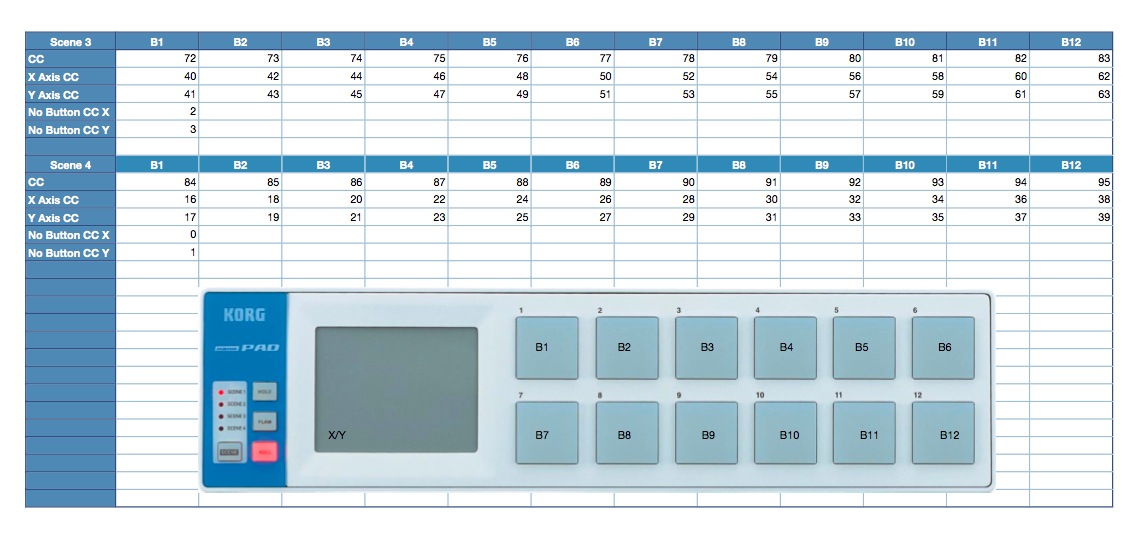
For Torq and right click learning programs

1. Load the Korg Kontrol Editor.
2. Read the setup pdf (Nano Setup CC Codes.pdf) and compare it with the live pdf (Nano Live CC Codes.pdf), to know what button represents which touchpad combo later.
3. Load the Korg Setup File (NanoPad Setup.nanopad_data and NanoPad Setup.nanopad_set from the zip file) and save it (consult your NanoPAD instructions).
4. Assign the knobs inside the DAW-/DJ-Application by pressing the button for each knob.
5. Load the Korg Live File (NanoPad Live.nanopad_data and NanoPad Live.nanopad_set from the zip file) and save it (consult your NanoPAD instructions).
6. Download Bome’s MidiTranslator.
7. Load the bmtp file from the zip file below.
8. Setup your DJ-Application to use Bome’sMidiTranslator as your MidiController.
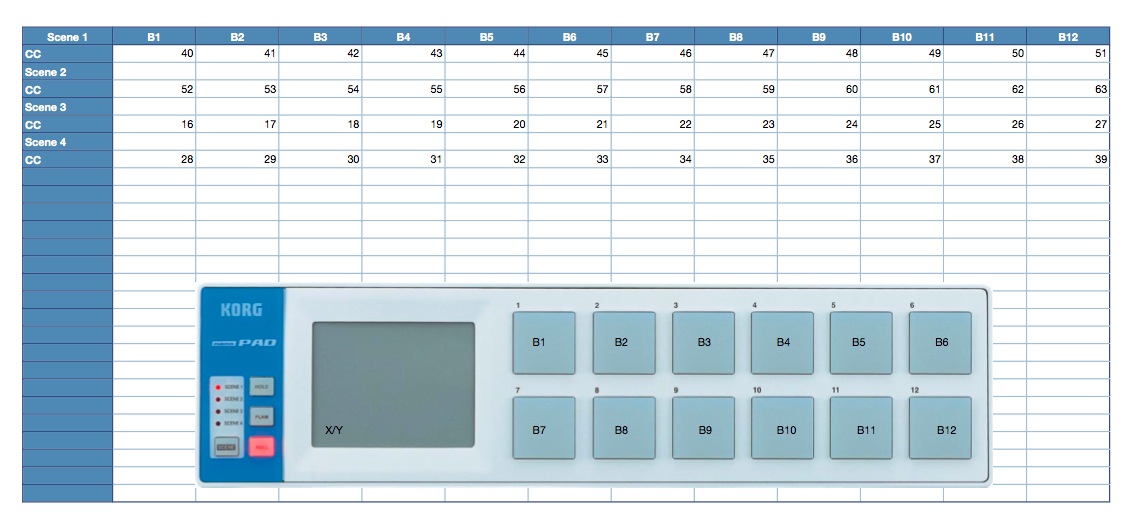


have a lot of fun 🙂

Tags: bomeDIYKorgmidinanopadTipstorqTraktor TipsTutorial
Share3Tweet2Share
Previous Post

VFX-1 Vestax Controller for Itch FX

Next Post

Save your Laptop

Related Posts

traktor-pro plus 3.8 pattern player controls
Dj and Production Tutorials

Review: Traktor Pro Plus 3.8 – After 8 months, is the subscription worth it?

April 20, 2023
Meet the Koala sampler app: a mobile production powerhouse, now with stems
DJ Gear

Meet the Koala sampler app: a mobile production powerhouse, now with stems

February 7, 2023
Tips for DJing in Extreme Cold: DJTT readers share their advice
DJ Techniques / Tips

Tips for DJing in Extreme Cold: DJTT readers share their advice

January 30, 2023
Load More
Next Post
Save your Laptop

Save your Laptop

Want to reach DJTT's audience here?

Shoot an email to advertising@djtechtools.com

DJTT ads
DJTT newsletter
Midi Fighter
Chat with us
  • ABOUT DJTT
  • CONTACT
  • PRIVACY
  • MIDI FIGHTER HELP
  • ABOUT DJTT
  • JOBS
  • CONTACT US
  • ADVERTISE
  • PRIVACY POLICY
  • ACCESSIBILITY STATEMENT

© 2024 DJ Techtools all rights reserved by DJ TechTools on all content unless otherwise noted.

No Result
View All Result
  • Blog
    • DJ Gear
      • DIY Projects
      • Gear Reviews
      • New Products
      • Controllerism
    • Techniques + Tips
      • Beginner DJ
      • Advanced DJ
      • Producer
      • Finger Drummer
    • News + Culture
      • Editorials + Opinions
      • Artist Interviews
      • Performances + Routines
      • How I Play
    • DJ Software Tutorials
      • Serato Tips
      • CDJ Tips
      • Ableton Live Tips
  • Store
    • Run by real DJs, not a corporation
    • DJ Controllers
      • Midi Fighter Twister
      • Midi Fighter Spectra
      • Midi Fighter 64
      • View All
    • Accessories
      • Chroma USB Drive for DJs
      • Chroma Caps
      • Chroma Cables Audio
      • Chroma Cables USB-A
      • Chroma Cables: USB-C
      • DJTT Gift Card
      • Midi Fighter T-Shirt
      • Keyboard Covers
      • Earplugs by V-Moda
    • Production Gear
    • Soundcards & Mixers
  • Community
    • Popular Forums
      • General Discussion
      • Buy & Sell
      • Reviews
      • Mixes
      • Music Production
      • Show Your Setup
      • Off Topic
    • Handy Links
      • New Posts
      • Private Messages
      • Register
      • Search
    • Midi Maps
      • Traktor
      • Ableton
      • Serato DJ
      • Midi Fighter 3D
      • Midi Fighter Twister
      • Midi Fighter Spectra
  • Midi Fighter
  • Chroma

© 2024 DJ Techtools all rights reserved by DJ TechTools on all content unless otherwise noted.

This website uses cookies. By continuing to use this website you are giving consent to cookies being used. Visit our Privacy and Cookie Policy.