DJ TechTools
  • Blog
    • DJ Gear
      • DIY Projects
      • Gear Reviews
      • New Products
      • Controllerism
    • Techniques + Tips
      • Beginner DJ
      • Advanced DJ
      • Producer
      • Finger Drummer
    • News + Culture
      • Editorials + Opinions
      • Artist Interviews
      • Performances + Routines
      • How I Play
    • DJ Software Tutorials
      • Serato Tips
        • Traktor Tips
      • CDJ Tips
      • Ableton Live Tips
  • Store
    • Run by real DJs, not a corporation
    • DJ Controllers
      • Midi Fighter Twister
      • Midi Fighter Spectra
      • Midi Fighter 64
      • View All
    • Accessories
      • Chroma USB Drive for DJs
      • Chroma Caps
      • Chroma Cables Audio
      • Chroma Cables USB-A
      • Chroma Cables: USB-C
      • DJTT Gift Card
      • Midi Fighter T-Shirt
      • Keyboard Covers
      • Earplugs by V-Moda
    • Production Gear
    • Soundcards & Mixers
  • Community
    • Popular Forums
      • General Discussion
      • Buy & Sell
      • Reviews
      • Mixes
      • Music Production
      • Show Your Setup
      • Off Topic
    • Handy Links
      • New Posts
      • Private Messages
      • Register
      • Search
    • Midi Maps
      • Traktor
      • Ableton
      • Serato DJ
      • Midi Fighter 3D
      • Midi Fighter Twister
      • Midi Fighter Spectra
  • Midi Fighter
  • Chroma
No Result
View All Result
DJ TechTools
  • Blog
    • DJ Gear
      • DIY Projects
      • Gear Reviews
      • New Products
      • Controllerism
    • Techniques + Tips
      • Beginner DJ
      • Advanced DJ
      • Producer
      • Finger Drummer
    • News + Culture
      • Editorials + Opinions
      • Artist Interviews
      • Performances + Routines
      • How I Play
    • DJ Software Tutorials
      • Serato Tips
        • Traktor Tips
      • CDJ Tips
      • Ableton Live Tips
  • Store
    • Run by real DJs, not a corporation
    • DJ Controllers
      • Midi Fighter Twister
      • Midi Fighter Spectra
      • Midi Fighter 64
      • View All
    • Accessories
      • Chroma USB Drive for DJs
      • Chroma Caps
      • Chroma Cables Audio
      • Chroma Cables USB-A
      • Chroma Cables: USB-C
      • DJTT Gift Card
      • Midi Fighter T-Shirt
      • Keyboard Covers
      • Earplugs by V-Moda
    • Production Gear
    • Soundcards & Mixers
  • Community
    • Popular Forums
      • General Discussion
      • Buy & Sell
      • Reviews
      • Mixes
      • Music Production
      • Show Your Setup
      • Off Topic
    • Handy Links
      • New Posts
      • Private Messages
      • Register
      • Search
    • Midi Maps
      • Traktor
      • Ableton
      • Serato DJ
      • Midi Fighter 3D
      • Midi Fighter Twister
      • Midi Fighter Spectra
  • Midi Fighter
  • Chroma
No Result
View All Result
DJ TechTools

Buttons on a Budget – Numark Mixtrack Review

djdrk by djdrk
September 5, 2011
in DJ Controllers, DJ Equipment / Accessories, Reviews
Reading Time: 3 mins read
0
Buttons on a Budget – Numark Mixtrack Review
352
VIEWS
Post on FacebookTweet thisUpvote on Reddit

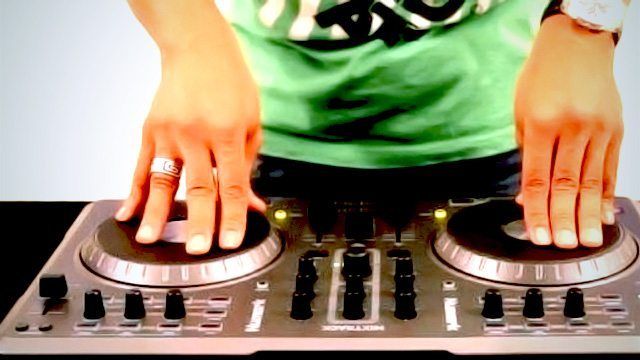
Numark, known for their reasonably priced and feature-rich DJ equipment, released the Mixtrack around mid-2010. The Mixtrack, apart from being budget friendly, packs a plethora of features in a compact chassis with controls and layouts that are recognizable by a DJ of any capacity.  Weighing in at only 4.15 lbs its super convenient to grab along with your laptop and transport straight to your gig.

THE GOOD
  • Solid, plastic construction and mappings available for Traktor and VDJ7.
  • Robust and efficient jog wheels.
  • USB powered.
  • Well spaced layout.
  • Everything on the surface sends out MIDI control.
  • Backlit buttons on most controls.
THE BAD
  • The buttons are slightly uncomfortable because they’re rigid and have a firm press and release.
  • Not equipped with a built in sound card.
  • No tension control on the jog wheels.
  • faders can be easily bent if a lot of pressure is applied.

A NO-HASSLE BUDGET CONTROLLER

You’ll be right at home with this easy to use and fully outfitted controller from Numark. It’s almost too easy to transport to your gigs and back. The unit also comes with ready to use versions of Traktor or Virtual DJ, so there’s no hassle setting up or purchasing software to get started. The lack of  an internal audio interface is a letdown, but All in all, this is a really cost effective controller.
UNIT OVERVIEW

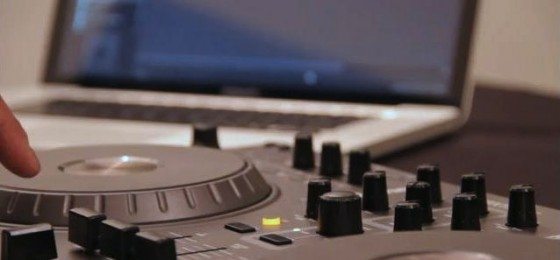
The Mixtrack was released as an entry level DJing console but it possesses the potential for an even greater use. It might not have all the bells and whistles of a super controller (like The Traktor S4), but it is actually more practical than a Vestax VCI-300. For those that require a sound card,  Numark released the Mixtrack Pro ($229.99 MSRP) which is the same controller with a basic internal sound card. There’s also another version that’s totally compatible with your iPod, called the iDJ3.

Even though the buttons on the unit are plastic they can withstand a beating. One downside is that they don’t have that soft squishy feeling like some high-grade controllers and can feel fairly stiff at times. The crossfader is relatively smooth and can be used for scratching although it might not be as long as you might like it to be.

The line faders have a smooth resistance but can get bent easily. The quality is on par with the price point, but don’t expect to take this thing on the road for extended periods.

One area of strength is in the touch sensitive jog wheels, which are large and fairly responsive. For such a in-expensive product, you do get a lot of surface area to play with.

One benefit of the plastic buttons is the visual feedback you get from the backlighting, which is strong and clear.  I should also mention that it is powered straight from your computer’s USB bus, so there’s no need for any external power supply.
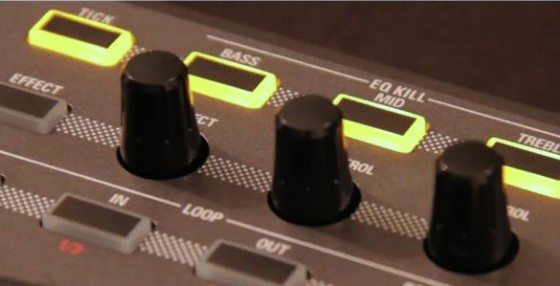
The control surface has cue gain and cue mix knobs so you can hear what you need to. There’s a set of 3 band EQ kill buttons on both sides of unit. Key lock and cue (headphone) buttons are placed at ideal locations.  Manual and Auto Loop buttons are a good addition to the beneficial controls. The ‘Scratch’ button toggles between using the jog wheels like a vinyl or a pitch bend tool (like beatmatching when the record is already playing). Then you have all the basic transport controls like Play/Pause, Stutter, Cue and Sync.

The Mixtrack is a fully MIDI-compliant controller. Therefore, you’re not restricted to using Traktor or Virtual DJ and can use any other software that supports MIDI mapping. It works seamlessly with Traktor and VDJ straight out of the box as they both provide built in templates that match the controls. There’s no need to even install drivers on a PC or Mac.

  • Price: $129
  • Communication: MIDI over USB (doesn’t require power supply) / Mac and Windows
  • Available: Now!
  • Ships with: Virtual DJ LE (America & Canada), Traktor LE (Europe & Asia Pacific)

THE BOTTOM LINE

With the two years that I’ve had my Mixtrack, I have to say, this unit has brought me further into the world of DJing and hasn’t let me down even once. If you’re looking for a cheap, entry-level controller, this very well might be the unit for you.
Tags: mix tracknumarknumark mixtrack reviewReview
Share3Tweet2Share
Previous Post

Scratch Live VS Traktor Scratch: The 2011 Update

Next Post

Space Age DJ Suitcase?

Related Posts

Engine DJ 5.0: on-board stems on the System 1, RGB waveforms for everyone
Breaking News

Engine DJ 5.0: on-board stems on the System 1, RGB waveforms for everyone

May 13, 2026
Is Pioneer DJ’s PLX-CRSS12 the ultimate turntable for DJs?
DJ Controllers

Is Pioneer DJ’s PLX-CRSS12 the ultimate turntable for DJs?

March 29, 2024
ROLI’s Seaboard RISE 2: seamless integration into the expressive world of MPE [REVIEW]
DJ Gear

ROLI’s Seaboard RISE 2: seamless integration into the expressive world of MPE [REVIEW]

November 27, 2023
Load More
Next Post
Space Age DJ Suitcase?

Space Age DJ Suitcase?

Want to reach DJTT's audience here?

Shoot an email to advertising@djtechtools.com

DJTT ads
DJTT newsletter
Midi Fighter
Chat with us
  • ABOUT DJTT
  • CONTACT
  • PRIVACY
  • MIDI FIGHTER HELP
  • ABOUT DJTT
  • JOBS
  • CONTACT US
  • ADVERTISE
  • PRIVACY POLICY
  • ACCESSIBILITY STATEMENT

© 2024 DJ Techtools all rights reserved by DJ TechTools on all content unless otherwise noted.

No Result
View All Result
  • Blog
    • DJ Gear
      • DIY Projects
      • Gear Reviews
      • New Products
      • Controllerism
    • Techniques + Tips
      • Beginner DJ
      • Advanced DJ
      • Producer
      • Finger Drummer
    • News + Culture
      • Editorials + Opinions
      • Artist Interviews
      • Performances + Routines
      • How I Play
    • DJ Software Tutorials
      • Serato Tips
      • CDJ Tips
      • Ableton Live Tips
  • Store
    • Run by real DJs, not a corporation
    • DJ Controllers
      • Midi Fighter Twister
      • Midi Fighter Spectra
      • Midi Fighter 64
      • View All
    • Accessories
      • Chroma USB Drive for DJs
      • Chroma Caps
      • Chroma Cables Audio
      • Chroma Cables USB-A
      • Chroma Cables: USB-C
      • DJTT Gift Card
      • Midi Fighter T-Shirt
      • Keyboard Covers
      • Earplugs by V-Moda
    • Production Gear
    • Soundcards & Mixers
  • Community
    • Popular Forums
      • General Discussion
      • Buy & Sell
      • Reviews
      • Mixes
      • Music Production
      • Show Your Setup
      • Off Topic
    • Handy Links
      • New Posts
      • Private Messages
      • Register
      • Search
    • Midi Maps
      • Traktor
      • Ableton
      • Serato DJ
      • Midi Fighter 3D
      • Midi Fighter Twister
      • Midi Fighter Spectra
  • Midi Fighter
  • Chroma

© 2024 DJ Techtools all rights reserved by DJ TechTools on all content unless otherwise noted.

This website uses cookies. By continuing to use this website you are giving consent to cookies being used. Visit our Privacy and Cookie Policy.