DJ TechTools
  • Blog
    • DJ Gear
      • DIY Projects
      • Gear Reviews
      • New Products
      • Controllerism
    • Techniques + Tips
      • Beginner DJ
      • Advanced DJ
      • Producer
      • Finger Drummer
    • News + Culture
      • Editorials + Opinions
      • Artist Interviews
      • Performances + Routines
      • How I Play
    • DJ Software Tutorials
      • Serato Tips
        • Traktor Tips
      • CDJ Tips
      • Ableton Live Tips
  • Store
    • Run by real DJs, not a corporation
    • DJ Controllers
      • Midi Fighter Twister
      • Midi Fighter Spectra
      • Midi Fighter 64
      • View All
    • Accessories
      • Chroma USB Drive for DJs
      • Chroma Caps
      • Chroma Cables Audio
      • Chroma Cables USB-A
      • Chroma Cables: USB-C
      • DJTT Gift Card
      • Midi Fighter T-Shirt
      • Keyboard Covers
      • Earplugs by V-Moda
    • Production Gear
    • Soundcards & Mixers
  • Community
    • Popular Forums
      • General Discussion
      • Buy & Sell
      • Reviews
      • Mixes
      • Music Production
      • Show Your Setup
      • Off Topic
    • Handy Links
      • New Posts
      • Private Messages
      • Register
      • Search
    • Midi Maps
      • Traktor
      • Ableton
      • Serato DJ
      • Midi Fighter 3D
      • Midi Fighter Twister
      • Midi Fighter Spectra
  • Midi Fighter
  • Chroma
No Result
View All Result
DJ TechTools
  • Blog
    • DJ Gear
      • DIY Projects
      • Gear Reviews
      • New Products
      • Controllerism
    • Techniques + Tips
      • Beginner DJ
      • Advanced DJ
      • Producer
      • Finger Drummer
    • News + Culture
      • Editorials + Opinions
      • Artist Interviews
      • Performances + Routines
      • How I Play
    • DJ Software Tutorials
      • Serato Tips
        • Traktor Tips
      • CDJ Tips
      • Ableton Live Tips
  • Store
    • Run by real DJs, not a corporation
    • DJ Controllers
      • Midi Fighter Twister
      • Midi Fighter Spectra
      • Midi Fighter 64
      • View All
    • Accessories
      • Chroma USB Drive for DJs
      • Chroma Caps
      • Chroma Cables Audio
      • Chroma Cables USB-A
      • Chroma Cables: USB-C
      • DJTT Gift Card
      • Midi Fighter T-Shirt
      • Keyboard Covers
      • Earplugs by V-Moda
    • Production Gear
    • Soundcards & Mixers
  • Community
    • Popular Forums
      • General Discussion
      • Buy & Sell
      • Reviews
      • Mixes
      • Music Production
      • Show Your Setup
      • Off Topic
    • Handy Links
      • New Posts
      • Private Messages
      • Register
      • Search
    • Midi Maps
      • Traktor
      • Ableton
      • Serato DJ
      • Midi Fighter 3D
      • Midi Fighter Twister
      • Midi Fighter Spectra
  • Midi Fighter
  • Chroma
No Result
View All Result
DJ TechTools

Meta.dj: Fluid iPad DJ and Production Tool

Dan White by Dan White
September 22, 2011
in DJ Internet Tools, DJ Software, News, News + Culture, Reviews
Reading Time: 4 mins read
0
Meta.dj: Fluid iPad DJ and Production Tool
358
VIEWS
Post on FacebookTweet thisUpvote on Reddit

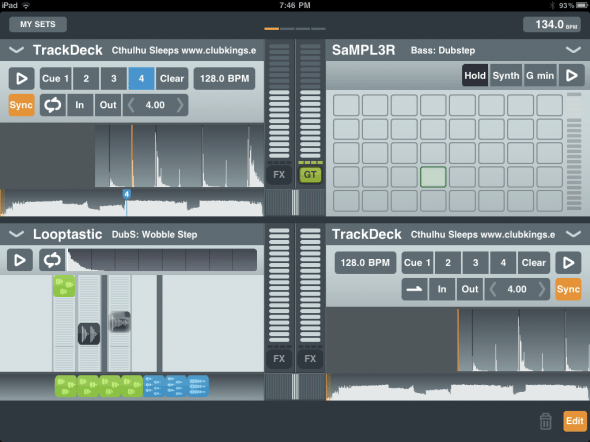
Sound Trend’s new iPad application, meta.DJ, hit the web earlier today, claiming to be the next level in DJing apps by combining DJing tools with production tools in a seamless interface made for serious use. We’ve had a chance to put the app through its paces and see if it lives up to the hype – and so far, we’re impressed.

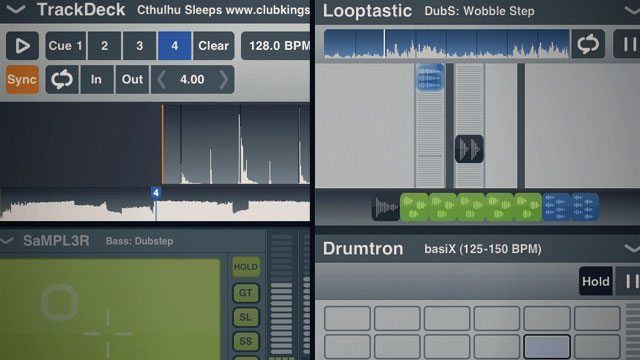
Meta.DJ is split up into four decks/devices, which already puts it bounds ahead of most other DJ software out there on iOS that only allow for two concurrent tracks. Each deck has standard up-faders and can be used with the powerful effects included in the software. That being said, you’re not restricted to just playing tracks – Sound Trend has cleverly compiled a suite of four devices that can be loaded into each deck.
TrackDeck

What digital DJ’s are the most used to – this is a standard track player that behaves nearly identically to a Traktor deck. You can load in your own tracks from your iPad’s iTunes library, and meta.DJ processes the track, loading a waveform and applying an automatic beat grid (more on that later). The processing time, about 15-30 seconds, is somewhat standard for most DJ applications, and we were testing this on an original iPad, so we imagine that on the new generation this process is much quicker.
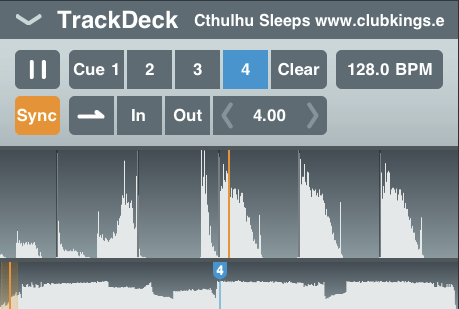
The TrackDeck has standard cue points, loops, and BPM controls that any digital DJ will find familiar and easy to use.

SaMPL3R
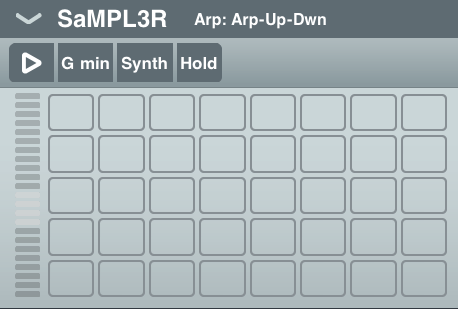
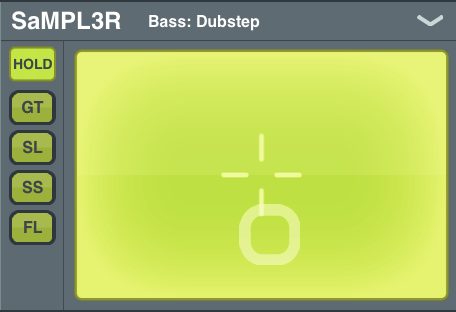
This is the sampler device in Meta.DJ – working off of the included sets of samples, this unit allows for you to adjust the key that you’re playing the samples in and work them in expressively and dynamically. It’s pretty fun – you can either play it on a grid that behaves very similarly to a Korg Kaossilator, or you can switch it to an 8-key virtual keyboard for more traditional control.

Looptastic and Drumtron
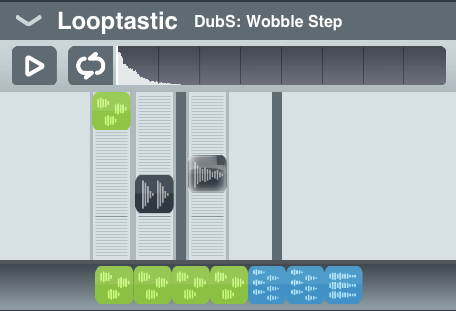
These units were a bit less impressive than the sampler, but still pretty powerful. If you’re already familiar with Looptastic as a standalone application, you know it’s a clean way to arrange individual loops and hits, with built-in volume mixing. There are plenty of included samples to throw into your loops, but you can also download more (some are free, some cost dollars), or even create your own.
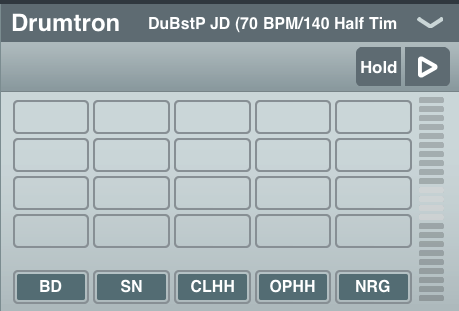
The Drumtron machine is a super simple interface that plays pre-arranged drum loops and allows you to tap out your own beats – but there didn’t seem to be any way to record new loops on the fly in this unit, which is what would really make this device shine.

Beatmatching

Everything in Meta.DJ is beatmatched via a master clock. Tracks that are loaded in from iTunes are analyzed on the fly and have a beat grid applied to them, which are saved in association to that file so that the next time it’s loaded, Meta.DJ instantly recalls the beat grid, loops, and cue points.

The beat grid is editable, but at least with the six songs I tested from my own library (all 125 to 146 BPM), it seemed to get it spot on each time.

Effects Units
Each deck is allowed its own instance of the built-in effect engine, in which up to three effects can be applied to each deck concurrently.  The effects are of a wide variety (see a full list at the bottom of this review), all of which are expressed using an XY pad, and have a hold feature for when you get that gater or beat roll just right. They’re fun and combine well – beat sync’d onto the master clock, of course!
Snapshots and Sets

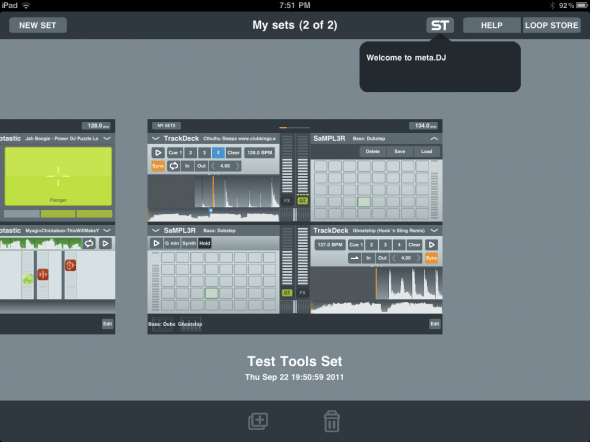
Once you get to a point that you like, you can save a Snapshot of each individual device that lives in a dock along the bottom of the screen, allowing you to come back to that exact same volume, arrangement, effects unit settings, and so on the next time that you load that device snapshot.

Snapshots make up Sets, which are less recallable on the fly – you can’t transition straight from one to the next without unloading the current set and starting up the next one – think of these more as projects that you work on and perfect.

Final First Impressions

While I’m not quite ready to walk out the door with just our iPad and Meta.DJ to go play a show, this seems to be the most compelling app for DJs yet on the iPad. It’s sitting in a great position to start sniping off some of the computer-based DJ applications that aren’t being developed as earnestly. The app is fun and expressive, and with a few more structural features like advanced routing for audio out of the iPad and monitoring your tracks, it could very well be your new choice for truly mobile DJing. Just remember that when you get less modular with what you’re DJing with, you need to always have a back up plan.

For more information on Meta.DJ, visit the app’s website. 

Tags: appdjipadmetameta dj app
Share3Tweet2Share
Previous Post

Milestone Controllers: Changing the Game

Next Post

DIY: Taking Your Tracks from the Studio to the Club

Related Posts

In The Mind Of A DJ: Jus-Ed Interview
Artist Features

In The Mind Of A DJ: Jus-Ed Interview

June 9, 2019
Traktor DJ 2 released today
Breaking News

Traktor DJ 2 With Soundcloud, Retina Support Out Now For Windows, Mac, iPad

May 28, 2019
djay for iOS: Every Algoriddim App Merged Into One, Free, With Better Spotify Integration
Breaking News

djay for iOS: Every Algoriddim App Merged Into One, Free, With Better Spotify Integration

December 13, 2018
Load More
Next Post
DIY: Taking Your Tracks from the Studio to the Club

DIY: Taking Your Tracks from the Studio to the Club

Want to reach DJTT's audience here?

Shoot an email to advertising@djtechtools.com

DJTT ads
DJTT newsletter
Midi Fighter
Chat with us
  • ABOUT DJTT
  • CONTACT
  • PRIVACY
  • MIDI FIGHTER HELP
  • ABOUT DJTT
  • JOBS
  • CONTACT US
  • ADVERTISE
  • PRIVACY POLICY
  • ACCESSIBILITY STATEMENT

© 2024 DJ Techtools all rights reserved by DJ TechTools on all content unless otherwise noted.

No Result
View All Result
  • Blog
    • DJ Gear
      • DIY Projects
      • Gear Reviews
      • New Products
      • Controllerism
    • Techniques + Tips
      • Beginner DJ
      • Advanced DJ
      • Producer
      • Finger Drummer
    • News + Culture
      • Editorials + Opinions
      • Artist Interviews
      • Performances + Routines
      • How I Play
    • DJ Software Tutorials
      • Serato Tips
      • CDJ Tips
      • Ableton Live Tips
  • Store
    • Run by real DJs, not a corporation
    • DJ Controllers
      • Midi Fighter Twister
      • Midi Fighter Spectra
      • Midi Fighter 64
      • View All
    • Accessories
      • Chroma USB Drive for DJs
      • Chroma Caps
      • Chroma Cables Audio
      • Chroma Cables USB-A
      • Chroma Cables: USB-C
      • DJTT Gift Card
      • Midi Fighter T-Shirt
      • Keyboard Covers
      • Earplugs by V-Moda
    • Production Gear
    • Soundcards & Mixers
  • Community
    • Popular Forums
      • General Discussion
      • Buy & Sell
      • Reviews
      • Mixes
      • Music Production
      • Show Your Setup
      • Off Topic
    • Handy Links
      • New Posts
      • Private Messages
      • Register
      • Search
    • Midi Maps
      • Traktor
      • Ableton
      • Serato DJ
      • Midi Fighter 3D
      • Midi Fighter Twister
      • Midi Fighter Spectra
  • Midi Fighter
  • Chroma

© 2024 DJ Techtools all rights reserved by DJ TechTools on all content unless otherwise noted.

This website uses cookies. By continuing to use this website you are giving consent to cookies being used. Visit our Privacy and Cookie Policy.