DJ TechTools
  • Blog
    • DJ Gear
      • DIY Projects
      • Gear Reviews
      • New Products
      • Controllerism
    • Techniques + Tips
      • Beginner DJ
      • Advanced DJ
      • Producer
      • Finger Drummer
    • News + Culture
      • Editorials + Opinions
      • Artist Interviews
      • Performances + Routines
      • How I Play
    • DJ Software Tutorials
      • Serato Tips
        • Traktor Tips
      • CDJ Tips
      • Ableton Live Tips
  • Store
    • Run by real DJs, not a corporation
    • DJ Controllers
      • Midi Fighter Twister
      • Midi Fighter Spectra
      • Midi Fighter 64
      • View All
    • Accessories
      • Chroma USB Drive for DJs
      • Chroma Caps
      • Chroma Cables Audio
      • Chroma Cables USB-A
      • Chroma Cables: USB-C
      • DJTT Gift Card
      • Midi Fighter T-Shirt
      • Keyboard Covers
      • Earplugs by V-Moda
    • Production Gear
    • Soundcards & Mixers
  • Community
    • Popular Forums
      • General Discussion
      • Buy & Sell
      • Reviews
      • Mixes
      • Music Production
      • Show Your Setup
      • Off Topic
    • Handy Links
      • New Posts
      • Private Messages
      • Register
      • Search
    • Midi Maps
      • Traktor
      • Ableton
      • Serato DJ
      • Midi Fighter 3D
      • Midi Fighter Twister
      • Midi Fighter Spectra
  • Midi Fighter
  • Chroma
No Result
View All Result
DJ TechTools
  • Blog
    • DJ Gear
      • DIY Projects
      • Gear Reviews
      • New Products
      • Controllerism
    • Techniques + Tips
      • Beginner DJ
      • Advanced DJ
      • Producer
      • Finger Drummer
    • News + Culture
      • Editorials + Opinions
      • Artist Interviews
      • Performances + Routines
      • How I Play
    • DJ Software Tutorials
      • Serato Tips
        • Traktor Tips
      • CDJ Tips
      • Ableton Live Tips
  • Store
    • Run by real DJs, not a corporation
    • DJ Controllers
      • Midi Fighter Twister
      • Midi Fighter Spectra
      • Midi Fighter 64
      • View All
    • Accessories
      • Chroma USB Drive for DJs
      • Chroma Caps
      • Chroma Cables Audio
      • Chroma Cables USB-A
      • Chroma Cables: USB-C
      • DJTT Gift Card
      • Midi Fighter T-Shirt
      • Keyboard Covers
      • Earplugs by V-Moda
    • Production Gear
    • Soundcards & Mixers
  • Community
    • Popular Forums
      • General Discussion
      • Buy & Sell
      • Reviews
      • Mixes
      • Music Production
      • Show Your Setup
      • Off Topic
    • Handy Links
      • New Posts
      • Private Messages
      • Register
      • Search
    • Midi Maps
      • Traktor
      • Ableton
      • Serato DJ
      • Midi Fighter 3D
      • Midi Fighter Twister
      • Midi Fighter Spectra
  • Midi Fighter
  • Chroma
No Result
View All Result
DJ TechTools

Exclusive In Depth Look: Smithson Martin KS-1974

Chris Cartledge by Chris Cartledge
January 21, 2012
in DJ Controllers, Gear Videos, NAMM 2012, News, News + Culture, Video Posts, Videos
Reading Time: 3 mins read
0
Exclusive In Depth Look: Smithson Martin KS-1974
184
VIEWS
Post on FacebookTweet thisUpvote on Reddit

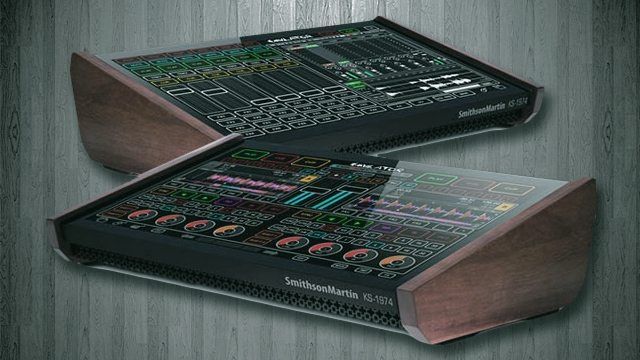
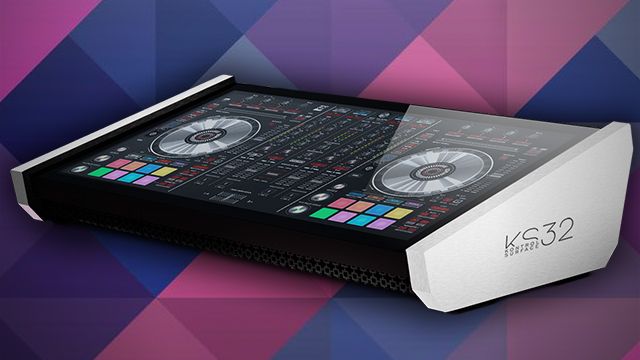
The Smithson Martin KS1974 is one of the more interesting products at this year’s NAMM show, because it’s a really laterally thought out product. What the guys at Smithson Martin are doing is bringing touch capability to your workflow without having to make any sacrifices to the raw power of your existing software setup. We had a chance to take an in-depth look, and a video overview and interview with Alan Smithson himself- click through to watch! 

IN A NUTSHELL

What we love:

  • Touch screen design brought to your existing software
  • Highly configurable overlays
  • Constant development
  • The look

What we don’t:

  • Price!
  • The nagging sensation that all you’re buying is a screen

Price: $2500

Availability: Not quite yet, but very soon (end of January, fingers crossed)


HARDWARE

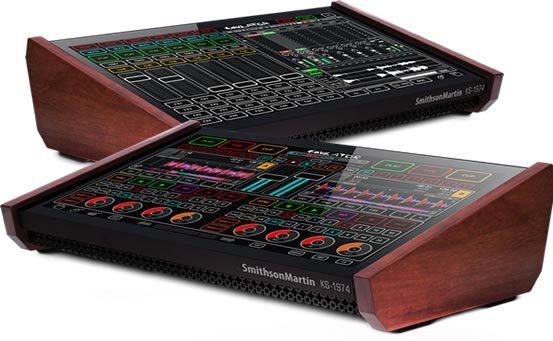
The KS1974 has no audio interface, no embedded computer, nothing but a screen in a cool looking box. We were a little surprised about this considering the price, but were told that the whole point of the KS1974 is to augment your setup – and what’s a setup without a computer or sound card? We can definitely see the logic – but it would still be nice to have everything totally embedded so that the unit was all that was needed.
BUT… WHY?!

Why not just use an iPad? Well, iPads are nowhere near as powerful as the computer you’re used to running Traktor, Live, or Scratch Live on for a start. The KS1974 is a way of translating your existing workflow into a touch based environment, and doing it totally head on; using an iPad as a touch controller to control your computer defeats the object of the design that Smithson Martin want to realise – a single screen, single interface, and single hub. Of course, your existing controllers will play just fine with the KS1974, because it’s the same software you’ve always used sitting underneath the Emulator software.


EMULATOR

Emulator is actually a very clever way to tackle the issue of making software that’s designed for mouse or external control work with touch. You create an interface that overlays your software, and assign MIDI values to the controls as you add them. This way you can learn them in software and suddenly you have controls that are actually usable. That’s not the clever bit, though: in order to see things like waveforms, you can cut sections of your overlay out so that there are little windows through to the underlying software. This allows Smithson Martin to neatly sidestep and potential licencing issues and give you their controls but the software you’re using’s GUI.
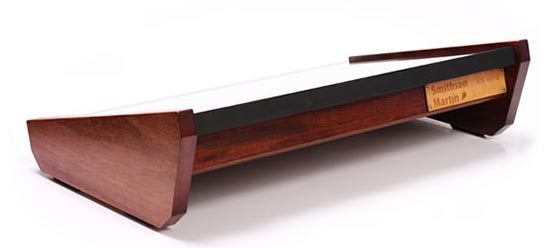
The software’s being updated too; we were told about new features like animated GIF support which sounded a little gimmicky but maybe there’ll be ways we haven’t yet thought of to utilise them creatively, as well as modular ‘instrument’ tools for interface creation. The ability of Emulator to be updated parallel to the music software that it controls means that you’re not going to be obsoleted in a month when the new version of your favourite software comes out with cool new features.

THE BOTTOM LINE

Why not just buy the touch screen that Smithson Martin are using? The guys concede that you definitely could, and if you wanted the absolute cheapest way to get Emulator to feature in your setup, it does seem like a viable option. You’d also have to think about how it should be angled, housed, deal with cable tangle, and so on though – and all that in mind, suddenly it doesn’t seem like such an attractive proposition compared to getting something off the shelf.

The KS1974 isn’t for everyone. To be honest, it’s probably not for most people, but the thing with boutique projects like this is that for the comparatively small number that Smithson Martin can make, there will be takers for whom it’s absolutely everything they’ve been looking for.

What do you think- will Smithson Martin be getting your hard earned, is it too expensive, or is it just not something that interests you?
Tags: ks1974namm 2012smithson martinTouch Screen
Share2Tweet1Share
Previous Post

Livid Set To Go Modular With MIDI Omni Modules

Next Post

Traktor 2.5 and Kontrol F1 Announced By Native Instruments

Related Posts

Kontrol Surface 32
Breaking News

Smithson Martin Kontrol Surface 32: Touch Surface With Control Templates

January 19, 2016
2012 DJTT NAMM Wrapup
Editorials and Opinions

2012 DJTT NAMM Wrapup

January 24, 2012
Alesis Vortex Drops; Brings MIDI Keytar to the Masses
Gear Videos

Alesis Vortex Drops; Brings MIDI Keytar to the Masses

January 21, 2012
Load More
Next Post
Traktor 2.5 and Kontrol F1 Announced By Native Instruments

Traktor 2.5 and Kontrol F1 Announced By Native Instruments

Want to reach DJTT's audience here?

Shoot an email to advertising@djtechtools.com

DJTT ads
DJTT newsletter
Midi Fighter
Chat with us
  • ABOUT DJTT
  • CONTACT
  • PRIVACY
  • MIDI FIGHTER HELP
  • ABOUT DJTT
  • JOBS
  • CONTACT US
  • ADVERTISE
  • PRIVACY POLICY
  • ACCESSIBILITY STATEMENT

© 2024 DJ Techtools all rights reserved by DJ TechTools on all content unless otherwise noted.

No Result
View All Result
  • Blog
    • DJ Gear
      • DIY Projects
      • Gear Reviews
      • New Products
      • Controllerism
    • Techniques + Tips
      • Beginner DJ
      • Advanced DJ
      • Producer
      • Finger Drummer
    • News + Culture
      • Editorials + Opinions
      • Artist Interviews
      • Performances + Routines
      • How I Play
    • DJ Software Tutorials
      • Serato Tips
      • CDJ Tips
      • Ableton Live Tips
  • Store
    • Run by real DJs, not a corporation
    • DJ Controllers
      • Midi Fighter Twister
      • Midi Fighter Spectra
      • Midi Fighter 64
      • View All
    • Accessories
      • Chroma USB Drive for DJs
      • Chroma Caps
      • Chroma Cables Audio
      • Chroma Cables USB-A
      • Chroma Cables: USB-C
      • DJTT Gift Card
      • Midi Fighter T-Shirt
      • Keyboard Covers
      • Earplugs by V-Moda
    • Production Gear
    • Soundcards & Mixers
  • Community
    • Popular Forums
      • General Discussion
      • Buy & Sell
      • Reviews
      • Mixes
      • Music Production
      • Show Your Setup
      • Off Topic
    • Handy Links
      • New Posts
      • Private Messages
      • Register
      • Search
    • Midi Maps
      • Traktor
      • Ableton
      • Serato DJ
      • Midi Fighter 3D
      • Midi Fighter Twister
      • Midi Fighter Spectra
  • Midi Fighter
  • Chroma

© 2024 DJ Techtools all rights reserved by DJ TechTools on all content unless otherwise noted.

This website uses cookies. By continuing to use this website you are giving consent to cookies being used. Visit our Privacy and Cookie Policy.