DJ TechTools
  • Blog
    • DJ Gear
      • DIY Projects
      • Gear Reviews
      • New Products
      • Controllerism
    • Techniques + Tips
      • Beginner DJ
      • Advanced DJ
      • Producer
      • Finger Drummer
    • News + Culture
      • Editorials + Opinions
      • Artist Interviews
      • Performances + Routines
      • How I Play
    • DJ Software Tutorials
      • Serato Tips
        • Traktor Tips
      • CDJ Tips
      • Ableton Live Tips
  • Store
    • Run by real DJs, not a corporation
    • DJ Controllers
      • Midi Fighter Twister
      • Midi Fighter Spectra
      • Midi Fighter 64
      • View All
    • Accessories
      • Chroma USB Drive for DJs
      • Chroma Caps
      • Chroma Cables Audio
      • Chroma Cables USB-A
      • Chroma Cables: USB-C
      • DJTT Gift Card
      • Midi Fighter T-Shirt
      • Keyboard Covers
      • Earplugs by V-Moda
    • Production Gear
    • Soundcards & Mixers
  • Community
    • Popular Forums
      • General Discussion
      • Buy & Sell
      • Reviews
      • Mixes
      • Music Production
      • Show Your Setup
      • Off Topic
    • Handy Links
      • New Posts
      • Private Messages
      • Register
      • Search
    • Midi Maps
      • Traktor
      • Ableton
      • Serato DJ
      • Midi Fighter 3D
      • Midi Fighter Twister
      • Midi Fighter Spectra
  • Midi Fighter
  • Chroma
No Result
View All Result
DJ TechTools
  • Blog
    • DJ Gear
      • DIY Projects
      • Gear Reviews
      • New Products
      • Controllerism
    • Techniques + Tips
      • Beginner DJ
      • Advanced DJ
      • Producer
      • Finger Drummer
    • News + Culture
      • Editorials + Opinions
      • Artist Interviews
      • Performances + Routines
      • How I Play
    • DJ Software Tutorials
      • Serato Tips
        • Traktor Tips
      • CDJ Tips
      • Ableton Live Tips
  • Store
    • Run by real DJs, not a corporation
    • DJ Controllers
      • Midi Fighter Twister
      • Midi Fighter Spectra
      • Midi Fighter 64
      • View All
    • Accessories
      • Chroma USB Drive for DJs
      • Chroma Caps
      • Chroma Cables Audio
      • Chroma Cables USB-A
      • Chroma Cables: USB-C
      • DJTT Gift Card
      • Midi Fighter T-Shirt
      • Keyboard Covers
      • Earplugs by V-Moda
    • Production Gear
    • Soundcards & Mixers
  • Community
    • Popular Forums
      • General Discussion
      • Buy & Sell
      • Reviews
      • Mixes
      • Music Production
      • Show Your Setup
      • Off Topic
    • Handy Links
      • New Posts
      • Private Messages
      • Register
      • Search
    • Midi Maps
      • Traktor
      • Ableton
      • Serato DJ
      • Midi Fighter 3D
      • Midi Fighter Twister
      • Midi Fighter Spectra
  • Midi Fighter
  • Chroma
No Result
View All Result
DJ TechTools

Traktor DJ Comes To iPhone

Dan White by Dan White
May 2, 2013
in Native Instruments, News, News + Culture, Traktor DJ
Reading Time: 4 mins read
0
Traktor DJ Comes To iPhone
271
VIEWS
Post on FacebookTweet thisUpvote on Reddit

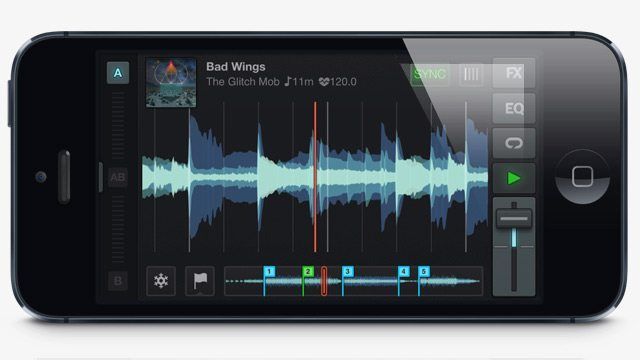
Native Instruments is making a play for iOS dominance, which started with the launch of Traktor DJ for iPad over two months ago, and continues today with a second version of the app with a clever re-optimized interface for iPhone. After the jump, watch the overview of the new app and see how people who don’t have tiny fingers can still mix on a much smaller screen.

THE APP

App: Traktor DJ
Manufacturer: Native Instruments
Availability: Now in the iTunes App Store
Pricing: $4.99
Requirements: Requires iOS 6.0 or later. This app is optimized for iPhone 5.

WHAT WE LIKE

Traktor DJ on iPhone brings true portability to Native Instruments mobile mixing app. As DJs, a lot of us find ourselves in situations where there’s not a single piece of DJ gear in sight at a party, but people still turn to us when everyone’s keen for some dance floor action. To be able to pull out the iPhone and start playing a set is the ultimate DJ-on-the-go experience.

Watch: DJ Shiftee’s routine with Traktor DJ on iPad

The scaled down interface takes some getting used to – it still packs all of the features of Traktor DJ for iPad into it, but now you’re able to focus in on either deck individually to make use of FX, EQs, and cue points. The A/B slider on the far left of the app makes this deck jumping a seamless flicking motion that could actually be done in the heat of a mix.
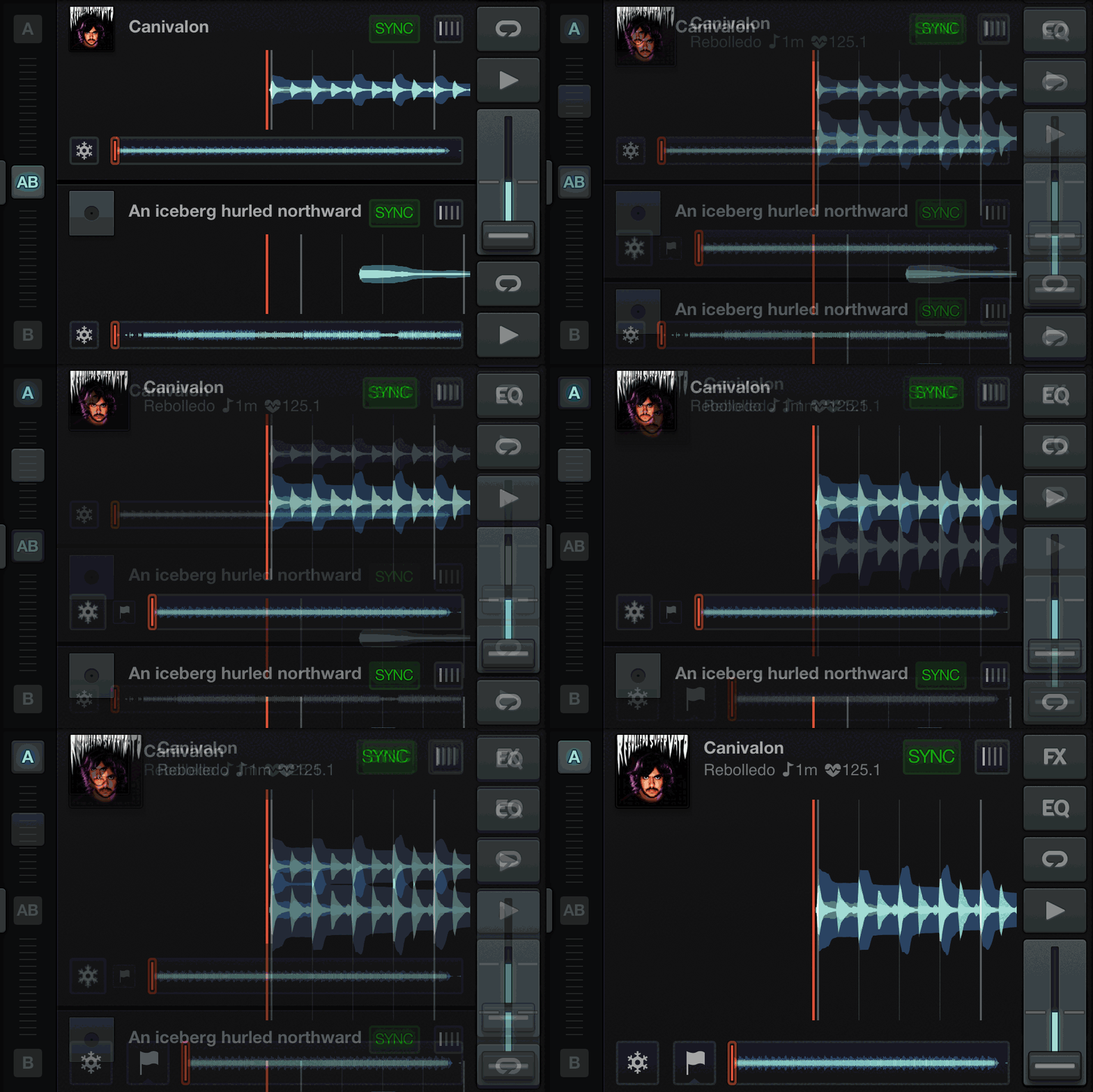
Freeze Mode and the song recommendation system continue to be powerful additions to the Traktor experience that we’re still wondering when they’ll make an appearance in Traktor Pro. Especially when one of their competitors products – Virtual DJ’s LiveFeedback engine – was just recently been updated to give dynamic suggested tracks to DJs.

The real win here is that iPhone-toting DJs now can use the collection sync (via Dropbox) to prepare their tracks – and that this tool costs just five dollars, instead of the heftier $20 for the iPad version. We think that there’s a great workflow for working professional DJs here who don’t or can’t be in front of their computer everytime they have to prepare for a gig. NI is leading the industry here as well – with only Pioneer’s Rekordbox having a similar prepare-on-the-go system.

Which one would you DJ with?

WHAT ISN’T SO HOT

The system requirements note that the application is optimized for iPhone 5 – and that extra few centimeters of screen real-estate on the 5 really makes a bit of a difference. It’s just enough additional room to take some of the small-screen pressure off of using controls that are so close to the track waveforms. That being said, the application is still very usable on iPhone 4 and 4S devices.

We’re also still waiting for some clean nudge options to allow us to manually beatmatch if the tracks start falling out of sync – but for most songs, it’s not even an issue.

Android users: A quick word here about the lack of support for your mobile OS. We chatted with NI breifly about this, and the big obstacle here is a lack of consistent hardware as well as some audio engine limitations – iOS is apparently way easier to deliver a consistent experience on since there’s only a few models of the device. That being said, we’d love to see an Android version!

WHAT SHOULD BE NEXT

A movement to iOS for portability and for simplifying the central hub of a DJ experience is a solid decision. Why do DJs need laptops over iOS devices? Nevertheless, mobile device DJing solutions still are lacking really solid paired hardware. Imagine being able to use some of Traktor’s hardware products with Traktor DJ – like the Kontrol S4’s complete controls, or the FX and looping controls of the Kontrol X1.

Some apps, like DJ Player, already have a way to not only MIDI map class-compliant controllers, but also to use DVS (albiet with a very limited selection of soundcards) – neither of which would be a bad idea to add to Traktor DJ to make it more of a professional tool.
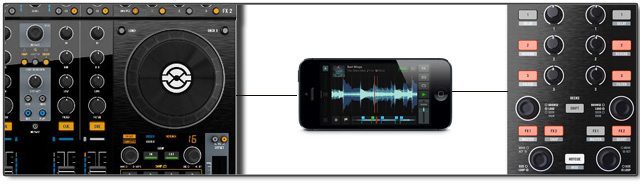
We’re also still waiting for a good audio solution – what if a Traktor DJ user wants to mix externally? (Editor’s note: DJTT commenter Scotland pointed out that the 1.1 update to Traktor DJ has an external mixing mode – hooray!) If apps like Traktor DJ are going to be successful in the long run and adopted for use beyond the pop-up party situation, they’ll need to be able to allow DJs to still use some type of tactile hardware – and potentially build hardware that’s optimized to be paired with iOS.

Read More: Ean Golden’s first look at Trakor DJ on iPad
Tags: djing on an iphoneIOSIphonemobile devicemobile djingsmall screen mixingtraktor djtraktor iphone
Share2Tweet1Share
Previous Post

Value-Added Mixing: When To DJ More and When To Do Less

Next Post

Midi Fighter X Design Contest Winners

Related Posts

Algoriddim’s djay Pro 5.0 is here: hyper-fast stem separation, flexible beat grids
iOS DJ Tips

Algoriddim’s djay Pro 5.0 is here: hyper-fast stem separation, flexible beat grids

December 6, 2023
Tips for DJing in Extreme Cold: DJTT readers share their advice
DJ Techniques / Tips

Tips for DJing in Extreme Cold: DJTT readers share their advice

January 30, 2023
A beginner’s guide to adding DJ tracks to your synthesizer set
Dj and Production Tutorials

A beginner’s guide to adding DJ tracks to your synthesizer set

August 15, 2021
Load More
Next Post
Midi Fighter X Design Contest Winners

Midi Fighter X Design Contest Winners

Want to reach DJTT's audience here?

Shoot an email to advertising@djtechtools.com

DJTT ads
DJTT newsletter
Midi Fighter
Chat with us
  • ABOUT DJTT
  • CONTACT
  • PRIVACY
  • MIDI FIGHTER HELP
  • ABOUT DJTT
  • JOBS
  • CONTACT US
  • ADVERTISE
  • PRIVACY POLICY
  • ACCESSIBILITY STATEMENT

© 2024 DJ Techtools all rights reserved by DJ TechTools on all content unless otherwise noted.

No Result
View All Result
  • Blog
    • DJ Gear
      • DIY Projects
      • Gear Reviews
      • New Products
      • Controllerism
    • Techniques + Tips
      • Beginner DJ
      • Advanced DJ
      • Producer
      • Finger Drummer
    • News + Culture
      • Editorials + Opinions
      • Artist Interviews
      • Performances + Routines
      • How I Play
    • DJ Software Tutorials
      • Serato Tips
      • CDJ Tips
      • Ableton Live Tips
  • Store
    • Run by real DJs, not a corporation
    • DJ Controllers
      • Midi Fighter Twister
      • Midi Fighter Spectra
      • Midi Fighter 64
      • View All
    • Accessories
      • Chroma USB Drive for DJs
      • Chroma Caps
      • Chroma Cables Audio
      • Chroma Cables USB-A
      • Chroma Cables: USB-C
      • DJTT Gift Card
      • Midi Fighter T-Shirt
      • Keyboard Covers
      • Earplugs by V-Moda
    • Production Gear
    • Soundcards & Mixers
  • Community
    • Popular Forums
      • General Discussion
      • Buy & Sell
      • Reviews
      • Mixes
      • Music Production
      • Show Your Setup
      • Off Topic
    • Handy Links
      • New Posts
      • Private Messages
      • Register
      • Search
    • Midi Maps
      • Traktor
      • Ableton
      • Serato DJ
      • Midi Fighter 3D
      • Midi Fighter Twister
      • Midi Fighter Spectra
  • Midi Fighter
  • Chroma

© 2024 DJ Techtools all rights reserved by DJ TechTools on all content unless otherwise noted.

This website uses cookies. By continuing to use this website you are giving consent to cookies being used. Visit our Privacy and Cookie Policy.