DJ TechTools
  • Blog
    • DJ Gear
      • DIY Projects
      • Gear Reviews
      • New Products
      • Controllerism
    • Techniques + Tips
      • Beginner DJ
      • Advanced DJ
      • Producer
      • Finger Drummer
    • News + Culture
      • Editorials + Opinions
      • Artist Interviews
      • Performances + Routines
      • How I Play
    • DJ Software Tutorials
      • Serato Tips
        • Traktor Tips
      • CDJ Tips
      • Ableton Live Tips
  • Store
    • Run by real DJs, not a corporation
    • DJ Controllers
      • Midi Fighter Twister
      • Midi Fighter Spectra
      • Midi Fighter 64
      • View All
    • Accessories
      • Chroma USB Drive for DJs
      • Chroma Caps
      • Chroma Cables Audio
      • Chroma Cables USB-A
      • Chroma Cables: USB-C
      • DJTT Gift Card
      • Midi Fighter T-Shirt
      • Keyboard Covers
      • Earplugs by V-Moda
    • Production Gear
    • Soundcards & Mixers
  • Community
    • Popular Forums
      • General Discussion
      • Buy & Sell
      • Reviews
      • Mixes
      • Music Production
      • Show Your Setup
      • Off Topic
    • Handy Links
      • New Posts
      • Private Messages
      • Register
      • Search
    • Midi Maps
      • Traktor
      • Ableton
      • Serato DJ
      • Midi Fighter 3D
      • Midi Fighter Twister
      • Midi Fighter Spectra
  • Midi Fighter
  • Chroma
No Result
View All Result
DJ TechTools
  • Blog
    • DJ Gear
      • DIY Projects
      • Gear Reviews
      • New Products
      • Controllerism
    • Techniques + Tips
      • Beginner DJ
      • Advanced DJ
      • Producer
      • Finger Drummer
    • News + Culture
      • Editorials + Opinions
      • Artist Interviews
      • Performances + Routines
      • How I Play
    • DJ Software Tutorials
      • Serato Tips
        • Traktor Tips
      • CDJ Tips
      • Ableton Live Tips
  • Store
    • Run by real DJs, not a corporation
    • DJ Controllers
      • Midi Fighter Twister
      • Midi Fighter Spectra
      • Midi Fighter 64
      • View All
    • Accessories
      • Chroma USB Drive for DJs
      • Chroma Caps
      • Chroma Cables Audio
      • Chroma Cables USB-A
      • Chroma Cables: USB-C
      • DJTT Gift Card
      • Midi Fighter T-Shirt
      • Keyboard Covers
      • Earplugs by V-Moda
    • Production Gear
    • Soundcards & Mixers
  • Community
    • Popular Forums
      • General Discussion
      • Buy & Sell
      • Reviews
      • Mixes
      • Music Production
      • Show Your Setup
      • Off Topic
    • Handy Links
      • New Posts
      • Private Messages
      • Register
      • Search
    • Midi Maps
      • Traktor
      • Ableton
      • Serato DJ
      • Midi Fighter 3D
      • Midi Fighter Twister
      • Midi Fighter Spectra
  • Midi Fighter
  • Chroma
No Result
View All Result
DJ TechTools

BitTorrent Sync: Free Alternative To Dropbox For DJs + Producers

Ryan Dejaegher by Ryan Dejaegher
October 22, 2013
in Breaking News, DJ Internet Tools, News, Production Tips
Reading Time: 3 mins read
0
BitTorrent Sync: Free Alternative To Dropbox For DJs + Producers
77
VIEWS
Post on FacebookTweet thisUpvote on Reddit

Lots of DJs and producers want to be able to organize the same iTunes library on any computer, have Ableton Projects available on all computers, and Traktor collection synced across machines. The obvious answer is Dropbox – but it carries its own limitations in terms of cost and storage limits. In the search for an alternative appeared BitTorrent Sync, which uses the distributed power of BitTorrent to cleanly sync your files across as many machines as you want- read on to learn more.

“BitTorrent! Won’t the Feds shut me down?”

Don’t panic, this isn’t remotely illegal. BitTorrent Sync is very similar to Dropbox – here’s the core feature set that makes it just as good:

  • Automatically keeps folders and files in sync across multiple computers and users
  • Free and no storage limit: storage is limited by the size of your HD. If you want 2 TB of syncing space, just get an external HD.
  • Private and secure: There’s no middleman or third party data centre involved, so your data is your data. The file transfers are encrypted and folders are connected to one another by a randomly generated pass key (check out the security features here)
  • Fast – P2p Speeds: The more computers you have sharing a folder, the faster you’ll be able to push changes across all of them – since they use the peer-to-peer sharing structure that makes BitTorrent one of the fastest and most efficient methods of file distribution on the internet.
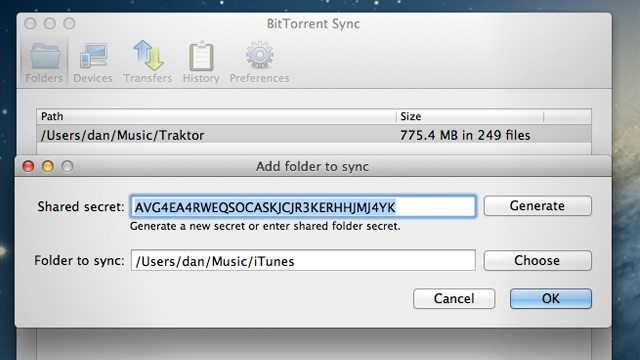
bit-torrent-sync-setup
Setting up shared folders on BitTorrent Sync

SYNC STYLES

The only major setting that BitTorrent Sync has comes in the type of synchronization:

Full Access (2 way sync): This is just like Dropbox – add/delete any files or folders from one folder and it is added/deleted from the other folder. Great because it creates mirrored folders, bad because you have to be a bit more cautious about deleting things.

Read Only (1 way sync): One folder is the master and the other is a slave. So files that are added/deleted to the master are added or deleted from the slave. But any files that are added or deleted to the slave folder won’t sync to the master folder. This could be a good option if you’re doing an off-site backup where you don’t want anything being accidentally deleted.

WHY DJS + PRODUCERS WOULD USE BT SYNC

Three reasons for why this is an essential tool for any DJ or producer.

1) Collaboration: Many people already use Dropbox, but that free 5GB starts to go pretty quick once you start sharing full Ableton projects with all the samples included. With BitTorrent Sync, having no limit on size allows sharing of all of your production projects for free. BitTorrent Sync will keep folders in sync and up to date. Of course, there’s no intelligent detection of who is working on what- you’ll need a service like Splice for that.

2) Consolidate iTunes (or any track collection): Finally! An iTunes library that always contains the latest tracks and playlists no matter which computer you added it from. BitTorrent Sync will also sync deletions between folders. This can be great if you’re purging your iTunes library of Spice Girls, but keep this in mind because you don’t want to accidentally delete a song and lose it on every computer.

3) Off-site backup: With hard drives it’s not a matter of if it will fail, but when. You can use BitTorrent Sync to backup specific folders or even your entire computer with a big enough external HD set up at a friends or parents house. BitTorrent Sync will automatically push any changes to that external HD. (*If you do this, load the external HD with files from your computer first, don’t try to copy 1TB over the internet).

Here’s a quick demo of how the tech works:

Want to learn more about Bittorrent Sync and how it all works? Check out their FAQ
Tags: bittorrentbittorrent syncdropboxdropbox alternativefilesharingsync itunessync music collectionssync traktor librariesSynchronzation
Share1Tweet1Share
Previous Post

Video: Mad Zach Soundpacks Halloween Discount

Next Post

Review: Traktor Kontrol S4 MK2 and S2 MK2

Related Posts

Engine OS’ v1.6 update: streaming from Dropbox + Beatsource LINK, flexible beat grids & more
News

Engine OS’ v1.6 update: streaming from Dropbox + Beatsource LINK, flexible beat grids & more

February 23, 2021
Blend.io: A Peek Into The Future Of Music Project Collaboration?
DJ Internet Tools

Blend.io: A Peek Into The Future Of Music Project Collaboration?

August 15, 2013
Traktor DJ on iPad: Exclusive First Look
DJ Gear Announcements

Traktor DJ on iPad: Exclusive First Look

February 21, 2013
Load More
Next Post
Review: Traktor Kontrol S4 MK2 and S2 MK2

Review: Traktor Kontrol S4 MK2 and S2 MK2

Want to reach DJTT's audience here?

Shoot an email to advertising@djtechtools.com

DJTT ads
DJTT newsletter
Midi Fighter
Chat with us
  • ABOUT DJTT
  • CONTACT
  • PRIVACY
  • MIDI FIGHTER HELP
  • ABOUT DJTT
  • JOBS
  • CONTACT US
  • ADVERTISE
  • PRIVACY POLICY
  • ACCESSIBILITY STATEMENT

© 2024 DJ Techtools all rights reserved by DJ TechTools on all content unless otherwise noted.

No Result
View All Result
  • Blog
    • DJ Gear
      • DIY Projects
      • Gear Reviews
      • New Products
      • Controllerism
    • Techniques + Tips
      • Beginner DJ
      • Advanced DJ
      • Producer
      • Finger Drummer
    • News + Culture
      • Editorials + Opinions
      • Artist Interviews
      • Performances + Routines
      • How I Play
    • DJ Software Tutorials
      • Serato Tips
      • CDJ Tips
      • Ableton Live Tips
  • Store
    • Run by real DJs, not a corporation
    • DJ Controllers
      • Midi Fighter Twister
      • Midi Fighter Spectra
      • Midi Fighter 64
      • View All
    • Accessories
      • Chroma USB Drive for DJs
      • Chroma Caps
      • Chroma Cables Audio
      • Chroma Cables USB-A
      • Chroma Cables: USB-C
      • DJTT Gift Card
      • Midi Fighter T-Shirt
      • Keyboard Covers
      • Earplugs by V-Moda
    • Production Gear
    • Soundcards & Mixers
  • Community
    • Popular Forums
      • General Discussion
      • Buy & Sell
      • Reviews
      • Mixes
      • Music Production
      • Show Your Setup
      • Off Topic
    • Handy Links
      • New Posts
      • Private Messages
      • Register
      • Search
    • Midi Maps
      • Traktor
      • Ableton
      • Serato DJ
      • Midi Fighter 3D
      • Midi Fighter Twister
      • Midi Fighter Spectra
  • Midi Fighter
  • Chroma

© 2024 DJ Techtools all rights reserved by DJ TechTools on all content unless otherwise noted.

This website uses cookies. By continuing to use this website you are giving consent to cookies being used. Visit our Privacy and Cookie Policy.